# 2do-cli
> 2do inside your command line
Latest version **1.1.7** (published 2019-08-11) · MIT license · 0 weekly downloads
## Install
```sh
npm install 2do-cli
pnpm add 2do-cli
yarn add 2do-cli
bun add 2do-cli
```
Provides the command `2do`.
## Health
**Score 15/100 (F)** — status: abandoned.
Positive: no vulnerabilities.
Warnings: low downloads; no types; no esm support.
Negative: abandoned; low maintenance score.
## Facts
| | |
|---|---|
| Version | 1.1.7 |
| Published | 2019-08-11 |
| First published | 2017-09-08 |
| Weekly downloads | 0 |
| License | MIT |
| TypeScript types | none |
| Module format | CommonJS |
| Dependencies | 6 |
| Unpacked size | 22.6 KB |
| Known vulnerabilities | 0 |
| Install scripts | no |
| GitHub stars | 8 |
| Author | Hosein2398 |
| Maintainers | hosein2398 |
| Keywords | todo, task, 2do, console |
## Links
- npm: https://www.npmjs.com/package/2do-cli
- Repository: https://github.com/hosein2398/2do-cli
- Homepage: https://github.com/hosein2398/2do-cli#readme
- Issues: https://github.com/hosein2398/2do-cli/issues
- npm.io page: https://npm.io/package/2do-cli
## Dependencies (6)
- [chalk](https://npm.io/package/chalk.md) ^2.1.0
- [colors](https://npm.io/package/colors.md) ^1.3.2
- [figlet](https://npm.io/package/figlet.md) ^1.2.0
- [vorpal](https://npm.io/package/vorpal.md) ^1.12.0
- [inquirer](https://npm.io/package/inquirer.md) ^3.2.3
- [cli-table3](https://npm.io/package/cli-table3.md) ^0.5.1
## Recent versions
- 1.1.7 (latest) — 2019-08-11
- 1.1.6 — 2018-12-01
- 1.1.5 — 2018-07-06
- 1.1.4 — 2018-02-01
- 1.1.3 — 2017-12-10
- 1.1.2 — 2017-11-21
- 1.1.1 — 2017-09-30
- 1.1.0 — 2017-09-17
- 1.0.29 — 2017-09-11
- 1.0.28 — 2017-09-08
- 1.0.27 — 2017-09-08
- 1.0.26 — 2017-09-08
- 1.0.25 — 2017-09-08
- 1.0.24 — 2017-09-08
- 1.0.23 — 2017-09-08
- … 5 more at https://npm.io/package/2do-cli/versions
## README
# 2do-cli [](https://travis-ci.org/hosein2398/2do-cli) 
Commnad line todo app.
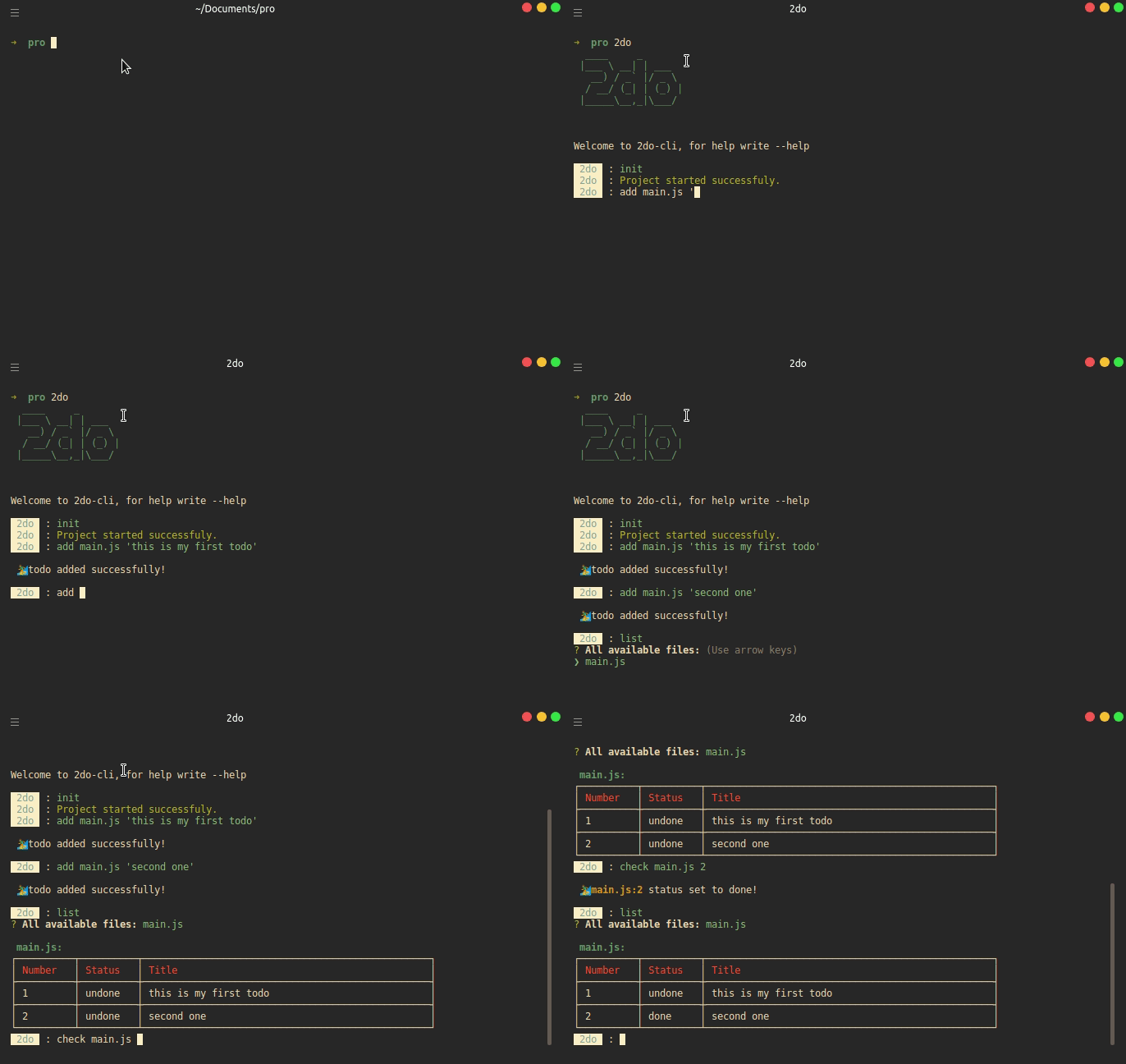
## Demo
## Installation
```
npm i -g 2do-cli
```
Or if using Yarn:
```
yarn global add 2do-cli
```
## Usage
- [Initializing](#initializing)
- [Adding a file](#adding-a-file)
- [Show todo](#show-todo)
- [Check todo](#check-todo)
- [Listing](#listing)
- [Removing](#removing)
---
### Initializing
Open up any repository that you want to use 2do-cli indside.
Then type:
```
2do
```
2do-cli will start, after that write :
```
init
```
And 2do-cli will generate a 2do.json file in you repo.
---
### Adding a file
To work with 2do-cli you have add a file and then todos related to that.
Lets say you have a file named `main.js` and you want to add some todos for this file, to do so (after inializing 2do-cli in your repo) you have to type:
```
add main.js 'Here is my first todo for main.js'
```
After a while you might know that you want to add another todo for same file, so just use same command like:
```
add main.js 'Here is my second todo for main.js '
```
---
### Show todo
Now if you want to see all todos of `main.js` you simply write:
```
show main.js
```
and all todos of that file will appear.
---
### Check todo
So what if you want to know you have completed a todo or not. There is default `status` field for every todo,
and it's value is set to `undone` by default. If you want to change it so that you know your todo is done:
```
check main.js 4
```
This will set status of fourth todo of main.js to `done`.
---
### Listing
You can list all of files which have todos in current directory and select any one that you want, by typing :
```
list
```
---
### Removing
You can remove a file, which removes all of it's todos too, or you can only remove a todo of a file, to do prior one you just write:
```
delete main.js
```
And if you want to remove only second todo of this file you go like:
```
delete main.js 2
```
Above command will remove second todo of main.js .
---
### Version
To get current version just type :
```
version
```
---
_Source: https://npm.io/package/2do-cli · Machine-readable twin of the npm.io package page. Health data is recomputed on every publish._