# @alicloud/console-bench-core
> alibabacloud console bench sdk core
Latest version **1.0.0** (published 2020-12-15) · Apache-2.0 license · 0 weekly downloads
## Install
```sh
npm install @alicloud/console-bench-core
pnpm add @alicloud/console-bench-core
yarn add @alicloud/console-bench-core
bun add @alicloud/console-bench-core
```
## Health
**Score 15/100 (F)** — status: abandoned.
Positive: no vulnerabilities.
Warnings: low downloads; no types; no esm support.
Negative: abandoned; low maintenance score.
## Facts
| | |
|---|---|
| Version | 1.0.0 |
| Published | 2020-12-15 |
| First published | 2020-12-15 |
| Weekly downloads | 0 |
| License | Apache-2.0 |
| TypeScript types | none |
| Module format | CommonJS |
| Dependencies | 3 |
| Unpacked size | 22.2 KB |
| Known vulnerabilities | 0 |
| Install scripts | no |
| Author | zhenhua lee |
| Maintainers | jacksontian, fengmk2, pagecao, aliyunsdkteam, console-fe |
| Keywords | aliyun, alibabacloud, consolebench, pop, openapi |
## Links
- npm: https://www.npmjs.com/package/@alicloud/console-bench-core
- Repository: git@gitlab.alibaba-inc.com:isv-projects/node-sdk
- npm.io page: https://npm.io/package/@alicloud/console-bench-core
## Dependencies (3)
- [kitx](https://npm.io/package/kitx.md) ^2.1.0
- [httpx](https://npm.io/package/httpx.md) ^2.2.7
- [json-bigint](https://npm.io/package/json-bigint.md) ^1.0.0
## Alternatives
- [react-native-root-siblings](https://npm.io/package/react-native-root-siblings.md) — 102.9K weekly downloads
- [@praxisui/dialog](https://npm.io/package/@praxisui/dialog.md) — 2.0K weekly downloads
- [easy-toggle-state](https://npm.io/package/easy-toggle-state.md) — 350 weekly downloads
- [ngx-lightbox-evp](https://npm.io/package/ngx-lightbox-evp.md) — 19 weekly downloads
- [react-native-modal-translucent-axton](https://npm.io/package/react-native-modal-translucent-axton.md) — 4 weekly downloads
## Recent versions
- 1.0.0 (latest) — 2020-12-15
## README

企业工作台 Node.js SDK
## 安装
安装依赖,并写入 `package.json`
```
npm install @alicloud/console-bench-core -S
```
## 环境要求
- Node.js >= 8.x
- 找阿里云企业工作台团队,提供 OpenAPI 访问凭证,示例如下:
```json
{
"appName": "my-app", // 应用的唯一标识
"arnPostfix": "my-role", // 角色定义
"consoleKey": "xxx",
"consoleSecret": "xxx",
"openapiList": [ // OpenAPI调用白名单
{
"product": "ecs",
"actions": [
"DescribeInstances",
"xxxx"
]
}
]
}
```
## 快速使用
```javascript
const Core = require('@alicloud/console-bench-core');
var client = new Core({
consoleKey: ${consoleKey},
consoleSecret: ${consoleSecret},
endpoint: 'console-work.aliyuncs.com',
product: 'Ecs',
apiVersion: '2014-05-26'
});
var params = {
RegionId: "cn-zhangjiakou",
AliUid: "xxx",
IdToken : 'xxx' // AliUid 或 IdToken
}
var requestOption = {
method: 'GET'
};
client
.request('DescribeInstances', params, requestOption)
.then((result) => {
console.log(JSON.stringify(result));
}, (ex) => {
console.log(ex);
})
```
说明:
- endpoint: 测试环境下需要 host 绑定 `114.55.202.134 console-work.aliyuncs.com`
## 关于 OpenAPI 调用权限的配置说明
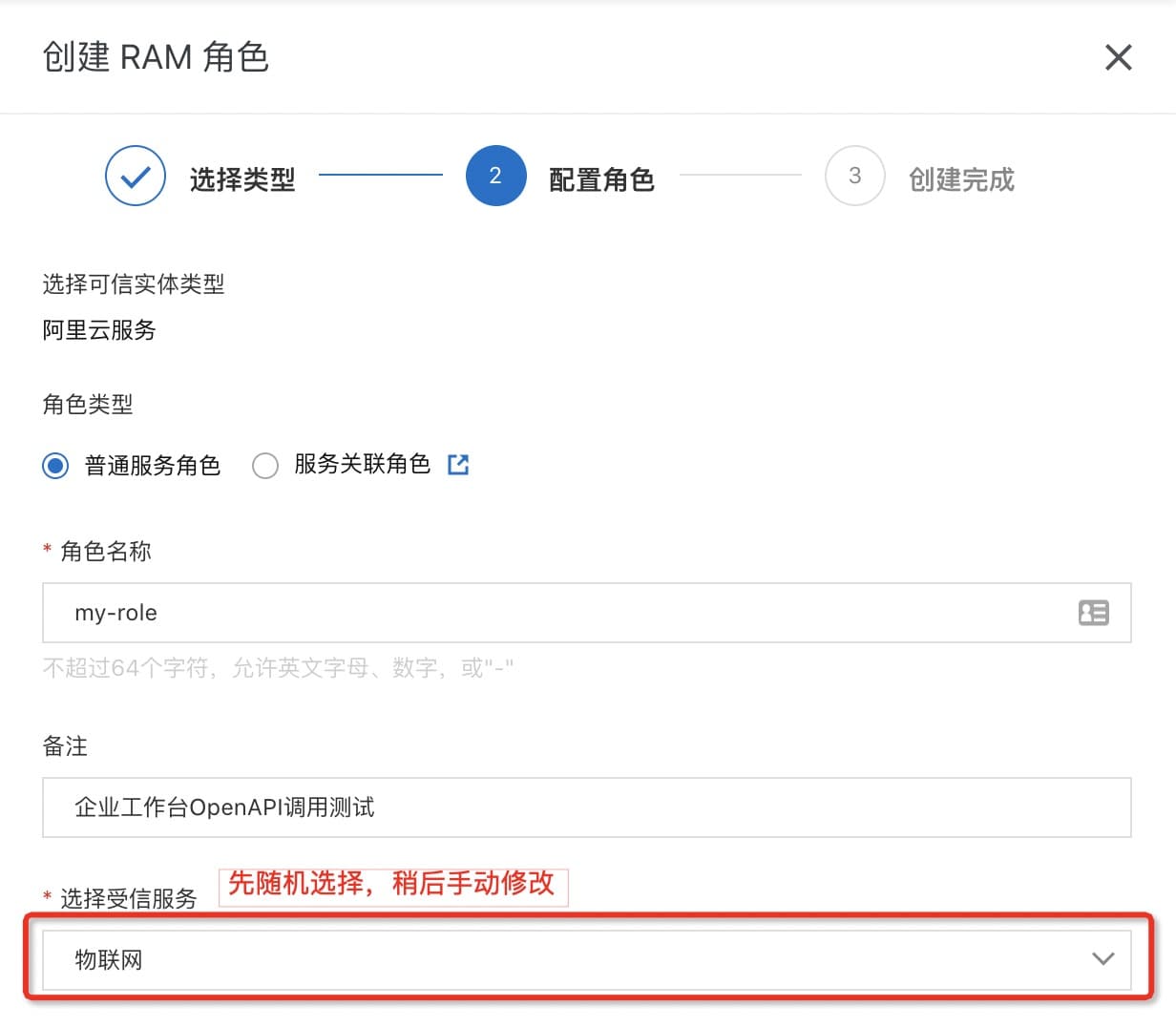
### 添加服务角色
首先登录阿里云 [RAM控制台](https://ram.console.aliyun.com/roles) ,创建服务角色
### 修改角色信任策略
角色的权限主体设置成企业工作台:
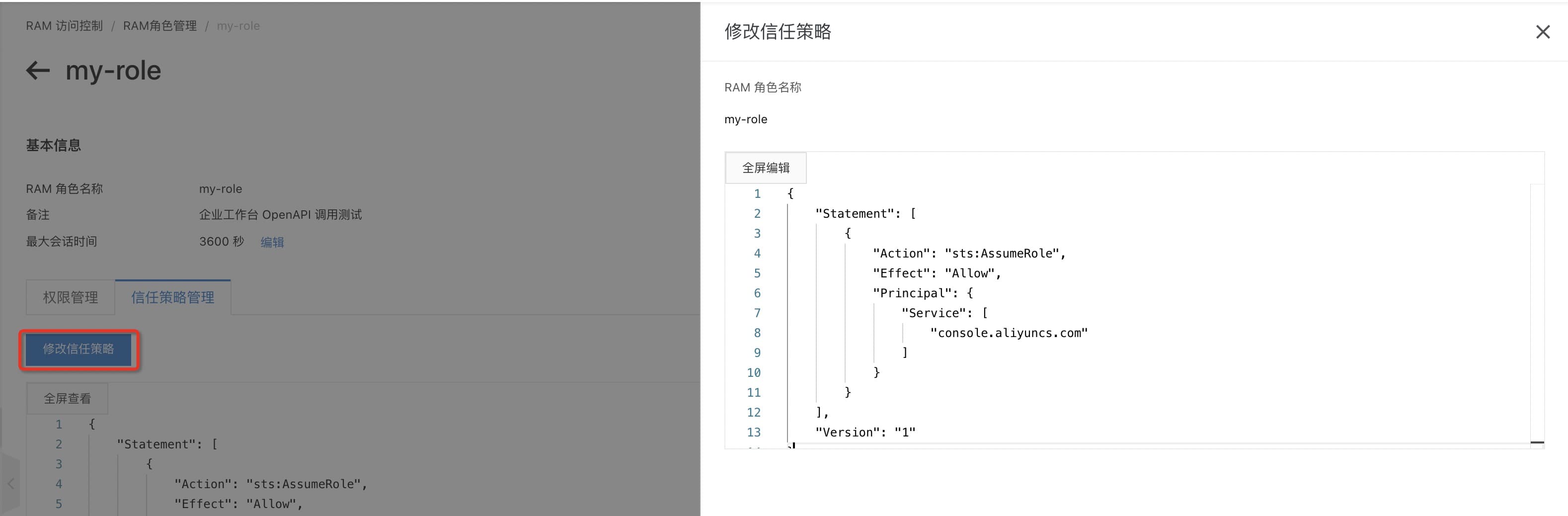
```json
{
"Statement": [
{
"Action": "sts:AssumeRole",
"Effect": "Allow",
"Principal": {
"Service": [
"console.aliyuncs.com"
]
}
}
],
"Version": "1"
}
```
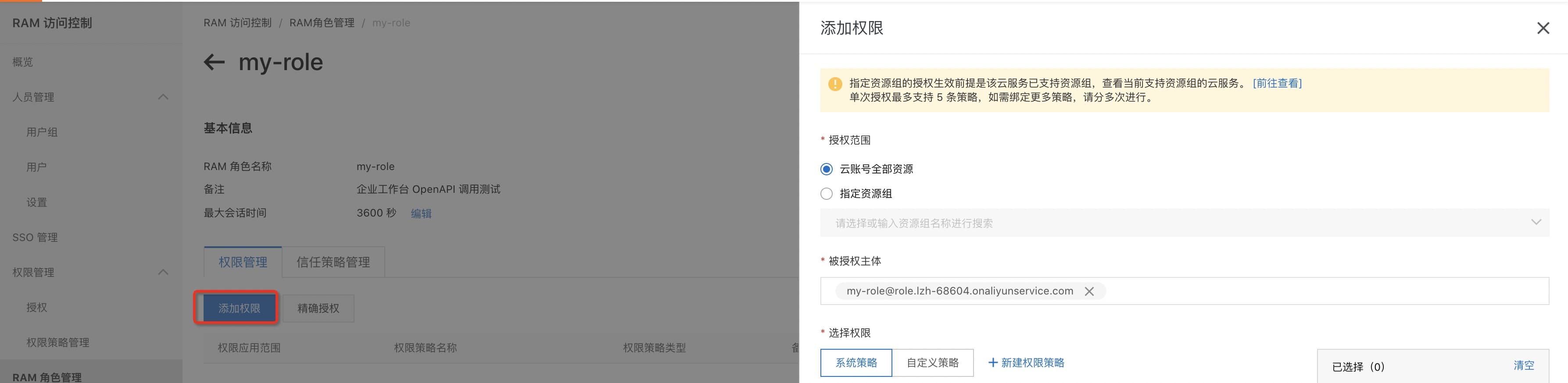
### 添加角色权限
按需给该角色添加您应用的权限:
### 整理调用的OpenAPI
把您产品需要的 OpenAPI 整理处理,按照如下格式提交给企业工作台团队:
```json
[
{
"product": "ecs",
"actions": [
"DescribeInstances",
"DescribeRegions"
"..."
]
},
{
...
}
]
```
### 完成配置
经过上述步骤,就可以基于企业工作台提供的 SDK ,进行OpenAPI的调用测试。
## 许可证
[Apache-2.0](http://www.apache.org/licenses/LICENSE-2.0)
Copyright (c) 2009-present, Alibaba Cloud All rights reserved.
---
_Source: https://npm.io/package/@alicloud/console-bench-core · Machine-readable twin of the npm.io package page. Health data is recomputed on every publish._