[](https://github.com/AlyIbrahim1/claude-statusline/actions/workflows/ci.yml)
[](https://www.npmjs.com/package/@alyibrahim/claude-statusline)
[](https://www.npmjs.com/package/@alyibrahim/claude-statusline)
[](LICENSE)
**A rich, fast statusline for [Claude Code](https://claude.ai/code)** — shows model, git branch, context usage, rate limits, session cost, and split input/output token counts after every response.
Runs as a **compiled Rust binary** (~5ms startup vs ~100ms for Node.js). Zero shell dependencies. One install command.

---
## Install
```bash
npm install -g @alyibrahim/claude-statusline
```
Done. The statusline configures itself automatically. Restart Claude Code to see it.
> If auto-setup didn't run: `claude-statusline setup`
**Plugin install (Claude Code marketplace):** Search for `claude-statusline` in the Claude Code plugin browser. The plugin sets itself as your statusline at the next session start (unless you already use a different statusline; run `/setup` to replace it) and repoints itself after plugin updates. To get the native Rust binary after a plugin install, run:
```bash
claude-statusline download-binary
claude-statusline setup
```
---
## What you get
**Line 1** — Model name · Effort level · Directory `(branch +commits)` · Context bar
**Line 2** — Weekly token usage · 5h usage · Reset countdown *(Pro/Max)* — or — Session cost *(API key)* · Session tokens `X↓ + C cache Y↑`
| Feature | Details |
|---|---|
| Context bar | Normalized to usable % — accounts for the auto-compact buffer |
| Rate limits | Shows 5h and weekly usage with color-coded thresholds |
| Session cost | Displayed only for API key users, hidden for subscribers |
| Session tokens | Read incrementally from the session transcript and its subagent transcripts, with repeated entries counted once. Shows new input (including cache writes), cache reads and output separately (`X↓ + C cache Y↑`) |
| Effort level | Live value from Claude Code, including mid-session `/effort` changes (`[L]` `[M]` `[H]` `[XH]` `[MAXX]`) |
| Git branch | Read straight from `.git` (no `git` process per render); short SHA when detached; absent outside a repo |
| Session commits | Shows `+N` next to the branch for commits made during the current session |
| Directory label | Displays as `~/parent/dir` (or `parent/dir` outside your home) so you always know which project you're in |
| Terminal wrapping | Lines wrap to fit terminal width — reads `COLUMNS` or `stdout.columns` automatically |
---
## Session History
Track token usage, cost, and duration across every Claude Code session. Choose between a **terminal-native TUI** or a **browser dashboard** — your preference is saved automatically.
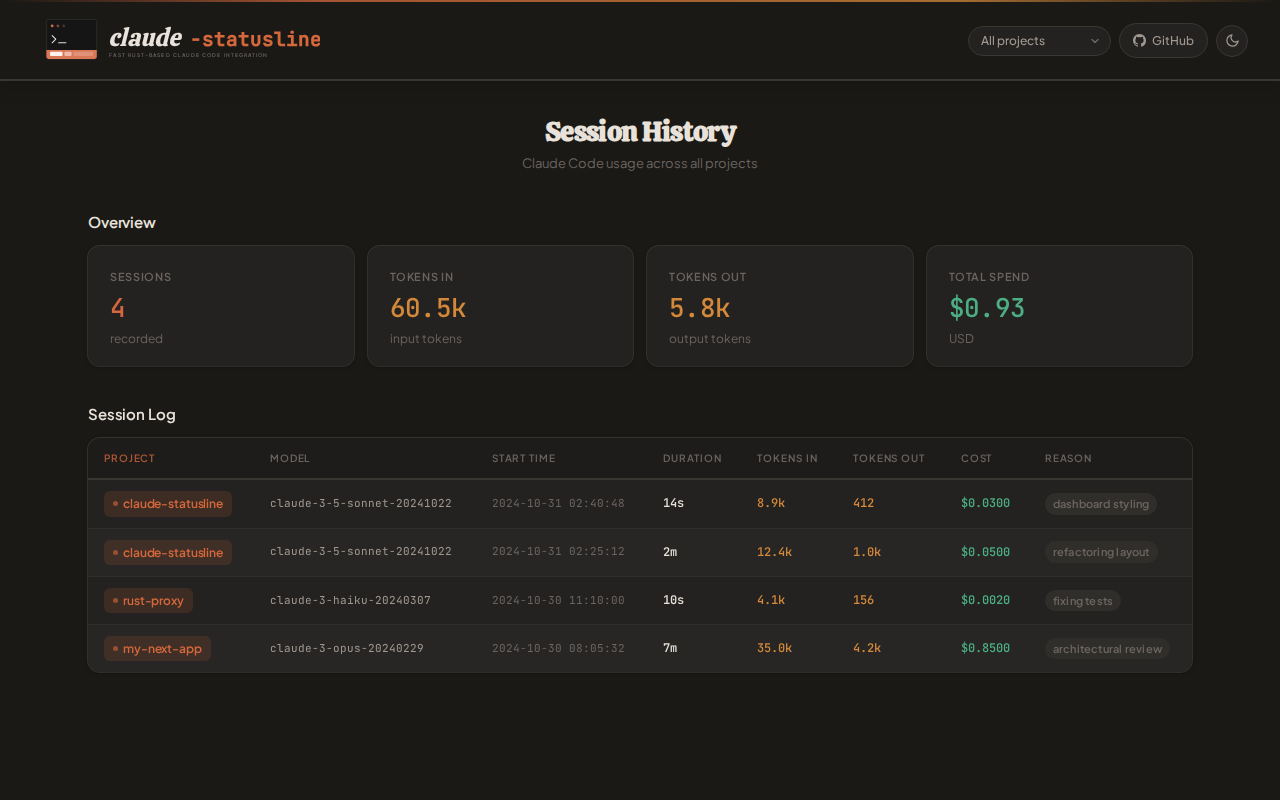
Session history is **enabled by default** on setup. Each session records:
| Field | Details |
|---|---|
| Project | Name of the directory Claude Code was launched in |
| Model | Which Claude model was used |
| Tokens | Input, cache-read and output counts (including subagents) |
| Cost | Session cost reported by Claude Code |
| Duration | Session length |
| Exit reason | How the session ended (`clear`, `resume`, `logout`, `prompt_input_exit`, `other`) |
**Commands:**
```bash
claude-statusline history # Open dashboard in saved mode (default: web)
claude-statusline history --mode terminal # Switch to terminal TUI (persisted)
claude-statusline history --mode web # Switch to browser dashboard (persisted)
claude-statusline enable-history # Enable session tracking
claude-statusline disable-history # Disable session tracking
```
Everything lives in one folder, `~/.claude/statusline/` (or `$CLAUDE_CONFIG_DIR/statusline/`):
| Path | Contents |
|---|---|
| `history.js` | One compact line (~100 bytes) per finished session, append-only |
| `sessions/.json` | Working state of a running session; deleted when the session ends |
| `dashboard.html` | The web dashboard; written once and updated only when a new version changes it |
A session is written to history when it ends. State left behind by a session that never ended cleanly (crash, killed terminal) is written and removed after 24 hours. With history disabled, session state is deleted after 7 days without being recorded. Sessions that used no tokens are not recorded. Files from older versions (`statusline-history.jsonl`, `statusline-tokcache-*`, `statusline-session-*`) are converted and removed automatically.
### Claude Code slash commands
Commands are also available directly inside Claude Code as slash commands:
- `/history`
- `/history-enable`
- `/history-disable`
- `/history-mode `
- `/download-binary`
Project contributors get these from the repo at `.claude/commands/`.
Global npm installs copy them to `~/.claude/commands/` automatically.
Plugin installs include them via the plugin's `commands/` directory.
### Terminal TUI
`--mode terminal` opens an interactive full-screen dashboard directly in your terminal — no browser required. Requires the native Rust binary (falls back to web dashboard with a warning if unavailable).
```
┌─ claude-statusline history ──────────────────────────────────────────────┐
│ Sessions: 42 Tokens: 8.3M Cost: $12.47 │
└──────────────────────────────────────────────────────────────────────────┘
┌──────────────────────────────────────────────────────────────────────────┐
│ Filter: [All Projects ▾] │
└──────────────────────────────────────────────────────────────────────────┘
┌──────────────────────────────────────────────────────────────────────────┐
│ Title Project Model Started Dur Tok Cost│
│ │
│> Fix login bug my-web-app sonnet-4-6 04-02 14:10 32m 842k $2.14│
│ Add CSV export cli-tool opus-4-6 04-01 09:02 1h4m 1.2M $5.60│
│ Speed up ingest data-pipeline haiku-4-5 03-31 17:45 18m 220k $0.44│
│ Dark mode toggle my-web-app sonnet-4-6 03-30 11:20 45m 990k $2.89│
│ Rate limiting api-server sonnet-4-6 03-29 08:05 2h1m 2.1M $8.33│
│ │
└──────────────────────────────────────────────────────────────────────────┘
┌──────────────────────────────────────────────────────────────────────────┐
│ up/down or j/k: move f: filter Enter: apply Esc: close q: quit │
└──────────────────────────────────────────────────────────────────────────┘
```
Press `f` to open the project filter popup:
```
┌─ Filter by Project ──────────┐
│ ██ All Projects ██ │
│ api-server │
│ cli-tool │
│ data-pipeline │
│ my-web-app │
└──────────────────────────────┘
```
Rows are color-coded by exit reason: green = normal, yellow = interrupted, orange = pending.
### Web Dashboard
`--mode web` (the default) opens `~/.claude/statusline/dashboard.html` in your browser, with each session's title, project filtering, time frames, search and a light/dark theme toggle. The page reads `history.js` from its own folder and refreshes itself, so you can leave it open and new sessions appear as they finish. It makes no network requests.
---
## Platform support
Pre-built Rust binaries are available for **Linux x64/arm64, macOS x64/arm64, and Windows x64**. All Linux distributions (Ubuntu, Arch, Fedora, etc.) are supported. Any other platform falls back to the JS implementation automatically — no action needed.
Plugin installs skip `npm install`, so the binary is not downloaded automatically. Run `claude-statusline download-binary` once to get it.
See [PLATFORMS.md](PLATFORMS.md) for the full compatibility guide, per-platform install instructions, and feature availability table.
---
## Why this one
| | claude-statusline | Others |
|---|---|---|
| Startup time | ~5ms (Rust binary) | ~100ms (Node.js cold-start every prompt) |
| Shell dependencies | None | Require `jq`, `bc`, or `ccusage` |
| API calls | None — reads Claude's stdin directly | Poll OAuth endpoint, risk rate limits |
| Subscription-aware | Shows usage/resets for Pro/Max, cost for API | Treat everyone as API user |
| Context bar | Usable % after auto-compact buffer | Raw remaining % |
| Session tokens | Incremental transcript reads with duplicate entries counted once, including subagents | Stale stdin snapshot or none |
| Session commits | Tracks git commits made this session | — |
| Session history | Terminal TUI + browser dashboard, per-project filtering, zero dependencies | — |
---
## Requirements
- **Node.js ≥18** — for install/uninstall scripts only (not needed at runtime on supported platforms)
- **git** — optional, enables branch display
---
## Uninstall
```bash
claude-statusline uninstall
npm uninstall -g @alyibrahim/claude-statusline
```
> Always run `claude-statusline uninstall` first. It removes the `statusLine` entry, the history hook and the dashboard mode from `~/.claude/settings.json`, deletes the four history slash commands from `~/.claude/commands/` (other commands are untouched), and deletes `~/.claude/statusline/` (history included). npm 7 and later do not run uninstall scripts, so `npm uninstall -g` on its own leaves `settings.json` pointing at a statusline that no longer exists.
---
## Notes
- Settings are written only to the `statusLine` key — all other `~/.claude/settings.json` keys are untouched
- Respects `$CLAUDE_CONFIG_DIR` if set
- Switched Node versions on an unsupported platform? Re-run `claude-statusline setup`
## License
MIT
---
_Source: https://npm.io/package/@alyibrahim/claude-statusline-linux-arm64 · Machine-readable twin of the npm.io package page. Health data is recomputed on every publish._
