# @angular-material-extensions/select-icon
Latest version **2.0.1** (published 2020-11-20) · MIT license · 0 weekly downloads
## Install
```sh
npm install @angular-material-extensions/select-icon
pnpm add @angular-material-extensions/select-icon
yarn add @angular-material-extensions/select-icon
bun add @angular-material-extensions/select-icon
```
## Health
**Score 25/100 (F)** — status: abandoned.
Positive: has types; esm support; no vulnerabilities.
Warnings: low downloads.
Negative: abandoned; low maintenance score.
## Facts
| | |
|---|---|
| Version | 2.0.1 |
| Published | 2020-11-20 |
| First published | 2020-10-05 |
| Weekly downloads | 0 |
| License | MIT |
| TypeScript types | bundled |
| Module format | ESM + CommonJS |
| Node | >=10.13 |
| Dependencies | 1 |
| Unpacked size | 102.8 KB |
| Known vulnerabilities | 0 |
| Install scripts | no |
| GitHub stars | 6 |
| Author | anthonynahas |
| Maintainers | anthonynahas |
| Keywords | ng, library, angular, material, material design, ssr, select icon, icon picker, icon button, image button |
## Links
- npm: https://www.npmjs.com/package/@angular-material-extensions/select-icon
- Repository: https://github.com/angular-material-extensions/select-icon
- Homepage: https://angular-material-extensions.github.io/select-icon/
- Issues: https://github.com/angular-material-extensions/select-icon/issues
- npm.io page: https://npm.io/package/@angular-material-extensions/select-icon
## Dependencies (1)
- [tslib](https://npm.io/package/tslib.md) ^2.0.0
## Alternatives
- [angular-pipes](https://npm.io/package/angular-pipes.md) — 5.6K weekly downloads
- [@ng-web-apis/midi](https://npm.io/package/@ng-web-apis/midi.md) — 2.6K weekly downloads
- [happn-3](https://npm.io/package/happn-3.md) — 1.6K weekly downloads
- [@opensip-cli/lang-go](https://npm.io/package/@opensip-cli/lang-go.md) — 1.2K weekly downloads
- [mongoose-typescript](https://npm.io/package/mongoose-typescript.md) — 85 weekly downloads
## Recent versions
- 2.0.1 (latest) — 2020-11-20
- 2.0.0 — 2020-11-20
- 1.0.1 — 2020-10-05
- 1.0.0 — 2020-10-05
## README

# @angular-material-extensions/select-icon - Angular component that allows to select an option in form of a material design icon button
[](https://badge.fury.io/js/%40angular-material-extensions%2Fselect-icon)
[](https://angular-material-extensions.github.io/select-icon)
[](https://angular-material-extensions.github.io/select-icon/doc/index.html)
[](https://gitter.im/angular-material-extensions/Lobby?utm_source=badge&utm_medium=badge&utm_campaign=pr-badge&utm_content=badge)
[](https://travis-ci.org/angular-material-extensions/select-icon)
[](https://codecov.io/gh/angular-material-extensions/select-icon)
[](https://david-dm.org/angular-material-extensions/select-icon)
[](https://david-dm.org/angular-material-extensions/select-icon#info=devDependencies)
[](https://greenkeeper.io/)
[](https://github.com/angular-material-extensions/select-icon/blob/master/LICENSE)

## Built by and for developers :heart:
Do you have any question or suggestion ? Please do not hesitate to contact us!
Alternatively, provide a PR | open an appropriate issue [here](https://github.com/angular-material-extensions/select-icon/issues)
If you like this project, support [angular-material-extensions](https://github.com/angular-material-extensions)
by starring :star: and sharing it :loudspeaker:
## Table of Contents
- [Demo](#demo)
- [Components](#components)
- [Dependencies](#dependencies)
- [Installation](#installation)
- [API](#api)
- [Usage](#usage)
- [Run Demo App Locally](#run-demo-app-locally)
- [Other Angular Libraries](#other-angular-libraries)
- [Support](#support)
- [License](#license)
## [Demo](https://angular-material-extensions.github.io/select-country)
View all the directives and components in action at [https://angular-material-extensions.github.io/select-country](https://angular-material-extensions.github.io/select-country)
## Library's components
- `` used to display the main component
---
## Dependencies
* [Angular](https://angular.io) developed and tested with `10.x`
---
## [Installation](https://angular-material-extensions.github.io/select-icon/getting-started)
## 1. Install via *ng add*. (Recommended)
If Angular Material Design is not setup, just run `ng add @angular/material` [learn more](https://material.angular.io/guide/getting-started)
Now add the library via the `angular schematics`
```shell
ng add @angular-material-extensions/select-icon
```
## 2. Install via *npm*. (Alternative)
Now install `@angular-material-extensions/select-icon` via:
```shell
npm install --save @angular-material-extensions/select-icon
```
### Import the library
If you installed the library via angular schematics, you can skip this step
```typescript
import { MatSelectIconModule } from '@angular-material-extensions/select-icon';
@NgModule({
declarations: [AppComponent, ...],
imports: [MatSelectIconModule, ...],
bootstrap: [AppComponent]
})
export class AppModule {
}
```
Other modules in your application like for lazy loading import ` MatSelectIconModule ` into your feature module:
## API
### `` used to display the main component - [see the demo examples](https://angular-material-extensions.github.io/select-icon/examples)
| option | bind | type | default | description |
|:-------------------|:--------:|:------:|:------------:|:-------------------------------------------------------------------------------------------------|
| icons | `Input()` | `MatSelectIcon[]` | - | the icons to display
| value | `Input()` | `MatSelectIcon` | - | the selected value
| onIconSelected | `Output()` | `EventEmitter` | - | emits the selected icon as object (see the interface below)
```typescript
interface MatSelectIcon {
url: string;
value?: any;
color?: ThemePalette;
tags?: string[]; // todo: 10.2020
}
```
## [Usage](https://angular-material-extensions.github.io/select-icon)
```html
```
```typescript
import { MatSelectIcon } from '@angular-material-extensions/select-icon';
icons: MatSelectIcon[] = [
{
url: 'assets/icons/countrys-flags/lebanon.svg'
// color: 'accent'
},
{
url: 'assets/icons/countrys-flags/germany.svg',
color: 'warn'
},
{
url: 'assets/icons/countrys-flags/italy.svg',
color: 'primary'
},
{
url: 'assets/icons/countrys-flags/france.svg',
color: 'primary'
},
{
url: 'assets/icons/countrys-flags/spain.svg',
color: 'accent'
},
{
url: 'assets/icons/countrys-flags/united-kingdom.svg',
color: 'accent'
}
];
onIconSelected(selectedIcon: MatSelectIcon) {
console.log('selected icon');
}
```
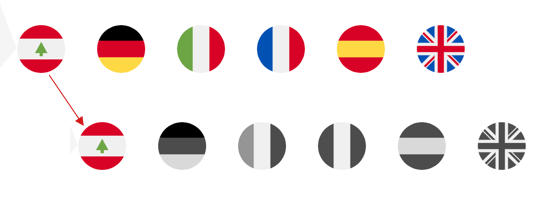
#### with reactive forms
```html
```
```typescript
import { MatSelectIcon } from '@angular-material-extensions/select-icon';
selectIconFC: FormControl = new FormControl();
```
with selected value
```html
```
```typescript
import { MatSelectIcon } from '@angular-material-extensions/select-icon';
selectIconDefault: FormControl = new FormControl(this.icons[0]);
```
### Run Demo App Locally
Build the library
```bash
$ npm run build:lib
```
Serve the demo app
```bash
$ npm start
```
## Other Angular Libraries
- [ngx-auth-firebaseui](https://github.com/AnthonyNahas/ngx-auth-firebaseui)
- [ngx-linkifyjs](https://github.com/AnthonyNahas/ngx-linkifyjs)
- [@angular-material-extensions/password-strength](https://github.com/angular-material-extensions/password-strength)
- [@angular-material-extensions/google-maps-autocomplete](https://github.com/angular-material-extensions/google-maps-autocomplete)
- [@angular-material-extensions/link-preview](https://github.com/angular-material-extensions/link-preview)
- [@angular-material-extensions/fab-menu](https://github.com/angular-material-extensions/fab-menu)
- [@angular-material-extensions/select-country](https://github.com/angular-material-extensions/select-country)
- [@angular-material-extensions/pages](https://github.com/angular-material-extensions/pages)
- [@angular-material-extensions/contacts](https://github.com/angular-material-extensions/contacts)
---
## Support
+ Drop an email to: [Anthony Nahas](mailto:anthony.na@hotmail.de)
+ or open an appropriate [issue](https://github.com/angular-material-extensions/select-icon/issues)
+ let us chat on [Gitter](https://gitter.im/angular-material-extensions/Lobby)
Built by and for developers :heart: we will help you :punch:
---

This project is supported by [jetbrains](https://www.jetbrains.com/) with 1 ALL PRODUCTS PACK OS LICENSE incl. [webstorm](https://www.jetbrains.com/webstorm)
---
## License
Copyright (c) 2020 [Anthony Nahas](https://github.com/AnthonyNahas). Licensed under the MIT License (MIT)

---
_Source: https://npm.io/package/@angular-material-extensions/select-icon · Machine-readable twin of the npm.io package page. Health data is recomputed on every publish._