# @ani4aniket/rn-infinite-scroll
> A react native component that lets you scroll infinitely in both directions by repeating the same items.
Latest version **0.0.2** (published 2020-06-29) · MIT license · 0 weekly downloads
## Install
```sh
npm install @ani4aniket/rn-infinite-scroll
pnpm add @ani4aniket/rn-infinite-scroll
yarn add @ani4aniket/rn-infinite-scroll
bun add @ani4aniket/rn-infinite-scroll
```
## Health
**Score 15/100 (F)** — status: abandoned.
Positive: no vulnerabilities.
Warnings: low downloads; no types; no esm support; pre 1.0.
Negative: abandoned; low maintenance score.
## Facts
| | |
|---|---|
| Version | 0.0.2 |
| Published | 2020-06-29 |
| First published | 2020-06-29 |
| Weekly downloads | 0 |
| License | MIT |
| TypeScript types | none |
| Module format | CommonJS |
| Dependencies | 1 |
| Unpacked size | 3.7 MB |
| Known vulnerabilities | 0 |
| Install scripts | no |
| GitHub stars | 0 |
| Author | Aniket Kumar |
| Maintainers | ani4aniket |
| Keywords | react-native, infinite, scroll, looping |
## Links
- npm: https://www.npmjs.com/package/@ani4aniket/rn-infinite-scroll
- Repository: https://github.com/ani4aniket/rn-infinite-scroll
- Homepage: https://github.com/ani4aniket/rn-infinite-scroll#readme
- Issues: https://github.com/ani4aniket/rn-infinite-scroll/issues
- npm.io page: https://npm.io/package/@ani4aniket/rn-infinite-scroll
## Dependencies (1)
- [prop-types](https://npm.io/package/prop-types.md) 15.7.2
## Recent versions
- 0.0.2 (latest) — 2020-06-29
- 0.0.1 — 2020-06-29
## README
# @ani4aniket/rn-infinite-scroll
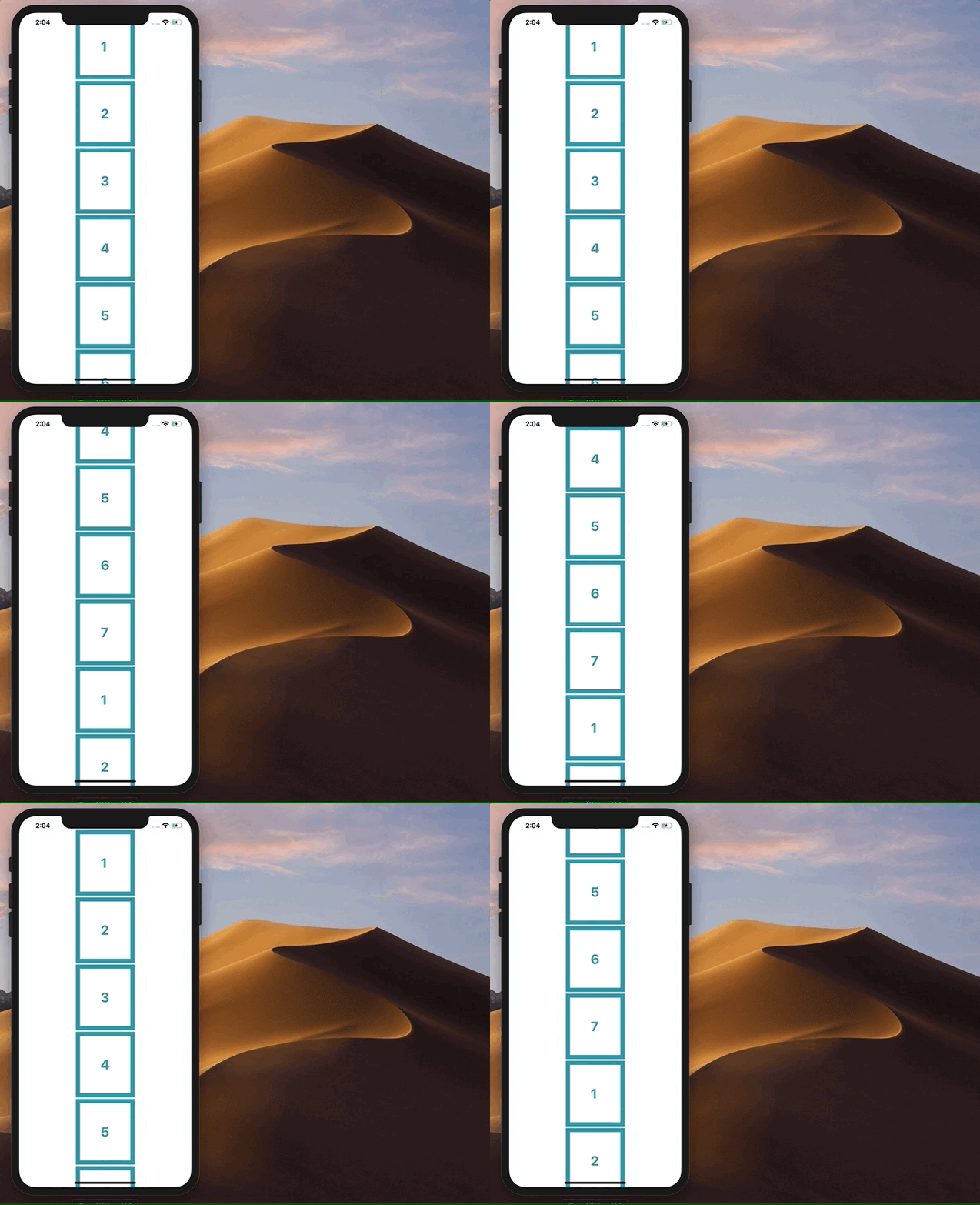
A react native component that lets you scroll infinitely in both directions by repeating the same items.
## Installation
Run `npm install @ani4aniket/rn-infinite-scroll` or `yarn add @ani4aniket/rn-infinite-scroll` in your project directory.
## Usage
This snippet would produce the output shown in the above gif
```
import React, { Component } from 'react';
import { Platform, StyleSheet, Text, View, FlatList, } from 'react-native';
import InfiniteScroll from 'react-native-infinite-looping-scroll';
export default class App extends Component {
constructor(props) {
super(props)
}
render() {
return (
{item.key}}
/>
);
}
}
const styles = StyleSheet.create({
container: {
flex: 1,
justifyContent: 'center',
alignItems: 'center',
backgroundColor: '#F5FCFF',
},
listItem: {
flexDirection: 'row',
justifyContent: 'space-between',
alignItems: 'center',
padding: 50,
margin: 2,
borderColor: '#0099A8',
borderWidth: 10,
backgroundColor: '#FEFEFE'
},
text: {
color: '#0099A8',
fontSize: 32,
fontWeight: 'bold'
},
welcome: {
fontSize: 20,
textAlign: 'center',
margin: 10,
},
instructions: {
textAlign: 'center',
color: '#333333',
marginBottom: 5,
},
});
```
## Props
It accepts all the [FlatList](https://facebook.github.io/react-native/docs/flatlist.html) props out of which renderItem and data are the compulsory ones and has one more extra prop called `offset` which lets you set the offset at which new data should be added. The default value is 20 and you can change it according to your item.
---
_Source: https://npm.io/package/@ani4aniket/rn-infinite-scroll · Machine-readable twin of the npm.io package page. Health data is recomputed on every publish._