# @antmove/wx-qq
> transform wechat miniprogram to qq miniprogram tool.
Latest version **1.2.5** (published 2021-01-11) · GPL-3.0 license · 0 weekly downloads
## Install
```sh
npm install @antmove/wx-qq
pnpm add @antmove/wx-qq
yarn add @antmove/wx-qq
bun add @antmove/wx-qq
```
## Health
**Score 15/100 (F)** — status: abandoned.
Positive: no vulnerabilities.
Warnings: low downloads; no types; no esm support.
Negative: abandoned; low maintenance score.
## Facts
| | |
|---|---|
| Version | 1.2.5 |
| Published | 2021-01-11 |
| First published | 2019-11-13 |
| Weekly downloads | 0 |
| License | GPL-3.0 |
| TypeScript types | none |
| Module format | CommonJS |
| Dependencies | 8 |
| Unpacked size | 195.5 KB |
| Known vulnerabilities | 0 (+25 in 1 direct dependencies) |
| Install scripts | no |
| Author | amap-appx@service.autonavi.com |
| Maintainers | amove |
## Links
- npm: https://www.npmjs.com/package/@antmove/wx-qq
- npm.io page: https://npm.io/package/@antmove/wx-qq
## Dependencies (8)
- [css](https://npm.io/package/css.md) ^2.2.4
- [axios](https://npm.io/package/axios.md) ^0.19.0
- [chalk](https://npm.io/package/chalk.md) ^2.4.2
- [fs-extra](https://npm.io/package/fs-extra.md) ^8.1.0
- [colornames](https://npm.io/package/colornames.md) ^1.1.1
- [htmlparser2](https://npm.io/package/htmlparser2.md) ^3.10.1
- [@antmove/utils](https://npm.io/package/@antmove/utils.md) ^1.2.5
- [@babel/preset-env](https://npm.io/package/@babel/preset-env.md) ^7.5.5
## Recent versions
- 1.2.5 (latest) — 2021-01-11
- 1.2.3 — 2021-01-05
- 1.2.2 — 2020-12-30
- 1.2.0 — 2020-12-16
- 1.1.6 — 2020-09-21
- 1.1.4 — 2020-08-24
- 1.1.3 — 2020-08-06
- 1.1.2 — 2020-08-06
- 1.1.1 — 2020-08-06
- 1.0.66 — 2020-07-24
- 1.0.64 — 2020-07-17
- 1.0.62 — 2020-07-15
- 1.0.61 — 2020-07-10
- 1.0.56 — 2020-06-02
- 1.0.51 — 2020-05-21
- … 11 more at https://npm.io/package/@antmove/wx-qq/versions
## README
# wx-qq-plugin

## 介绍
* 微信转qq小程序插件
> 一键实现微信小程序项目到头条小程序的迁徙,不再为重复开发而烦恼。
## 目录
* 安装
* VsCode 转换插件
* VsCode 编译步骤
* 使用 npm 或 yarn 安装
* 快速开始
* 命令行使用
* 命令行参数说明
* Node.js 使用方式
* API
* transformFramework
* App
* 贡献
* 协议
* 联系
## 安装
### vscode 转换插件
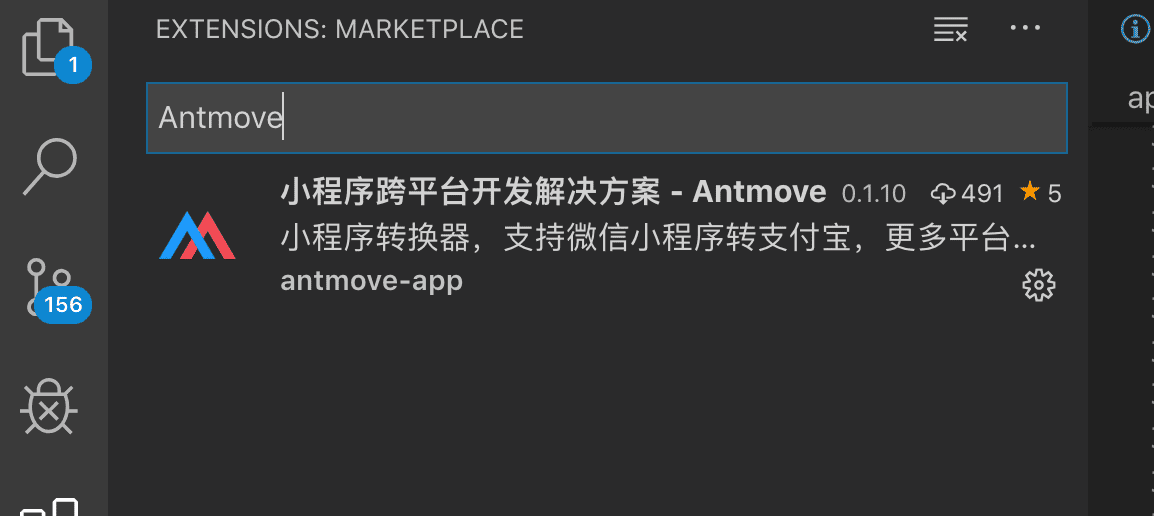
在 vscode 扩展中搜索 `Antmove` 下载安装 Antmove vscode 转换插件实现一键转换。
### VsCode 编译步骤
* 安装扩展(Antmove - antmove-vscode-plugin)
* 在 VsCode 中打开要转换的项目
* 打开 VsCode 命令面板
* Mac: `command + shift + p`
* Windows: `ctrl + shift + p`
* 输入 `Antmove`
* 运行 `Antmove: Run antmove wx-qq` 命令,实现微信小程序转换qq小程序的转换
* 运行如上命令后会给出一个弹窗,选择转换后生成代码存储目录
* 转换完成
* [antmove-vscode-plugin](https://marketplace.visualstudio.com/items?itemName=antmove-app.antmove-vscode-plugin&ssr=false)
> 本插件依赖于 vscode 代码编辑器,安装了 vscode 的用户才能使用。
### 使用 npm 或 yarn 安装
> 我们推荐使用 npm 或 yarn 的方式进行开发,不仅可在开发环境轻松调试,也可放心地在生产环境打包部署使用,享受整个生态圈和工具链带来的诸多好处。
* 全局安装
```bash
$ npm install antmove -g
```
* 本地安装
```bash
$ npm install antmove --save
```
> 如果你的网络环境不佳,推荐使用 [cnpm](https://github.com/cnpm/cnpm)。
## 快速开始
### 命令行使用
```bash
npm i -g antmove
```
> 通过 npm 或 yarn 全局安装才能使用如下命令行
* `antmove wx-qq`(使用前请将终端切换到需转换编译的支付宝小程序项目路径)
```bash
antmove wx-qq
```
* `antmove` - 该命令更加灵活,可配置输出输出目录/编译模式等
```bash
antmove wx-qq -i ./wechat-mini/project -o ./dist/qq-mini/project --env development
```
> 如上的命令表示将 `./wechat-mini/project` 微信小程序项目转换为qq小程序项目,转换到 `./dist/qq-mini/project` 目录
> 如果你不想输入参数,可以体验交互式的命令方式,执行 `antmove` 即可。
### 命令行参数说明
* `--type,-t`
* 可选,(wx-qq),选择编译工具,此参数代表选择的微信转头条的工具
* `--input,-i`
* 可选,编译源码目录,如果不传则是当前目录
* `--output,-o`
* 可传,编译输出目录
* `--component,-c`
* 可传,组件纬度转换,可单独组件或插件
* `--env,-e`
* 可选(development/production),编译模式,生产模式代码会压缩,无编译日志及运行时日志
### Node.js 使用方式
#### 示例
```js
const path = require('path');
const transformFramework = require('antmove');
const AlipayPlugin = require('@antmove/wx-qq');
let outputPath = path.join(__dirname, '../../dist', '/qqmini-demo');
let inputDirPath = path.join(__dirname, '../../examples/miniprogram-demo/miniprogram');
const App = transformFramework();
App.use(
AlipayPlugin,
{
entry: inputDirPath,
dist: outputPath,
env: 'development'
})
.start();
```
## API
### `transformFramework`
工具实例生成函数。
```js
const transformFramework = require('antmove');
const App = transformFramework(); // 得到的 app 实例即可进行转换处理操作
```
### `App`
* `use` | `Function` - `App.use(plugin, pluginOptions)` - 挂载插件到实例上,可挂载多个,按挂载顺序执行
* `plugin`: 转换插件
* `pluginOptions`: 转换插件配置项
* `entry` | `String` - 转换源码目录
* `dist` | `String` - 转换后代码输出目录
* `env` | `String` - 编译环境设置(env/prod)
* 默认值为生产环境
* `start` | `Function` - 开始编译操作
## 贡献
欢迎参与 Antmove 项目的开发建设和讨论。
> 提交 pull request 之前请先提 [Issue 讨论](https://github.com/ant-move/antmove/issues).
## 协议
[GPL](https://choosealicense.com/licenses/gpl-3.0/)
## 联系
如果您在使用的过程中碰到问题,可以通过下面几个途径寻求帮助。
* 钉钉微信交流群: 
 * 邮件:amap-appx@service.autonavi.com
---
_Source: https://npm.io/package/@antmove/wx-qq · Machine-readable twin of the npm.io package page. Health data is recomputed on every publish._
* 邮件:amap-appx@service.autonavi.com
---
_Source: https://npm.io/package/@antmove/wx-qq · Machine-readable twin of the npm.io package page. Health data is recomputed on every publish._