# @bedframe/cli

> Bedframe CLI - your Browser Extension Development framework (dev utility)

Latest version **0.1.2** (published 2026-03-17) · MIT license · 0 weekly downloads

## Install

```sh
npm install @bedframe/cli
pnpm add @bedframe/cli
yarn add @bedframe/cli
bun add @bedframe/cli
```

Provides the commands `bedframe`, `create-bedframe`.

## Health

**Score 60/100 (C)** — status: stable.

Positive: has types; esm support; no vulnerabilities; high maintenance score.

Warnings: low downloads; pre 1.0.

## Facts

| | |
|---|---|
| Version | 0.1.2 |
| Published | 2026-03-17 |
| First published | 2023-05-22 |
| Weekly downloads | 0 |
| License | MIT |
| TypeScript types | bundled |
| Module format | ESM + CommonJS |
| Dependencies | 10 |
| Unpacked size | 167.5 KB |
| Known vulnerabilities | 0 |
| Install scripts | no |
| GitHub stars | 582 |
| Author | Joe Nyaggah |
| Maintainers | nyaggah |

## Links

- npm: https://www.npmjs.com/package/@bedframe/cli
- Repository: https://github.com/nyaggah/bedframe
- Homepage: https://bedframe.dev
- Issues: https://github.com/nyaggah/bedframe/issues
- npm.io page: https://npm.io/package/@bedframe/cli

## Dependencies (10)

- [vite](https://npm.io/package/vite.md) ^6.4.1
- [execa](https://npm.io/package/execa.md) ^9.6.1
- [listr](https://npm.io/package/listr.md) ^0.14.3
- [prompts](https://npm.io/package/prompts.md) ^2.4.2
- [kolorist](https://npm.io/package/kolorist.md) ^1.8.0
- [commander](https://npm.io/package/commander.md) ^14.0.2
- [node-fetch](https://npm.io/package/node-fetch.md) ^3.3.2
- [nanospinner](https://npm.io/package/nanospinner.md) ^1.2.2
- [pkg-install](https://npm.io/package/pkg-install.md) ^1.0.0
- [@bedframe/core](https://npm.io/package/@bedframe/core.md) 0.1.0

## Recent versions

- 0.1.2 (latest) — 2026-03-17
- 0.1.1 — 2026-03-10
- 0.1.0 — 2026-03-10
- 0.0.95 — 2025-06-22
- 0.0.94 — 2025-06-22
- 0.0.93 — 2025-06-22
- 0.0.92 — 2025-06-18
- 0.0.91 — 2025-03-04
- 0.0.90 — 2024-12-10
- 0.0.89 — 2024-11-21
- 0.0.88 — 2024-11-20
- 0.0.87 — 2024-10-12
- 0.0.86 — 2024-10-09
- 0.0.85 — 2024-08-08
- 0.0.84 — 2024-08-07
- … 79 more at https://npm.io/package/@bedframe/cli/versions

## README

<div>
  >_<br />
  <br />
  <span style="color:#c792e9">B R O W S E R</span><br />
  <span style="color: #c3e88d">E X T E N S I O N</span><br />
  <span style="color: #8addff">D E V E L O P M E N T</span><br />
  <span style="color: #ffcb6b">F R A M E W O R K</span><br />
</div>

<br />

<p align="left">
  <a aria-label="Bedframe logo" href="https://bedframe.dev">
    <img src="https://img.shields.io/badge/BEDFRAME-7a46fc.svg?style=for-the-badge&logo=Bedframe&labelColor=CCC">
  </a>
  <a aria-label="@bedframe/cli - NPM version" href="https://www.npmjs.com/package/@bedframe/cli">
    <img alt="@bedframe/cli - NPM version" src="https://img.shields.io/npm/v/@bedframe/cli.svg?style=for-the-badge&labelColor=000000&label=cli">
  </a>
  <a aria-label="@bedframe/core - NPM version" href="https://www.npmjs.com/package/@bedframe/core">
    <img alt="@bedframe/core - NPM version" src="https://img.shields.io/npm/v/@bedframe/core.svg?style=for-the-badge&labelColor=000000&label=core">
  </a>
  <a aria-label="License" href="https://github.com/nyaggah/bedframe/blob/main/LICENSE">
    <img alt="" src="https://img.shields.io/npm/l/next.svg?style=for-the-badge&labelColor=000000">
  </a>
</p>

## **@bedframe/cli**

![Bedframe - Make, Version & Publish cross-browser extensions continously with ease](https://github.com/nyaggah/bedframe/assets/284415/d545dea4-129e-42f0-82fd-5e856c655e61)
![bedframe-cli](https://github.com/nyaggah/bedframe/assets/284415/512540dd-18b7-4fbe-9ebe-861722b83a97)

<!-- Your Browser Extension Development Framework (dev utility) -->

The Bedframe Command Line Interface (CLI) lets you make and manage your BED directly from the terminal.

## Installation

<blockquote><br />
  <h4><strong>Node Version Requirement</strong></h4>  
  Bedframe CLI requires <a href="https://nodejs.org/" target="_blank" rel="noopener noreferrer">Node.js</a> version 18+. 20+. You can manage multiple versions of Node on the same machine with <a href="https://github.com/tj/n" target="_blank" rel="noopener noreferrer">n</a>, <a href="https://github.com/creationix/nvm" target="_blank" rel="noopener noreferrer">nvm</a> or <a href="https://github.com/coreybutler/nvm-windows" target="_blank" rel="noopener noreferrer">nvm-windows</a>.
  <br /><br />
</blockquote>

```bash
#  with bun
bun add @bedframe/cli -g

#  with pnpm
pnpm add @bedframe/cli -g

# with npm
npm install @bedframe/cli -g

# with yarn
yarn add @bedframe/cli -g
```

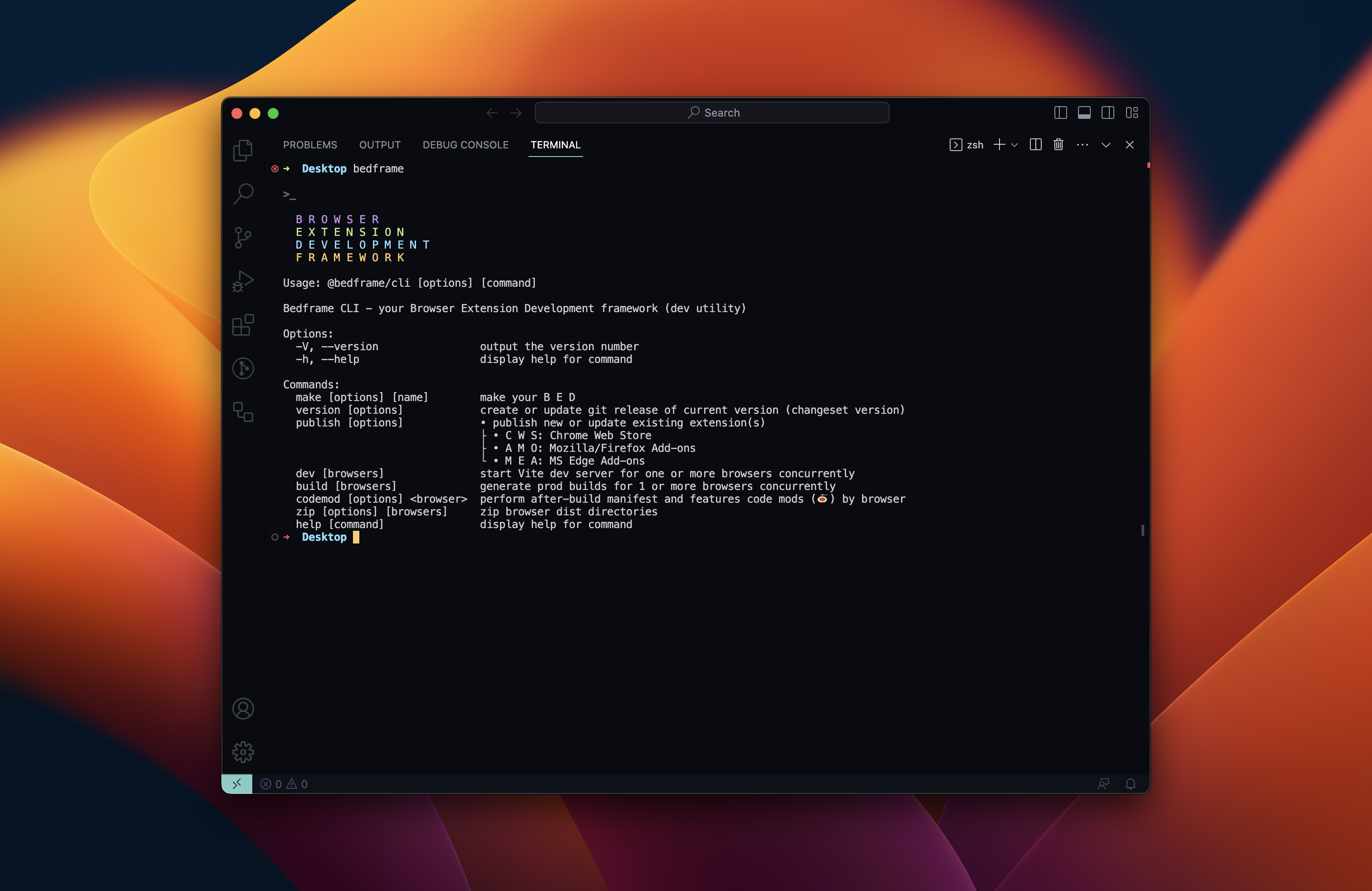
After installation, you will have access to the `bedframe` executable in your command line. You can verify that it is properly installed by simply running `bedframe`, which should present you with an intro and help message.

```bash
>_

  B R O W S E R
  E X T E N S I O N
  D E V E L O P M E N T
  F R A M E W O R K

  @bedframe/cli v0.0.78


Usage: @bedframe/cli [options] [command]

Bedframe CLI - your Browser Extension Development framework (dev utility)

Options:
  -V, --version             output the version number
  -h, --help                display help for command

Commands:
  make [options] [name]     make your B E D
  version [options]         create or update git release of current version (changeset version)
  publish [options]         publish new or update existing extension(s)
                            - chrome: Chrome Web Store (C W S)
                            - firefox: Mozilla/Firefox Add-ons (A M O)
                            - edge: MS Edge Add-ons (M E A)
  dev [browsers]            start Vite dev server for one or more browsers concurrently
  build [browsers]          generate prod builds for 1 or more browsers concurrently
  zip [options] [browsers]  zip browser dist directories
  help [command]            display help for command
```

You can check you have the right version with this command:

```bash
bedframe --version
```

## Making your BED

To create a new bedframe project, run:

```bash
bedframe make
```

Then follow the prompts!

You can specify the `project name` as the first argument of the `make` command. Using `.` for the `project name` will scaffold the project in the current directory.

```bash
# scaffold project called `chrome-extension`
bedframe make chrome-extension

# scaffold project in the current directory
bedframe make .
```

You will then be prompted to configure your BED, picking `Framework`, `Language`, `Browser` to target, etc. All configurations can be manually edited once you generate the project.

<!--![Bedframe (Make command)](https://raw.githubusercontent.com/nyaggah/bedframe/main/packages/cli/public/assets/bedframe-cli--make-command.jpg)-->
<img src="https://github.com/nyaggah/bedframe/assets/284415/257191a2-6c7c-4bcb-86d9-8372194d68d7" alt="Bedframe - Make, Version & Publish cross-browser extensions continously with ease" />

## Commands

### M A K E

The Bedframe `make` command walks you through creating a Vite-powered, prod-ready Browser Extension Environment: one codebase continously deployed to version control and automatically published to all browser stores (currently Chrome, Firefox, and Edge).

You end up with a familiar Vite-powered project you're used to.

Run the `make` command to launch the project gen prompts.

Alternatively: this command is also available as the standalone [`create-bedframe`](https://github.com/nyaggah/bedframe/tree/main/packages/create-bedframe) package.

<details>
<summary>Command Details</summary>

```bash

>_

  B R O W S E R
  E X T E N S I O N
  D E V E L O P M E N T
  F R A M E W O R K

  @bedframe/cli v0.0.78


Usage: @bedframe/cli make [options] [name]

make your B E D

Arguments:
  name                                   project name

Options:
  -b, --browsers <browsers>              comma-separated list browsers (chrome, edge, firefox, etc)
  -v, --version <version>                project version (0.0.1)
  -d, --description <description>        project description
  -a, --author <author>                  project author  (name, email, url)
  --license <license>                    project license (MIT)
  -r, --private                          visibility of project (true)
  -t, --type <type>                      extension type (popup)
  --override <override>                  page to override (newtab)
  --options <options>                    whether to and how render options (embedded)
  -p, --packageManager <packageManager>  package manager to use (pnpm)
  -f, --framework <framework>            framework to use (react)
  -l, --language <language>              language to use (typescript)
  -s, --style <style>                    css framework to use (tailwind)
  -o, --lintFormat                       add linting with formatting (true)
  -e, --tests                            add tests (vitest + testing library) (true)
  -g, --git                              initialize git for source control (true)
  -h, --gitHooks                         use git hooks (true)
  -c, --commitLint                       use commit linting (true)
  -x, --changesets                       use changesets (true)
  -i, --installDeps                      install dependencies (true)
  -y, --yes                              make your BED w/ preconfigured defaults (false)
  --help                                 display help for command
```

### Args

<details>
  <summary>Name</summary>
  
  The CLI `name` argument sets manifests' `name` property (required) which is a short, plain text string (maximum of 45 characters) that identifies the extension. For example:
  
  ```json
  {
    "name": "My extension name"
  }
  ```
  
  You can specify a locale-specific string; see [Internationalization](#) for details.
  
  It is displayed in the following locations:
  
  - Install dialog
  - Extensions page (chrome://extensions)
  - [Chrome Web Store](https://chrome.google.com/webstore)
  
  See also [Short Name](#).
  
</details>

### Flags / Options

You can optionally by-pass the prompts if you pass in the requisite flags to the `make` command.

As an example, to scaffold a multi-extension project i.e. BED environment targeting Chrome, Brave, Opera and Edge browsers you can run:

```bash
$ bedframe make multi-extension-project \
  --browsers 'chrome, firefox, safari, brave, opera, edge' \
  --version '0.0.0'  \
  --description 'this is my BED! there are many like it, but this one is... MINE!!!'  \
  --author 'joe, joe@bedframe.dev, https://bedframe.dev'  \
  --license MIT  \
  --private  \
  --type overlay  \
  --override newtab  \
  --options embedded  \
  --packageManager bun \
  --framework react \
  --language typescript \
  --style tailwind \
  --lintFormat \
  --tests \
  --git \
  --gitHooks \
  --commitLint \
  --changesets \
  --installDeps
```

If any required configuration isn't passed in via `flags` the CLI will prompt you for the missing requirements.

### Options

| Flag (short) | Flag (long)            | Type           | Description                                     | Default    |
| ------------ | ---------------------- | -------------- | ----------------------------------------------- | ---------- |
| -v           | --version              | string         | Specify project version                         | 0.0.1      |
| -b           | --browsers             | Browser[]      | Specify comma-separated list of target browsers | chrome     |
| -p           | --packageManager&nbsp; | PackageManager | Specify package manager to use                  | yarn       |
| -f           | --framework            | Framework      | Specify framework to use                        | react      |
| -l           | --language             | Language       | Specify language to use                         | typescript |
| -s           | --style                | Style          | Specify CSS solution to use                     | tailwind   |
| -o           | --lintFormat           | boolean        | Configure linting with formatting               | true       |
| -g           | --git                  | boolean        | Initialize git source control                   | true       |
| -h           | --gitHooks             | boolean        | Add git hooks (Husky + lint staged)             | true       |
| -t           | --tests                | boolean        | Add tests (Vitest + Testing Library + jsdom)    | true       |
| -c           | --commitLint           | boolean        | Add commit linting                              | true       |
| -x           | --changesets           | boolean        | Add changesets                                  | true       |
| -i           | --installDeps          | boolean        | Add &amp; install dependencies                  | true       |
| -y           | --yes                  | boolean        | Set up Bedframe w/ preconfigured defaults       | false      |
|              | --help                 |                | display help for command                        |            |

<details>
<summary>Package Manager</summary>
Pick from either npm, yarn or pnpm

</details>

<details>
  <summary>Version</summary>
  
  The `version` passed in via the Bedframe CLI make command flag (`-v, --version`) or via prompt response is used to set the `version` for both your project's package.json and the (one or more) manifests for the extension(s) in your project.
  
  <blockquote>
  <h4>Note</h4>
  The `version` in manifest.json is not in semVer while the `version` in pacakge.json must be parseable by <a href="https://github.com/npm/node-semver">node-semver</a>. If you find the two need to be different in your project, you can alternatively pass in the Version Name flag (`--versionName`) and this will be the semVer-valid `version` used in the package.json and as `version_name` in manifest.json.
  </blockquote>
  <Br />
  
  One to four dot-separated integers identifying the version of this extension. A couple of rules apply to the integers:
  
  The integers must be between `0` and `65535`, inclusive.
  Non-zero integers can't start with `0`. For example, `032` is invalid because it begins with a zero.
  They must not be all zero. For example, `0` and `0.0.0.0` are invalid while `0.1.0.0` is valid.
  
  Here are some examples of valid versions:
  
  - `"version": "1"`
  - `"version": "1.0"`
  - `"version": "2.10.2"`
  - `"version": "3.1.2.4567"`
  
  If the published extension has a newer version string than the installed extension, then the extension is automatically updated.
  
  The comparison starts with the leftmost integers. Then, if those integers are equal, the integers to the right are compared, and so on. For example, `1.2.0` is a newer version than `1.1.9.9999`.
  
  A missing integer is equal to zero. For example, `1.1.9.9999` is newer than `1.1`, and `1.1.9.9999` is older than `1.2`.
  
</details>

<details><summary>Browser</summary></details>
<details><summary>framework</summary></details>
<details><summary>language</summary></details>
<details><summary>style</summary></details>
<details><summary>lintFormat</summary></details>
<details><summary>git</summary></details>
<details><summary>gitHooks</summary></details>
<details><summary>tests</summary></details>
<details><summary>commitLint</summary></details>
<details><summary>changesets</summary></details>
<details><summary>installDeps</summary></details>
<details><summary>yes</summary></details>
<details><summary>help</summary></details>

</details>

### V E R S I O N

create or update git release of current version

<details>
<summary>Command Details</summary>

```bash
>_

  B R O W S E R
  E X T E N S I O N
  D E V E L O P M E N T
  F R A M E W O R K

Usage: @bedframe/cli version [options]

create or update git release of current version (changeset version)

Options:
  --ignore <package>  skip a package from being published
  --snapshot          create a snapshot release for testing
  -h, --help          display help for command
```

</details>

### P U B L I S H

publish new or update existing extension(s)

<details>
<summary>Command Details</summary>
<br />

```bash
>_

B R O W S E R
E X T E N S I O N
D E V E L O P M E N T
F R A M E W O R K

Usage: @bedframe/cli publish [options]

• publish new or update existing extension(s)
├ • C W S: Chrome Web Store
├ • A M O: Mozilla/Firefox Add-ons
└ • M E A: MS Edge Add-ons

Options:
-b, --browsers <browsers...> specify browsers to publish (chrome,firefox,edge)
-h, --help display help for command
```

</details>

### D E V

start vite dev server for 1 or more browsers.<br />
alias for vite dev w/ --mode &lt;browser&gt;

<details>
  <summary>Command Details</summary>
  
  ```bash
  >_
  
    B R O W S E R
    E X T E N S I O N
    D E V E L O P M E N T
    F R A M E W O R K
  
  Usage: @bedframe/cli dev [options] [browsers]
  
  start Vite dev server for one or more browsers concurrently
  
  Options:
    -h, --help  display help for command
  ```
  
  ```bash
  > bedframe dev
  6 BEDs starting vite dev server! 🚀
  └ dist/
    ├ brave/
    ├ chrome/
    ├ edge/
    ├ firefox/
    ├ opera/
    └ safari/
  ```
  
</details>

### B U I L D

generate prod builds for 1 or more browsers<br />
alias for vite build w/ --mode &lt;browser&gt;

<details>
  <summary>Command Details</summary>
  
  ```bash
  >_
  
    B R O W S E R
    E X T E N S I O N
    D E V E L O P M E N T
    F R A M E W O R K
  
  Usage: @bedframe/cli build [options] [browsers]
  
  generate prod builds for 1 or more browsers concurrently
  
  Options:
    -h, --help  display help for command
  ```
  
</details>

### Z I P

create zip archive(s) for 1 or more browsers

<details>
<summary>Command Details</summary>

```bash
>_

  B R O W S E R
  E X T E N S I O N
  D E V E L O P M E N T
  F R A M E W O R K

Usage: @bedframe/cli zip [options] [browsers]

zip browser dist directories

Arguments:
  browsers                 list of browser names

Options:
  -d, --distDir <distDir>  current dist dir to create archive from (e.g. -d
                           ./dist/<browser>)
  -n, --name <name>        what to name the zip file (including .zip)
  -h, --help               display help for command
```

</details>

---
_Source: https://npm.io/package/@bedframe/cli · Machine-readable twin of the npm.io package page. Health data is recomputed on every publish._