# @bibliotheca-dao/postcss-100vh-fix
> PostCSS plugin to fix height/min-height: 100vh on iOS
Latest version **1.0.3** (published 2022-03-14) · MIT license · 0 weekly downloads
## Install
```sh
npm install @bibliotheca-dao/postcss-100vh-fix
pnpm add @bibliotheca-dao/postcss-100vh-fix
yarn add @bibliotheca-dao/postcss-100vh-fix
bun add @bibliotheca-dao/postcss-100vh-fix
```
## Health
**Score 15/100 (F)** — status: abandoned.
Positive: no vulnerabilities.
Warnings: low downloads; no types; no esm support.
Negative: abandoned; low maintenance score.
## Facts
| | |
|---|---|
| Version | 1.0.3 |
| Published | 2022-03-14 |
| First published | 2022-03-14 |
| Weekly downloads | 0 |
| License | MIT |
| TypeScript types | none |
| Module format | CommonJS |
| Node | >=10.0 |
| Dependencies | 0 |
| Unpacked size | 6.6 KB |
| Known vulnerabilities | 0 |
| Install scripts | no |
| GitHub stars | 945 |
| Author | Andrey Sitnik |
| Maintainers | redbeardeth |
| Keywords | postcss, css, postcss-plugin, 100vh, safari, height, min-height, -webkit-fill-available |
## Links
- npm: https://www.npmjs.com/package/@bibliotheca-dao/postcss-100vh-fix
- Repository: https://github.com/postcss/postcss-100vh-fix
- Homepage: https://github.com/postcss/postcss-100vh-fix#readme
- Issues: https://github.com/postcss/postcss-100vh-fix/issues
- Funding: https://opencollective.com/postcss/
- npm.io page: https://npm.io/package/@bibliotheca-dao/postcss-100vh-fix
## Alternatives
- [style-dictionary](https://npm.io/package/style-dictionary.md) — 2.0M weekly downloads
- [postcss-merge-idents](https://npm.io/package/postcss-merge-idents.md) — 1.7M weekly downloads
- [@fontsource/noto-sans](https://npm.io/package/@fontsource/noto-sans.md) — 93.0K weekly downloads
- [uglifycss](https://npm.io/package/uglifycss.md) — 71.6K weekly downloads
- [mat4-interpolate](https://npm.io/package/mat4-interpolate.md) — 23.3K weekly downloads
## Recent versions
- 1.0.3 (latest) — 2022-03-14
- 1.0.2 — 2022-03-14
## README
# PostCSS `100vh` Fix
 [PostCSS] plugin to fix [iOS’s bug] with `100vh`.
It works in Chrome (just `-webkit-fill-available` causes problems in Chrome
in some cases), iOS/iPad/MacOS Safari and [all other browsers].
Pure CSS solution, no JS required.
```css
body {
/* Footer will be hidden on iOS Safari because of bottom panel */
height: 100vh;
}
```
```css
body {
height: 100vh;
}
/* Avoid Chrome to see Safari hack */
@supports (-webkit-touch-callout: none) {
body {
/* The hack for Safari */
height: -webkit-fill-available;
}
}
```
 It works with `min-height` and `max-height` too.
[all other browsers]: https://caniuse.com/#feat=viewport-units
[iOS’s bug]: https://allthingssmitty.com/2020/05/11/css-fix-for-100vh-in-mobile-webkit/
[PostCSS]: https://github.com/postcss/postcss
 ## Limits
Pure CSS solution is limited. For many cases you need to use JS-based hack like
[`postcss-viewport-height-correction`]:
Our hack do not work with partial height like `height: 90vh`
or `height: calc(100vh - 60px)`.
Also, we do not fix Chrome for Android bug:
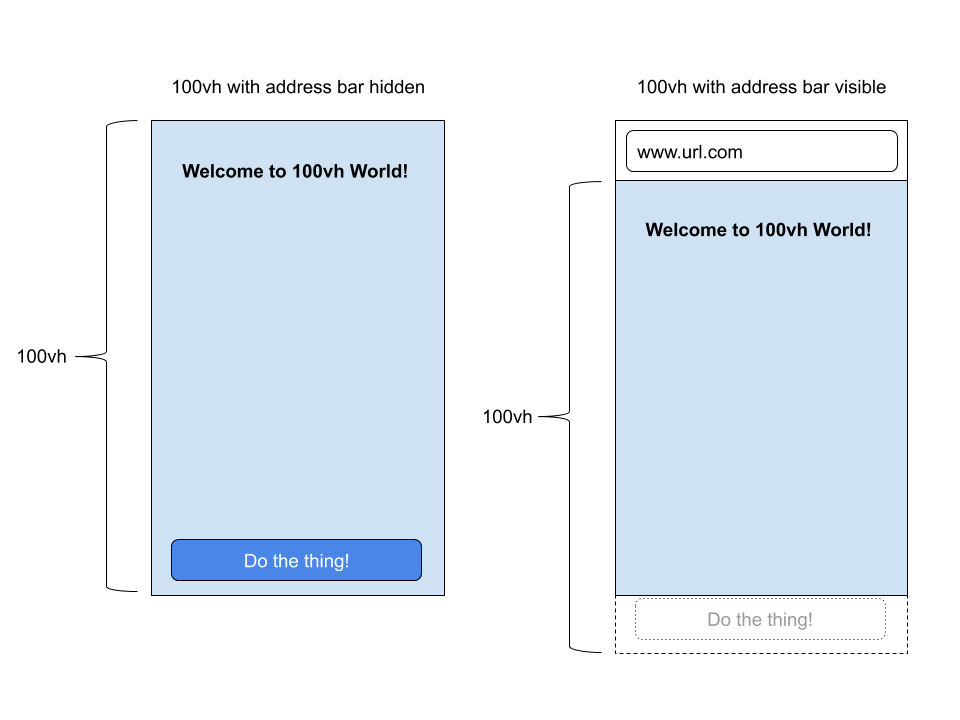 [`postcss-viewport-height-correction`]: https://github.com/Faisal-Manzer/postcss-viewport-height-correction
## Usage
**Step 1:** Install plugin:
```sh
npm install --save-dev postcss postcss-100vh-fix
```
**Step 2:** Check you project for existed PostCSS config: `postcss.config.js`
in the project root, `"postcss"` section in `package.json`
or `postcss` in bundle config.
If you do not use PostCSS, add it according to [official docs]
and set this plugin in settings.
**Step 3:** Add the plugin to plugins list:
```diff
module.exports = {
plugins: [
+ require('postcss-100vh-fix'),
require('autoprefixer')
]
}
```
**Step 4:** Use `height: 100vh` or `min-height: 100vh` in your CSS.
---
_Source: https://npm.io/package/@bibliotheca-dao/postcss-100vh-fix · Machine-readable twin of the npm.io package page. Health data is recomputed on every publish._