# @blackpixel/framer-navbarcomponent
> Generate an iOS-style navigation bar with title, action buttons and search bar.
Latest version **1.0.0** (published 2017-10-13) · MIT license · 0 weekly downloads
## Install
```sh
npm install @blackpixel/framer-navbarcomponent
pnpm add @blackpixel/framer-navbarcomponent
yarn add @blackpixel/framer-navbarcomponent
bun add @blackpixel/framer-navbarcomponent
```
## Health
**Score 15/100 (F)** — status: abandoned.
Positive: no vulnerabilities.
Warnings: low downloads; no types; no esm support.
Negative: abandoned; low maintenance score.
## Facts
| | |
|---|---|
| Version | 1.0.0 |
| Published | 2017-10-13 |
| First published | 2017-10-13 |
| Weekly downloads | 0 |
| License | MIT |
| TypeScript types | none |
| Module format | CommonJS |
| Dependencies | 1 |
| Known vulnerabilities | 0 |
| Install scripts | no |
| GitHub stars | 16 |
| Author | Black Pixel |
| Maintainers | iconmaster |
| Keywords | framerjs, framer, coffeescript, navbar, ios |
## Links
- npm: https://www.npmjs.com/package/@blackpixel/framer-navbarcomponent
- Repository: https://github.com/bpxl-labs/NavbarComponent
- Issues: https://github.com/bpxl-labs/NavbarComponent/issues
- npm.io page: https://npm.io/package/@blackpixel/framer-navbarcomponent
## Dependencies (1)
- [coffeeify](https://npm.io/package/coffeeify.md) ^2.1.0
## Alternatives
- [@luma.gl/experimental](https://npm.io/package/@luma.gl/experimental.md) — 77.1K weekly downloads
- [persona-harness](https://npm.io/package/persona-harness.md) — 4.7K weekly downloads
- [@tsparticles/effect-bubble](https://npm.io/package/@tsparticles/effect-bubble.md) — 4.6K weekly downloads
- [f3d](https://npm.io/package/f3d.md) — 730 weekly downloads
- [spark-html-motion](https://npm.io/package/spark-html-motion.md) — 298 weekly downloads
## Recent versions
- 1.0.0 (latest) — 2017-10-13
## README
# NavbarComponent Framer Module
[](https://opensource.org/licenses/MIT)
[](.github/CONTRIBUTING.md)
[]()
The NavbarComponent module allows you to generate an iOS-style navigation bar with title, action buttons, and search bar. Scroll effects mimic those on iOS, and views can be navigated forward and reverse.
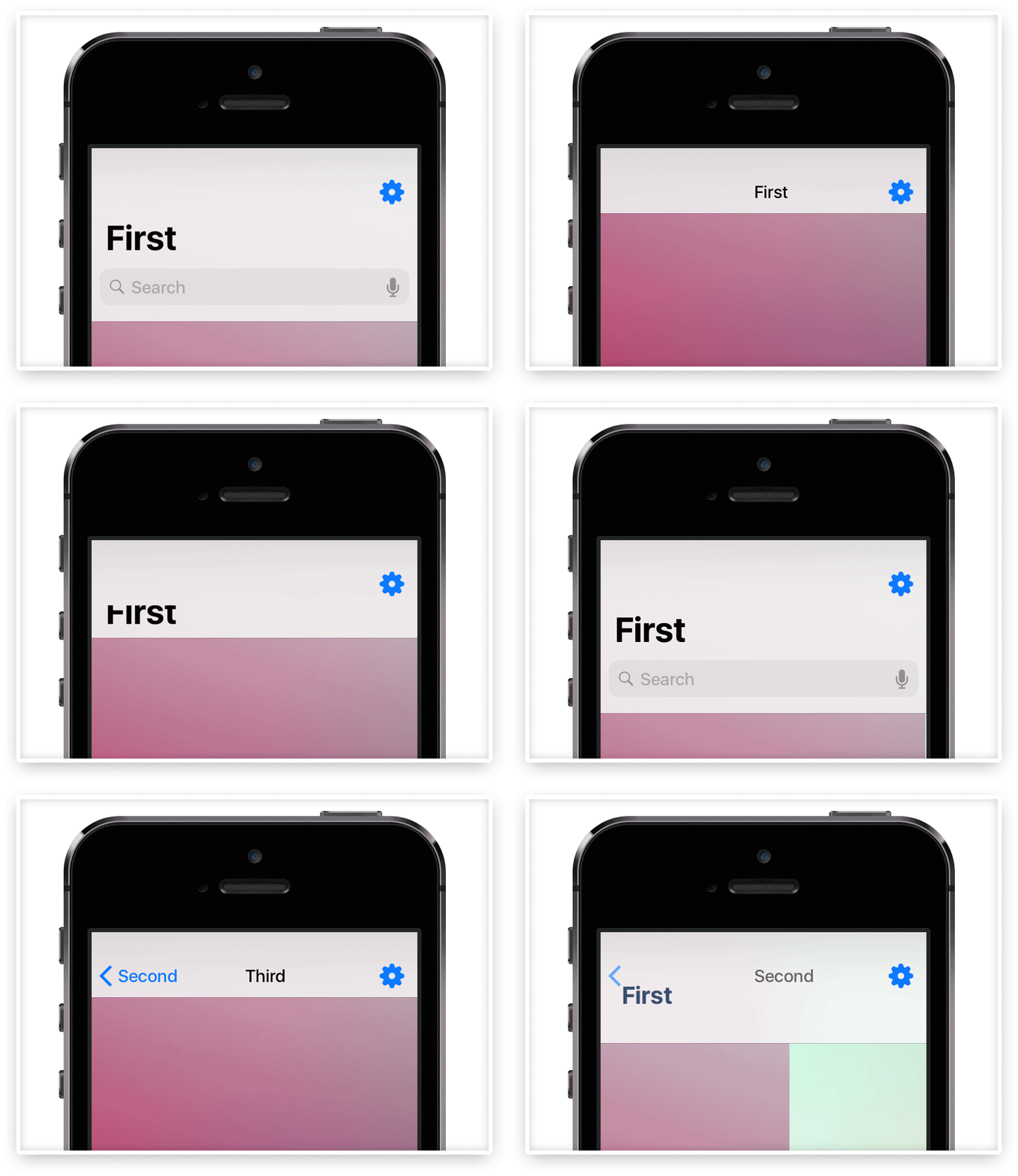 ### Installation
#### Manual installation
Copy or save the `NavbarComponent` file into your project's `modules` folder.
### Adding It to Your Project
In your Framer project, add the following:
```coffeescript
myNavbar = require "NavbarComponent"
```
### API
#### `new NavbarComponent`
Instantiates a new instance of NavbarComponent.
#### Available options
```coffeescript
myNavbar = new NavbarComponent
# General
style: ("light" || "dark")
size: ("large" || "small")
title:
# Buttons
buttonCount:
buttonSize:
buttonActions:
imagePrefix:
imageSuffix:
backAction:
# Search bar
searchLabel:
search:
dictation:
# Colors
textColor: (hex or rgba)
backgroundColor: (hex or rgba)
searchBarColor: (hex or rgba)
searchIconColor: (hex or rgba)
accentColor: (hex or rgba)
```
#### Activating scroll effects
NavbarComponent will need to know which layer's scroll position it ought to match. Do not attempt to set it as the header of a FlowComponent. Rather, use the `scrollWith()` feature and indicate your FlowComponent or ScrollComponent to the NavbarComponent.
```coffeescript
myNavbar.scrollWith(layer) # layer will be the name of your FlowComponent or ScrollComponent
```
#### Navigation effects
To mimic view-by-view navigation, use `showNext()` and `showPrevious(`). When using `showNext()`, provide a title for the next view. NavbarComponent will store these for purposes of returning to them with `showPrevious()`.
```coffeescript
myNavbar.showNext("Your title here")
myNavbar.showPrevious()
```
For debugging help, you can inspect NavbarComponent's stored list of titles.
```coffeescript
print myNavbar.history
```
#### Navbar size
Not all iOS navbars use the large title style. You may enforce a smaller title using `size: "small"`.
#### The search bar
If you instantiate the NavbarComponent with `search: true`, your initial navbar view will display a search bar. Your users can type in this bar. If you wish to check the current value of the search bar, use the `search` variable.
```coffeescript
print myNavbar.search
```
#### Button images
All images are assumed to live in the `images` directory and to be numbered starting with zero. You may supply a prefix and suffix. If your button images are located in a `buttons` directory within `images` and named:
```coffeescript
item0.png
item1.png
item2.png
```
then your `imagePrefix` will be `"buttons/item"` and your `imageSuffix` will be `"png"`.
Do not include the `images` directory in `imagePrefix`.
#### Button size
Action button assets are assumed to be 24pt by 24pt. If yours are of another size, supply the correct dimension with `buttonSize: `. This will prevent your assets from being scaled.
#### Button actions
The back button that appears on secondary views can be given an action, as can individual action buttons. Most likely, you will want the back button to activate the NavbarComponent's `showPrevious()` feature, along with any navigation relevant to your prototype (e.g., the `showPrevious()` FlowComponent feature). Action button actions should be arranged in a comma-separated array, one action per line.
```coffeescript
backAction: -> myNavbar.showPrevious()
buttonActions: [
-> print "1",
-> print "second",
-> print "item the third"
]
```
---
Website: [blackpixel.com](https://blackpixel.com) ·
GitHub: [@bpxl-labs](https://github.com/bpxl-labs/) ·
Twitter: [@blackpixel](https://twitter.com/blackpixel) ·
Medium: [@bpxl-craft](https://medium.com/bpxl-craft)
---
_Source: https://npm.io/package/@blackpixel/framer-navbarcomponent · Machine-readable twin of the npm.io package page. Health data is recomputed on every publish._