# @codeparrot/js-agent
> Record and replay API traffic
Latest version **2.0.4** (published 2023-07-07) · UNLICENSED license · 50 weekly downloads
## Install
```sh
npm install @codeparrot/js-agent
pnpm add @codeparrot/js-agent
yarn add @codeparrot/js-agent
bun add @codeparrot/js-agent
```
## Health
**Score 20/100 (F)** — status: abandoned.
Positive: no vulnerabilities; growing popularity.
Warnings: low downloads; no types; no esm support.
Negative: abandoned; low maintenance score.
## Facts
| | |
|---|---|
| Version | 2.0.4 |
| Published | 2023-07-07 |
| First published | 2023-02-09 |
| Weekly downloads | 50 |
| License | UNLICENSED |
| TypeScript types | none |
| Module format | CommonJS |
| Dependencies | 10 |
| Unpacked size | 33.4 KB |
| Known vulnerabilities | 0 (+1 in 1 direct dependencies) |
| Install scripts | no |
| Author | Vedant |
| Maintainers | royaljain0203, vedant1811 |
## Links
- npm: https://www.npmjs.com/package/@codeparrot/js-agent
- npm.io page: https://npm.io/package/@codeparrot/js-agent
## Dependencies (10)
- [@opentelemetry/api](https://npm.io/package/@opentelemetry/api.md) ^1.4.0
- [@google-cloud/storage](https://npm.io/package/@google-cloud/storage.md) ^6.9.4
- [@opentelemetry/sdk-node](https://npm.io/package/@opentelemetry/sdk-node.md) ^0.35.1
- [@codeparrot/instrumentation](https://npm.io/package/@codeparrot/instrumentation.md) ^0.35.7
- [@opentelemetry/sdk-trace-base](https://npm.io/package/@opentelemetry/sdk-trace-base.md) ^1.9.1
- [@codeparrot/instrumentation-pg](https://npm.io/package/@codeparrot/instrumentation-pg.md) 0.34.8
- [@codeparrot/instrumentation-grpc](https://npm.io/package/@codeparrot/instrumentation-grpc.md) ^0.35.14
- [@codeparrot/instrumentation-http](https://npm.io/package/@codeparrot/instrumentation-http.md) ^0.35.13
- [@opentelemetry/instrumentation-redis-4](https://npm.io/package/@opentelemetry/instrumentation-redis-4.md) ^0.34.2
- [@opentelemetry/exporter-trace-otlp-grpc](https://npm.io/package/@opentelemetry/exporter-trace-otlp-grpc.md) ^0.39.1
## Recent versions
- 2.0.4 (latest) — 2023-07-07
- 0.0.2001 (cm-test) — 2023-07-04
- 2.0.3 — 2023-07-07
- 2.0.2 — 2023-07-06
- 2.0.1 — 2023-07-06
- 2.0.0 — 2023-07-05
- 1.2.7 — 2023-07-03
- 1.2.6 — 2023-07-03
- 1.2.5 — 2023-06-23
- 1.2.4 — 2023-06-08
- 0.0.10007 — 2023-06-06
- 0.0.10006 — 2023-06-06
- 0.0.10005 — 2023-06-06
- 0.0.10004 — 2023-06-06
- 0.0.10003 — 2023-06-06
- … 26 more at https://npm.io/package/@codeparrot/js-agent/versions
## README
# What is CodeParrot?
### Get a change report on response body, latency & error rates of your APIs!
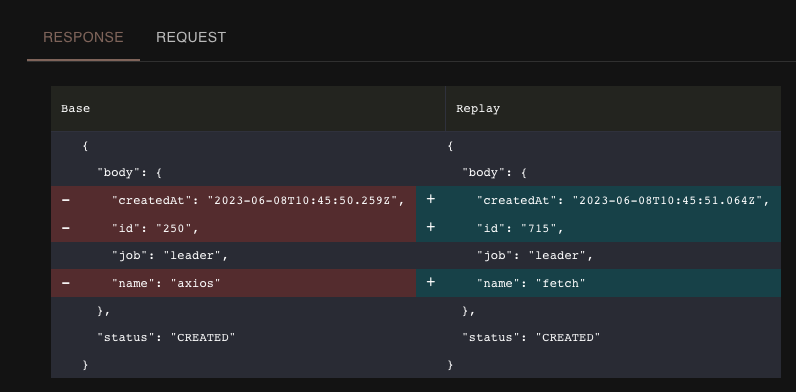
An Example Diff
CodeParrot uses AI and production traffic to generate a **change report**. This report gives you insights on differences in response body for all unique requests coming to your service!
It works by "recording" production (or staging env) traffic. Our AI figures out the unique API calls from this traffic, and also mocks the downstream dependencies! *Magic right?!* 🤯
Then for every PR, the above unique API calls are run against the new version of code. Its like- auto-generated functional tests (API calls for a service, with dependencies mocked).
# Installation
## Step 1 - Install the nodeJs "record" agent
1. Install the CodeParrot dependency `@codeparrot/js-agent` by running
```bash
npm install @codeparrot/js-agent
```
This will add a dependency `"@codeparrot/js-agent": "^1.2.3"`, in your `package.json`
2. Update the `node` start app command with `-r @codeparrot/js-agent`, like
```json
"scripts": {
"server": "node -r @codeparrot/js-agent index.js"
}
```
This basically `require`’s the code parrot agent package **before** your application code.
### Set the following env variable:
```bash
# set it to your *unique* service name
CODE_PARROT_APP_NAME=
```
When you start your nodeJS application and see a log line like:
```
@codeparrot/js-agent, v1.2.5 nodejs-agent-<...>gserviceaccount.com
```
CodeParrot record is set up! 🎉 Use your application as normal, and CodeParrot will record the network traffic.
## Step 2 - Install GitHub App
Install the [CodeParrot GitHub App](https://github.com/apps/codeparrot-app) in the repo(s) that already have replay set up. *(It asks for the minimum possible permissions)*
Then, create 2 new files:
1. `codeparrot-replay.Dockerfile`
2. `codeparrot.sh`
to run the tests. Every code push, this Dockerfile is built and run. This new Dockerfile is almost as same as your existing one, except that it sets the `CMD` to run `codeparrot.sh` instead of the usual `npm start`.
`codeparrot.sh` runs your app start command (like `npm start`) in a loop, until all the tests execute.
Example `codeparrot.sh` :
```bash
#!/bin/sh
while :
do
CODE_PARROT_IS_REPLAY=true npm start && break
echo "Non-zero exit! Restarting replay..."
done
```
Example `codeparrot-replay.Dockerfile` :
```bash
# ... existing app setup
COPY codeparrot.sh ./codeparrot.sh
CMD ["sh", "./codeparrot.sh"]
```
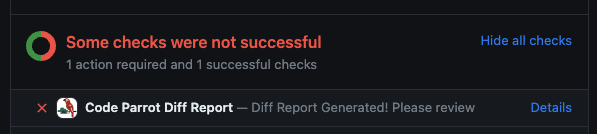
Now, in every PR, a GitHub "check" with a link to the Change Report will appear: 🎉
# Contributing, Self Setup
Refer to [CONTRIBUTING.md](./CONTRIBUTING.md)
---
_Source: https://npm.io/package/@codeparrot/js-agent · Machine-readable twin of the npm.io package page. Health data is recomputed on every publish._