# @ecohead/kondonizer
> 🗂 A universal media library web component based on the Custom Elements standard.
Latest version **0.1.0** (published 2022-06-02) · MIT license · 0 weekly downloads
> **Deprecated.** This package is deprecated.
## Install
```sh
npm install @ecohead/kondonizer
pnpm add @ecohead/kondonizer
yarn add @ecohead/kondonizer
bun add @ecohead/kondonizer
```
## Health
**Score 10/100 (F)** — status: deprecated.
Negative: deprecated.
## Facts
| | |
|---|---|
| Version | 0.1.0 |
| Published | 2022-06-02 |
| First published | 2022-06-02 |
| Weekly downloads | 0 |
| License | MIT |
| TypeScript types | bundled |
| Module format | ESM + CommonJS |
| Dependencies | 4 |
| Unpacked size | 326.5 KB |
| Known vulnerabilities | 0 |
| Install scripts | yes |
| GitHub stars | 5 |
| Author | Aurélien Devaux |
| Maintainers | aurel_dvx |
| Keywords | Media Library, Custom Elements, HTML, Component |
## Links
- npm: https://www.npmjs.com/package/@ecohead/kondonizer
- Repository: https://github.com/ecohead/kondonizer
- Homepage: https://kondonizer.aureldvx.fr/
- Issues: https://github.com/ecohead/kondonizer/issues
- npm.io page: https://npm.io/package/@ecohead/kondonizer
## Dependencies (4)
- [lit](https://npm.io/package/lit.md) ^2.0.2
- [zod](https://npm.io/package/zod.md) ^3.14.4
- [nanoid](https://npm.io/package/nanoid.md) ^3.3.3
- [filesize](https://npm.io/package/filesize.md) ^8.0.7
## Alternatives
- [@tsparticles/shape-image](https://npm.io/package/@tsparticles/shape-image.md) — 303.7K weekly downloads
- [@tsparticles/shape-line](https://npm.io/package/@tsparticles/shape-line.md) — 233.7K weekly downloads
- [stringify-attributes](https://npm.io/package/stringify-attributes.md) — 58.6K weekly downloads
- [mobile-drag-drop](https://npm.io/package/mobile-drag-drop.md) — 46.3K weekly downloads
- [@comunica/actor-rdf-parse-html](https://npm.io/package/@comunica/actor-rdf-parse-html.md) — 29.2K weekly downloads
## Recent versions
- 0.1.0 (latest) — 2022-06-02
## README




[](https://https://npmjs.com/package/@ecohead/kondonizer)
[](https://twitter.com/aureldvx)
[](https://discord.gg/gPFM7ffu5B)





[](https://discord.gg/gPFM7ffu5B)
# Kondonizer
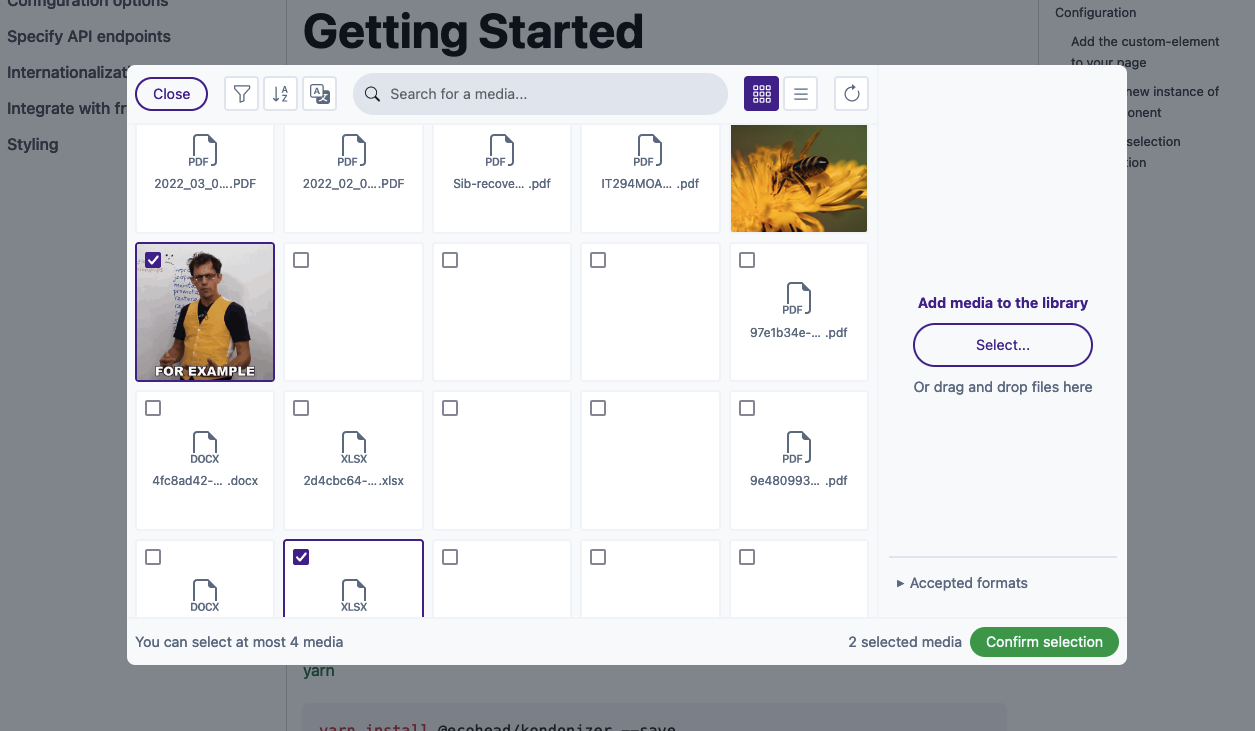
Kondonizer is a custom element (a native HTML tag) that can be integrated in any frontend code. It displays a media library based on a Media model, like WordPress does internally. You can select, upload, edit and delete one or multiple files, all based on a configuration object highly customizable.
This web component needs between 2 and 5 API endpoints to be fully working. More info in the [documentation](https://aureldvx.fr/ecohead/kondonizer/specify-api-endpoints).
## Documentation
The full documentation is accessible in a [dedicated website](https://aureldvx.fr/ecohead/kondonizer).
## Installation
You can use your preferred package manager.
[npm](https://www.npmjs.com/)
```bash
npm install @ecohead/kondonizer --save
```
[yarn](https://yarnpkg.com/)
```bash
yarn add @ecohead/kondonizer --save
```
[pnpm](https://pnpm.io/)
```bash
pnpm install @ecohead/kondonizer --save
```
## Configuration
### Add the custom-element to your page
The first step is to place the HTML tag where you need it in your template :
```html
```
At this point, you will see any changes, because you need to create an instance of kondonizer to actually display the component UI.
### Create a new instance of the component
The `eco-kondonizer` custom element provide a method to create a new instance with some options. To display the component UI, you need to create a new instance as follows :
```js
// At the top of the file
import { EcoKondonizer, defineConfig } from "@ecohead/kondonizer";
// Anywhere in the same file
const kondonizer = document.querySelector('eco-kondonizer');
if (!kondonizer) return;
kondonizer.createInstance({
// Create default options, but necessary to be customized
config: defineConfig(),
// Pass [] to no existing selection, or an array of ids (e.g. [12,28,46])
selectedMedias: [],
// Defaults to 'en-US'
defaultLang: 'fr-FR'
});
```
> **Note**
> All the options available are listed [here](https://aureldvx.fr/ecohead/kondonizer/configuration-options).
> **Warning**
> Some config options are required (e.g. **server endpoints**), so you need to pass a correct config to view the component UI.
### Listen to selection confirmation
A [CustomEvent](https://developer.mozilla.org/en-US/docs/Web/API/CustomEvent/CustomEvent) is emitted each time the user clicks on the confirm button in the modal.
So, to get the user selection, you have to listen to this event as follows :
```js
kondonizer.addEventListener('kondoupdate', (e) => {
console.log(e.detail)
});
/**
* Outputs :
* {
* identifier: 'some-uuid', // Unique identifier of the instance
* selection: [12,24] // All media ids selected in the modal
* }
*/
```
### Et voilà !
You now have a fully functional web component that you can integrate in any of your templates.
If you need more details in the integration in the most popular front-end frameworks and libraries, see [Integrate with front-end frameworks](ttps://aureldvx.fr/ecohead/kondonizer/integrate-with-frameworks).
## Preview
You can also have a working demo on the documentation website.
## Credits
- [Bootstrap Icons](https://icons.getbootstrap.com/) for all icons
- [Tailwind CSS](https://tailwindcss.com/) for default color palette
- [Unsplash](https://unsplash.com/) for all demo images
- [Adonis](https://adonisjs.com/) for demo API
- [Docusaurus](https://docusaurus.io/) for documentation website
## License
This library is MIT licensed.
---
_Source: https://npm.io/package/@ecohead/kondonizer · Machine-readable twin of the npm.io package page. Health data is recomputed on every publish._