 [][1]
[][2]
[][3]
[][4]
[][5]
[][6]
`@elementum/template` is a lightweight and powerful HTML template engine for vanilla WebComponents.
- [📝 How to use it][7]
- [Creating a basic template: `html` function][8]
- [Nested templates][9]
- [Rendering into a container][10]
- [🧪 Full example][11]
- [⚙️ Installation][12]
- [Import from CDN as ES Module][13]
- [Or install the package locally][14]
- [Other import methods][15]
---
[][1]
[][2]
[][3]
[][4]
[][5]
[][6]
`@elementum/template` is a lightweight and powerful HTML template engine for vanilla WebComponents.
- [📝 How to use it][7]
- [Creating a basic template: `html` function][8]
- [Nested templates][9]
- [Rendering into a container][10]
- [🧪 Full example][11]
- [⚙️ Installation][12]
- [Import from CDN as ES Module][13]
- [Or install the package locally][14]
- [Other import methods][15]
---
 ### How to use it
#### Creating a basic template: `html` function
To define and init a new `Template`, you need to use the `html` template tag:
```javascript
import { html, render } from '@elementumjs/template';
const template = (list) => html`
### How to use it
#### Creating a basic template: `html` function
To define and init a new `Template`, you need to use the `html` template tag:
```javascript
import { html, render } from '@elementumjs/template';
const template = (list) => html`My list has ${ list.length } item(s).
Random number: ${ html`${ Math.random() }` }
`; ``` * **Conditional rendering**: Return a template based on a condition: ```javascript const userProfile = (user) => html`...`; const loginButton = () => html`...`; const template = (userLogged) => html`My list has ${ list.length } item(s).
${ listTemplate(list) } ### Full example
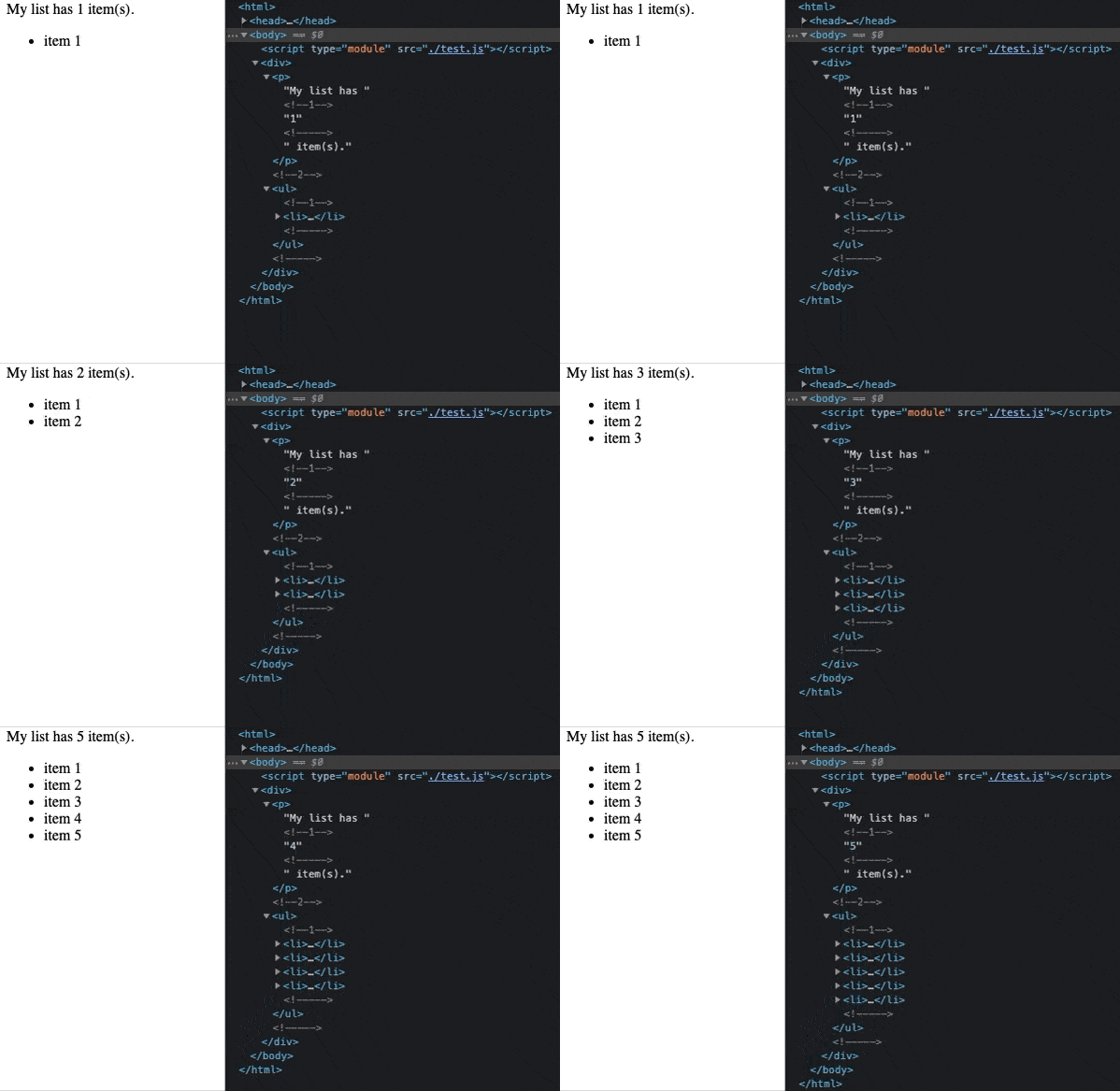 ```javascript
// import { html, render } from "https://cdn.jsdelivr.net/gh/elementumjs/template/dist/template.esm.js";
import { html, render } from '@elementumjs/template';
// Create the templates
const listTemplate = (list) => html`
```javascript
// import { html, render } from "https://cdn.jsdelivr.net/gh/elementumjs/template/dist/template.esm.js";
import { html, render } from '@elementumjs/template';
// Create the templates
const listTemplate = (list) => html`My list has ${ list.length } item(s).
${ listTemplate(list) } ### Installation
#### Import from CDN as ES Module
Import from [jsDelivr CDN](https://www.jsdelivr.com/):
```javascript
import { html, render } from "https://cdn.jsdelivr.net/gh/elementumjs/template/dist/template.esm.js";
```
#### Or install the package locally
##### Download the package
Install via `npm`:
```sh
npm install @elementumjs/template
```
##### Import as ES Module
[ES Module](http://exploringjs.com/es6/ch_modules.html) builds are intended for use with modern bundlers like [webpack 2](https://webpack.js.org) or [rollup](http://rollupjs.org/). Use it with ES6 JavaScript `import`:
```javascript
import { html, render } from '@elementumjs/template';
```
#### Other import methods
Checkout other import methods in [`dist/README.md`](./dist/README.md).
[0]: assets/header.png
[1]: https://cdn.jsdelivr.net/gh/elementumjs/template/dist/template.umd.js
[2]: https://www.npmjs.com/package/@elementumjs/template
[3]: https://github.com/elementumjs/template/actions?query=workflow%3Aproduction
[4]: https://github.com/elementumjs/template/actions?query=workflow%3Adevelop
[5]: docs/globals.md
[6]: LICENSE
[7]: #how-to-use-it
[8]: #creating-a-basic-template-html-function
[9]: #nested-templates
[10]: #rendering-into-a-container
[11]: #full-example
[12]: #installation
[13]: #import-from-cdn-as-es.module
[14]: #or-install-the-package-locally
[15]: #other-import-methods
---
_Source: https://npm.io/package/@elementumjs/template · Machine-readable twin of the npm.io package page. Health data is recomputed on every publish._
### Installation
#### Import from CDN as ES Module
Import from [jsDelivr CDN](https://www.jsdelivr.com/):
```javascript
import { html, render } from "https://cdn.jsdelivr.net/gh/elementumjs/template/dist/template.esm.js";
```
#### Or install the package locally
##### Download the package
Install via `npm`:
```sh
npm install @elementumjs/template
```
##### Import as ES Module
[ES Module](http://exploringjs.com/es6/ch_modules.html) builds are intended for use with modern bundlers like [webpack 2](https://webpack.js.org) or [rollup](http://rollupjs.org/). Use it with ES6 JavaScript `import`:
```javascript
import { html, render } from '@elementumjs/template';
```
#### Other import methods
Checkout other import methods in [`dist/README.md`](./dist/README.md).
[0]: assets/header.png
[1]: https://cdn.jsdelivr.net/gh/elementumjs/template/dist/template.umd.js
[2]: https://www.npmjs.com/package/@elementumjs/template
[3]: https://github.com/elementumjs/template/actions?query=workflow%3Aproduction
[4]: https://github.com/elementumjs/template/actions?query=workflow%3Adevelop
[5]: docs/globals.md
[6]: LICENSE
[7]: #how-to-use-it
[8]: #creating-a-basic-template-html-function
[9]: #nested-templates
[10]: #rendering-into-a-container
[11]: #full-example
[12]: #installation
[13]: #import-from-cdn-as-es.module
[14]: #or-install-the-package-locally
[15]: #other-import-methods
---
_Source: https://npm.io/package/@elementumjs/template · Machine-readable twin of the npm.io package page. Health data is recomputed on every publish._