# @evanx/reo
> Redis-based content publisher
Latest version **0.1.0** (published 2017-02-17) · ISC license · 0 weekly downloads
## Install
```sh
npm install @evanx/reo
pnpm add @evanx/reo
yarn add @evanx/reo
bun add @evanx/reo
```
## Health
**Score 15/100 (F)** — status: abandoned.
Positive: no vulnerabilities.
Warnings: low downloads; no types; no esm support; pre 1.0.
Negative: abandoned; low maintenance score.
## Facts
| | |
|---|---|
| Version | 0.1.0 |
| Published | 2017-02-17 |
| First published | 2017-02-17 |
| Weekly downloads | 0 |
| License | ISC |
| TypeScript types | none |
| Module format | CommonJS |
| Dependencies | 8 |
| Known vulnerabilities | 0 (+2 in 2 direct dependencies) |
| Install scripts | no |
| GitHub stars | 0 |
| Author | Evan Summers |
| Maintainers | evanx |
## Links
- npm: https://www.npmjs.com/package/@evanx/reo
- Repository: https://github.com/evanx/reo
- Homepage: https://github.com/evanx/reo#readme
- Issues: https://github.com/evanx/reo/issues
- npm.io page: https://npm.io/package/@evanx/reo
## Dependencies (8)
- [redis](https://npm.io/package/redis.md) ^2.6.4
- [lodash](https://npm.io/package/lodash.md) ^4.17.4
- [bluebird](https://npm.io/package/bluebird.md) ^3.4.6
- [cli-color](https://npm.io/package/cli-color.md) ^1.1.0
- [node-fetch](https://npm.io/package/node-fetch.md) ^1.6.3
- [fs-blob-store](https://npm.io/package/fs-blob-store.md) ^5.2.1
- [redis-app-rpf](https://npm.io/package/redis-app-rpf.md) ^0.1.4
- [multi-exec-async](https://npm.io/package/multi-exec-async.md) ^0.2.0
## Recent versions
- 0.1.0 (latest) — 2017-02-17
## README
# reo
This service archives JSON documents from Redis to disk-based BLOB storage.
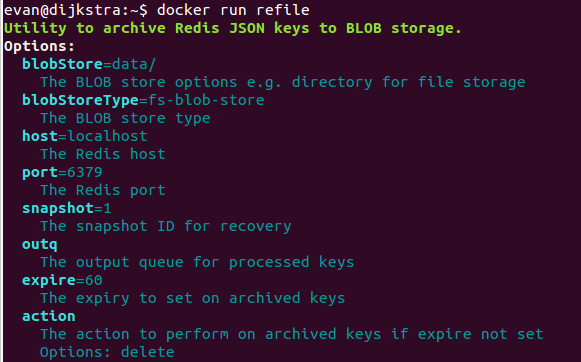 ## Use case
The intended use case is for publishing cacheable data to the web. Structured data is stored in Redis for simplicity and in-memory speed. However, to reduce RAM requirements, large collections of JSON documents are archived to disk-based storage. Those documents are typically retrieved via HTTP e.g. using Nginx.
## Config
See `lib/config.js`
```javascript
module.exports = {
description: 'Utility to archive Redis JSON keys to BLOB storage.',
required: {
blobStore: {
description: 'the BLOB store options e.g. directory for file storage',
default: 'data/'
},
blobStoreType: {
description: 'the BLOB store type',
default: 'fs-blob-store'
},
host: {
description: 'the Redis host',
default: 'localhost'
},
port: {
description: 'the Redis port',
default: 6379
},
snapshotId: {
description: 'the snapshot ID for recovery',
default: 1
},
outq: {
description: 'the output queue for archived keys',
required: false
},
expire: {
description: 'the expiry to set on archived keys',
unit: 'seconds',
example: 60,
required: false
},
}
}
```
Note that if `outq` is set, then the processed key is pushed to that queue. Further processing from that queue takes responsibility to expire or delete the archived keys.
Otherwise if `expire` is set then once the key has been extracted to BLOB storage, it is set to expire.
Otherwise if neither `outq` or `expire` are set, it is deleted.
## Usage
The application sets some JSON data in Redis:
```sh
redis-cli set user:evanxsummers '{"twitter": "@evanxsummers"}'
```
The application pushes the updated key to `reo:key:q`
```sh
redis-cli lpush reo:key:q user:evanxsummers
```
This utility will read the JSON content from Redis and write it to BLOB storage.
The intention is that the documents are retrieved via HTTP sourced from that BLOB storage, rather than from Redis.
A document that has been deleted can similarly be pushed to this queue:
```sh
redis-cli del user:evanxsummers
redis-cli lpush reo:key:q user:evanxsummers
```
where in this case, reo will remove the JSON file from the BLOB store.
## Files
In the case of the key `user:evanxsummers` the following files are written to storage:
```
data/key/SY4o/ZdUV/user-evanxsummers.json.gz
data/sha/gUiW/KhI8/gUiWKhI8O2Kai3jXAFKhTXFWNpQ.user-evanxsummers.json.gz
data/time/2017-02-14/01h12m20/998/user-evanxsummers.json.gz
```
where the file in `data/key/` is the current version of the document to be published via HTTP.
### Key files
Note that the path is split up with `/` so that when using a simple file system as BLOB storage,
e.g served using Nginx, there will be a limited number of files per subdirectory, for practical reasons.
In the case of `data/key/` the path is prefixed by part of the SHA of the key itself:
```
$ echo -n 'user:evanxsummers' | openssl sha1 -binary | base64 | cut -b1-8
SY4oZdUV
```
Hence the path prefix `/data/key/SY4o/ZdUV/` for that key.
Also note that any alphanumeric characters including colons are replaced with a dash, hence the file name `user-evanxsummers.json.gz` for the key `user:evanxsummers`
### Immutable historical files
Additionally two historical versions are stored:
- a copy named according to the SHA of the contents i.e. content addressable
- a copy named by the timestamp when the content is archived
These two files are intended to be immutable facts, i.e. not overwritten by subsequent updates. The SHA files are intended for versioning, and the timestamped copies are useful for debugging.
```sh
$ zcat data/time/2017-02-14/01h12m20/998/user-evanxsummers.json.gz | jq
{
"twitter": "@evanxsummers"
}
```
Incidently, the compressed content can be streamed as is in `gzip` by the HTTP server, assuming the client accepts `gzip` encoding.
## Snapshots
The SHA and timestamp for each archival is recorded in Redis against the current snapshot ID. That data in Redis, together with the above files, should be sufficient to enable another service to create a snapshot, e.g. for recovery.
Another service might serve a specific snapshot from the BLOB store, by looking up the corresponding SHA (version) from Redis for that document and snapshot. Such a service can be useful for a rollback/forward strategy.
The following related services are planned:
- delete an older snapshot, including related SHA files
- extract a specific snapshot to BLOB storage
- redirecting web server for a specific snapshot i.e. to the appropriate SHA file
- proxying web server for a specific snapshot
## Docker
You can build as follows:
```
docker build -t reo https://github.com/evanx/reo.git
```
See `test/demo.sh` https://github.com/evanx/reo/blob/master/test/demo.sh
- isolated network `reo-network`
- isolated Redis instance named `reo-redis`
- two `spiped` containers to test encrypt/decrypt tunnels
- the prebuilt image `evanxsummers/reo`
- host volume `$HOME/volumes/reo/data`
## Implementation
See `lib/index.js`
We monitor the `reo:key:q` input queue.
```javascript
const blobStore = require(config.blobStoreType)(config.blobStore);
while (true) {
const key = await client.brpoplpushAsync('reo:key:q', 'reo:busy:key:q', 1);
...
}
```
We record the following in Redis:
```javascript
multi.hset(`reo:modtime:h`, key, timestamp);
multi.hset(`reo:sha:h`, key, sha);
multi.hset(`reo:${config.snapshotId}:sha:h`, key, sha);
multi.zadd(`reo:${config.snapshotId}:key:${key}:z`, timestamp, sha);
```
where the `sha` of the `key` is stored for the snapshot, and also the historical SHA's for a specific key are recorded in a sorted set by the `timestamp`
If the specified Redis key does not exist, we can assume it was deleted. In this case we record the following in Redis:
```javascript
multi.hset(`reo:modtime:h`, key, timestamp);
multi.hdel(`reo:sha:h`, key);
multi.hdel(`reo:${config.snapshotId}:sha:h`, key);
multi.zadd(`reo:${config.snapshotId}:key:${key}:z`, timestamp, timestamp);
```
where we delete current entries for this key and add the `timetamped` to a sorted set, for point-of-time recovery.
## Use case
The intended use case is for publishing cacheable data to the web. Structured data is stored in Redis for simplicity and in-memory speed. However, to reduce RAM requirements, large collections of JSON documents are archived to disk-based storage. Those documents are typically retrieved via HTTP e.g. using Nginx.
## Config
See `lib/config.js`
```javascript
module.exports = {
description: 'Utility to archive Redis JSON keys to BLOB storage.',
required: {
blobStore: {
description: 'the BLOB store options e.g. directory for file storage',
default: 'data/'
},
blobStoreType: {
description: 'the BLOB store type',
default: 'fs-blob-store'
},
host: {
description: 'the Redis host',
default: 'localhost'
},
port: {
description: 'the Redis port',
default: 6379
},
snapshotId: {
description: 'the snapshot ID for recovery',
default: 1
},
outq: {
description: 'the output queue for archived keys',
required: false
},
expire: {
description: 'the expiry to set on archived keys',
unit: 'seconds',
example: 60,
required: false
},
}
}
```
Note that if `outq` is set, then the processed key is pushed to that queue. Further processing from that queue takes responsibility to expire or delete the archived keys.
Otherwise if `expire` is set then once the key has been extracted to BLOB storage, it is set to expire.
Otherwise if neither `outq` or `expire` are set, it is deleted.
## Usage
The application sets some JSON data in Redis:
```sh
redis-cli set user:evanxsummers '{"twitter": "@evanxsummers"}'
```
The application pushes the updated key to `reo:key:q`
```sh
redis-cli lpush reo:key:q user:evanxsummers
```
This utility will read the JSON content from Redis and write it to BLOB storage.
The intention is that the documents are retrieved via HTTP sourced from that BLOB storage, rather than from Redis.
A document that has been deleted can similarly be pushed to this queue:
```sh
redis-cli del user:evanxsummers
redis-cli lpush reo:key:q user:evanxsummers
```
where in this case, reo will remove the JSON file from the BLOB store.
## Files
In the case of the key `user:evanxsummers` the following files are written to storage:
```
data/key/SY4o/ZdUV/user-evanxsummers.json.gz
data/sha/gUiW/KhI8/gUiWKhI8O2Kai3jXAFKhTXFWNpQ.user-evanxsummers.json.gz
data/time/2017-02-14/01h12m20/998/user-evanxsummers.json.gz
```
where the file in `data/key/` is the current version of the document to be published via HTTP.
### Key files
Note that the path is split up with `/` so that when using a simple file system as BLOB storage,
e.g served using Nginx, there will be a limited number of files per subdirectory, for practical reasons.
In the case of `data/key/` the path is prefixed by part of the SHA of the key itself:
```
$ echo -n 'user:evanxsummers' | openssl sha1 -binary | base64 | cut -b1-8
SY4oZdUV
```
Hence the path prefix `/data/key/SY4o/ZdUV/` for that key.
Also note that any alphanumeric characters including colons are replaced with a dash, hence the file name `user-evanxsummers.json.gz` for the key `user:evanxsummers`
### Immutable historical files
Additionally two historical versions are stored:
- a copy named according to the SHA of the contents i.e. content addressable
- a copy named by the timestamp when the content is archived
These two files are intended to be immutable facts, i.e. not overwritten by subsequent updates. The SHA files are intended for versioning, and the timestamped copies are useful for debugging.
```sh
$ zcat data/time/2017-02-14/01h12m20/998/user-evanxsummers.json.gz | jq
{
"twitter": "@evanxsummers"
}
```
Incidently, the compressed content can be streamed as is in `gzip` by the HTTP server, assuming the client accepts `gzip` encoding.
## Snapshots
The SHA and timestamp for each archival is recorded in Redis against the current snapshot ID. That data in Redis, together with the above files, should be sufficient to enable another service to create a snapshot, e.g. for recovery.
Another service might serve a specific snapshot from the BLOB store, by looking up the corresponding SHA (version) from Redis for that document and snapshot. Such a service can be useful for a rollback/forward strategy.
The following related services are planned:
- delete an older snapshot, including related SHA files
- extract a specific snapshot to BLOB storage
- redirecting web server for a specific snapshot i.e. to the appropriate SHA file
- proxying web server for a specific snapshot
## Docker
You can build as follows:
```
docker build -t reo https://github.com/evanx/reo.git
```
See `test/demo.sh` https://github.com/evanx/reo/blob/master/test/demo.sh
- isolated network `reo-network`
- isolated Redis instance named `reo-redis`
- two `spiped` containers to test encrypt/decrypt tunnels
- the prebuilt image `evanxsummers/reo`
- host volume `$HOME/volumes/reo/data`
## Implementation
See `lib/index.js`
We monitor the `reo:key:q` input queue.
```javascript
const blobStore = require(config.blobStoreType)(config.blobStore);
while (true) {
const key = await client.brpoplpushAsync('reo:key:q', 'reo:busy:key:q', 1);
...
}
```
We record the following in Redis:
```javascript
multi.hset(`reo:modtime:h`, key, timestamp);
multi.hset(`reo:sha:h`, key, sha);
multi.hset(`reo:${config.snapshotId}:sha:h`, key, sha);
multi.zadd(`reo:${config.snapshotId}:key:${key}:z`, timestamp, sha);
```
where the `sha` of the `key` is stored for the snapshot, and also the historical SHA's for a specific key are recorded in a sorted set by the `timestamp`
If the specified Redis key does not exist, we can assume it was deleted. In this case we record the following in Redis:
```javascript
multi.hset(`reo:modtime:h`, key, timestamp);
multi.hdel(`reo:sha:h`, key);
multi.hdel(`reo:${config.snapshotId}:sha:h`, key);
multi.zadd(`reo:${config.snapshotId}:key:${key}:z`, timestamp, timestamp);
```
where we delete current entries for this key and add the `timetamped` to a sorted set, for point-of-time recovery.
https://twitter.com/@evanxsummers
---
_Source: https://npm.io/package/@evanx/reo · Machine-readable twin of the npm.io package page. Health data is recomputed on every publish._