# @ice/form
> ICE 表单组件
Latest version **0.1.7** (published 2019-07-25) · MIT license · 0 weekly downloads
## Install
```sh
npm install @ice/form
pnpm add @ice/form
yarn add @ice/form
bun add @ice/form
```
## Health
**Score 15/100 (F)** — status: abandoned.
Positive: no vulnerabilities.
Warnings: low downloads; no types; no esm support; pre 1.0.
Negative: abandoned; low maintenance score.
## Facts
| | |
|---|---|
| Version | 0.1.7 |
| Published | 2019-07-25 |
| First published | 2019-05-29 |
| Weekly downloads | 0 |
| License | MIT |
| TypeScript types | none |
| Module format | CommonJS |
| Dependencies | 4 |
| Unpacked size | 3.6 MB |
| Known vulnerabilities | 0 |
| Install scripts | no |
| Maintainers | alvinhui, boiawang, clarkxia, jasonintju, lip966, oraaange, sobear, temper357, yundong |
| Keywords | ice, react, component |
## Links
- npm: https://www.npmjs.com/package/@ice/form
- Homepage: https://unpkg.com/@ice/form@0.1.7/build/index.html
- npm.io page: https://npm.io/package/@ice/form
## Dependencies (4)
- [classnames](https://npm.io/package/classnames.md) ^2.2.6
- [prop-types](https://npm.io/package/prop-types.md) ^15.5.8
- [lodash.isequal](https://npm.io/package/lodash.isequal.md) ^4.5.0
- [async-validator](https://npm.io/package/async-validator.md) ^1.11.2
## Alternatives
- [mobx-react](https://npm.io/package/mobx-react.md) — 2.8M weekly downloads
- [rc-tree](https://npm.io/package/rc-tree.md) — 2.6M weekly downloads
- [@react-oauth/google](https://npm.io/package/@react-oauth/google.md) — 1.3M weekly downloads
- [@wagmi/connectors](https://npm.io/package/@wagmi/connectors.md) — 877.0K weekly downloads
- [vee-validate](https://npm.io/package/vee-validate.md) — 836.4K weekly downloads
## Recent versions
- 0.1.7 (latest) — 2019-07-25
- 0.1.5-0 (beta) — 2019-07-02
- 0.1.6 — 2019-07-25
- 0.1.5 — 2019-07-02
- 0.1.4 — 2019-06-27
- 0.1.4-0 — 2019-06-27
- 0.1.3 — 2019-06-26
- 0.1.3-0 — 2019-06-26
- 0.1.2 — 2019-06-24
- 0.1.2-2 — 2019-06-21
- 0.1.2-1 — 2019-06-21
- 0.1.2-0 — 2019-06-21
- 0.1.1 — 2019-06-14
- 0.1.0 — 2019-06-11
- 0.1.0-8 — 2019-06-06
- … 8 more at https://npm.io/package/@ice/form/versions
## README
---
title: IceForm
category: Components
chinese: 表单组件
---
表单组件
## 参数(Props)
| 参数名 | 说明 | 必填 | 类型 | 默认值 | 备注 |
| ------ | ---- | ---- | ---- | ------ | ---- |
| initialValues | 表单初始值 | N | object | {} | - |
| onSubmit | submit函数 | Y | function | - | - |
| onChange | 表单变化回调 | N | function | - | function(values: object, item: object) => void
参数:
values: {object} 表单数据
item: {object} 详细
item.name: {string} 变化的组件名
item.value: {string} 变化的数据 |
| rules | 校验规则 | N | object | {} | - |
| effects | 联动规则 | N | array | [] | - |
| layout | 表单布局 | N | object | | - |
| renderField | 自定义 Field 布局 | N | function | - | function({label, component, error}) => dom
参数:
label: {string/element} Field 的 label
component: {string/function} 待渲染的控件
error: {string/element} Field 错误提示信息 |
其他属性比如 `style`、`className` 等均会传递到 `form` 标签上。
`layout` 是个对象,包含 4 个属性:
```js
{
labelAlign: 'left', // label 的位置,'left'、'top',默认 'left'
labelTextAlign: 'right', // label 文字对齐方式,'left'、'right',默认 'right'
labelCol: 1, // label 占的栅格宽度,共 12 等分,默认 2
wrapperCol: 3, // 控件占的栅格宽度,共 12 等分,默认 6
}
```
`rules` 是一个 Object,`key` 是 `` 的 `name` 属性值,`value` 是个数组,数组里面的每一项是一个校验规则,参考 [async-validator](https://github.com/yiminghe/async-validator)。
```js
```
`effects` 是个数组,写法如下:
```js
```
监听该 `field` 的 `onChange` 事件,然后设置其他表单项的数据,从而达到联动效果。`handler` 的参数是 `formCore` 对象,该对象暴露一些 api 可以设置 value、error、show/hide 等。
## Field 组件
| 参数名 | 说明 | 必填 | 类型 | 默认值 | 备注 |
| ------ | ---- | ---- | ---- | ------ | ---- |
| label | 表单项的 label | N | string/element | - | - |
| name | 表单项的 name | Y | string | - | - |
| component | 表单类型,原生 html 标签或者三方组件 | N | string/function | - | 'input' 'textarea' Input Radio |
| value | 表单项的值 | N | - | '' | - |
| rules | 校验规则 | N | object or array | - | - |
| effects | 联动规则 | N | object | - | - |
| visible | 显示隐藏当前 Field | N | boolean | true | true/false |
| setValueFormatter | 格式化控件渲染值 | N | function | | function(savedValue) => renderValue |
| getValueFormatter | 格式化控件提交值 | N | function | | function(renderValue) => savedValue |
| layout | 设置当前 Field 的布局 | N | object | 同 Form layout | 当前 Field 的 layout 会覆盖 Form 的 layout |
| tips | 提示信息 | N | string | | |
| valueName | 控件值的名称,比如,radio 的 valueName 为 'checked',value 为 true/false | N | string | | 比如 Fusion 的 Switch 组件 |
| errorRender | 自定义 error 渲染 | N | function(error) {} | | |
| onChange | 自定义 onChange 函数 | N | function() {} | | 默认情况下已处理表单的 onChange(eventOrValue) 事件,如果接入的三方控件 onChange 的第一个参数不是 event 或者 value,可以主动设置对应的值。比如,接入控件的 onChange(xxx, value) 第二个参数才是 value,则可以手动设置 `formCore.setValue(fieldname, value)` |
`style`、`className` 属性会传递到 Field 最外层 dom 上,其他属性会传递到 `component` 上,如果没有 `component` 但有 `children`,则属性传递到 `children` 上。
`Field` 的 `rules` 和 `effects` 不需要 `name` 作为 key 了,写法如下:
```js
```
## FieldArray 组件
FieldArray 表示渲染数组类型的数据,属性同 Field:
```js
```
## `formCore` API
`formCore` 会暴露一些 API,使用这些 API 可以获取、设置表单的数据、状态等。
- `getFieldValue(name)`:获取某一 `Field` 的值
- `setFieldValue(name, value)`:设置某一 `Field` 的值
- `getValues()`:获取表单的 values
- `setValues(values, runEffects)`:设置表单的 values,runEffects 为 Boolean,表示设置 values 之后是否需要执行表单的 effects,默认 false
- `getFieldError(name)`:获取某一 `Field` 的 error 信息
- `setFieldError(name, errMsg)`:设置某一 `Field` 的 error 信息
- `getErrors()`:获取所有 `Field` 的 error 信息
- `setErrors(errors)`:设置某些 `Field` 的 error 信息
- `getFieldProps(name)`:获取某一 `Field` 的属性值
- `setFieldProps(name, prop)`:设置某一 `Field` 的属性值
- `submit()`:提交表单
- `reset(initialValues)`:重置表单值为表单初始化时的默认值,如果表单初始化时没有默认值,则清空表单;如果传了参数 initialValues,则 initialValues 会成为新的表单默认值
也可以通过属性的方式获取到一些数据:
- `formCore.values`:获取表单的所有值
- `formCore.errors`:获取表单校验的错误信息
- `formCore.pristine`:表单当前的 `values` 是否与 `initialValues` 相等
## 延伸阅读
### 开发 @ice/form 表单背景
对于前端,表单开发是一件特别繁琐的事情,尤其在中后台业务中,大家常常会被各种五花八门的表单折磨,又不得不面对现实地去寻找最佳方案,但最终都会发现过度设计的表单组件性能不好,使用简单的表单组件还是需要写大量的业务代码。经过长期的积累以及在社区的调研,我们开发了一个表单组件帮助大家快速地创建一个高性能表单。
### 组件特性
- 内部几乎无依赖,体积小
- 内部管理表单状态,提升开发效率
- 使用观察者模式提升表单性能
- 强大的校验以及声明式联动
- 可结合第三方组件库(Next、Antd)
- 可自定义 Field
### 架构方案
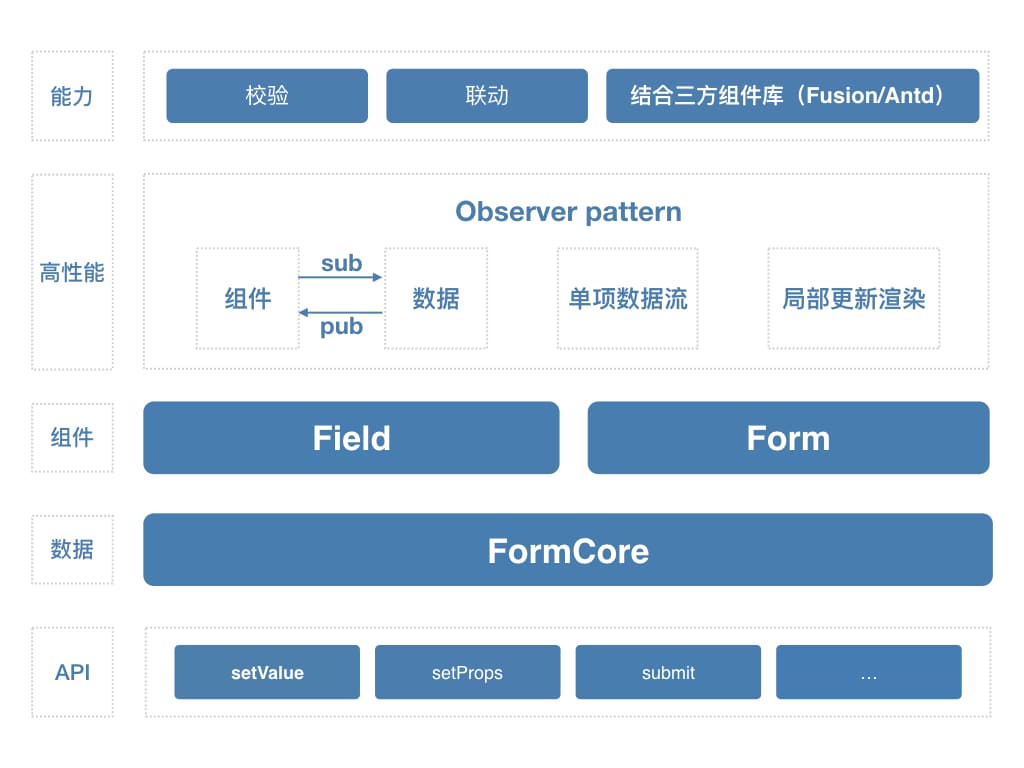
如上图所示,整个表单的数据都放在 FormCore 这一层,同时 FormCore 会暴露一些 API,以便获取、设置、处理数据。Form、Field 组件通过 Sub/Pub 模式与 FormCore 通信,FormCore 通知组件何时重新渲染。表单提供了校验、联动以及结合 Fusion、Antd 三方组件库使用等能力。
### 竞品对比
**[NoForm](https://github.com/alibaba/nopage)**
NoForm 是一个表单操作(比如说校验、提交、联动等)抽象到上层,下层又包装了 Next、Antd 等组件,UI 上的能力较强,也封装了一些常用的布局,但功能能力较弱,用户实现复杂逻辑还是需要写很多代码。
**[Formik](https://github.com/jaredpalmer/formik)**、**[react-final-form](https://github.com/final-form/react-final-form)**
这两个组件有一些共性,都是通过 render props 的方式实现了复杂的状态管理,在性能上也非常地卓越,在社区得到了大量的好评,但在联动上的能力较弱(目前只能更新 value),而且如果要集成 Next 或者 Antd 需要将库的表单组件都封装成 Field,成本较高。
### 相关链接
- [formik](https://github.com/jaredpalmer/formik)
- [react-final-form](https://github.com/final-form/react-final-form)
- [noform](https://alibaba.github.io/nopage/#/nopage/noform/brief-intro)
---
_Source: https://npm.io/package/@ice/form · Machine-readable twin of the npm.io package page. Health data is recomputed on every publish._