# @jesobreira/react-avatar-edit
> ReactJS component to upload, crop, and preview avatars
Latest version **0.7.2** (published 2021-12-17) · MIT license · 0 weekly downloads
## Install
```sh
npm install @jesobreira/react-avatar-edit
pnpm add @jesobreira/react-avatar-edit
yarn add @jesobreira/react-avatar-edit
bun add @jesobreira/react-avatar-edit
```
## Health
**Score 20/100 (F)** — status: abandoned.
Positive: has types; no vulnerabilities.
Warnings: low downloads; no esm support; pre 1.0.
Negative: abandoned; low maintenance score.
## Facts
| | |
|---|---|
| Version | 0.7.2 |
| Published | 2021-12-17 |
| First published | 2019-02-28 |
| Weekly downloads | 0 |
| License | MIT |
| TypeScript types | bundled |
| Module format | CommonJS |
| Dependencies | 4 |
| Unpacked size | 210.4 KB |
| Known vulnerabilities | 0 |
| Install scripts | no |
| GitHub stars | 571 |
| Author | Kirill Novikov |
| Maintainers | jesobreira |
| Keywords | avatar, react, canvas |
## Links
- npm: https://www.npmjs.com/package/@jesobreira/react-avatar-edit
- Repository: https://github.com/kirill3333/react-avatar
- Homepage: https://github.com/kirill3333/react-avatar#readme
- Issues: https://github.com/kirill3333/react-avatar/issues
- npm.io page: https://npm.io/package/@jesobreira/react-avatar-edit
## Dependencies (4)
- [konva](https://npm.io/package/konva.md) 2.5.1
- [piexifjs](https://npm.io/package/piexifjs.md) 1.0.4
- [webpack-cli](https://npm.io/package/webpack-cli.md) 2.1.4
- [react-svg-inline](https://npm.io/package/react-svg-inline.md) ^2.1.1
## Alternatives
- [mobx-react](https://npm.io/package/mobx-react.md) — 2.8M weekly downloads
- [rc-tree](https://npm.io/package/rc-tree.md) — 2.6M weekly downloads
- [@react-oauth/google](https://npm.io/package/@react-oauth/google.md) — 1.3M weekly downloads
- [@wagmi/connectors](https://npm.io/package/@wagmi/connectors.md) — 877.0K weekly downloads
- [vee-validate](https://npm.io/package/vee-validate.md) — 836.4K weekly downloads
## Recent versions
- 0.7.2 (latest) — 2021-12-17
- 0.7.1 — 2019-02-28
## README
# react-avatar
👤 Load, crop and preview avatar with ReactJS component
[](https://badge.fury.io/js/react-avatar-edit)
## Demo
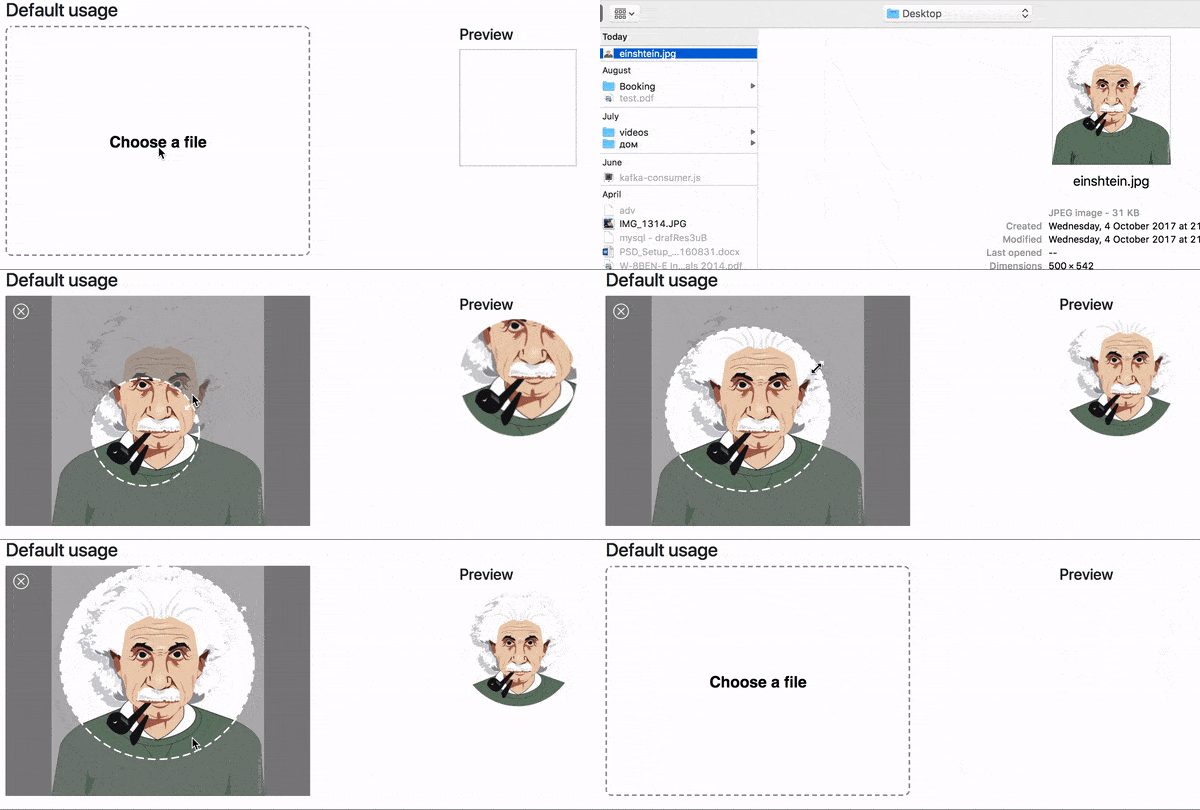
## [Demo website](https://kirill3333.github.io/react-avatar/)
## Install
```npm i react-avatar-edit```
## Usage
```javascript
import React from 'react'
import ReactDOM from 'react-dom'
import Avatar from '@jesobreira/react-avatar-edit'
class App extends React.Component {
constructor(props) {
super(props)
const src = './example/einshtein.jpg'
this.state = {
preview: null,
src
}
this.onCrop = this.onCrop.bind(this)
this.onClose = this.onClose.bind(this)
this.onBeforeFileLoad = this.onBeforeFileLoad.bind(this)
}
onClose(status) {
// status = true for OK button, false for Cancel button
this.setState({preview: null})
}
onCrop(preview) {
this.setState({preview})
}
onBeforeFileLoad(elem) {
if(elem.target.files[0].size > 71680){
alert("File is too big!");
elem.target.value = "";
};
}
render () {
return (
)
}
}
ReactDOM.render( , document.getElementById('root'))
```
## Component properties
| Prop | Type | Description
| ---------------------- | ---------------- | ---------------
| img | Image | The Image object to display
| src | String/Base64 | The url to base64 string to load (use urls from your domain to prevent security errors)
| width | Number | The width of the editor
| height | Number | The height of the editor (image will fit to this height if neither imageHeight, nor imageWidth is set)
| imageWidth | Number | The desired width of the image, can not be used together with imageHeight
| imageHeight | Number | The desired height of the image, can not be used together with imageWidth
| cropRadius | Number | The crop area radius in px (default: calculated as min image with/height / 3)
| cropColor | String | The crop border color (default: white)
| lineWidth | Number | The crop border width (default: 4)
| minCropRadius | Number | The min crop area radius in px (default: 30)
| backgroundColor | Sting | The color of the image background (default: white)
| closeIconColor | String | The close button color (default: white)
| shadingColor | String | The shading color (default: grey)
| shadingOpacity | Number | The shading area opacity (default: 0.6)
| mimeTypes | String | The mime types used to filter loaded files (default: image/jpeg,image/png)
| label | String | Label text (default: Choose a file)
| labelStyle | Object | The style object for preview label (use camel case for css properties fore example: fontSize)
| borderStyle | Object | The style for object border preview (use camel case for css properties fore example: fontSize)
| onImageLoad(image) | Function | Invoked when image based on src prop finish loading
| onCrop(image) | Function | Invoked when user drag&drop event stop and return croped image in base64 sting
| onBeforeFileLoad(file) | Function | Invoked when user before upload file with internal file loader (etc. check file size)
| onFileLoad(file) | Function | Invoked when user upload file with internal file loader
| onClose(status) | Function | Invoked when user clicks on close editor button
## Contributing
* To start developer server please use ```npm run start```
* To build production bundle use ```npm run build```
---
_Source: https://npm.io/package/@jesobreira/react-avatar-edit · Machine-readable twin of the npm.io package page. Health data is recomputed on every publish._