# @kuy472013/vue-notification

> Package to display notifications in vue.

Latest version **1.0.7** (published 2022-03-14) · MIT license · 0 weekly downloads

## Install

```sh
npm install @kuy472013/vue-notification
pnpm add @kuy472013/vue-notification
yarn add @kuy472013/vue-notification
bun add @kuy472013/vue-notification
```

## Health

**Score 15/100 (F)** — status: abandoned.

Positive: no vulnerabilities.

Warnings: low downloads; no types; no esm support.

Negative: abandoned; low maintenance score.

## Facts

| | |
|---|---|
| Version | 1.0.7 |
| Published | 2022-03-14 |
| First published | 2022-03-05 |
| Weekly downloads | 0 |
| License | MIT |
| TypeScript types | none |
| Module format | CommonJS |
| Dependencies | 0 |
| Unpacked size | 25.6 KB |
| Known vulnerabilities | 0 |
| Install scripts | no |
| GitHub stars | 0 |
| Author | kuy |
| Maintainers | kuy472013 |
| Keywords | vue, vue3, notification, notify, vue-notification, toast, message |

## Links

- npm: https://www.npmjs.com/package/@kuy472013/vue-notification
- Repository: https://github.com/kuy00/vue-notification
- Homepage: https://github.com/kuy00/vue-notification#readme
- Issues: https://github.com/kuy00/vue-notification
- npm.io page: https://npm.io/package/@kuy472013/vue-notification

## Alternatives

- [update-check](https://npm.io/package/update-check.md) — 4.0M weekly downloads
- [react-native-onesignal](https://npm.io/package/react-native-onesignal.md) — 134.5K weekly downloads
- [react-redux-toastr](https://npm.io/package/react-redux-toastr.md) — 33.7K weekly downloads
- [@nocobase/plugin-notification-manager](https://npm.io/package/@nocobase/plugin-notification-manager.md) — 2.0K weekly downloads
- [react-simple-toasts](https://npm.io/package/react-simple-toasts.md) — 1.9K weekly downloads

## Recent versions

- 1.0.7 (latest) — 2022-03-14
- 1.0.6 — 2022-03-05
- 1.0.4 — 2022-03-05
- 1.0.3 — 2022-03-05
- 1.0.2 — 2022-03-05
- 1.0.1 — 2022-03-05
- 1.0.0 — 2022-03-05

## README

[![npm version](https://badge.fury.io/js/@kuy472013%2Fvue-notification.svg)](https://badge.fury.io/js/@kuy472013%2Fvue-notification)
[![npm](https://img.shields.io/npm/dm/@kuy472013/vue-notification)](https://www.npmjs.com/package/@kuy472013/vue-notification)

# Vue.js Notification

<p align="center">
  <img src="https://user-images.githubusercontent.com/27402363/156883079-18baaf9a-2cb5-44fb-b16c-735cfcbb3443.gif">
</p>
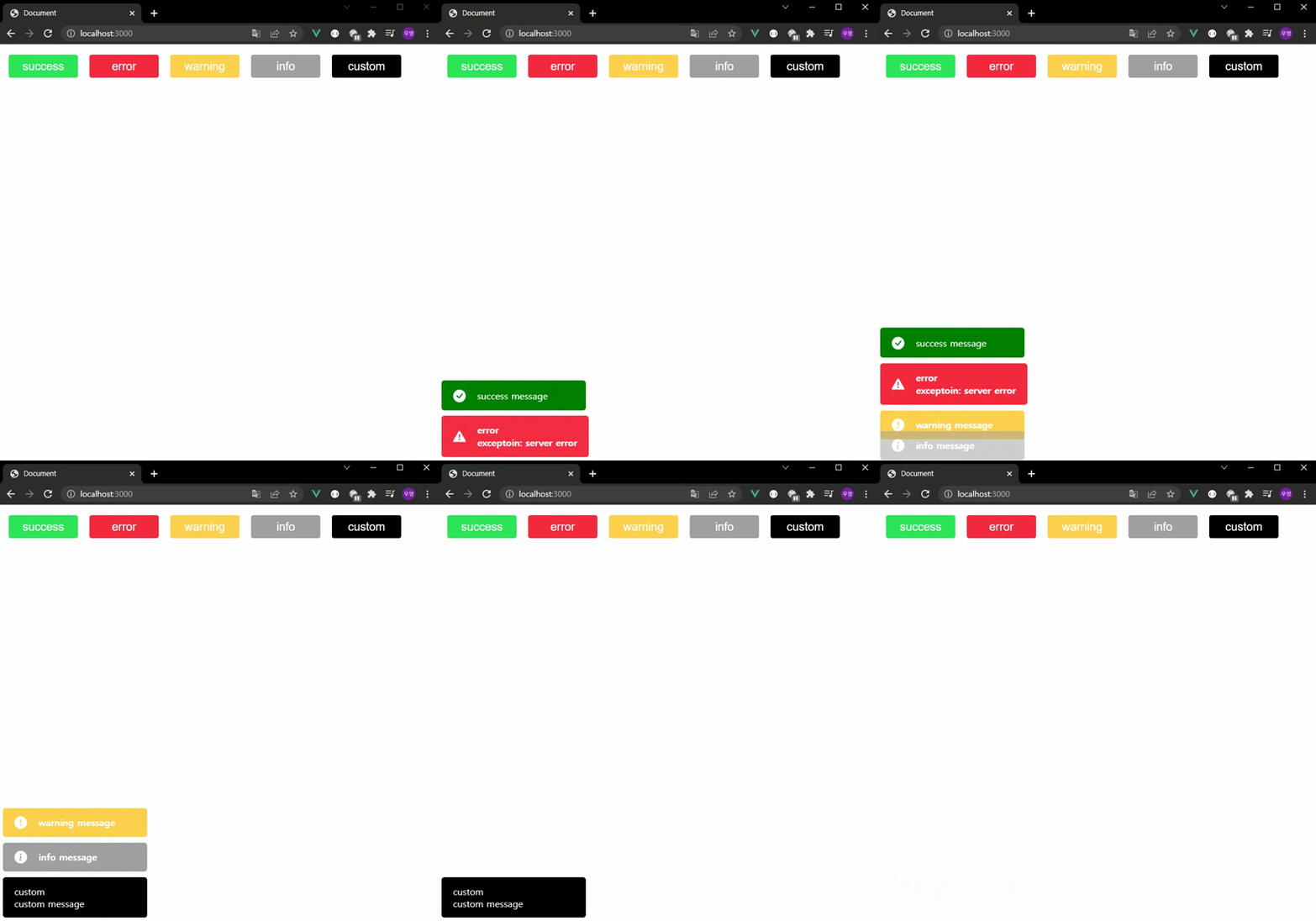
This allows settings that do not require individual settings, such as the size, location, and animation of the notification, to be set through props, and is designed to allow individual notification styles to be specified through API.

## Setup

package install
```bash
npm install --save @kuy472013/vue-notification
```

`main.js`
```javascript
import { createApp } from 'vue'
import App from './App.vue'
import Notifications from '@kuy472013/vue-notification'

const app = createApp(App)
app.use(Notifications)
```

`App.vue`
```vue
<Notification />
```

## Usage

You can show notifications by calling the registered view plugin.
```vue
<template>
  <div id='app'>
    <button @click='test()'>test</button>
  </div>
</template>

<script>
export default {
  name: 'App',
  methods: {
    test: function () {
      this.$notification()
    }
  }
}
</script>
```

## Props

Common notification settings can be changed using props.
```vue
<Notification
  position='left-bottom'
  :duration=5000
/>
```
| Name         | Type     | Default         | Description                                                                                                                                                                   |
| ------------ | -------- | --------------- | ----------------------------------------------------------------------------------------------------------------------------------------------------------------------------- |
| width        | Number   | 250             | Option to set the width of the notification element.<br>(must be a numeric, unit: px)                                                                                            |
| height       | Number   | 50              | Option to set the heigth of the notification element.<br>(must be a numeric, unit: px)                                                                                           |
| position     | String   | center-bottom   | Option to specify where the notification element will be shown.<br>Please enter a combination of the values below.<br>X: ['left', 'right', 'center']<br>Y: ['top', 'bottom']  |
| speed        | Number   | 1000            | Option to set the animation duration of the notification element.<br>(unit: ms)                                                                                                  |
| duration     | Number   | 3000            | Option to set how long the notification element stays on the screen.<br>(unit: ms)                                                                                               |

## API

API provided by notification plugin.
```vue
app.$notification({
  type: 'success',
  classes: 'customStyle',
  contents: message,
})
```
| Name         | Type            | Default         | Description                                                                                                                                                                   |
| ------------ | --------------- | --------------- | ----------------------------------------------------------------------------------------------------------------------------------------------------------------------------- |
| type         | String          | info            | You can use the notification plugin to set among the types of notifications provided by default.<br>supported types : success, error, warning, info                           |
| classes      | String          | null            | You can set up a separate class using the notification plugin to specify custom styles.                                                                                       |
| contents     | String          | message         | You can configure the content of the notification using the notification plugin.                                                                                              |
| component    | Vue Component   | null            | By using the notification plugin, you can use a component created separately from the design provided by default.                                                             |

---
_Source: https://npm.io/package/@kuy472013/vue-notification · Machine-readable twin of the npm.io package page. Health data is recomputed on every publish._