# @marp-team/marpit-svg-polyfill

> Polyfill for inline SVG slides rendered by Marpit

Latest version **2.1.0** (published 2023-02-10) · MIT license · 0 weekly downloads

## Install

```sh
npm install @marp-team/marpit-svg-polyfill
pnpm add @marp-team/marpit-svg-polyfill
yarn add @marp-team/marpit-svg-polyfill
bun add @marp-team/marpit-svg-polyfill
```

## Health

**Score 30/100 (F)** — status: abandoned.

Positive: has types; esm support; no vulnerabilities; high quality score.

Warnings: low downloads.

Negative: abandoned; low maintenance score.

## Facts

| | |
|---|---|
| Version | 2.1.0 |
| Published | 2023-02-10 |
| First published | 2018-12-29 |
| Weekly downloads | 0 |
| License | MIT |
| TypeScript types | bundled |
| Module format | ESM + CommonJS |
| Node | >=10 |
| Dependencies | 0 |
| Unpacked size | 19.9 KB |
| Known vulnerabilities | 0 |
| Install scripts | no |
| GitHub stars | 16 |
| Author | Marp team |
| Maintainers | yhatt |

## Links

- npm: https://www.npmjs.com/package/@marp-team/marpit-svg-polyfill
- Repository: https://github.com/marp-team/marpit-svg-polyfill
- Homepage: https://github.com/marp-team/marpit-svg-polyfill#readme
- Issues: https://github.com/marp-team/marpit-svg-polyfill/issues
- npm.io page: https://npm.io/package/@marp-team/marpit-svg-polyfill

## Recent versions

- 2.1.0 (latest) — 2023-02-10
- 2.0.0 — 2022-04-12
- 1.7.1 — 2021-02-07
- 1.7.0 — 2020-08-18
- 1.6.0 — 2020-08-16
- 1.5.0 — 2020-07-16
- 1.4.0 — 2020-07-09
- 1.3.0 — 2020-06-07
- 1.2.1 — 2020-04-18
- 1.2.0 — 2020-01-12
- 1.1.1 — 2019-07-13
- 1.1.0 — 2019-06-20
- 1.0.0 — 2019-06-05
- 0.3.0 — 2019-03-20
- 0.2.0 — 2018-12-31
- … 2 more at https://npm.io/package/@marp-team/marpit-svg-polyfill/versions

## README

# @marp-team/marpit-svg-polyfill

[![CircleCI](https://img.shields.io/circleci/project/github/marp-team/marpit-svg-polyfill/main.svg?style=flat-square&logo=circleci)](https://circleci.com/gh/marp-team/marpit-svg-polyfill/)
[![Codecov](https://img.shields.io/codecov/c/github/marp-team/marpit-svg-polyfill/main.svg?style=flat-square&logo=codecov)](https://codecov.io/gh/marp-team/marpit-svg-polyfill)
[![npm](https://img.shields.io/npm/v/@marp-team/marpit-svg-polyfill.svg?style=flat-square&logo=npm)](https://www.npmjs.com/package/@marp-team/marpit-svg-polyfill)
[![LICENSE](https://img.shields.io/github/license/marp-team/marpit-svg-polyfill.svg?style=flat-square)](./LICENSE)

The polyfill for [the inline SVG slide][inline-svg] rendered by [Marpit].

[marpit]: https://github.com/marp-team/marpit
[inline-svg]: https://marpit.marp.app/inline-svg

### Supported browser

- [WebKit](#webkit) based browser: Safari and iOS browsers (including iOS Chrome, iOS Firefox, iOS Edge, and so on...)

## Usage

```html
<!-- Generated HTML by Marpit's inline SVG mode -->
<div class="marpit">
  <svg viewBox="0 0 1280 720" data-marpit-svg="">
    <foreignObject width="1280" height="720">
      <section>...</section>
    </foreignObject>
  </svg>
</div>

<!-- After than, use polyfill through jsDelivr CDN -->
<script src="https://cdn.jsdelivr.net/npm/@marp-team/marpit-svg-polyfill/lib/polyfill.browser.js"></script>
```

## Why need?

### WebKit

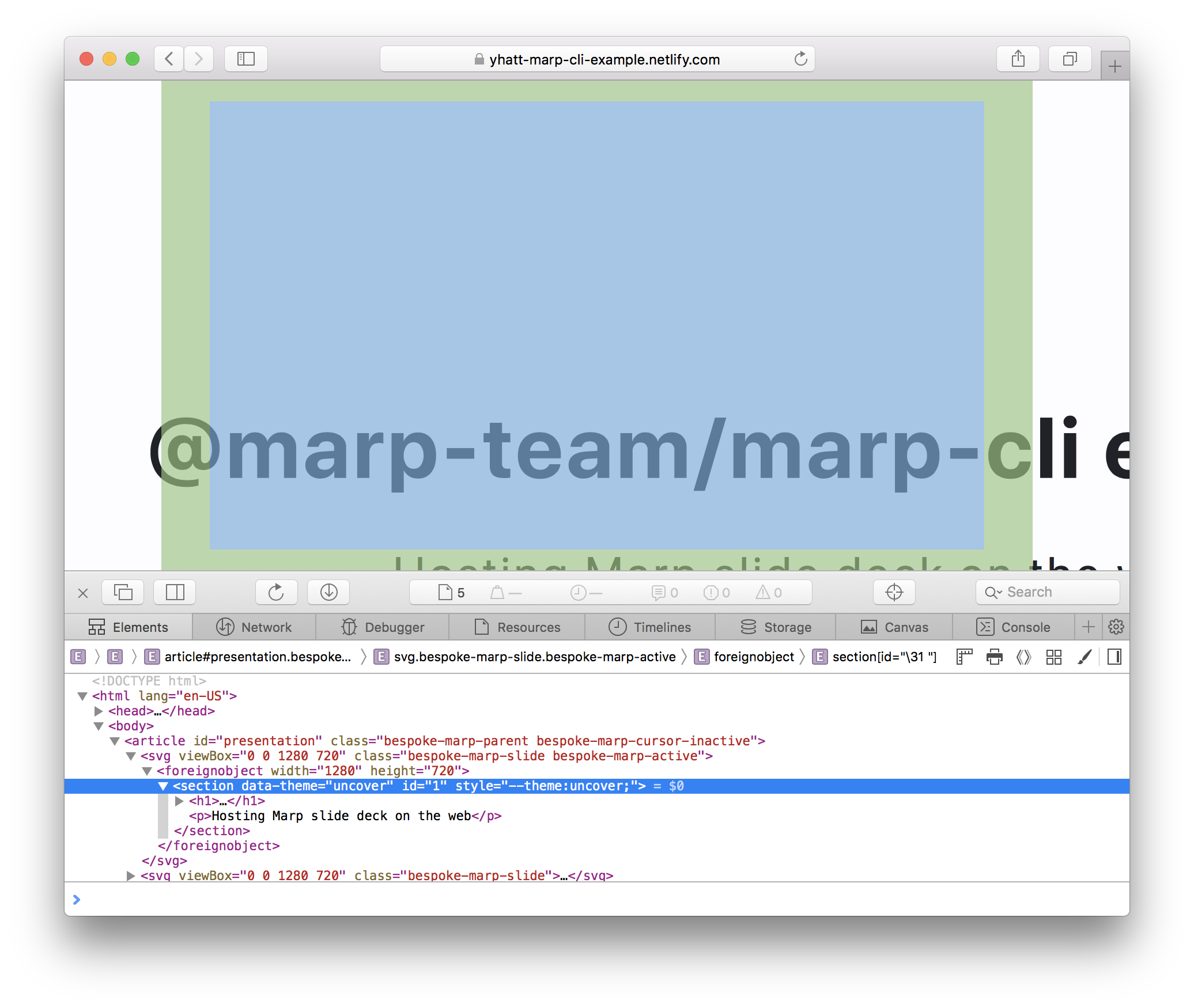
[Marpit]'s [inline SVG slide][inline-svg] has a lot of advantages: No requires JavaScript, gives better performance for scaling, and has predicatable DOM structure.

But unfortunately, WebKit browser has not scaled the wrapped HTML correctly. It is caused from a long standing [bug 23113](https://bugs.webkit.org/show_bug.cgi?id=23113), and it does not resolved in the last 15 years.
![](https://raw.githubusercontent.com/marp-team/marpit-svg-polyfill/main/docs/webkit-bug.png)

> **Note**
> A brand-new SVG engine for WebKit called as [**"Layer-based SVG engine (LBSE)"**](https://blogs.igalia.com/nzimmermann/posts/2021-10-29-layer-based-svg-engine/) is currently under development, and it will finally bring glitch-free scaling without JS. (See also: [Status of the new SVG engine in WebKit](https://wpewebkit.org/blog/05-new-svg-engine.html))
>
> You can test LBSE in [Safari Technology Preview](https://developer.apple.com/safari/technology-preview/) by following these steps:
>
> 1. Install Safari Technology Preview
> 1. Run `defaults write com.apple.SafariTechnologyPreview IncludeInternalDebugMenu 1` in terminal
> 1. Open Safari Technology Preview
> 1. Turn on **"Layer-based SVG engine (LBSE)"** from "Debug" menu → "WebKit Internal Features"
> 1. Restart app
>
> marpit-svg-polyfill v2.1.0 and later will try to detect whether or not enabled LBSE, and does not apply polyfill if LBSE was available.

## Solutions

### For Webkit

#### Scaling

We try to simulate scaling and centering by applying `transform` / `transform-origin` style to Marpit `<section>` elements.

```html
<svg viewBox="0 0 1280 960">
  <foreignObject width="1280" height="960">
    <section style="transform-origin:0 0;transform:matrix(......);">
      ...
    </section>
  </foreignObject>
</svg>
```

marpit-svg-polyfill uses the result of `getScreenCTM()` method, so the polyfill will sacrifice "zero-JS slide", the key feature of inline SVG.

#### Repainting

WebKit browser would not trigger repainting even if modified the contents of slide. It becomes a problem when supporting the live preview feature in Marp tools.

Fortunately, [a genius already resolved this problem only in CSS!](https://stackoverflow.com/a/21947628) `transform:translateZ(0)` would trigger re-painting immidiately when modified contents.

#### Animation GIF

People like to put GIF animation in the slide. However, GIF in polyfilled slides have glitches. GIF updates only a cropped part somewhere.

Applying `transform:translateZ(0.0001px)` to each `<section>` elements within SVG is a magic to resolve that. 🪄

> **Warning**
> This style brings slightly blurred contents too. Our polyfill prefers to render animated contents correctly.

<!--

## Advanced

### Apply polyfill manually

You may pick out the logic of polyfill if you required. When called a picked function, it applies polyfill forcibly without browser detection.

```javascript
import { webkit } from '@marp-team/marpit-svg-polyfill'

const observer = () => {
  // Apply polyfill for webkit forcibly
  webkit()

  window.requestAnimationFrame(observer)
}

document.addEventListener('DOMContentLoaded', observer)
```

#### Use case in Blink browsers

We have confirmed a similar rendering bug to WebKit in a few Blink based browsers. (e.g. Chrome 66, Electron 3.x. refs: [marp-team/marpit#35](https://github.com/marp-team/marpit/pull/35), [marp-team/marp-cli#15](https://github.com/marp-team/marp-cli/pull/15))

We are not applied polyfill for Blink browsers because [they are working toward to resolve this.](https://bugs.chromium.org/p/chromium/issues/detail?id=467484) But you may apply `webkit()` manually if you required.

-->

## Contributing

We are following [the contributing guideline of marp-team projects](https://github.com/marp-team/.github/blob/master/CONTRIBUTING.md). Please read these guidelines this before starting work in this repository.

## Author

Managed by [@marp-team](https://github.com/marp-team).

- <img src="https://github.com/yhatt.png" width="16" height="16"/> Yuki Hattori ([@yhatt](https://github.com/yhatt))

## License

This module releases under the [MIT License](LICENSE).

---
_Source: https://npm.io/package/@marp-team/marpit-svg-polyfill · Machine-readable twin of the npm.io package page. Health data is recomputed on every publish._