# @matejmazur/react-katex
> Display math in TeX with KaTeX and ReactJS
Latest version **3.1.3** (published 2020-08-11) · MIT license · 0 weekly downloads
## Install
```sh
npm install @matejmazur/react-katex
pnpm add @matejmazur/react-katex
yarn add @matejmazur/react-katex
bun add @matejmazur/react-katex
```
## Health
**Score 30/100 (F)** — status: abandoned.
Positive: has types; esm support; no vulnerabilities; high quality score.
Warnings: low downloads.
Negative: abandoned; low maintenance score.
## Facts
| | |
|---|---|
| Version | 3.1.3 |
| Published | 2020-08-11 |
| First published | 2018-11-06 |
| Weekly downloads | 0 |
| License | MIT |
| TypeScript types | bundled |
| Module format | ESM + CommonJS |
| Node | >=12 |
| Dependencies | 0 |
| Unpacked size | 29 KB |
| Known vulnerabilities | 0 |
| Install scripts | no |
| GitHub stars | 162 |
| Author | Matej Bransky |
| Maintainers | matejmazur |
| Keywords | react, tex, latex, math, katex |
## Links
- npm: https://www.npmjs.com/package/@matejmazur/react-katex
- Repository: git@github.com:MatejBransky/react-katex
- Homepage: https://github.com/MatejBransky/react-katex
- Issues: https://github.com/MatejBransky/react-katex/issues
- npm.io page: https://npm.io/package/@matejmazur/react-katex
## Alternatives
- [mobx-react](https://npm.io/package/mobx-react.md) — 2.8M weekly downloads
- [rc-tree](https://npm.io/package/rc-tree.md) — 2.6M weekly downloads
- [@react-oauth/google](https://npm.io/package/@react-oauth/google.md) — 1.3M weekly downloads
- [@wagmi/connectors](https://npm.io/package/@wagmi/connectors.md) — 877.0K weekly downloads
- [vee-validate](https://npm.io/package/vee-validate.md) — 836.4K weekly downloads
## Recent versions
- 3.1.3 (latest) — 2020-08-11
- 3.1.2 — 2020-08-10
- 3.1.1 — 2020-08-10
- 3.1.0 — 2020-08-10
- 3.0.2 — 2018-11-20
- 3.0.1 — 2018-11-07
- 3.0.0 — 2018-11-07
- 2.1.9 — 2018-11-07
- 2.1.8 — 2018-11-07
- 2.1.7 — 2018-11-07
- 2.1.6 — 2018-11-07
- 2.1.5 — 2018-11-07
- 2.0.5 — 2018-11-07
- 2.0.4 — 2018-11-07
- 2.0.3 — 2018-11-07
- … 10 more at https://npm.io/package/@matejmazur/react-katex/versions
## README
Comparison with `react-katex`: https://github.com/talyssonoc/react-katex/issues/49.

## Installation
```sh
$ npm install katex @matejmazur/react-katex
# or
$ yarn add katex @matejmazur/react-katex
```
## Usage
```jsx
import 'katex/dist/katex.min.css';
import TeX from '@matejmazur/react-katex';
```
### Inline math
Display math in the middle of the text.
```jsx
ReactDOM.render(
,
document.getElementById('math')
);
// or
ReactDOM.render(
\int_0^\infty x^2 dx,
document.getElementById('math')
);
```
It will be rendered like this:

### Block math
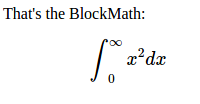
Display math in a separated block, with larger font and symbols.
```jsx
ReactDOM.render(
,
document.getElementById('math')
);
// or
ReactDOM.render(
\int_0^\infty x^2 dx,
document.getElementById('math')
);
```
It will be rendered like this:
**Note:**
Don't forget to import KaTeX CSS file.
```jsx
import 'katex/dist/katex.min.css';
```
### Error handling
#### Default error message
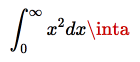
By default the error rendering is handled by KaTeX. You can optionally pass `errorColor` (defaults to `#cc0000`) as a prop:
```jsx
ReactDOM.render(
,
document.getElementById('math')
);
```
This will be rendered like so:
#### Custom error message
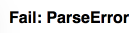
It's possible to handle parse errors using the prop `renderError`. This prop must be a function that receives the error object and returns what should be rendered when parsing fails:
```jsx
ReactDOM.render(
{
return Fail: {error.name};
}}
/>,
document.getElementById('math')
);
// The code above will render 'Fail: ParseError' because it's the value returned from `renderError`.
```
This will render `Fail: ParseError`:
#### Custom wrapper component
You can change the wrapper component (block math uses `div` and inline uses `span`) by whatever you want via `props.as` attribute.
```jsx
ReactDOM.render(
,
document.getElementById('math')
);
```
### Escaping expressions
In addition to using the `math` property, you can also quote as a child allowing the use of `{ }` in your expression.
```jsx
ReactDOM.render(
{'\\frac{\\text{m}}{\\text{s}^2}'},
document.getElementById('math')
);
```
Or Multiline
```jsx
ReactDOM.render(
{`\\frac{\\text{m}}
{\\text{s}^2}`},
document.getElementById('math')
);
```
However, it can be annoying to escape backslashes. This can be circumvented with the `String.raw` tag on a template literal when using ES6.
```jsx
ReactDOM.render(
{String.raw`\frac{\text{m}}{\text{s}^2}`},
document.getElementById('math')
);
```
Backticks must be escaped with a backslash but would be passed to KaTeX as \\\`. A tag can be created to replace \\\` with \`
```jsx
const latex = (...a) => String.raw(...a).replace('\\`', '`');
ReactDOM.render({latex`\``}, document.getElementById('math'));
```
You can even do variable substitution
```jsx
const top = 'm';
const bottom = 's';
ReactDOM.render(
{String.raw`\frac{\text{${top}}}{\text{${bottom}}^2}`},
document.getElementById('math')
);
```
### Configuring KaTeX
You can change directly [all KaTeX options](https://katex.org/docs/options.html) via `props.settings`:
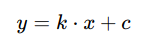
**Example of adding a custom macro:**
```jsx
ReactDOM.render(
y = k * x + c
);
```
Result:
---
_Source: https://npm.io/package/@matejmazur/react-katex · Machine-readable twin of the npm.io package page. Health data is recomputed on every publish._