# @miaguila/theme
> Mi Águila Theme library
Latest version **0.0.114** (published 2020-01-31) · ISC license · 0 weekly downloads
## Install
```sh
npm install @miaguila/theme
pnpm add @miaguila/theme
yarn add @miaguila/theme
bun add @miaguila/theme
```
## Health
**Score 15/100 (F)** — status: abandoned.
Positive: no vulnerabilities.
Warnings: low downloads; no types; no esm support; pre 1.0.
Negative: abandoned; low maintenance score.
## Facts
| | |
|---|---|
| Version | 0.0.114 |
| Published | 2020-01-31 |
| First published | 2019-03-24 |
| Weekly downloads | 0 |
| License | ISC |
| TypeScript types | none |
| Module format | CommonJS |
| Dependencies | 0 |
| Unpacked size | 504.3 KB |
| Known vulnerabilities | 0 |
| Install scripts | no |
| Author | Mi Águila |
| Maintainers | alejandroforero, andalm, npmmiaguila, seruda |
## Links
- npm: https://www.npmjs.com/package/@miaguila/theme
- Repository: https://github.com/MiAguila/miaguila-kit/tree/master/projects/theme
- npm.io page: https://npm.io/package/@miaguila/theme
## Recent versions
- 0.0.114 (latest) — 2020-01-31
- 0.0.112 — 2020-01-31
- 0.0.111 — 2019-12-18
- 0.0.110 — 2019-12-11
- 0.0.109 — 2019-12-02
- 0.0.108 — 2019-10-08
- 0.0.107 — 2019-09-08
- 0.0.106 — 2019-09-08
- 0.0.105 — 2019-08-29
- 0.0.104 — 2019-08-16
- 0.0.103 — 2019-08-16
- 0.0.102 — 2019-08-16
- 0.0.101 — 2019-08-14
- 0.0.100 — 2019-08-09
- 0.0.99 — 2019-08-07
- … 83 more at https://npm.io/package/@miaguila/theme/versions
## README
# @miaguila/theme
The Mi Aguila Theme Library consists of predefined variables for basic design elements such as color, typography, and spacing. These system properties allow for building layouts and visual styles from defined constraints. This library has to "speak" the same design language as the Design Team resources.
## File structure
theme library has 3 main folders: **core, common** and **utils.**
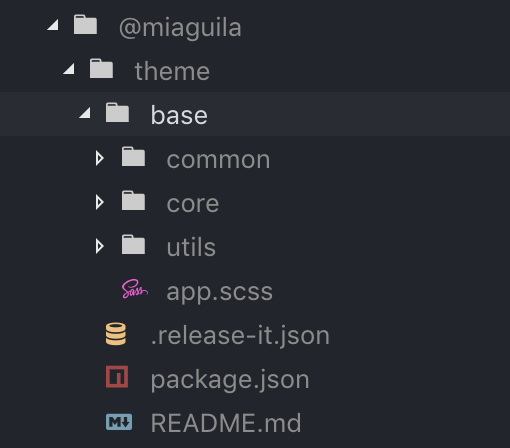
**common:** Sometimes there are some simple components that don't need to be a UI Angular component (e.g. links, labels, etc). Designing a UI Angular component could be a long process (e.g. add logic, add different states, unit test, etc) or the component is so simple that it doesn't make sense to turn it into a complex Angular component. As a result of this, the common folder contains the styles of these simple CSS components.
**core:** It includes all the design basis of Mi Águila:
- Mi Águila foundations (e.g. color palette, typography, typescale).
- Utility classes (e.g. bg-dark-snow, w-full, text-left, etc).
- Global SASS variables (e.g. breakpoint-sm, font-size-base, line-height, etc).
**utils:** You can find all the global mixins, functions, and so on.
## Usage
**1.** In order to use this library within any Mi Aguila's Web project, you have to install the respective npm package (in this case **theme** library), running the following command:
npm install @miaguila/theme --save-dev
**2.** Import the needed library's files on each project's SCSS file that requires the core elements. You could either import the entry point file (@miaguila/theme/base/app.scss) in order to have access to each core element, or just import the specific required file (e.g. variables.scss):
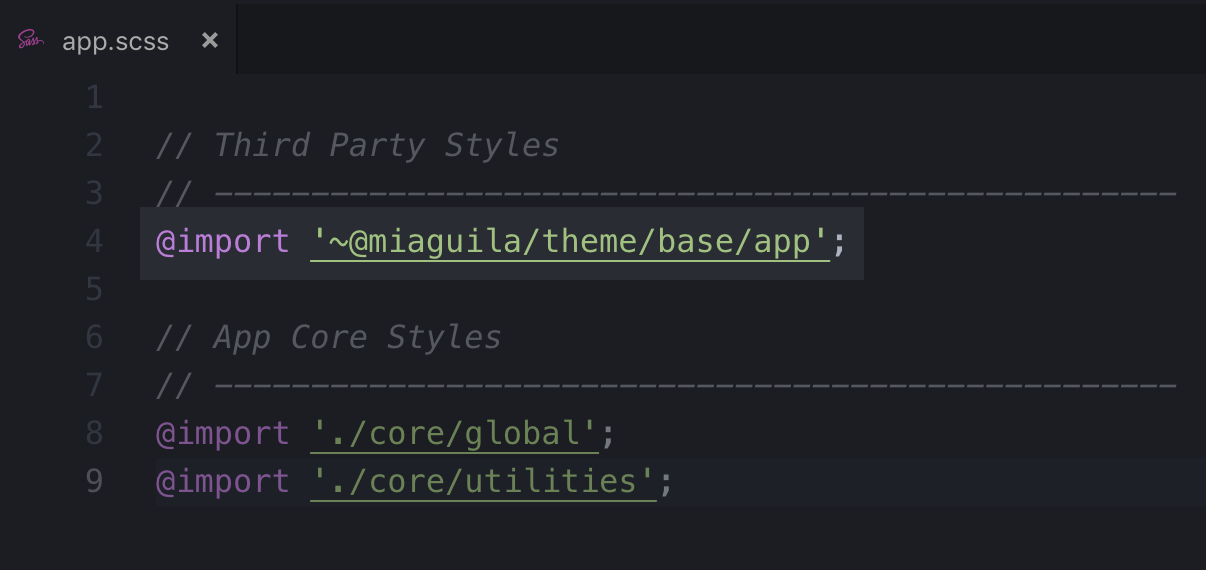
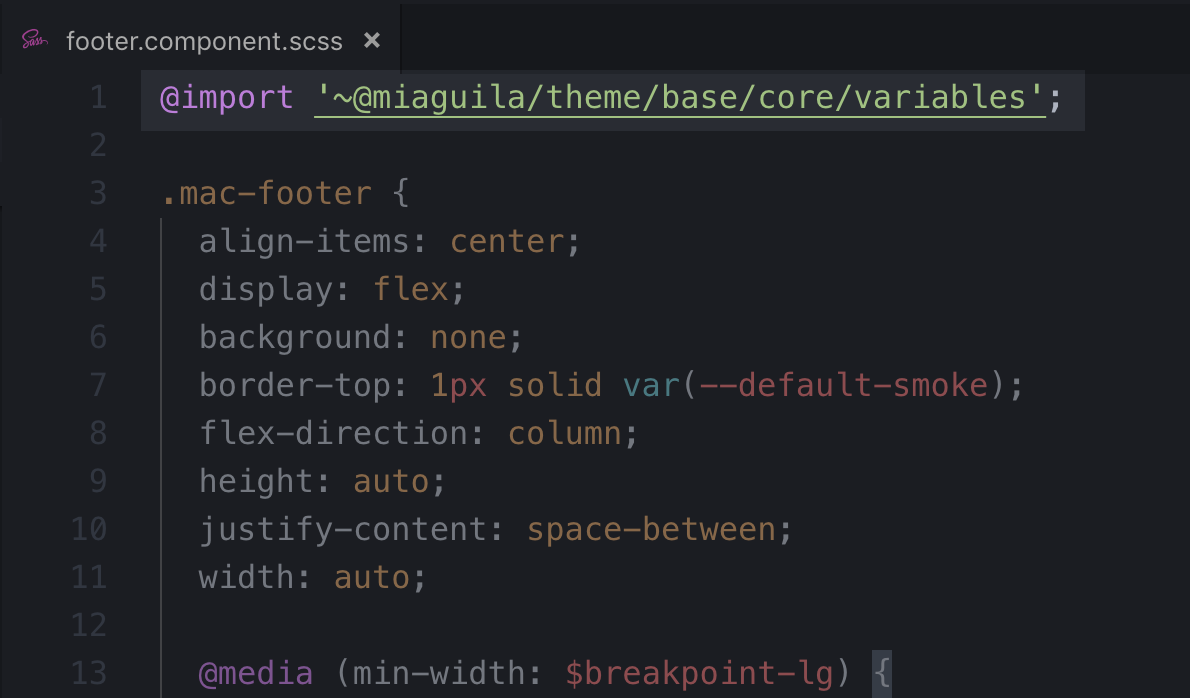
**3.** Within the file where you import the theme library resources, you can have access to the variables, utility classes, mixins, etc:
### **Utility classes**
Hello world
### **Sass variables**
// $breakpoint-lg: global responsive breakpoint
.puv-block {
@media (min-width: $breakpoint-lg) {
left: 160px;
top: 45%;
transform: translate(0px, -50%);
}
}
### **Primitive variables (color palette, font size base, etc)**
.mac-footer {
align-items: center;
background: none;
border-top: 1px solid var(--default-smoke);
font-size: var(--font-size-base);
display: flex;
}
# **Push and Deploy new features**
Whenever someone wants to make a change on the core in **theme** library, it's needed to follow the bellow steps:
**1.** Clone the Github project:
git clone [git@github.com:MiAguila/miaguila-kit-theme.git](git@github.com:MiAguila/miaguila-kit-theme.git)
**2.** The library is within the **projects** folder

**3.** This project has 2 main branches
**master:** It's the main branch (it is the Production environment). It's up to date with each library in npm packages repo ([https://www.npmjs.com/](https://www.npmjs.com/)).
**develop:** It's the branch where gather all the new features before being approved by the reviewer in order to merge with master branch.
**4.** Create a new branch from the respective parent branch: For example, If you are going to add or change something in **theme** library, you should create the new branch from **develop**.
when you will push your changes, you have to follow the below flow:
(theme)-my-branch → lib-theme → develop → master
- Make your changes in the new branch (e.g. **feature/**add-new-color).
- If everything is Ok (all the test pass, code reviewer approves, etc), make a pull request from **feature/**add-new-color to **develop** branch.
- If everything is Ok (all the test pass, code reviewer approves, etc), make a pull request from **develop** to **master** branch.
- The continuous integration system is going to take the new changes pushed in the master branch, it will auto-increment version number of each library, publish new changes in npm packages repo and deploy it to the storybook environment.
---
_Source: https://npm.io/package/@miaguila/theme · Machine-readable twin of the npm.io package page. Health data is recomputed on every publish._