
# @odg/test

> Stanley TheTemplate for typescript project

Latest version **1.6.0** (published 2022-11-20) · MIT license · 0 weekly downloads

## Install

```sh
npm install @odg/test
pnpm add @odg/test
yarn add @odg/test
bun add @odg/test
```

## Health

**Score 25/100 (F)** — status: abandoned.

Positive: has types; no vulnerabilities; high quality score.

Warnings: low downloads; no esm support.

Negative: abandoned; low maintenance score.

## Facts

| | |
|---|---|
| Version | 1.6.0 |
| Published | 2022-11-20 |
| First published | 2022-11-20 |
| Weekly downloads | 0 |
| License | MIT |
| TypeScript types | bundled |
| Module format | CommonJS |
| Dependencies | 1 |
| Unpacked size | 29.2 KB |
| Known vulnerabilities | 0 |
| Install scripts | no |
| GitHub stars | 0 |
| Author | Dragons Gamers |
| Maintainers | dragonsgamers |

## Links

- npm: https://www.npmjs.com/package/@odg/test
- Repository: https://github.com/ODGodinho/TestPackage
- Homepage: https://github.com/ODGodinho/TestPackage#readme
- Issues: https://github.com/ODGodinho/TestPackage/issues
- npm.io page: https://npm.io/package/@odg/test

## Dependencies (1)

- [@odg/tsconfig](https://npm.io/package/@odg/tsconfig.md) *

## Recent versions

- 1.6.0 (latest) — 2022-11-20
- 1.5.0 — 2022-11-20

## README

<h1 align="center">
    <a href="https://github.com/ODGodinho">
        <img
            src="https://raw.githubusercontent.com/ODGodinho/Stanley-TheTemplate/main/public/images/Stanley.jpg"
            alt="Stanley Imagem" width="500"
        />
    </a>
    <br />
    Stanley The Template For Typescript By Dragons Gamers.
    <br />
</h1>

<h4 align="center">Template Stanley for Typescript projects and packages 📦</h4>

<p align="center">

[![Stargazers](https://img.shields.io/github/stars/ODGodinho/Stanley-TheTemplate-Typescript?color=F430A4)](https://github.com/ODGodinho/Stanley-TheTemplate-Typescript/stargazers)
[![Made by ODGodinho](https://img.shields.io/badge/made%20by-ODGodinho-%2304A361)](https://www.linkedin.com/in/victor-alves-odgodinho/)

[![Forks](https://img.shields.io/github/forks/ODGodinho/Stanley-TheTemplate-Typescript?color=CD4D34)](https://github.com/ODGodinho/Stanley-TheTemplate-Typescript/network/members)
![Repository size](https://img.shields.io/github/repo-size/ODGodinho/Stanley-TheTemplate-Typescript)
[![GitHub last commit](https://img.shields.io/github/last-commit/ODGodinho/Stanley-TheTemplate-Typescript)](https://github.com/ODGodinho/Stanley-TheTemplate-Typescript/commits/master)
[![License](https://img.shields.io/badge/license-MIT-brightgreen)](https://opensource.org/licenses/MIT)

</p>

# Table of Contents

- [🎇 Benefits](#-benefits)
- [📗 Libraries](#-libraries)
- [📁 Dependencies](#-dependencies)
- [⏩ Get Started](#-get-started)
  - [🔘 Use Template](#-use-template)
  - [🔑 Configure Github Token](#-configure-github-token)
    - [🙈 Create Github Token](#-create-github-token)
    - [🔐 Create project Environment](#-create-project-environment)
  - [💻 Prepare to develop](#-prepare-to-develop)
  - [📍 Start Project](#-start-project)
  - [📨 Build and Run](#-build-and-run)
  - [🧪 Teste Code](#-teste-code)

---

## 🎇 Benefits

- 🚀 Speed start new project or package using typescript
- 🚨 Over 300 rules for pattern, possible errors and errors in Linter
- 🎇 Code quality guaranteed
- 📢 AutoReview when opening a pull-request/merge
    ![AutoReview Comment example](https://user-images.githubusercontent.com/3797062/97085944-87233a80-165b-11eb-94a8-0a47d5e24905.png)
- 🧪 Automatic Test when opening pull-request/merge

## 📗 Libraries

- [Node.js 16](https://nodejs.org/?n=dragonsgamers)
- [Typescript](https://www.typescriptlang.org/?n=dragonsgamers)
- [Eslint](https://eslint.org/?n=dragonsgamers)
- [ODG-Linter-JS](https://github.com/ODGodinho/ODG-Linter-Js?n=dragonsgamers)
- [EditorConfig](https://editorconfig.org/?n=dragonsgamers)
- [ReviewDog](https://github.com/reviewdog/action-eslint)

## 📁 Dependencies

- [Node.js](https://nodejs.org) 16 or later
- [Yarn](https://yarnpkg.com/) Optional/Recommended
- [ODG TsConfig](https://github.com/ODGodinho/tsconfig) Last Version

## ⏩ Get Started

---

### 🔘 Use Template

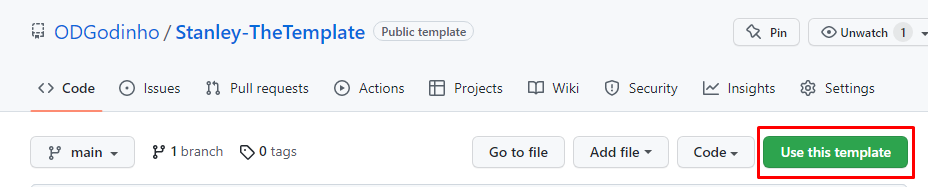
Click in use this template button and clone your template project
![Use Template](https://raw.githubusercontent.com/ODGodinho/Stanley-TheTemplate/main/public/images/UseTemplate.png)

### 🔑 Configure Github Token

#### 🙈 Create Github Token

Before create new GITHUB_TOKEN in

- <https://docs.github.com/en/enterprise-server@3.4/authentication/keeping-your-account-and-data-secure/creating-a-personal-access-token>

#### 🔐 Create project Environment

- On GitHub.com, navigate to the main page of the repository.
- Under your repository name, click `⚙️ Settings`.
![Github Setting images example](https://docs.github.com/assets/cb-27528/images/help/repository/repo-actions-settings.png)
- In the "Security" section of the sidebar, select `✳️ Secrets`, then click Actions.
- Click New repository secret.
- Type a name with: **GH_TOKEN**
- Enter with your access secret token `ghp_Dsfde....`
- Click Add secret.

### 💻 Prepare To Develop

Copy `.env.example` to `.env` and add the values according to your needs.

### 📍 Start Project

First install dependencies with the following command

```bash
yarn install
# or
npm install
```

## 📨 Build and Run

To build the project, you can use the following command

> if you change files, you need to run `yarn build` and `yarn start` again

```bash
yarn build && yarn start
# or
yarn dev
```

## 🧪 Teste Code

To Test execute this command

```bash
yarn test
# or
yarn test:watch
```

---
_Source: https://npm.io/package/@odg/test · Machine-readable twin of the npm.io package page. Health data is recomputed on every publish._
