# @onereach/regular-expressions
> 🔍 OneReach Regular Expressions ecosystem. Components and helpers. To use in external components
Latest version **0.5.22** (published 2023-08-01) · UNLICENSED license · 0 weekly downloads
## Install
```sh
npm install @onereach/regular-expressions
pnpm add @onereach/regular-expressions
yarn add @onereach/regular-expressions
bun add @onereach/regular-expressions
```
## Health
**Score 20/100 (F)** — status: abandoned.
Positive: esm support; no vulnerabilities.
Warnings: low downloads; no types; pre 1.0.
Negative: abandoned; low maintenance score.
## Facts
| | |
|---|---|
| Version | 0.5.22 |
| Published | 2023-08-01 |
| First published | 2021-04-27 |
| Weekly downloads | 0 |
| License | UNLICENSED |
| TypeScript types | none |
| Module format | ESM + CommonJS |
| Dependencies | 1 |
| Unpacked size | 874.9 KB |
| Known vulnerabilities | 0 |
| Install scripts | no |
| Author | Vladimir Gerasimenko |
| Maintainers | onereach.admin, onereach.user |
## Links
- npm: https://www.npmjs.com/package/@onereach/regular-expressions
- Repository: https://gitlab.internal.onereach.io/onereach/ui-components/regular-expressions
- Homepage: https://onereach-regular-expressions.surge.sh
- npm.io page: https://npm.io/package/@onereach/regular-expressions
## Dependencies (1)
- [espree](https://npm.io/package/espree.md) ^9.3.0
## Recent versions
- 0.5.22 (latest) — 2023-08-01
- 0.5.23-bumpversion76.0 (beta) — 2023-08-01
- 0.5.22-bumpversion74.0 — 2023-08-01
- 0.5.21 — 2023-08-01
- 0.5.20-regexbuilderstyles70.0 — 2023-08-01
- 0.5.20-regexbuilderstyles71.0 — 2023-08-01
- 0.5.19 — 2022-03-08
- 0.5.18 — 2022-03-08
- 0.5.17 — 2022-03-08
- 0.5.16 — 2022-03-08
- 0.5.15 — 2022-03-08
- 0.5.14 — 2022-03-07
- 0.5.13 — 2022-03-07
- 0.5.12 — 2022-03-07
- 0.5.11 — 2022-03-07
- … 33 more at https://npm.io/package/@onereach/regular-expressions/versions
## README
# @onereach/regular-expressions
## 🔍 OneReach Regular Expressions ecosystem. Components and helpers.
[Live demo](https://onereach-regular-expressions.surge.sh/)
#### 📣 NOTE: `@onereach/regular-expressions` requires environment with globally available `or-ui`.
## 🚀 Usage example
Just import stuff you need from npm package
```js
import { RegexBuilder, getRegexBodyFlags } from '@onereach/regular-expressions'
```
### Package exports:
## 🧱 Components:
### `RegexBuilder`
Input for writing RegExp with detailed tokens explanation.
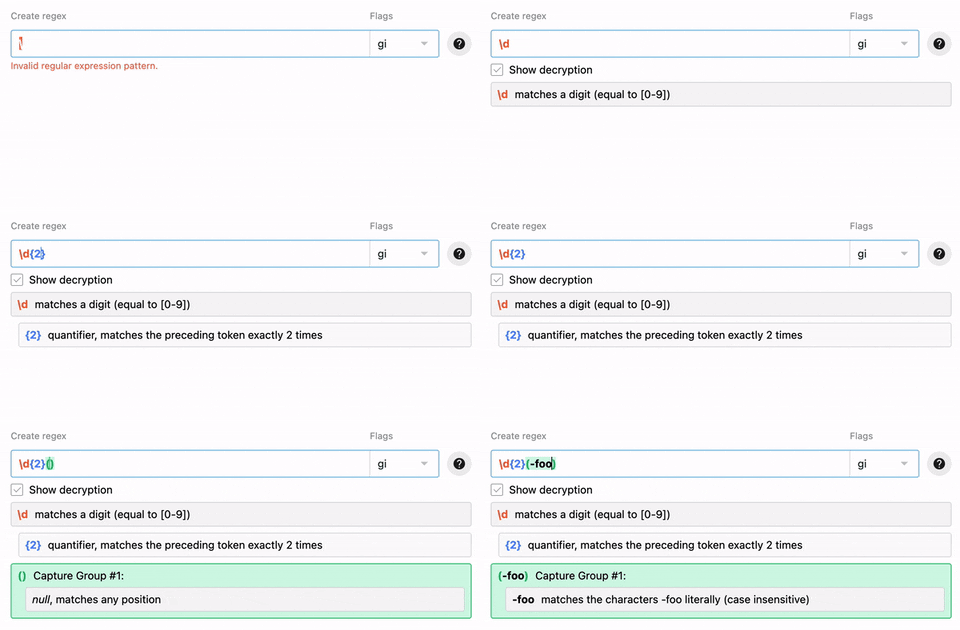
```js
props: {
// RegExp as string in format '/\\d{2}/gi'
regex: {
type: String,
default: ''
},
readonly: {
type: Boolean,
default: false
},
label: {
type: String,
default: 'Find'
},
error: {
type: String,
default: ''
},
regexDetailsVisibility: {
type: Boolean,
default: false
},
docsVisibility: {
type: Boolean,
default: false
},
mergeFields: {
type: Array,
default: () => []
},
noMergeFields: {
type: Boolean,
default: false
}
}
```
| Event | Payload | Description |
| -| - | -|
| `update:regex` | regexString | Emitted when regex changed |
| `focus` | | Emitted when input field is focused |
| `blur` | | Emitted when input field is unfocused |
### `RegexMatcher`
Input for testing RegExp for matches.
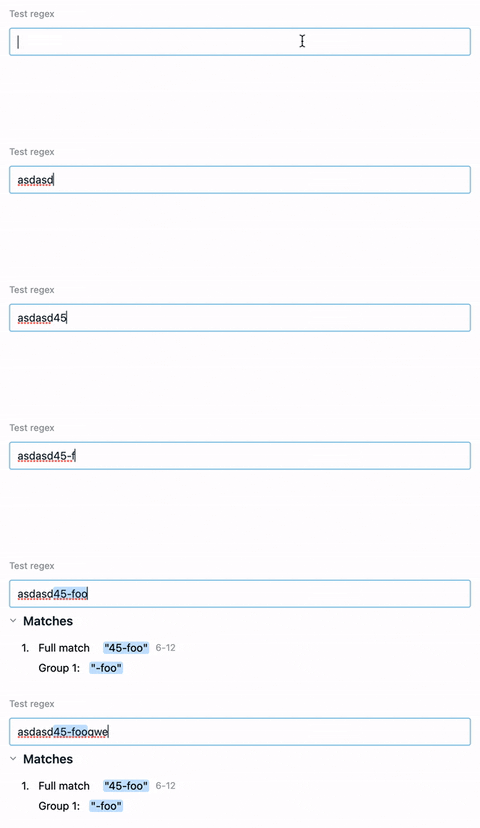
```js
props: {
// RegExp as string in format '/\\d{2}/gi'
regex: {
type: String,
default: ''
},
stringToTest: {
type: String,
default: ''
},
readonly: {
type: Boolean,
default: false
},
label: {
type: String,
default: 'Test'
},
matchDetailsVisibility: {
type: Boolean,
default: false
}
}
```
| Event | Payload | Description |
| -| - | -|
| `matchFound` | arrayOfMatches | Emitted when got match in stringToTest |
| `update:stringToTest` | stringToTest | Emitted when stringToTest is changed |
### `PlainTextBuilder`
Input for creating RegExp, but body is plain text.
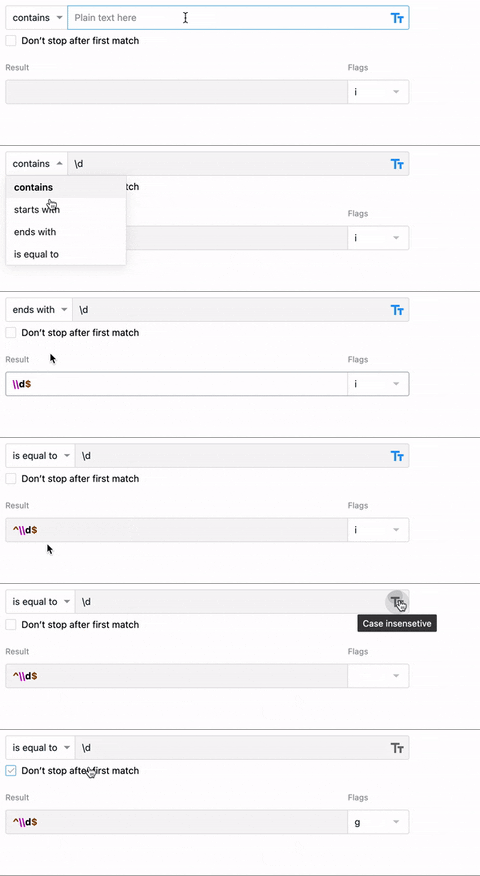
```js
props: {
// RegExp as string in format '/\\d{2}/gi'
regex: {
type: String,
default: '//i'
},
label: {
type: String,
default: 'Find'
},
readonly: {
type: Boolean,
default: false
},
error: {
type: String,
default: ''
}
}
```
| Event | Payload | Description |
| -| - | -|
| `update:regex` | regexString | Emitted when regex changed |
### `RegexDocs`
List of available RegExp tokens. Used inside RegexBuilder as modal.
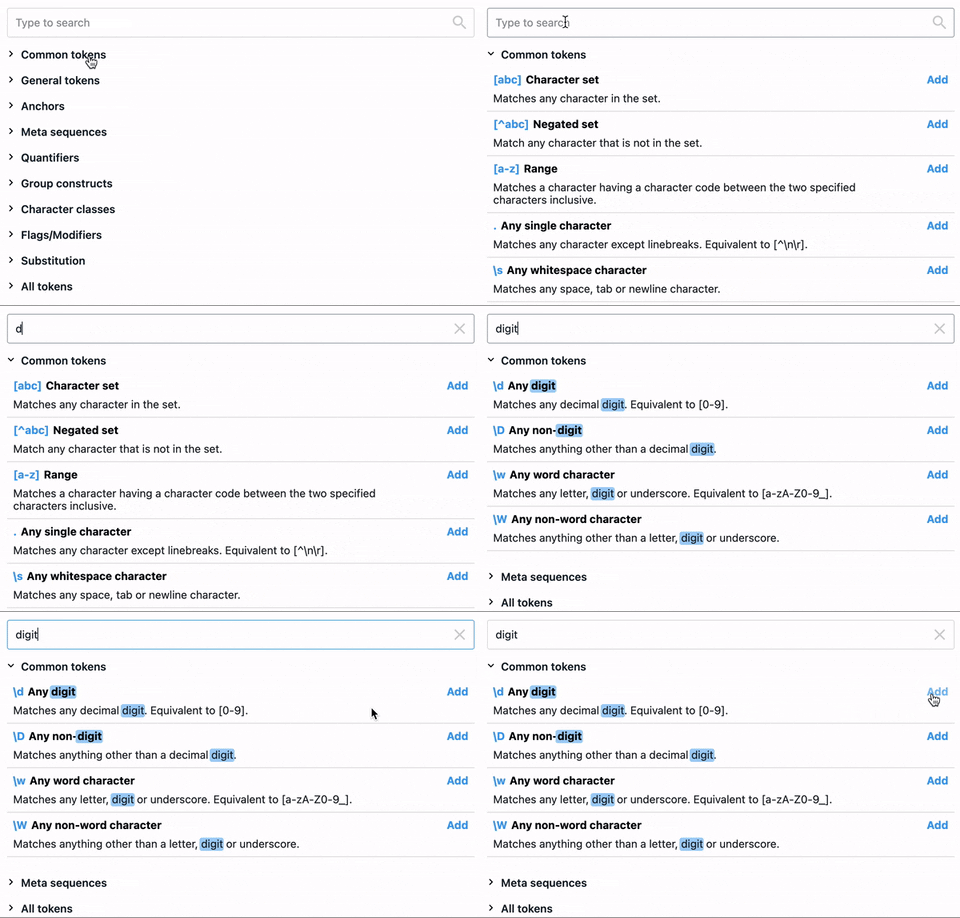
```js
props: {
// is 'Add' button hidden
readonly: {
type: Boolean,
default: false
}
}
```
| Event | Payload | Description |
| -| - | -|
| `addToRegex` | tokenObject | Emitted when 'Add' button clicked |
### `RegexesStorage`
Modal with list of Favorites and Library RegExps.
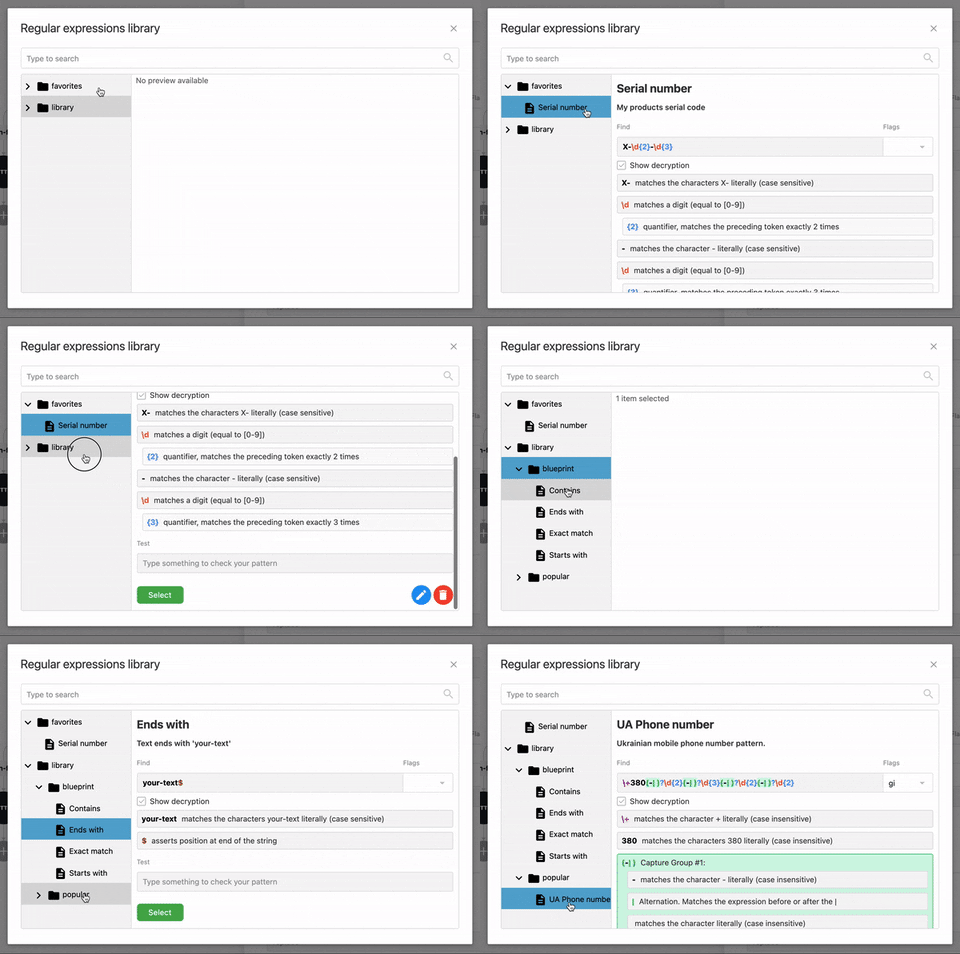
Requires `this.$flow` to be available.
Favorites (items in KeyValueStorage of your account) can be edited via `FavoritesAPI.js` service (`import { FavoritesAPI } from @onereach/regular-expressions`)
Library (items in KeyValueStorage of Provides account) can be edited via API (https://devdocs-staging.onereach.ai/providers/index.html#/regular%20expressions) or UI flow in Provides account (https://studio.staging.onereach.ai/flows/4289e44f-c771-4abd-b933-696258d987db/bbef6ab4-6f04-4aa3-93b9-78813426ea1c)
Usage:
```js
```
| Event | Payload | Description |
| -| - | -|
| `select` | regexObject | Emitted when 'Select' button clicked |
| `favoritesWasChanged` | favoritesArray | Emitted when list of favorites was changed (some item was edited or deleted) |
## 🛠 Helpers:
### `getRegexBodyFlags`
Parse regexString body and flags to use it as new RegExp(body, flags).
```js
'/\d{2}/gi' => { body: '\d{2}', flags: 'gi' }
```
### `FavoritesAPI`
Class for CRUD operations with Favorites RegExps.
Usage:
```js
import { FavoritesAPI } from '@onereach/regular-expressions'
const favoritesAPI = new FavoritesAPI({
$flowApiKeyValueSdkApiUrl: this.$flow.api.keyValue.sdkApiUrl,
$flowToken: this.$flow.token
})
await favoritesAPI.getItems()
await favoritesAPI.setItem(id, { id, name, description, categories, regex })
await favoritesAPI.deleteItem(id)
```
#
Some exports, methods and event are non documented, because used in edge case scenarios. But feel free checking out source code on GitLab 😉
#### 📣 NOTE: this project uses [changelog-ci](https://gitlab.com/onereach/platform/service/changelog-ci). Don't forget to include [changelog](https://gitlab.com/onereach/platform/service/changelog-ci/-/wikis/How-To-Generate-correct-changelog-and-project-version-using-changelog-CI) with merge request.
---
_Source: https://npm.io/package/@onereach/regular-expressions · Machine-readable twin of the npm.io package page. Health data is recomputed on every publish._