# @promisepending/logger.js
> A better logger
Latest version **1.1.3** (published 2026-10-02) · MIT license · 0 weekly downloads
## Install
```sh
npm install @promisepending/logger.js
pnpm add @promisepending/logger.js
yarn add @promisepending/logger.js
bun add @promisepending/logger.js
```
## Health
**Score 70/100 (B)** — status: active.
Positive: has types; no vulnerabilities; has provenance; recently updated; high maintenance score; high quality score.
Warnings: low downloads; no esm support.
## Facts
| | |
|---|---|
| Version | 1.1.3 |
| Published | 2026-10-02 |
| First published | 2023-03-16 |
| Weekly downloads | 0 |
| License | MIT |
| TypeScript types | bundled |
| Module format | CommonJS |
| Dependencies | 3 |
| Unpacked size | 37.6 KB |
| Known vulnerabilities | 0 |
| Install scripts | no |
| Provenance | attested (GitHub Actions) |
| GitHub stars | 3 |
| Author | PromisePending |
| Maintainers | lobometalurgico, spacefox__ |
| Keywords | logger, typescript |
## Links
- npm: https://www.npmjs.com/package/@promisepending/logger.js
- Repository: https://github.com/PromisePending/logger.js
- Homepage: https://github.com/PromisePending/logger.js#readme
- Issues: https://github.com/PromisePending/logger.js/issues
- npm.io page: https://npm.io/package/@promisepending/logger.js
## Dependencies (3)
- [chalk](https://npm.io/package/chalk.md) 4.1.2
- [adm-zip](https://npm.io/package/adm-zip.md) 0.6.1
- [escape-html](https://npm.io/package/escape-html.md) 1.0.3
## Alternatives
- [cli-color](https://npm.io/package/cli-color.md) — 3.4M weekly downloads
- [log](https://npm.io/package/log.md) — 1.3M weekly downloads
- [logstash-client](https://npm.io/package/logstash-client.md) — 4.5K weekly downloads
- [@nocobase/plugin-logger](https://npm.io/package/@nocobase/plugin-logger.md) — 2.0K weekly downloads
- [child-process-debug](https://npm.io/package/child-process-debug.md) — 695 weekly downloads
## Recent versions
- 1.1.3 (latest) — 2026-10-02
- 2.0.0-alpha.2 (alpha) — 2026-10-02
- 1.1.2 — 2026-07-26
- 2.0.0-alpha.1 — 2024-06-27
- 2.0.0-alpha.0 — 2024-06-14
- 3.0.0-alpha.0 — 2024-06-14
- 1.1.1 — 2023-07-20
- 1.1.0 — 2023-06-07
- 1.0.4 — 2023-03-16
- 1.0.3 — 2023-03-16
- 1.0.2 — 2023-03-16
- 1.0.1 — 2023-03-16
- 1.0.0 — 2023-03-16
## README
Logger.JS


#
📖 About
This is a simple logger for NodeJS, made in TypeScript, with the objective of make beautiful and easy to read logs.
Originally made for [twitch.js](https://github.com/PromisePending/twitch.js), we decided to make it in a separate package, so that it can be used in other projects without the need to install the entire twitch.js package or copy and maintain the code.
📦 Installing
To install Logger.JS in your project, you need first to have NodeJS installed, then run the following command in your terminal:
### NPM:
```
npm install @promisepending/logger.js
```
### Yarn:
```
yarn add @promisepending/logger.js
```
⌨ Use example
To use Logger.JS in your project, you need to import the logger class, then create an instance of that class, passing as parameter your logger configurations as an object, or nothing if you want to use the default configurations.
```js
const { Logger } = require('@promisepending/logger.js');
// or
import { Logger } from '@promisepending/logger.js';
const logger = new Logger({
prefix: 'Logger.JS', // This will be the prefix of all logs (default: null)
disableFatalCrash: true, // If true, the logger will not crash the process when a fatal error occurs (default: false)
allLineColored: true, // If true, the whole line will be colored instead of only the prefix (default: false)
coloredBackground: false, // If true, the background of the lines will be colored instead of the text (default: false)
debug: false, // If true, the logger will log debug messages (default: false)
fileProperties: { // This is the configuration of the log files
enable: true, // If true, the logger will log to files (default: false) [NOTE: If false all below options will be ignored]
logFolderPath: './logs', // This is the path of the folder where the log files will be saved (default: './logs')
enableLatestLog: true, // If true, the logger will save the latest log in a file (default: true)
enableDebugLog: true, // If true, the logger will save the debug logs in a file (default: false)
enableErrorLog: true, // If true, the logger will save the error logs in a file (default: false)
enableFatalLog: true, // If true, the logger will save the fatal logs in a file (default: true)
generateHTMLLog: true, // If true, the logger will generate a HTML file with the logs otherwise a .log file (default: false)
compressLogFilesAfterNewExecution: true, // If true, the logger will compress the log files to zip after a new execution (default: true)
},
});
```
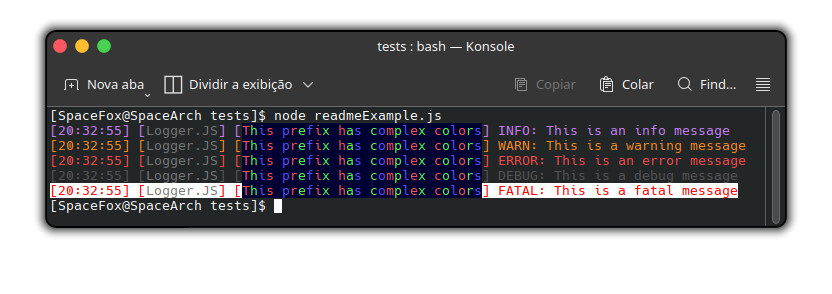
After creating the logger instance, you can use the methods to log your messages, as shown below:
```js
logger.info('This is an info message');
logger.warn('This is a warning message');
logger.error('This is an error message');
logger.debug('This is a debug message');
logger.fatal('This is a fatal message');
```
### Results:
📝 License
This project is licensed under the MIT License - see the [LICENSE](/LICENSE) file for details.
📜 Changelog
See the [CHANGELOG](/CHANGELOG.md) file for details.
🤝 Contributing
Contributions is what makes the open source community an amazing place and its a wonderful place to learn, inspire and create. Any contribution you make will be **very much appreciated**.
1. Make a Fork of the Project
2. Create your feature branch (`git checkout -b feature/AmazingFeature`)
3. Commit your changes (`git commit -m 'Add some AmazingFeature'`)
4. Push to the branch (`git push origin feature/AmazingFeature`)
5. Open a Pull Request
😉 Authors
#
Made with 💜 By PromisePending™'s team.
---
_Source: https://npm.io/package/@promisepending/logger.js · Machine-readable twin of the npm.io package page. Health data is recomputed on every publish._

