# @react-native-nitro-geolocation/rozenite-plugin
> react-native-nitro-geolocation devtools plugin with rozenite
Latest version **2.0.0** (published 2026-09-09) · MIT license · 0 weekly downloads
## Install
```sh
npm install @react-native-nitro-geolocation/rozenite-plugin
pnpm add @react-native-nitro-geolocation/rozenite-plugin
yarn add @react-native-nitro-geolocation/rozenite-plugin
bun add @react-native-nitro-geolocation/rozenite-plugin
```
## Health
**Score 75/100 (B)** — status: active.
Positive: has types; esm support; no vulnerabilities; has provenance; recently updated; high maintenance score; high quality score.
Warnings: low downloads.
## Facts
| | |
|---|---|
| Version | 2.0.0 |
| Published | 2026-09-09 |
| First published | 2025-12-31 |
| Weekly downloads | 0 |
| License | MIT |
| TypeScript types | bundled |
| Module format | ESM + CommonJS |
| Dependencies | 1 |
| Unpacked size | 467.8 KB |
| Known vulnerabilities | 0 |
| Install scripts | no |
| Provenance | attested (GitHub Actions) |
| GitHub stars | 116 |
| Maintainers | jingjing2222 |
| Keywords | react-native, geolocation, nitro, devtools, rozenite, location, mock |
## Links
- npm: https://www.npmjs.com/package/@react-native-nitro-geolocation/rozenite-plugin
- Repository: https://github.com/jingjing2222/react-native-nitro-geolocation
- Homepage: https://github.com/jingjing2222/react-native-nitro-geolocation#readme
- Issues: https://github.com/jingjing2222/react-native-nitro-geolocation/issues
- npm.io page: https://npm.io/package/@react-native-nitro-geolocation/rozenite-plugin
## Dependencies (1)
- [@rozenite/plugin-bridge](https://npm.io/package/@rozenite/plugin-bridge.md) 2.2.0
## Alternatives
- [pagerjs](https://npm.io/package/pagerjs.md) — 60 weekly downloads
- [whistle.savefor-mock](https://npm.io/package/whistle.savefor-mock.md) — 4 weekly downloads
- [@absmartly/api-mocks](https://npm.io/package/@absmartly/api-mocks.md) — 0 weekly downloads
- [foss-design](https://npm.io/package/foss-design.md) — 0 weekly downloads
- [@chrismessina/raycast-faker](https://npm.io/package/@chrismessina/raycast-faker.md) — 0 weekly downloads
## Recent versions
- 2.0.0 (latest) — 2026-09-09
- 2.0.0-rc.0 (rc) — 2026-08-31
- 1.1.2 — 2026-05-19
- 1.1.1 — 2026-05-08
- 1.1.0 — 2026-05-05
- 1.0.3 — 2026-04-28
- 1.0.2 — 2026-04-24
- 1.0.1 — 2026-01-31
- 1.0.0 — 2025-12-31
- 0.0.1 — 2025-12-31
## README
# @react-native-nitro-geolocation/rozenite-plugin
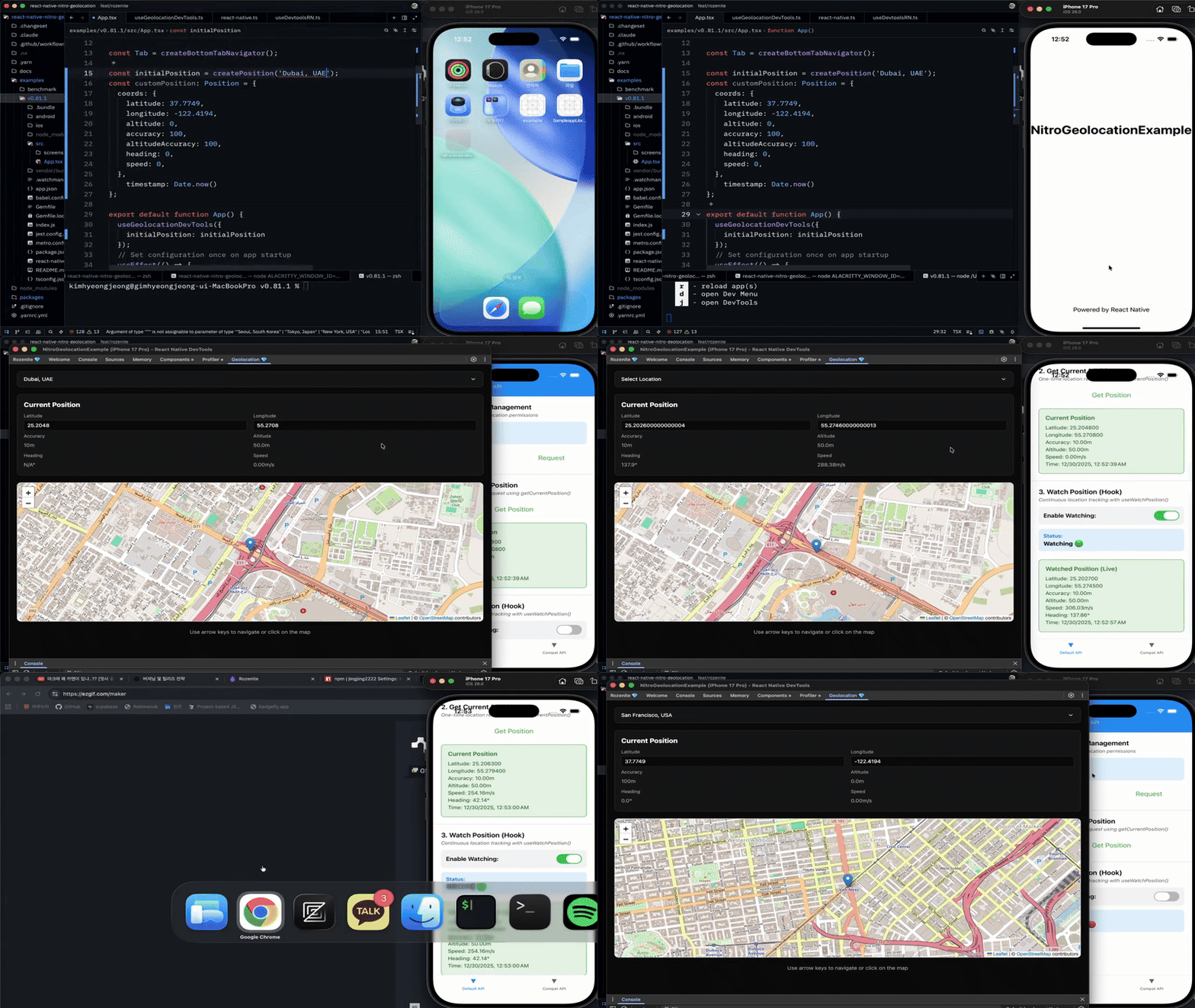
Rozenite DevTools Plugin for [react-native-nitro-geolocation](https://github.com/jingjing2222/react-native-nitro-geolocation). Mock geolocation data in development with an interactive map interface.
> **⚠️ Prerequisites**: This plugin requires Rozenite 2.2 or newer to be set up in your project. Follow the [Rozenite installation guide](https://www.rozenite.dev/) to configure DevTools before using this plugin.
> **ℹ️ API Compatibility**: This DevTools plugin only works with `react-native-nitro-geolocation`. It does not support the Compat API (`react-native-nitro-geolocation/compat`).
## Demo
## Features
- 🗺️ Interactive map-based position control
- 📍 Click on map to set location
- ⌨️ Arrow key navigation for precise adjustments
- 🏙️ 20 pre-configured city locations
- ✏️ Manual latitude/longitude input
- 📊 Real-time heading, speed, and accuracy calculation
- 🎯 Per-watch distance filters and Android interval/update limits
- 🌓 Dark mode support
## Installation
```bash
npm install @react-native-nitro-geolocation/rozenite-plugin
# or
yarn add @react-native-nitro-geolocation/rozenite-plugin
```
## Usage
Add the devtools hook to your app:
```tsx
import { useGeolocationDevTools } from "@react-native-nitro-geolocation/rozenite-plugin";
function App() {
useGeolocationDevTools();
return ;
}
```
### With initial position
#### Using city presets
```tsx
import {
useGeolocationDevTools,
createPosition,
} from "@react-native-nitro-geolocation/rozenite-plugin";
function App() {
useGeolocationDevTools({
initialPosition: createPosition("Dubai, UAE"),
});
return ;
}
```
#### Using custom coordinates
```tsx
import {
useGeolocationDevTools,
type Position,
} from "@react-native-nitro-geolocation/rozenite-plugin";
const customPosition: Position = {
coords: {
latitude: 37.7749,
longitude: -122.4194,
altitude: 0,
accuracy: 100,
altitudeAccuracy: 100,
heading: 0,
speed: 0,
},
timestamp: Date.now(),
};
function App() {
useGeolocationDevTools({
initialPosition: customPosition,
});
return ;
}
```
### Available city presets
Seoul, Tokyo, New York, Los Angeles, San Francisco, London, Paris, Berlin, Sydney, Singapore, Hong Kong, Shanghai, Beijing, Dubai, Mumbai, Bangkok, Toronto, São Paulo, Mexico City, Moscow
## Opening DevTools
1. Start your React Native app with Metro
2. Press `j` in the Metro terminal
3. Enable the Geolocation plugin in DevTools
4. Start mocking locations!
## Controls
- **Click map**: Set location instantly
- **Arrow keys**: Move position precisely
- **Input fields**: Enter exact coordinates
- **Dropdown**: Select city preset
## License
MIT License.
---
_Source: https://npm.io/package/@react-native-nitro-geolocation/rozenite-plugin · Machine-readable twin of the npm.io package page. Health data is recomputed on every publish._