# @react-native-segmented-control/segmented-control
> React Native SegmentedControlIOS library
Latest version **2.6.1** (published 2026-11-25) · MIT license · 0 weekly downloads
## Install
```sh
npm install @react-native-segmented-control/segmented-control
pnpm add @react-native-segmented-control/segmented-control
yarn add @react-native-segmented-control/segmented-control
bun add @react-native-segmented-control/segmented-control
```
## Health
**Score 70/100 (B)** — status: active.
Positive: has types; no vulnerabilities; has provenance; recently updated; high maintenance score; high quality score.
Warnings: low downloads; no esm support.
## Facts
| | |
|---|---|
| Version | 2.6.1 |
| Published | 2026-11-25 |
| First published | 2021-02-05 |
| Weekly downloads | 0 |
| License | MIT |
| TypeScript types | bundled |
| Module format | CommonJS |
| Dependencies | 0 |
| Unpacked size | 49.7 KB |
| Known vulnerabilities | 0 |
| Install scripts | no |
| Provenance | attested (GitHub Actions) |
| GitHub stars | 663 |
| Author | M.Haris Baig |
| Maintainers | naturalclar |
| Keywords | SegmentedControlIOS, react-native |
## Links
- npm: https://www.npmjs.com/package/@react-native-segmented-control/segmented-control
- Repository: https://github.com/react-native-segmented-control/segmented-control
- Homepage: https://github.com/react-native-segmented-control/segmented-control#readme
- Issues: https://github.com/react-native-segmented-control/segmented-control/issues
- npm.io page: https://npm.io/package/@react-native-segmented-control/segmented-control
## Recent versions
- 2.6.1 (latest) — 2026-11-25
- 2.6.0 — 2026-11-23
- 2.5.9 — 2026-11-22
- 2.5.8 — 2026-11-18
- 2.5.7 — 2024-12-11
- 2.5.6 — 2024-11-13
- 2.5.5 — 2024-10-23
- 2.5.4 — 2024-09-17
- 2.5.3 — 2024-09-17
- 2.5.2 — 2024-04-18
- 2.5.1 — 2024-04-17
- 2.5.0 — 2024-01-03
- 2.4.3 — 2023-12-12
- 2.4.2 — 2023-06-25
- 2.4.1 — 2023-03-15
- … 2 more at https://npm.io/package/@react-native-segmented-control/segmented-control/versions
## README
# `@react-native-segmented-control/segmented-control`
![Supports iOS and Android and Web][support-badge]![Github Action Badge][gha-badge] ![npm][npm-badge] [![Lean Core Extracted][lean-core-badge]][lean-core-issue]
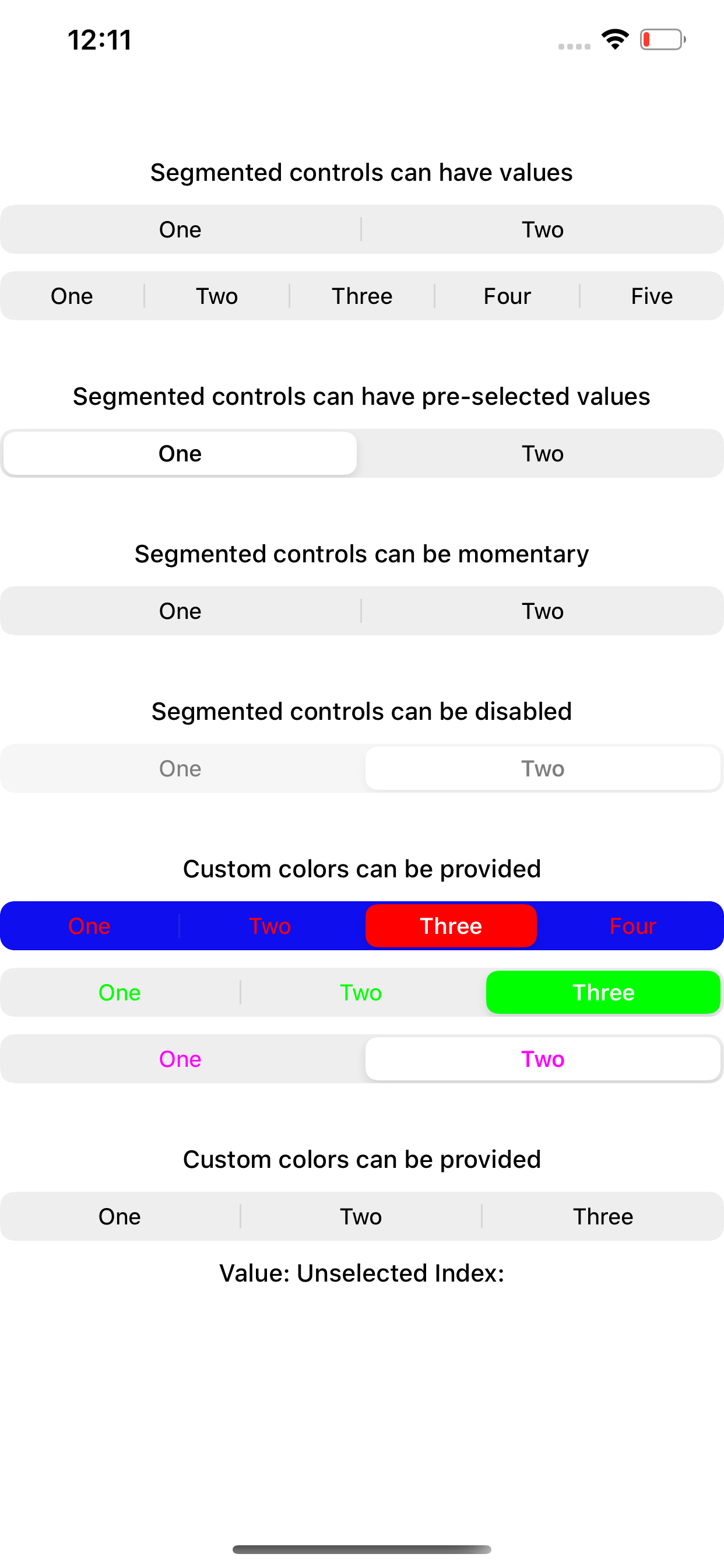
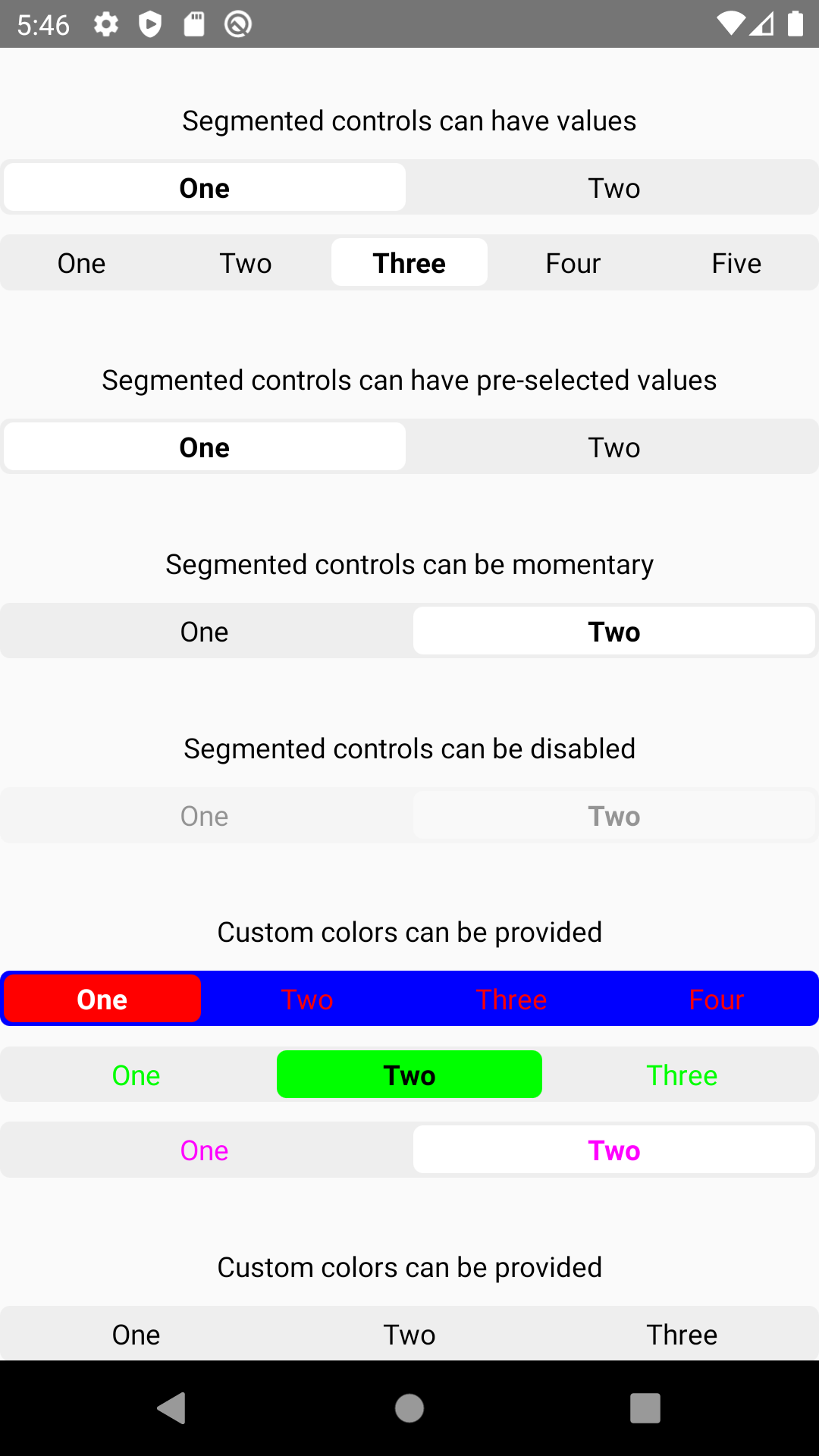
React Native SegmentedControl library. Use SegmentedControl to render a UISegmentedControl iOS.
For Android and Web, it has a js implementation that mocks iOS 13 style of UISegmentedControl.
| iOS | Android | Web |
| ----------------------------------------------------------------------------------------------------------------------------- | ----------------------------------------------------------------------------------------------------------------------------- | ---------------------------------------------------------------------------------------------------------------------------- |
|  |
 |
 |
## Supported React Native Version
| react-native-segmented-control | react-native |
| ------------------------------ | ------------ |
| v2.2.0 | >= 0.62 |
| <= v2.2.0 | >= 0.57 |
This module is NOT supported in the Expo Go app on iOS, because it requires custom native code. You need to use a custom development client or eject into bare workflow in order to use this module on iOS.
## Getting started
Install the library using your package manager:
pnpm:
```
pnpm install --save @react-native-segmented-control/segmented-control
```
yarn:
```
yarn add @react-native-segmented-control/segmented-control
```
npm:
```
npm install --save @react-native-segmented-control/segmented-control
```
## Link
### React Native 0.60+
The package is [automatically linked](https://github.com/react-native-community/cli/blob/master/docs/autolinking.md) when building the app. All you need to do is:
```sh
npx pod-install
```
For android, no linking is needed, as the module is implemented in js.
For React Native version 0.59 or older
### React Native <= 0.59
run `react-native link @react-native-segmented-control/segmented-control`
or you can follow the instructions to [manually link this package](https://facebook.github.io/react-native/docs/linking-libraries-ios#manual-linking).
## Upgrading to React Native _0.60+_
New React Native comes with `autolinking` feature, which automatically links Native Modules in your project. In order to get it to work, make sure you unlink `Segmented Control` first:
`react-native unlink @react-native-segmented-control/segmented-control`
## Migrating from the core `react-native` module
This module was created when the segmentedControlIos was split out from the core of React Native. To migrate to this module you need to follow the installation instructions above and then change you imports from:
```javascript
import {SegmentedControlIOS} from 'react-native';
```
to:
```javascript
import SegmentedControl from '@react-native-segmented-control/segmented-control';
```
## Usage
Start by importing the library:
Use `SegmentedControl` to render a UISegmentedControl iOS.
#### Programmatically changing selected index
The selected index can be changed on the fly by assigning the
selectedIndex prop to a state variable, then changing that variable.
Note that the state variable would need to be updated as the user
selects a value and changes the index, as shown in the example below.
```javascript
import SegmentedControl from '@react-native-segmented-control/segmented-control';
return (
{
this.setState({selectedIndex: event.nativeEvent.selectedSegmentIndex});
}}
/>
);
```
---
# Reference
## Props
Inherits [View Props](view.md#props).
### `enabled`
If false the user won't be able to interact with the control. Default value is true.
| Type | Required |
| ---- | -------- |
| bool | No |
### `disabledIndices`
Indexes of the segments (positions in `values`) the user can't interact with, while the other segments stay interactive. For example, `disabledIndices={[1]}` disables the second segment. Out-of-range indexes are ignored.
| Type | Required |
| --------------- | -------- |
| array of number | No |
---
### `momentary`
If true, then selecting a segment won't persist visually. The `onValueChange` callback will still work as expected.
| Type | Required | Platform |
| ---- | -------- | -------- |
| bool | No | iOS |
---
### `onChange`
Callback that is called when the user taps a segment; passes the event as an argument
| Type | Required |
| -------- | -------- |
| function | No |
---
### `onValueChange`
Callback that is called when the user taps a segment; passes the segment's value as an argument
| Type | Required |
| -------- | -------- |
| function | No |
---
### `selectedIndex`
The index in `props.values` of the segment to be (pre)selected.
| Type | Required |
| ------ | -------- |
| number | No |
---
### `tintColor`
Accent color of the control.
| Type | Required |
| ------ | -------- |
| string | No |
---
### `backgroundColor`
Background color color of the control. (iOS 13+ only)
| Type | Required | Supported Version |
| ------ | -------- | ----------------- |
| string | No | iOS 13+ |
---
### `values`
The labels for the control's segment buttons, in order.
| Type | Required |
| ------- | -------- |
| (string | number | Image)[] | No |
### `appearance`
(iOS 13+ only)
Overrides the control's appearance irrespective of the OS theme
| Type | Required | Platform |
| --------------- | -------- | ----------------- |
| 'dark', 'light' | No | iOS, Android, Web |
### `fontStyle`
(iOS 13+ only)
| Type | Required | Platform |
| ------ | -------- | -------- |
| object | No | iOS, Android, Web |
An object container
- `color`: color of segment text
- `fontSize`: font-size of segment text
- `fontFamily`: font-family of segment text
- `fontWeight`: font-weight of segment text
### `activeFontStyle`
(iOS 13+ only)
| Type | Required | Platform |
| ------ | -------- | -------- |
| object | No | iOS, Android, Web |
- `color`: overrides color of selected segment text
- `fontSize`: overrides font-size of selected segment text
- `fontFamily`: overrides font-family of selected segment text
- `fontWeight`: overrides font-weight of selected segment text
### `tabStyle`
(Android and Web only) Styles the clickable surface which is responsible to change tabs
| Type | Required | Platform |
| ------ | -------- | -------- |
| object | No | Android, Web |
Extends [ViewStyles](https://reactnative.dev/docs/view-style-props)
### `sliderStyle`
(Android and Web only) Styles the slider component (Animated.View)
| Type | Required | Platform |
| ------ | -------- | -------- |
| object | No | Android, Web |
Extends [ViewStyles](https://reactnative.dev/docs/view-style-props)
## Tips and Tricks
### How can I increase the height of the tab ?
For android and IOS, simply pass `prop.style`:
```json
{
"height": number
}
```
For react-native-web, additionally pass :
```json
{
"paddingVertical": number,
or
"height": number
}
```
### Adding padding makes text disappear on Android
If padding amount exceeds the fixed height of the container, it will shrink the text. So either increase the height or reduce your padding.
## Maintainers
- [M.Haris Baig](https://github.com/harisbaig100)
- [Naturalclar](https://github.com/Naturalclar)
## Contributing
Please see the [`contributing guide`](/CONTRIBUTING.md).
## License
The library is released under the MIT licence. For more information see [`LICENSE`](/LICENSE).
[gha-badge]: https://github.com/react-native-segmented-control/segmented-control/workflows/Build/badge.svg
[npm-badge]: https://img.shields.io/npm/v/@react-native-segmented-control/segmented-control.svg?style=flat-square
[lean-core-badge]: https://img.shields.io/badge/Lean%20Core-Extracted-brightgreen.svg?style=flat-square
[lean-core-issue]: https://github.com/facebook/react-native/issues/23313
[support-badge]: https://img.shields.io/badge/platforms-android%20|%20ios%20|%20web-lightgrey.svg?style=flat-square
---
_Source: https://npm.io/package/@react-native-segmented-control/segmented-control · Machine-readable twin of the npm.io package page. Health data is recomputed on every publish._