# @rsc-labs/backstage-highlights-plugin
Latest version **0.3.0** (published 2024-10-18) · MPL-2.0 license · 0 weekly downloads
## Install
```sh
npm install @rsc-labs/backstage-highlights-plugin
pnpm add @rsc-labs/backstage-highlights-plugin
yarn add @rsc-labs/backstage-highlights-plugin
bun add @rsc-labs/backstage-highlights-plugin
```
## Health
**Score 35/100 (D)** — status: maintenance-mode.
Positive: has types; no vulnerabilities; high quality score.
Warnings: low downloads; no esm support; pre 1.0.
Negative: stale; low maintenance score.
## Facts
| | |
|---|---|
| Version | 0.3.0 |
| Published | 2024-10-18 |
| First published | 2023-11-19 |
| Weekly downloads | 0 |
| License | MPL-2.0 |
| TypeScript types | bundled |
| Module format | CommonJS |
| Dependencies | 14 |
| Unpacked size | 81.3 KB |
| Known vulnerabilities | 0 |
| Install scripts | no |
| GitHub stars | 5 |
| Maintainers | szymkiewicz.radoslaw |
| Keywords | backstage, plugin, frontend, highlights, git, rsc-labs, typescript, javascript |
## Links
- npm: https://www.npmjs.com/package/@rsc-labs/backstage-highlights-plugin
- Repository: https://github.com/RSC-Labs/backstage-highlights-plugin
- Homepage: https://github.com/RSC-Labs/backstage-highlights-plugin#readme
- Issues: https://github.com/RSC-Labs/backstage-highlights-plugin/issues
- npm.io page: https://npm.io/package/@rsc-labs/backstage-highlights-plugin
## Dependencies (14)
- [luxon](https://npm.io/package/luxon.md) ^3.4.4
- [react-use](https://npm.io/package/react-use.md) ^17.2.4
- [@types/fs-extra](https://npm.io/package/@types/fs-extra.md) ^9.0.1
- [@backstage/theme](https://npm.io/package/@backstage/theme.md) ^0.4.2
- [@material-ui/lab](https://npm.io/package/@material-ui/lab.md) 4.0.0-alpha.61
- [@backstage/errors](https://npm.io/package/@backstage/errors.md) ^1.2.3
- [@material-ui/core](https://npm.io/package/@material-ui/core.md) ^4.12.2
- [@material-ui/icons](https://npm.io/package/@material-ui/icons.md) ^4.9.1
- [javascript-time-ago](https://npm.io/package/javascript-time-ago.md) 2.5.9
- [@backstage/catalog-model](https://npm.io/package/@backstage/catalog-model.md) ^1.4.3
- [@backstage/core-components](https://npm.io/package/@backstage/core-components.md) ^0.13.5
- [@backstage/core-plugin-api](https://npm.io/package/@backstage/core-plugin-api.md) ^1.6.0
- [@types/javascript-time-ago](https://npm.io/package/@types/javascript-time-ago.md) 2.0.7
- [@backstage/plugin-catalog-react](https://npm.io/package/@backstage/plugin-catalog-react.md) ^1.8.5
## Alternatives
- [@openai/codex-sdk](https://npm.io/package/@openai/codex-sdk.md) — 731.4K weekly downloads
- [babel-plugin-transform-react-jsx](https://npm.io/package/babel-plugin-transform-react-jsx.md) — 565.0K weekly downloads
- [babel-helper-remove-or-void](https://npm.io/package/babel-helper-remove-or-void.md) — 508.5K weekly downloads
- [@pnpm/store-controller-types](https://npm.io/package/@pnpm/store-controller-types.md) — 186.9K weekly downloads
- [react-native-signature-canvas](https://npm.io/package/react-native-signature-canvas.md) — 155.6K weekly downloads
## Recent versions
- 0.3.0 (latest) — 2024-10-18
- 0.2.0 — 2024-06-28
- 0.1.5 — 2023-12-03
- 0.1.4 — 2023-11-21
- 0.1.3 — 2023-11-20
- 0.1.2 — 2023-11-20
- 0.1.1 — 2023-11-19
- 0.1.0 — 2023-11-19
- 0.0.1 — 2023-11-19
## README
# @rsc-labs/backstage-highlights-plugin
 Backstage Highlights Plugin is configurable and customizable plugin for viewing the most important information about your entity.
### Why?
We have a lot information from different plugins and also in Overview tab, but sometimes:
- we want to see some short summary from couple of plugins
- we do not want to jump to every card to get such information
The "Highlights" shall provide you possibility to create such small, useful view.
# Getting started
If you haven't already, check out the [Backstage docs](https://backstage.io/docs/getting-started/) and create a Backstage application with
```
npx @backstage/create-app
```
Then, you will need to install and configure the highlights plugins for the frontend and the backend.
Backend plugin installation can be found here: [Backend plugin](https://github.com/RSC-Labs/backstage-highlights-plugin/tree/main/plugins/backstage-highlights-plugin-backend)
# Frontend plugin
Install:
```bash
cd packages/app
yarn add @rsc-labs/backstage-highlights-plugin
```
### Card:
Add the card to `packages/app/src/components/catalog/EntityPage.tsx`:
```jsx
// import:
import { isGitlabHighlightsAvailable, EntityHighlightsCard } from '@rsc-labs/backstage-highlights-plugin';
// use it in entity view
const overviewContent = (
)
```
For the best UX we strongly recommend to use as much horizontal space as possible. Thanks to that you will have your highlights on top of your page as a bar.
Backstage Highlights Plugin is configurable and customizable plugin for viewing the most important information about your entity.
### Why?
We have a lot information from different plugins and also in Overview tab, but sometimes:
- we want to see some short summary from couple of plugins
- we do not want to jump to every card to get such information
The "Highlights" shall provide you possibility to create such small, useful view.
# Getting started
If you haven't already, check out the [Backstage docs](https://backstage.io/docs/getting-started/) and create a Backstage application with
```
npx @backstage/create-app
```
Then, you will need to install and configure the highlights plugins for the frontend and the backend.
Backend plugin installation can be found here: [Backend plugin](https://github.com/RSC-Labs/backstage-highlights-plugin/tree/main/plugins/backstage-highlights-plugin-backend)
# Frontend plugin
Install:
```bash
cd packages/app
yarn add @rsc-labs/backstage-highlights-plugin
```
### Card:
Add the card to `packages/app/src/components/catalog/EntityPage.tsx`:
```jsx
// import:
import { isGitlabHighlightsAvailable, EntityHighlightsCard } from '@rsc-labs/backstage-highlights-plugin';
// use it in entity view
const overviewContent = (
)
```
For the best UX we strongly recommend to use as much horizontal space as possible. Thanks to that you will have your highlights on top of your page as a bar.
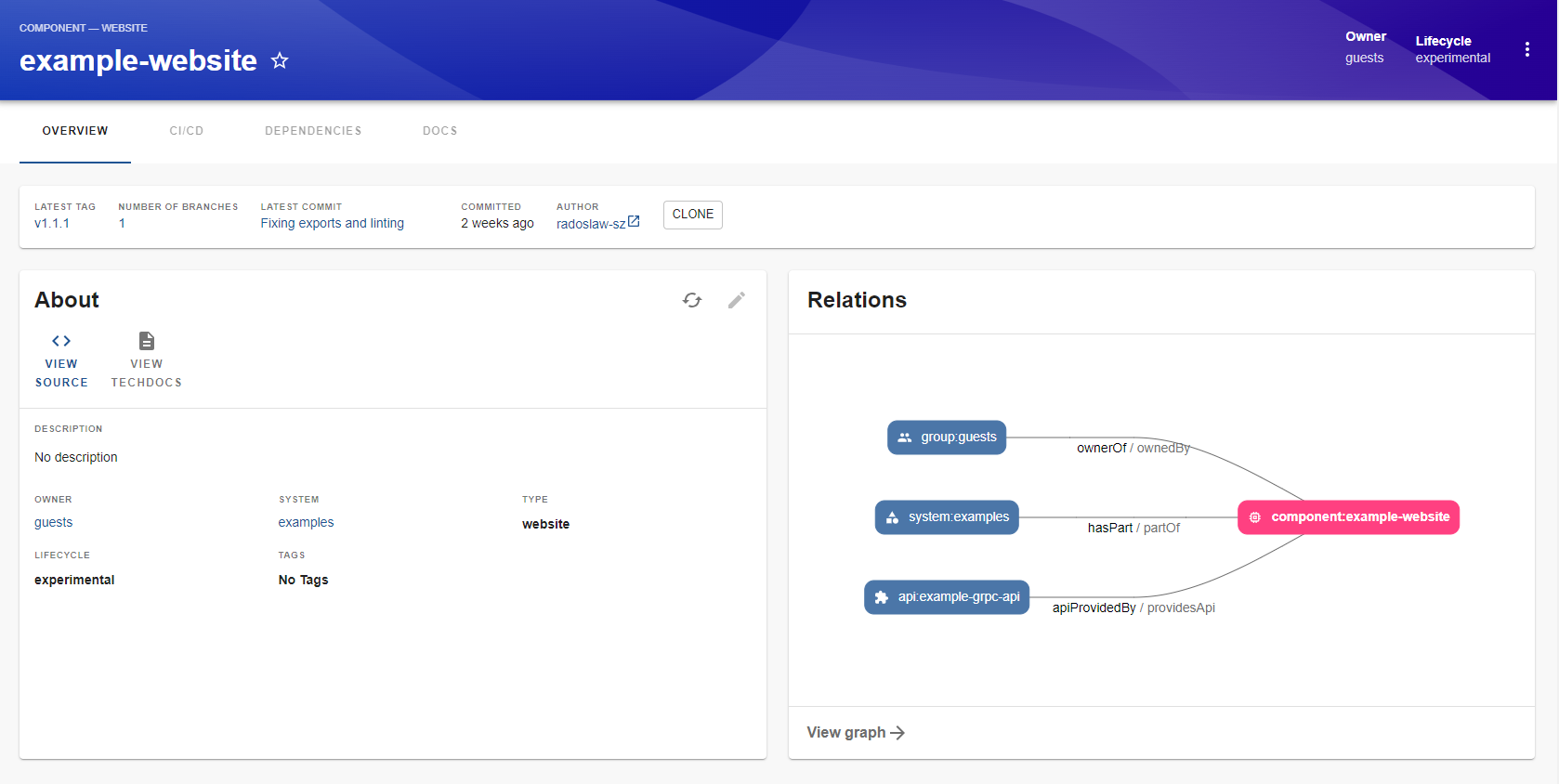 Of course, you can also make it smaller and near the other card.
### Built-in fields
At this moment, "highlights plugin" comes with built-in support of basic information about Git. As you can see in above picture, we support following fields:
- latest tag
- number of branches
- latest commit
- date of latest commit
- author of latest commit
- clone button
You can click at the field and get more information. For example, when you click on latest tag you will get longer history:
Of course, you can also make it smaller and near the other card.
### Built-in fields
At this moment, "highlights plugin" comes with built-in support of basic information about Git. As you can see in above picture, we support following fields:
- latest tag
- number of branches
- latest commit
- date of latest commit
- author of latest commit
- clone button
You can click at the field and get more information. For example, when you click on latest tag you will get longer history:
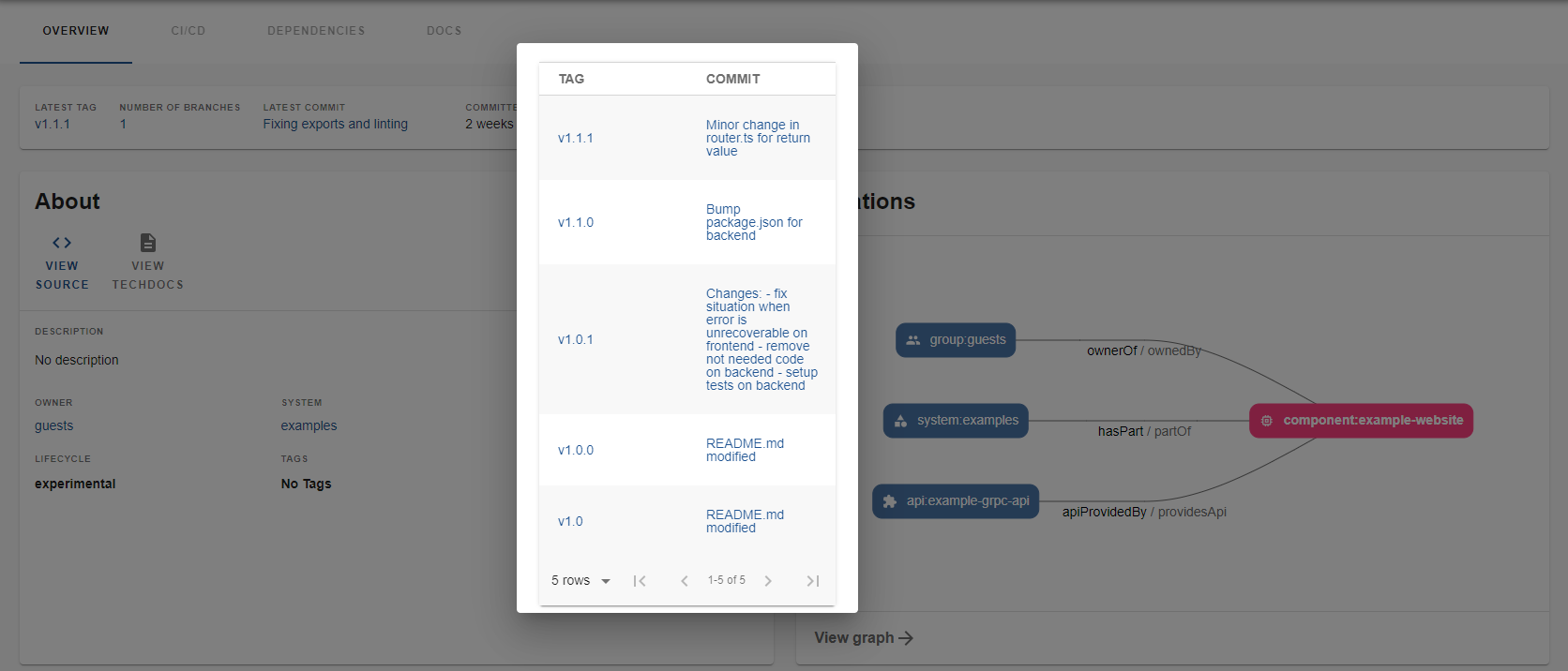 Other fields can have similar functionality, but it depends on the provider (Github API provides more information)
At this moment built-in fields supports Github and Gitlab (see: Configuration of Backend).
## Frontend configuration
By default, you can use EntityHighlights without any parameter - it gives you above built-in fields.
However, you may want change a behaviour or implement your custom fields.
Below you can find an interface:
```typescript
/** @public */
export interface EntityHighlightsProps {
fields?: EHighlightFields[];
customFields?: HighlightCustomField[];
}
```
1. fields - this parameter describes what built-in you would like to see and in what order
2. customFields - this parameter can let you define your own field. Every custom field contains:
- fieldLabel - it is a title of the field (you can see it in built-in fields). It is optional parameter as your field can be also without a title (example: Clone button in built-in fields)
- field - it is simple React component
## TODO
[ ] Unit tests
[ ] More fields to support
## Contribution
Contributions are welcome and they are greatly appreciated!
## License
Licensed under the Mozilla Public License, Version 2.0: https://www.mozilla.org/en-US/MPL/2.0/
---
© 2023 RSC https://rsoftcon.com/
---
_Source: https://npm.io/package/@rsc-labs/backstage-highlights-plugin · Machine-readable twin of the npm.io package page. Health data is recomputed on every publish._
Other fields can have similar functionality, but it depends on the provider (Github API provides more information)
At this moment built-in fields supports Github and Gitlab (see: Configuration of Backend).
## Frontend configuration
By default, you can use EntityHighlights without any parameter - it gives you above built-in fields.
However, you may want change a behaviour or implement your custom fields.
Below you can find an interface:
```typescript
/** @public */
export interface EntityHighlightsProps {
fields?: EHighlightFields[];
customFields?: HighlightCustomField[];
}
```
1. fields - this parameter describes what built-in you would like to see and in what order
2. customFields - this parameter can let you define your own field. Every custom field contains:
- fieldLabel - it is a title of the field (you can see it in built-in fields). It is optional parameter as your field can be also without a title (example: Clone button in built-in fields)
- field - it is simple React component
## TODO
[ ] Unit tests
[ ] More fields to support
## Contribution
Contributions are welcome and they are greatly appreciated!
## License
Licensed under the Mozilla Public License, Version 2.0: https://www.mozilla.org/en-US/MPL/2.0/
---
© 2023 RSC https://rsoftcon.com/
---
_Source: https://npm.io/package/@rsc-labs/backstage-highlights-plugin · Machine-readable twin of the npm.io package page. Health data is recomputed on every publish._