# @sakitam-gis/vitepress-playground
> 为你的 vitepress 网站添加一个在线示例功能
Latest version **1.2.0** (published 2024-04-18) · MIT license · 0 weekly downloads
## Install
```sh
npm install @sakitam-gis/vitepress-playground
pnpm add @sakitam-gis/vitepress-playground
yarn add @sakitam-gis/vitepress-playground
bun add @sakitam-gis/vitepress-playground
```
## Health
**Score 25/100 (F)** — status: abandoned.
Positive: has types; esm support; no vulnerabilities.
Warnings: low downloads.
Negative: abandoned; low maintenance score.
## Facts
| | |
|---|---|
| Version | 1.2.0 |
| Published | 2024-04-18 |
| First published | 2023-12-18 |
| Weekly downloads | 0 |
| License | MIT |
| TypeScript types | bundled |
| Module format | ESM + CommonJS |
| Dependencies | 5 |
| Unpacked size | 376.9 KB |
| Known vulnerabilities | 0 |
| Install scripts | no |
| Maintainers | sakitam-gis-owner, sakitam-fdd |
## Links
- npm: https://www.npmjs.com/package/@sakitam-gis/vitepress-playground
- npm.io page: https://npm.io/package/@sakitam-gis/vitepress-playground
## Dependencies (5)
- [vue](https://npm.io/package/vue.md) ^3.3.7
- [codesandbox](https://npm.io/package/codesandbox.md) ^2.2.3
- [floating-vue](https://npm.io/package/floating-vue.md) ^5.2.2
- [@stackblitz/sdk](https://npm.io/package/@stackblitz/sdk.md) ^1.9.0
- [@vue/compiler-core](https://npm.io/package/@vue/compiler-core.md) ^3.3.7
## Recent versions
- 1.2.0 (latest) — 2024-04-18
- 1.1.8 — 2024-04-16
- 1.1.7 — 2024-04-12
- 1.1.6 — 2024-04-12
- 1.1.5 — 2024-04-12
- 1.1.3 — 2024-03-21
- 1.1.2 — 2024-03-20
- 1.1.1 — 2024-03-20
- 1.1.0 — 2024-03-20
- 1.0.1 — 2024-03-20
- 1.0.0 — 2023-12-18
## README
## @sakitam-gis/vitepress-playground
为你的 vitepress 网站添加一个在线示例功能
## Feature
- 🚀 约定式示例编程
- 🔍 支持 .vue 单文件示例和代码块示例
- 🎨 自动化的 [Vue SFC Playground](https://play.vuejs.org/) 、 [stackblitz](https://stackblitz.com)、[codesandbox](https://codesandbox.io) 代码示例
- 💡 支持 markdown 中 importMap 配置
## Use
### Install
```bash
pnpm i @sakitam-gis/vitepress-playground
```
### Import
主要配置的有两个位置:
1. `.vitepress/config.ts` / `.vitepress/config.js` / `.vitepress/config.mts` / `.vitepress/config.mjs`
```ts
import { defineConfig } from 'vitepress';
import config from '@sakitam-gis/vitepress-playground/config';
export default defineConfig({
extends: config,
... Your custom config
});
```
2. `.vitepress/theme/index.ts` / `.vitepress/theme/index.js`
```ts
import DefaultTheme from 'vitepress/theme';
import { SfcPlayground } from '@sakitam-gis/vitepress-playground';
import '@sakitam-gis/vitepress-playground/dist/style.css';
export default {
...DefaultTheme,
enhanceApp({ app, router, siteData }) {
app.component('SfcPlayground', SfcPlayground);
},
} as any;
```
### Dev
我们编写的示例基本如下:
```markdown
---
aside: false
importMap: {
"plotty": "https://esm.sh/plotty",
"geotiff": "https://esm.sh/geotiff@2.1.3",
}
---
## 使用 plotty 渲染 tiff 数据
```
注意以上 markdown 片段中 `importMap` 必须配置在头部配置中,他的内容为本页面所有 `sfc-playground` 的依赖集合,你可以使用 `esm.sh` 或者其他替代
产品,并且这个配置只在 vitepress 的在线代码编辑器[Vue SFC Playground](https://play.vuejs.org/)有用。代码 playground 在 markdown 中表现形式为 `html` 片段,相关属性配置项如下:
| 属性字段 | 作用 | 默认值 | 样例 |
| -------------------------- | ------------------------------------------------------------ | --------- | -------------------------- |
| src | 引用的 sfc 代码组件 | undefined | |
| language | 代码高亮语言格式 | vue | vue |
| title | 代码示例的标题 | '' | 按钮使用 |
| desc | 代码示例描述 | '' | 这是一个简单的按钮使用示例 |
| enableIntersectionObserver | 对当前示例是否启用可视区优化(如果启用,代码示例不在浏览器可视区内那么不会进行渲染,这在一些 webgl 可视化的展示比较有用,能够提高页面的浏览体验) | true | true |
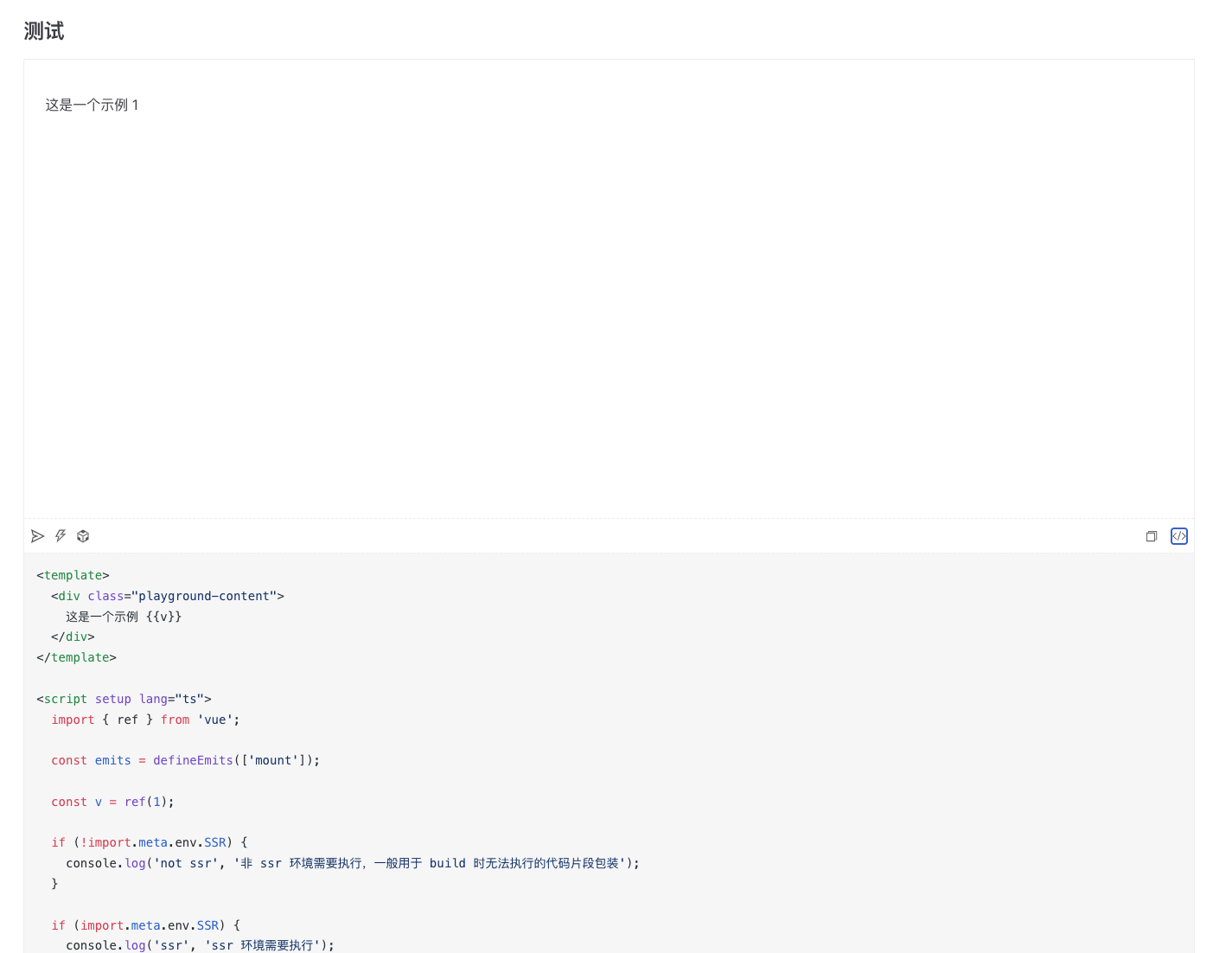
除了单文件示例外,也支持代码片段示例,基本示例如下:
```vue:demo
这是一个示例 {{v}}
```
上述配置完成后,正常启动 vitepress 开发即可
## Design
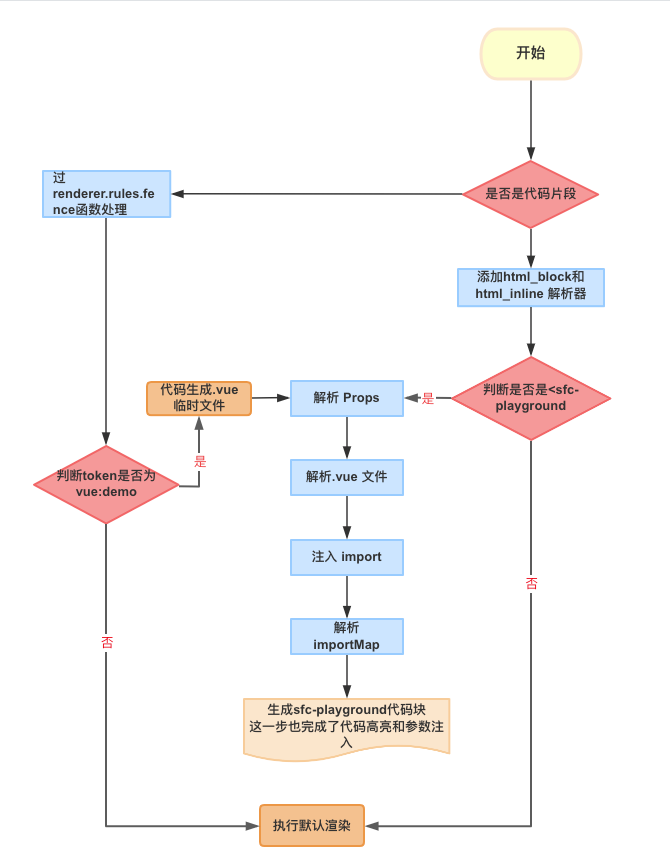
这里的设计思路很简单,正常情况下 markdown 文件都会被解析为内部标记,我们通过判断是否存在对应的示例标签来执行对应的解析逻辑。
这里的解析逻辑共有三种,分为两大类(code block 和 sfc),相关解析流程请查看下图:
### OnlineEditor
关于在线编辑器这里共支持了三种:[Vue SFC Playground](https://play.vuejs.org/) 、 [stackblitz](https://stackblitz.com)、[codesandbox](https://codesandbox.io)
其中前两种的支持比较完善,codesandbox目前由于限制个人用户草稿数目(Draft)和限制使用 `Sandbox` 可能会出现一些问题,有需要的话建议自行转为 `Devbox`.
---
_Source: https://npm.io/package/@sakitam-gis/vitepress-playground · Machine-readable twin of the npm.io package page. Health data is recomputed on every publish._