# @salla.sa/webhooks-actions
> Salla Webhooks Actions
Latest version **1.0.2** (published 2022-05-10) · ISC license · 0 weekly downloads
## Install
```sh
npm install @salla.sa/webhooks-actions
pnpm add @salla.sa/webhooks-actions
yarn add @salla.sa/webhooks-actions
bun add @salla.sa/webhooks-actions
```
## Health
**Score 15/100 (F)** — status: abandoned.
Positive: no vulnerabilities.
Warnings: low downloads; no types; no esm support.
Negative: abandoned; low maintenance score.
## Facts
| | |
|---|---|
| Version | 1.0.2 |
| Published | 2022-05-10 |
| First published | 2022-05-10 |
| Weekly downloads | 0 |
| License | ISC |
| TypeScript types | none |
| Module format | CommonJS |
| Dependencies | 0 |
| Unpacked size | 49.6 KB |
| Known vulnerabilities | 0 |
| Install scripts | no |
| Author | Salla App |
| Maintainers | ahmed-alkatheri, kulth00m, ibra-hassan, taghreedaaa, kodeburner, thaifani, emanlowndi, zymawy, muhammed-sh, dev-tarek, dev_fouda, rashaamer, egkrinkel, eslamoo, adelgs, asmaa_sh_ali, dhafer, anasred, omaralalwisalla, devlomingo, yamenarahman, ossycodes, salahmyn, anass_at, adilah.m, adel.elshafey, tahaabdoh, jamalla, krinkel, jalmatari, ashraf.reda, s.alkhwlani |
| Keywords | node, salla |
## Links
- npm: https://www.npmjs.com/package/@salla.sa/webhooks-actions
- Repository: https://github.com/SallaApp/webhooks-actions
- Homepage: https://github.com/SallaApp/webhooks-actions#readme
- Issues: https://github.com/SallaApp/webhooks-actions/issues
- npm.io page: https://npm.io/package/@salla.sa/webhooks-actions
## Recent versions
- 1.0.2 (latest) — 2022-05-10
- 1.0.0 — 2022-05-10
## README
# Overview
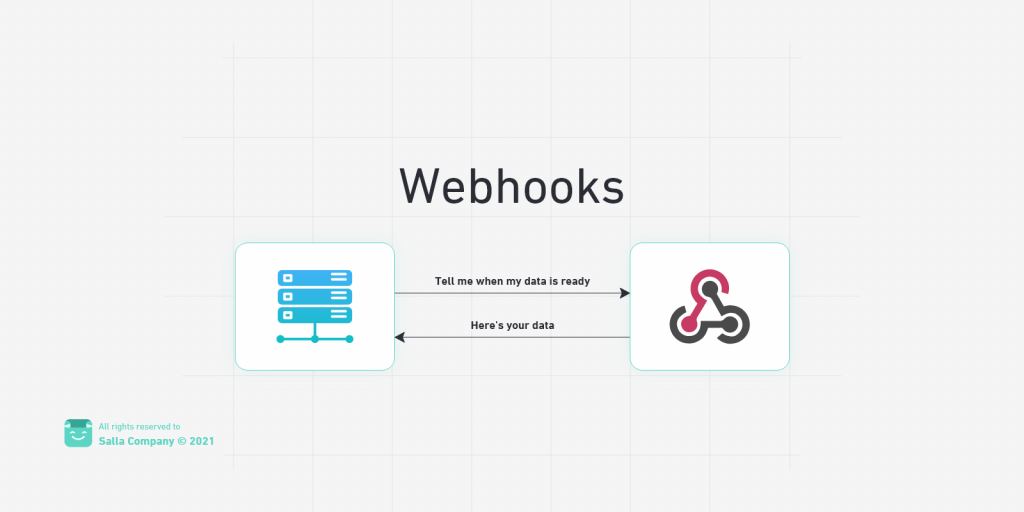
Webhooks simplify the communication between your App and Salla APIs. In this way, you will be notified whenever your app receives payload/data from the Salla APIs. These webhooks are triggered along with many actions such as an order or product being created, a customer logs in, a coupon is applied, and much more.
This module helps you to listen for notifications from Salla APIs within your Nodejs applications and Expressjs,
By using it you can impelement listernes for every event sent by Salla to your server .
For more information about Salla's Webhooks implementation, check our
[Webhooks Explained](https://salla.dev/blog/webhooks-101/).
## Webhooks Workflow
## Installation
$ npm install @salla.sa/webhooks-actions
(back to top)
## Usage
With Salla Webhooks Actions you can listen for notifications send by Salla to your endpoint set by Expressjs or other frameworks like next.js
### Impelement Using Listeners
You you can add listeners as a function, it will be exeucted every time an event is received .
```javascript
// Import Deps
const express = require("express");
const bodyParser = require("body-parser");
const consolidate = require("consolidate");
// Salla Webhook API
const SallaWebhook = require("@salla.sa/webhooks-actions");
// initialize app
const port = 8081;
let eventsStack = [];
const app = express();
app.use(bodyParser.urlencoded({ extended: false }));
app.use(bodyParser.json());
require("dotenv").config();
/*
A .env file should be automatically created in the root directory of your project when createing your project with @salla/SallaCLI.
environment-specific variables on new lines in the form of NAME=VALUE. For example:
SALLA_OAUTH_CLIENT_ID=xxxxxxxxxxxxxxxxxxxxxxxxxxxxxxx
SALLA_OAUTH_CLIENT_SECRET=xxxxxxxxxxxxxxxxxxxxxxxxxxxxxxx
SALLA_WEBHOOK_SECRET=xxxxxxxxxxxxxxxxxxxxxxxxxxxxxxx
SALLA_AUTHORIZATION_MODE=easy
SALLA_OAUTH_CLIENT_REDIRECT_URI=https://example.com/oauth/callback
SALLA_APP_ID=123456789
...
*/
const SALLA_WEBHOOK_SECRET = process.env.SALLA_WEBHOOK_SECRET;
SallaWebhook.setSecret(SALLA_WEBHOOK_SECRET);
// Add Webhook listeners
SallaWebhook.on("app.installed", (eventBody, userArgs) => {
// handel app.installed event
});
SallaWebhook.on("app.stroe.authorize", (eventBody, userArgs) => {
// handel app.app.stroe.authoriz event
});
// POST /webhook
app.post("/webhook", function (req, res) {
SallaWebhook.checkActions(req.body, req.headers.authorization, {
/* your args to pass to action files or listeners */
});
});
app.listen(port, function () {
console.log("App is listening on port " + port);
});
```
### Impelement Using Folder Structure
You you can add listeners as files easly using the `salla app create-webhook app.updated ` command; the file will be exeucted every time an event is received .
```javascript
/*
Actions
├───app
│ installed.js
│ store.authorize.js
├───brand
│ created.js
├───customer
│ login.js
│ otp.created.js
│ request.js
│ updated.js
├───order
│ created.js
├───project
│ created.js
└───store
branch.created.js
*/
// Import Deps
const express = require("express");
const bodyParser = require("body-parser");
const consolidate = require("consolidate");
// Salla Actions API
const SallaWebhook = require("@salla.sa/webhooks-actions");
// initialize app
const port = 8081;
let eventsStack = [];
const app = express();
app.use(bodyParser.urlencoded({ extended: false }));
app.use(bodyParser.json());
require("dotenv").config();
/*
A .env file should be automatically created in the root directory of your project when createing your project with @salla/SallaCLI.
environment-specific variables on new lines in the form of NAME=VALUE. For example:
SALLA_OAUTH_CLIENT_ID=xxxxxxxxxxxxxxxxxxxxxxxxxxxxxxx
SALLA_OAUTH_CLIENT_SECRET=xxxxxxxxxxxxxxxxxxxxxxxxxxxxxxx
SALLA_WEBHOOK_SECRET=xxxxxxxxxxxxxxxxxxxxxxxxxxxxxxx
SALLA_AUTHORIZATION_MODE=easy
SALLA_OAUTH_CLIENT_REDIRECT_URI=https://example.com/oauth/callback
SALLA_APP_ID=123456789
...
*/
const SALLA_WEBHOOK_SECRET = process.env.SALLA_WEBHOOK_SECRET;
SallaWebhook.setSecret(SALLA_WEBHOOK_SECRET);
SallaWebhook.on("all", (eventBody, userArgs) => {
// handel all actions even thats not authorized . good for logging .
});
// the endpoint to receive actions from Salla
app.post("/webhooks", (req, res) =>
SallaWebhook.checkActions(
req.body,
req.headers.authorization,
...{
/* add more arguments, will be passed to listner functions and SallaWebhook js files*/
}
)
);
app.listen(port, function () {
console.log("App is listening on port " + port);
});
```
(back to top)
Salla already defined a list of the webhooks/actions that are triggered automatically. The predefined webhooks/actions can be found in the folder [`Actions`](https://github.com/SallaApp/Laravel-Start-Kit/tree/master/Actions).
#### Order Related Webhooks/Actions
| ** Action Name ** | ** Description ** |
| ------------------------------------------------------------------------------- | ---------------------------------------------------------------------------- |
| [order.created](app/Actions/Order/Created.js) | This indicates a singular order has been created |
| [order.updated](app/Actions/Order/Updated.js) | Details, data and/or content of a specific order have been refreshed updated |
| [order.status.updated](app/Actions/Order/StatusUpdated.js) | Whenever there is an order status update, this is triggered |
| [order.cancelled](app/Actions/Order/Cancelled.js) | This happens when an order is cancelled |
| [order.refunded](app/Actions/Order/Refunded.js) | The refund action to refund the whole order is triggered. |
| [order.deleted](app/Actions/Order/) | This indicates an order has been deleted |
| [order.products.updated](app/Actions/Order/ProductsUpdated.js) | Order products is updated |
| [order.payment.updated](app/Actions/Order/PaymentUpdated.js) | A payment method has been updated |
| [order.coupon.updated](app/Actions/Order/CouponUpdated.js) | This is triggered whenever a Coupon is updated |
| [order.total.price.updated](app/Actions/Order/TotalPriceUpdated.js) | A total price of an order has been updated |
| [order.shipment.creating](app/Actions/Order/ShipmentCreating.js) | This indicates a new shipment is being created |
| [order.shipment.created](app/Actions/Order/ShipmentCreated.js) | This indicates a new shipment has been created |
| [order.shipment.cancelled](app/Actions/Order/ShipmentCancelled.js) | This indicates a an order shipment has been cancelled |
| [order.shipment.return.creating](app/Actions/Order/ShipmentReturnCreating.js) | This is triggered when a returned order shipment is being created |
| [order.shipment.return.created](app/Actions/Order/ShipmentReturnCreated.js) | This is triggered when a returned order shipment has been created |
| [order.shipment.return.cancelled](app/Actions/Order/ShipmentReturnCancelled.js) | This is triggered when a returned order shipment has been cancelled |
| [order.shipping.address.updated](app/Actions/Order/ShippingAddressUpdated.js) | Occurs when an Order shipping address is updated |
(back to top)
#### Product Related Webhooks/Actions
| ** Action Name ** | ** Description ** |
| ---------------------------------------------------------- | ------------------------------------------------------------------------------------ |
| [product.created](app/Actions/Product/Created.js) | A new product is created. Payload of the new product are to accompanying the product |
| [product.updated](app/Actions/Product/Updated.js) | Add/Modify details of a product |
| [product.deleted](app/Actions/Product/Deleted.js) | Delete a product along with all its variants and images |
| [product.available](app/Actions/Product/Available.js) | Flags a product as stock available |
| [product.quantity.low](app/Actions/Product/QuantityLow.js) | Shows warnings whenever a stock is of low quantity |
(back to top)
#### Shipping Companies Related Webhooks/Actions
| ** Action Name ** | ** Description ** |
| ------------------------ | ------------------------------------------------------------------------------------- |
| shipping.zone.created | This is triggered when a shipping zone has been created for a custom shipping company |
| shipping.zone.updated | This is triggered when a shipping zone has been updated for a custom shipping company |
| shipping.company.created | This is triggered when a custom shipping company has been created |
| shipping.company.updated | This is triggered when a custom shipping company has been updated |
| shipping.company.deleted | This is triggered when a custom shipping company has been deleted |
(back to top)
#### Customer Related Webhooks/Actions
| ** Action Name ** | ** Description ** |
| ---------------------------------------------------------- | ---------------------------------------- |
| [customer.created](app/Actions/Customer/Created.js) | Create a new customer record |
| [customer.updated](app/Actions/Customer/Updated.js) | Update details for a customer |
| [customer.login](app/Actions/Customer/Login.js) | Triggered whenever a customer log in |
| [customer.otp.request](app/Actions/Customer/OtpRequest.js) | One-Time Password request for a customer |
(back to top)
#### Category Related Webhooks/Actions
| ** Action Name ** | ** Description ** |
| --------------------------------------------------- | --------------------------------------------------- |
| [category.created](app/Actions/Category/Created.js) | Creates a new category for products to be put under |
| [category.updated](app/Actions/Category/Updated.js) | Add new or reform existing category details |
(back to top)
#### Brand Related Webhooks/Actions
| ** Action Name ** | ** Description ** |
| --------------------------------------------- | ------------------------------------------------------------------------------------ |
| [brand.created](app/Actions/Brand/Created.js) | Creates a new Brand. |
| [brand.updated](app/Actions/Brand/Updated.js) | Triggered when Information about a sepcific Brand is updated/refurbished/streamlined |
| [brand.deleted](app/Actions/Brand/Deleted.js) | An existing brand is then deleted and removed from a store |
(back to top)
#### Store Related Webhooks/Actions
| ** Action Name ** | ** Description ** |
| ---------------------------------------------------------------- | ---------------------------------- |
| [store.branch.created](app/Actions/Store/BranchCreated.js) | Creates a new store. |
| [store.branch.updated](app/Actions/Store/BranchUpdated.js) | Updates an existing branch |
| [store.branch.setDefault](app/Actions/Store/BranchSetDefault.js) | Sets for default a specific branch |
| [store.branch.activated](app/Actions/Store/BranchActivated.js) | Activates a disabled branch |
| [store.branch.deleted](app/Actions/Store/BranchDeleted.js) | Deletes a branch |
| [storetax.created](app/Actions/Store/TaxCreated.js) | Creats a new Store Tax |
(back to top)
#### Cart Related Webhooks/Actions
| ** Action Name ** | ** Description ** |
| ------------------------------------------------------------ | ----------------------------------------------- |
| [abandoned.cart](app/Actions/Miscellaneous/AbandonedCart.js) | Outputs a list of abandoned carts |
| [coupon.applied](app/Actions/Miscellaneous/CouponApplied.js) | Creates a discount code in the form of a coupon |
(back to top)
#### Special Offer Related Webhooks/Actions
| ** Action Name ** | ** Description ** |
| ------------------------------------------------------------------------ | --------------------------- |
| [specialoffer.created](app/Actions/Miscellaneous/SpecialofferCreated.js) | Creates a new special offer |
| [specialoffer.updated](app/Actions/Miscellaneous/SpecialofferUpdated.js) | Updates a special offer |
(back to top)
#### Miscellaneous Related Webhooks/Actions
| ** Action Name ** | ** Description ** |
| -------------------------------------------------------- | ------------------------------- |
| [review.added](app/Actions/Miscellaneous/ReviewAdded.js) | A product review has been added |
(back to top)
## Tests
$ npm install --dev
$ npm test
(back to top)
## Support
The team is always here to help you. Happen to face an issue? Want to report a bug? You can submit one here on Github using the [Issue Tracker](https://github.com/SallaApp/Salla-CLI/issues/new). If you still have any questions, please contact us via the [Telegram Bot](https://t.me/SallaSupportBot) or join in the Global Developer Community on [Telegram](https://t.me/salladev).
## Contributing
Contributions are what make the open-source community such an amazing place to learn, inspire, and create.
Any contributions you make are **greatly appreciated**.
If you have a suggestion that would make this better, please fork the repo and create a pull request.
You can also simply open an issue with the tag "enhancement". Don't forget to give the project a star! Thanks again!
1. Fork the Project
2. Create your Feature Branch (`git checkout -b feature/AmazingFeature`)
3. Commit your Changes (`git commit -m 'Add some AmazingFeature'`)
4. Push to the Branch (`git push origin feature/AmazingFeature`)
5. Open a Pull Request
(back to top)
## Security
If you discover any securitys-related issues, please email security@salla.sa instead of using the issue tracker.
## Credits
- [Salla](https://github.com/sallaApp)
- [All Contributors](../../contributors)
## License
The MIT License (MIT). Please see [License File](LICENSE.md) for more information.
(back to top)
---
_Source: https://npm.io/package/@salla.sa/webhooks-actions · Machine-readable twin of the npm.io package page. Health data is recomputed on every publish._