# @sedeh/tagger
> Have you ever been in need of a tagger that can tag a product or show a product as a favourite or some other purpose without writing much of a code? Tagger will tag items in the order being tagged. But wait. What if your user tag items in different days a
Latest version **3.0.0** (published 2024-02-14) · 0 weekly downloads
## Install
```sh
npm install @sedeh/tagger
pnpm add @sedeh/tagger
yarn add @sedeh/tagger
bun add @sedeh/tagger
```
## Health
**Score 25/100 (F)** — status: abandoned.
Positive: has types; esm support; no vulnerabilities.
Warnings: low downloads.
Negative: abandoned; low maintenance score.
## Facts
| | |
|---|---|
| Version | 3.0.0 |
| Published | 2024-02-14 |
| First published | 2019-02-24 |
| Weekly downloads | 0 |
| TypeScript types | bundled |
| Module format | ESM + CommonJS |
| Dependencies | 1 |
| Unpacked size | 120 KB |
| Known vulnerabilities | 0 |
| Install scripts | no |
| Maintainers | msalehisedeh |
| Keywords | angular 6+, tag, tag a user, tag a product, tag a location, tag an article, tag a video, tag an image, tags, tagger, tagging |
## Links
- npm: https://www.npmjs.com/package/@sedeh/tagger
- npm.io page: https://npm.io/package/@sedeh/tagger
## Dependencies (1)
- [tslib](https://npm.io/package/tslib.md) ^2.3.0
## Alternatives
- [@sindresorhus/slugify](https://npm.io/package/@sindresorhus/slugify.md) — 3.7M weekly downloads
- [solid-js](https://npm.io/package/solid-js.md) — 2.7M weekly downloads
- [expo-glass-effect](https://npm.io/package/expo-glass-effect.md) — 2.5M weekly downloads
- [nanoassert](https://npm.io/package/nanoassert.md) — 780.8K weekly downloads
- [@ffmpeg/ffmpeg](https://npm.io/package/@ffmpeg/ffmpeg.md) — 529.5K weekly downloads
## Recent versions
- 3.0.0 (latest) — 2024-02-14
- 2.0.0 — 2019-12-25
- 1.0.3 — 2019-03-03
- 1.0.2 — 2019-02-26
- 1.0.1 — 2019-02-26
- 1.0.0 — 2019-02-24
## README
# Welcome to tagger!
Have you ever been in need of a tagger that can tag a product or show a product as a favourite or some other purpose without writing much of a code? Tagger will tag items in the order being tagged. But wait. What if your user tag items in different days and you care about segregating them by date when displaying them back in a seperate page. No worries, you can set the tagger to remember dates of entry as well!
[Live Demo](https://stackblitz.com/edit/tagger?file=src%2Fapp%2Fapp.component.ts) |
[NPM](https://www.npmjs.com/package/@sedeh/tagger) |
[Comments/Requests](https://github.com/msalehisedeh/tagger/issues)
```
MODULE: TaggerModule
DIRECTIVE: TaggerDirective
INTERFACE: TagInfo
SERVICE: TaggerService
DEPENDENCIES:
"font-awesome": "^4.7.0",
"@sedeh/wizard-storage": "^1.2.5"
```
## Functionalities
### Interfaces
```javascript
interface TagInfo {
tagDate: Date,
taggedItem: any
}
```
### Events
| Event |Details |
|---------------------|----------------------------------------------------------------------|
|taggerChanged |will be triggered once an item is tagged. will send TagInfo of trigger ID, item ID, and the entry date if dateEnabled attribute is set. Otherwise will only send tagger ID as event. |
### Attributes
| Name |Details |
|---------------------|----------------------------------------------------------------------|
|tagIt |Title message to display when hovered on. default is 'tag it'. |
|taggedIt |Title message to display when hovered on. default is 'tagged it'. |
|taggedClass |Using Font-awesome or any other library, display icon to un-tag item. |
|taggableClass |Using Font-awesome or any other library, display icon to tag item. |
|taggerSize |Font size of the tag icon that displays the tag/un-tag font. |
|sticky |If the tag icon should stick on targeted item or hid/unhide on mouse enter/exit. |
|position |Position of tag icon on screen. choice of 'top:left', 'top:center', 'top:right', 'center:left', 'center:center', 'center:right', 'bottom:left', 'bottom:center', 'bottom:right' |
|dateEnabled |Will instruct the tagger to keep a reference of tagged items along with tagged date. |
|tagger |ID of the list in which tagged items should be added into. |
|taggerTag |The information that should be stored in tag list. it can be a user ID, product id, SKU, image URL, video URL, or any other relevant information for the application. If JSON is supplied, it will be stored as string. Avoid using json as tag info to have a better performance on large data sets. |
### Service methods
Recommend to only use hasTaggedItem, indexOfTaggedItem, getTaggedItems, and setTaggedItems unless if you are bypassing the tagger directive.
| Name |Details |
|---------------------|----------------------------------------------------------------------|
|tagItem |Will add the given info in tag list in session storage. |
| |1) id: ID of the tag items list |
| |2) info: the information to be stored (i.e, product id, url, ...) |
|releaseTaggedItem |Will remove the given info out of tag list in session storage. |
| |1) id: ID of the tag items list |
| |2) info: the information to be stored (i.e, product id, url, ...) |
|indexOfTaggedItem |Returns index of item in the list. |
| |1) id: ID of the tag items list |
| |2) info: the information to be stored (i.e, product id, url, ...) |
|hasTaggedItem |Returns true if item is in the list. |
| |1) id: ID of the tag items list |
| |2) info: the information to be stored (i.e, product id, url, ...) |
|getTaggedItems |Returns the list of items. |
| |1) id: ID of the tag items list |
|setTaggedItems |Sets the list of items in one shot. Good for initialization purpose. To reset the items, pass in an empty list. |
| |1) id: ID of the tag items list |
| |2) list: the tag items list |
### Sample usage
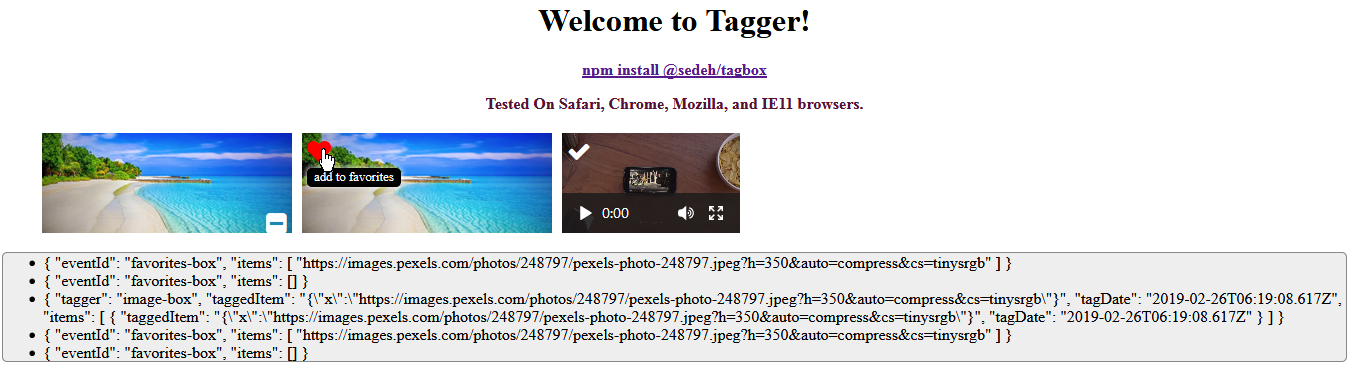
how to use it on any html node?
```javascript
Use tagger directive on a node
![]() ```
how to use it in conjunction with into-pipes?
```javascript
Use both into and tagger directive.
```
Once you receive the taggerChanged notification, use the TaggerService to retrieve the data for the tagger id sent to you as the event to save it in data base of your choice.
```javascript
itemTagUpdate(event) {
if (event.taggedItem) { // when tagger dateEnabled is set
const list = this.taggerService.getTaggedItems(event.tagger);
// save the list in database here..
} else {
const list = this.taggerService.getTaggedItems(event);
// save the list in database here..
}
}
```
## Revision History
| Version | Description |
|---------|-----------------------------------------------------------------------------------------------|
| 3.0.0 | Updated to Angular 15. |
| 2.0.0 | Updated to Angular 8. |
| 1.0.3 | Removed un-necessary dependency to @angular/http |
| 1.0.2 | Fixed an ADA issue. |
| 1.0.1 | Added dateEnabled attribute to keep track of tag dates. |
| 1.0.0 | Initial Release. |
---
_Source: https://npm.io/package/@sedeh/tagger · Machine-readable twin of the npm.io package page. Health data is recomputed on every publish._
```
how to use it in conjunction with into-pipes?
```javascript
Use both into and tagger directive.
```
Once you receive the taggerChanged notification, use the TaggerService to retrieve the data for the tagger id sent to you as the event to save it in data base of your choice.
```javascript
itemTagUpdate(event) {
if (event.taggedItem) { // when tagger dateEnabled is set
const list = this.taggerService.getTaggedItems(event.tagger);
// save the list in database here..
} else {
const list = this.taggerService.getTaggedItems(event);
// save the list in database here..
}
}
```
## Revision History
| Version | Description |
|---------|-----------------------------------------------------------------------------------------------|
| 3.0.0 | Updated to Angular 15. |
| 2.0.0 | Updated to Angular 8. |
| 1.0.3 | Removed un-necessary dependency to @angular/http |
| 1.0.2 | Fixed an ADA issue. |
| 1.0.1 | Added dateEnabled attribute to keep track of tag dates. |
| 1.0.0 | Initial Release. |

---
_Source: https://npm.io/package/@sedeh/tagger · Machine-readable twin of the npm.io package page. Health data is recomputed on every publish._