# @sqbiz/wplugin-variant-form
> - 一款高效的Vue低代码表单,可视化设计,一键生成源码,享受更多摸鱼时间
Latest version **1.0.2-biz-minions** (published 2022-11-07) · 0 weekly downloads
## Install
```sh
npm install @sqbiz/wplugin-variant-form
pnpm add @sqbiz/wplugin-variant-form
yarn add @sqbiz/wplugin-variant-form
bun add @sqbiz/wplugin-variant-form
```
## Health
**Score 15/100 (F)** — status: abandoned.
Positive: no vulnerabilities.
Warnings: low downloads; no types; no esm support.
Negative: abandoned; low maintenance score.
## Facts
| | |
|---|---|
| Version | 1.0.2-biz-minions |
| Published | 2022-11-07 |
| First published | 2022-11-07 |
| Weekly downloads | 0 |
| TypeScript types | none |
| Module format | CommonJS |
| Dependencies | 8 |
| Unpacked size | 1.4 MB |
| Known vulnerabilities | 0 (+24 in 2 direct dependencies) |
| Install scripts | no |
| Maintainers | oldinaction |
## Links
- npm: https://www.npmjs.com/package/@sqbiz/wplugin-variant-form
- npm.io page: https://npm.io/package/@sqbiz/wplugin-variant-form
## Dependencies (8)
- [vue](https://npm.io/package/vue.md) ^2.6.11
- [axios](https://npm.io/package/axios.md) ^0.21.1
- [core-js](https://npm.io/package/core-js.md) ^3.6.5
- [clipboard](https://npm.io/package/clipboard.md) ^2.0.8
- [element-ui](https://npm.io/package/element-ui.md) ^2.15.1
- [file-saver](https://npm.io/package/file-saver.md) ^2.0.5
- [vue2-editor](https://npm.io/package/vue2-editor.md) ^2.10.2
- [vuedraggable](https://npm.io/package/vuedraggable.md) ^2.24.3
## Recent versions
- 1.0.2-biz-minions (latest) — 2022-11-07
## README
## 简介
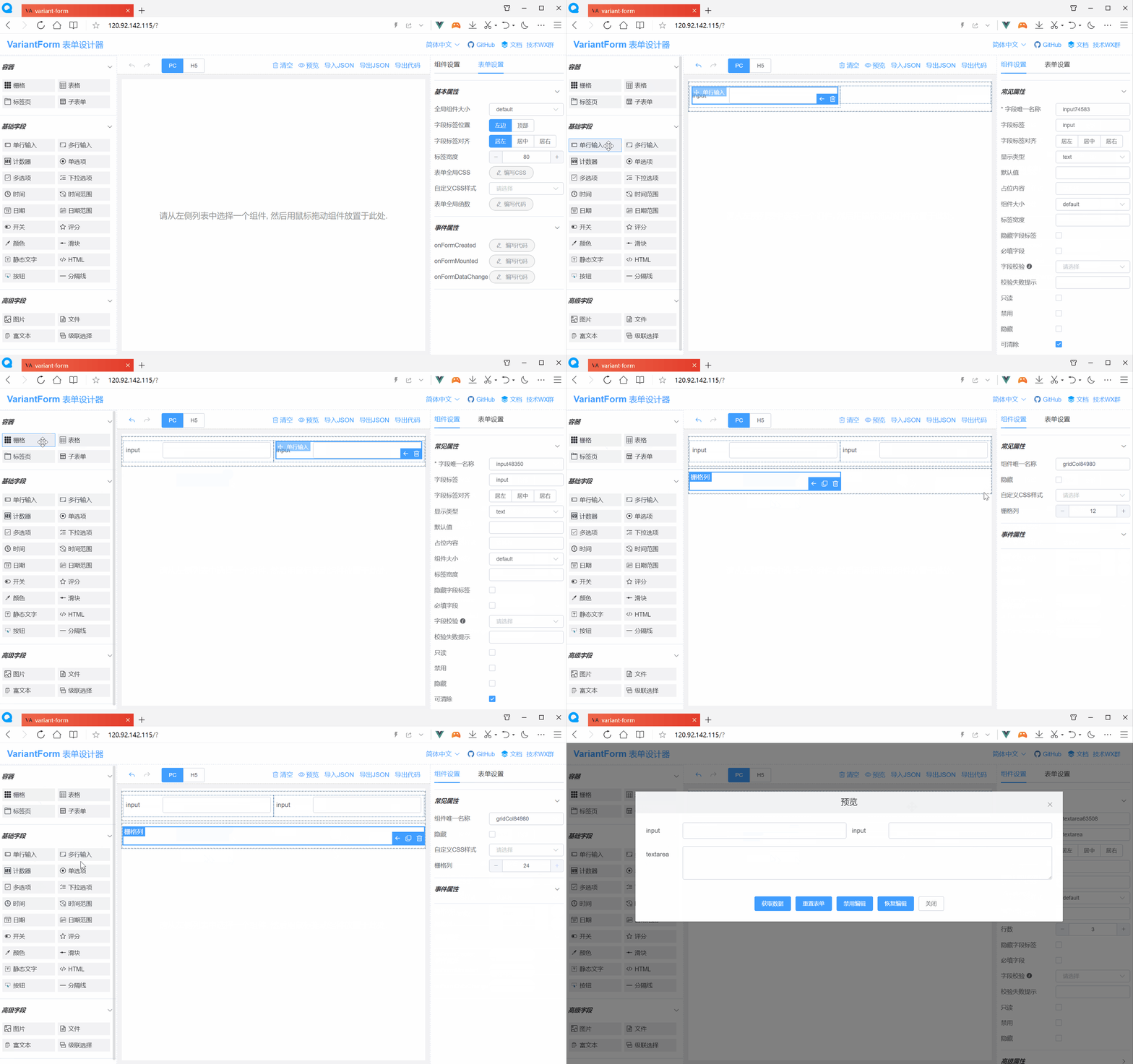
- 一款高效的Vue低代码表单,可视化设计,一键生成源码,享受更多摸鱼时间
## 使用
```bash
# 安装
npm i @sqbiz/wplugin-variant-form
```
- 引入并全局注册组件
```javascript
import Vue from 'vue'
import App from './App.vue'
import ElementUI from 'element-ui' //引入element-ui库
import WpluginVariantForm from 'wplugin-variant-form' //引入WpluginVariantForm库
import 'element-ui/lib/theme-chalk/index.css' //引入element-ui样式
import 'wplugin-variant-form/dist/VFormDesigner.css' //引入WpluginVariantForm样式
Vue.config.productionTip = false
Vue.use(ElementUI) //全局注册element-ui
Vue.use(WpluginVariantForm) //全局注册WpluginVariantForm(同时注册了v-form-designer和v-form-render组件)
new Vue({
render: h => h(App),
}).$mount('#app')
```
- 在Vue模板中使用表单设计器组件
```html
```
- 在Vue模板中使用表单渲染器组件
```html
Submit
```
## 开发
```bash
# 安装依赖
yarn install --registry=https://registry.npm.taobao.org
# 开发调试
npm run dev
# 生产打包(可直接运行)
npm run build
# 监控插件包,和npm link配合使用
npm run start
# 表单设计器 + 表单渲染器打包
npm run lib
# 表单渲染器打包(可基于json显示页面)
npm run lib-render
# 发布
npm publish
```
## 功能一览
```
> 拖拽式可视化表单设计;
> 支持PC、Pad、H5三种布局;
> 支持运行时动态加载表单;
> 支持表单复杂交互控制;
> 支持自定义CSS样式;
> 支持自定义校验逻辑;
> 支持国际化多语言;
> 兼容IE 11浏览器;
> 可导出Vue组件、HTML源码;
> 可导出Vue的SFC单文件组件;
> 支持开发自定义组件;
> 支持响应式自适应布局;
> 支持VS Code插件;
> 更多功能等你探究...;
```
### TODO
- 将 vue2-editor 换成 wplugin-tinymce
- 将 ace.js 单独异步加载
## 问题记录
- `npm link`后,在主项目中启动后报错`Error: No PostCSS Config found`
- 在当前项目根目录下创建`postcss.config.js`,并加入配置
```js
module.exports = {
plugins: {
autoprefixer: {
browsers: 'last 5 version'
}
}
}
```
---
_Source: https://npm.io/package/@sqbiz/wplugin-variant-form · Machine-readable twin of the npm.io package page. Health data is recomputed on every publish._