# @syncfusion/ej2-angular-pdfviewer
> Essential JS 2 PDF viewer Component for Angular
Latest version **34.2.8** (published 2026-09-15) · SEE LICENSE IN license license · 8.8K weekly downloads
## Install
```sh
npm install @syncfusion/ej2-angular-pdfviewer
pnpm add @syncfusion/ej2-angular-pdfviewer
yarn add @syncfusion/ej2-angular-pdfviewer
bun add @syncfusion/ej2-angular-pdfviewer
```
## Health
**Score 75/100 (B)** — status: active.
Positive: has types; esm support; no vulnerabilities; recently updated; high maintenance score.
## Facts
| | |
|---|---|
| Version | 34.2.8 |
| Published | 2026-09-15 |
| First published | 2018-12-10 |
| Weekly downloads | 8.8K |
| License | SEE LICENSE IN license |
| TypeScript types | bundled |
| Module format | ESM + CommonJS |
| Dependencies | 3 |
| Unpacked size | 389.4 KB |
| Known vulnerabilities | 0 |
| Install scripts | no |
| GitHub stars | 294 |
| Author | Syncfusion Inc. |
| Maintainers | syncfusionorg, essentialjs2, syncfusion-javascript |
| Keywords | angular, angular-pdf-viewer |
## Links
- npm: https://www.npmjs.com/package/@syncfusion/ej2-angular-pdfviewer
- Repository: https://github.com/syncfusion/ej2-angular-ui-components
- Homepage: https://www.syncfusion.com/angular-components
- Issues: https://github.com/syncfusion/ej2-angular-ui-components/issues
- npm.io page: https://npm.io/package/@syncfusion/ej2-angular-pdfviewer
## Dependencies (3)
- [@syncfusion/ej2-base](https://npm.io/package/@syncfusion/ej2-base.md) ~34.2.8
- [@syncfusion/ej2-pdfviewer](https://npm.io/package/@syncfusion/ej2-pdfviewer.md) 34.2.8
- [@syncfusion/ej2-angular-base](https://npm.io/package/@syncfusion/ej2-angular-base.md) ~34.2.8
## Alternatives
- [@cantoo/pdf-lib](https://npm.io/package/@cantoo/pdf-lib.md) — 297.9K weekly downloads
- [datatables.net-buttons](https://npm.io/package/datatables.net-buttons.md) — 200.1K weekly downloads
- [@ckeditor/ckeditor5-export-pdf](https://npm.io/package/@ckeditor/ckeditor5-export-pdf.md) — 167.0K weekly downloads
- [scanbot-web-sdk](https://npm.io/package/scanbot-web-sdk.md) — 15.0K weekly downloads
- [@regulaforensics/document-reader-webclient](https://npm.io/package/@regulaforensics/document-reader-webclient.md) — 7.8K weekly downloads
## Recent versions
- 34.2.8 (latest) — 2026-09-15
- 34.2.8-ngcc (ngcc) — 2026-09-15
- 30.2.8 (beta) — 2025-12-04
- 34.2.7 — 2026-09-08
- 34.2.7-ngcc — 2026-09-08
- 34.2.6 — 2026-09-01
- 34.2.6-ngcc — 2026-09-01
- 34.2.5 — 2026-08-25
- 34.2.5-ngcc — 2026-08-25
- 34.2.4 — 2026-08-18
- 34.2.4-ngcc — 2026-08-18
- 34.2.3 — 2026-08-11
- 34.2.3-ngcc — 2026-08-11
- 34.2.2 — 2026-08-05
- 34.2.2-ngcc — 2026-08-05
- … 564 more at https://npm.io/package/@syncfusion/ej2-angular-pdfviewer/versions
## README
# Angular PDF Viewer Component
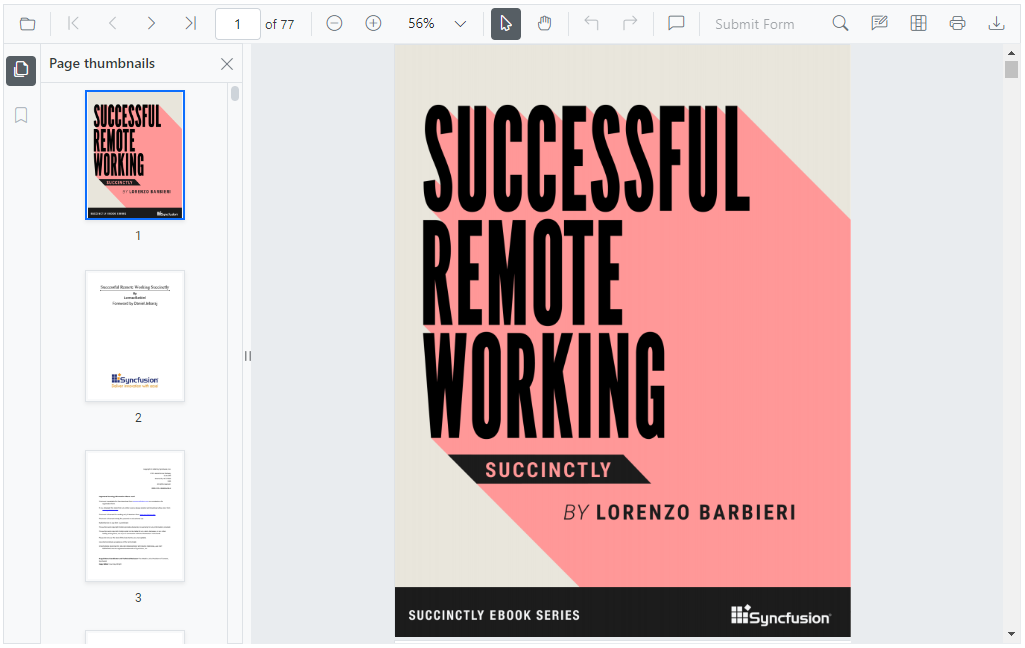
The Syncfusion® [Angular PDF Viewer](https://www.syncfusion.com/pdf-viewer-sdk/angular-pdf-viewer?utm_source=npm&utm_medium=listing&utm_campaign=angular-pdf-viewer-npm) component enables you to view, annotate, prepare and fill forms, and print PDF files from your web applications.
Getting started .
Online demos .
Learn more
Trusted by the world's leading companies

> **Using this package with an AI coding agent**
>
> Before generating Syncfusion code, ask your AI coding agent to run the Syncfusion setup using the following prompt:
>
> ```text
> Set up this project for Syncfusion before generating code. Fetch
> and follow the official instructions at https://ai.syncfusion.com,
> then report the detected platform, installed skill pack, MCP
> status, and any required licensing action.
> ```
> The setup detects your project’s platform and loads the appropriate Syncfusion skill pack. No Syncfusion account or MCP key is required to install or read Syncfusion agent skills.
>
> **Platform reference:** [https://ai.syncfusion.com/angular/llms.txt](https://ai.syncfusion.com/angular/llms.txt)
## Setup
### Create an Angular Application
You can use [Angular CLI](https://github.com/angular/angular-cli) to setup your Angular applications. To install the Angular CLI, use the following command.
```bash
npm install -g @angular/cli
```
Create a new Angular application using the following Angular CLI command.
```bash
ng new my-app
cd my-app
ng serve
```
### Adding Syncfusion® PDF Viewer package
All Syncfusion® Angular packages are available in [npmjs.com](https://www.npmjs.com/~syncfusionorg). To install the Angular PDF Viewer package, use the following command.
```bash
ng add @syncfusion/ej2-angular-pdfviewer
```
The above command does the below configuration to your Angular app.
* Adds `@syncfusion/ej2-angular-pdfviewer` package and its peer dependencies to your `package.json` file.
* Imports the `PdfViewerModule` in your application module `app.module.ts`.
* Registers the Syncfusion® UI default theme (material) in the `angular.json` file.
This makes it easy to add the Syncfusion® Angular PDF Viewer module to your project and start using it in your application.
### Adding CSS references for PDF Viewer
Install the styles package from npm using the following command:
```bash
npm install @syncfusion/ej2-tailwind3-theme
```
The Tailwind 3 theme package includes an `index.css` file that automatically imports all required PDF Viewer styles. Add the required PDF Viewer theme style reference to **src/styles.css** file.
```css
@import '../node_modules/@syncfusion/ej2-tailwind3-theme/styles/pdfviewer/index.css';
```
For more themes, see the [themes documentation](https://ej2.syncfusion.com/angular/documentation/appearance/overview#theme-packages).
### Add PDF Viewer component
In **src/app/app.component.ts**, use `` selector in the `template` attribute of the `@Component` directive to render the Syncfusion® Angular PDF Viewer component.
```typescript
import { Component, ViewEncapsulation, OnInit } from '@angular/core';
import {
PdfViewerComponent,
LinkAnnotationService,
BookmarkViewService,
MagnificationService,
ThumbnailViewService,
ToolbarService,
NavigationService,
TextSearchService,
TextSelectionService,
PrintService,
AnnotationService,
FormFieldsService,
FormDesignerService
} from '@syncfusion/ej2-angular-pdfviewer';
@Component({
selector: 'app-root',
template: `
`,
encapsulation: ViewEncapsulation.None,
providers: [
LinkAnnotationService,
BookmarkViewService,
MagnificationService,
ThumbnailViewService,
ToolbarService,
NavigationService,
TextSearchService,
TextSelectionService,
PrintService,
AnnotationService,
FormFieldsService,
FormDesignerService
],
})
export class AppComponent implements OnInit {
public resourcesUrl: string =
'https://cdn.syncfusion.com/ej2/31.2.2/dist/ej2-pdfviewer-lib';
public document: string = 'https://cdn.syncfusion.com/content/pdf/pdf-succinctly.pdf';
ngOnInit(): void {
}
}
```
## Supported frameworks
PDF Viewer component is also offered in the following list of frameworks.
| [ ](https://www.syncfusion.com/pdf-viewer-sdk/javascript-pdf-viewer?utm_medium=listing&utm_source=github)
[JavaScript](https://www.syncfusion.com/pdf-viewer-sdk/javascript-pdf-viewer?utm_medium=listing&utm_source=github) | [ ](https://www.syncfusion.com/pdf-viewer-sdk/react-pdf-viewer?utm_medium=listing&utm_source=github)
[React](https://www.syncfusion.com/pdf-viewer-sdk/react-pdf-viewer?utm_medium=listing&utm_source=github) | [ ](https://www.syncfusion.com/pdf-viewer-sdk/vue-pdf-viewer?utm_medium=listing&utm_source=github)
[Vue](https://www.syncfusion.com/pdf-viewer-sdk/vue-pdf-viewer?utm_medium=listing&utm_source=github) | [ ](https://www.syncfusion.com/pdf-viewer-sdk/asp-net-core-pdf-viewer?utm_medium=listing&utm_source=github)
[ASP.NET Core](https://www.syncfusion.com/pdf-viewer-sdk/asp-net-core-pdf-viewer?utm_medium=listing&utm_source=github) | [ ](https://www.syncfusion.com/pdf-viewer-sdk/asp-net-mvc-pdf-viewer?utm_medium=listing&utm_source=github)
[ASP.NET MVC](https://www.syncfusion.com/pdf-viewer-sdk/asp-net-mvc-pdf-viewer?utm_medium=listing&utm_source=github) |
| :-----: | :-----: | :-----: | :-----: | :-----: |
## Key features
* [View PDF Document](https://help.syncfusion.com/document-processing/pdf/pdf-viewer/angular/getting-started) - Open and display both the normal and the protected PDF files with AES and RC4 encryption.
* [Annotations](https://help.syncfusion.com/document-processing/pdf/pdf-viewer/angular/annotation/overview) - Annotate with text markup, shapes, stamps, ink, and sticky notes.
* [Form Fields](https://help.syncfusion.com/document-processing/pdf/pdf-viewer/angular/forms/overview) - Form filling and form designing can be done.
* [Signature](https://help.syncfusion.com/document-processing/pdf/pdf-viewer/angular/annotation/signature-annotation) - Hand-written and digital signatures are allowed.
* [Toolbar](https://help.syncfusion.com/document-processing/pdf/pdf-viewer/angular/toolbar) - Built-in-toolbar and custom toolbars to perform user interaction of PDF Viewer functionalities.
* [Navigation](https://help.syncfusion.com/document-processing/pdf/pdf-viewer/angular/navigation) - Easy navigation with the help of bookmarks, thumbnails, hyperlinks, and table of contents.
* [Magnification](https://help.syncfusion.com/document-processing/pdf/pdf-viewer/angular/magnification) - Fit to page, fit to width, and automatic (fits to the visible area).
* [Search](https://help.syncfusion.com/document-processing/pdf/pdf-viewer/angular/text-search/overview) - Search a text easily across the PDF document.
* [Core Interactions](https://help.syncfusion.com/document-processing/pdf/pdf-viewer/angular/interaction-mode) - Allows scrolling, zooming, panning, selection, and page navigation.
* [Print](https://help.syncfusion.com/document-processing/pdf/pdf-viewer/angular/print/overview) - Print the entire document or a specific page directly from the browser.
* [Globalization](https://help.syncfusion.com/document-processing/pdf/pdf-viewer/angular/localization/default-language) - Provides inherent support to localize the UI.
## Resources
* [Theme Studio](https://ej2.syncfusion.com/themestudio/?theme=tailwind3)
* [What's New](https://www.syncfusion.com/products/whatsnew/pdf-viewer-sdk?utm_medium=listing&utm_source=github)
* [Road Map](https://www.syncfusion.com/products/roadmap/pdf-viewer-sdk)
* [E-Books](https://www.syncfusion.com/succinctly-free-ebooks?searchkey=angular&type=all)
## Support
Product support is available through the following mediums.
* [Support ticket](https://support.syncfusion.com/support/tickets/create) - Guaranteed Response in 24 hours | Unlimited tickets | Holiday support
* [Community forum](https://www.syncfusion.com/forums/pdf-viewer-sdk?utm_source=npm&utm_medium=listing&utm_campaign=angular-pdf-viewer-npm)
* [GitHub issues](https://github.com/syncfusion/ej2-angular-ui-components/issues/new)
* [Request feature or report bug](https://www.syncfusion.com/feedback/pdf-viewer-sdk?utm_source=npm&utm_medium=listing&utm_campaign=angular-pdf-viewer-npm)
* Live chat
## Other Popular Angular Components
Explore other popular Syncfusion® Angular components curated from UI components, standalone SDKs, and document solution suites.
## Changelog
Check the changelog [here](https://github.com/syncfusion/ej2-angular-ui-components/blob/master/components/pdfviewer/CHANGELOG.md?utm_source=npm&utm_medium=listing&utm_campaign=angular-pdf-viewer-npm). Get minor improvements and bug fixes every week to stay up to date with frequent updates.
## License and copyright
> This is a commercial product and requires a paid license for possession or use. Syncfusion® licensed software, including this component, is subject to the terms and conditions of Syncfusion® [EULA](https://www.syncfusion.com/eula/es/). To acquire a license for 140+ [Angular UI components](https://www.syncfusion.com/angular-components), you can [purchase](https://www.syncfusion.com/sales/products) or [start a free 30-day trial](https://www.syncfusion.com/account/manage-trials/start-trials).
> A free community [license](https://www.syncfusion.com/products/communitylicense) is also available for companies and individuals whose organizations have less than $1 million USD in annual gross revenue and five or fewer developers.
© Copyright 2026 Syncfusion® Inc. All Rights Reserved. The Syncfusion® Essential Studio® license and copyright applies to this distribution.
---
_Source: https://npm.io/package/@syncfusion/ej2-angular-pdfviewer · Machine-readable twin of the npm.io package page. Health data is recomputed on every publish._