# @syncfusion/ej2-circulargauge
> Essential JS 2 CircularGauge Components
Latest version **34.2.8** (published 2026-09-15) · SEE LICENSE IN license license · 0 weekly downloads
## Install
```sh
npm install @syncfusion/ej2-circulargauge
pnpm add @syncfusion/ej2-circulargauge
yarn add @syncfusion/ej2-circulargauge
bun add @syncfusion/ej2-circulargauge
```
## Health
**Score 55/100 (C)** — status: active.
Positive: no vulnerabilities; recently updated; high maintenance score.
Warnings: low downloads; no types; no esm support.
## Facts
| | |
|---|---|
| Version | 34.2.8 |
| Published | 2026-09-15 |
| First published | 2017-08-31 |
| Weekly downloads | 0 |
| License | SEE LICENSE IN license |
| TypeScript types | none |
| Module format | CommonJS |
| Dependencies | 0 |
| Known vulnerabilities | 0 |
| Install scripts | no |
| GitHub stars | 448 |
| Author | Syncfusion Inc. |
| Maintainers | syncfusionorg, essentialjs2, syncfusion-javascript |
| Keywords | ej2, syncfusion, ej2-circulargauge, typescript, javascript, circular, gauge, arc-gauge, radial-gauge, semi-circular-gauge, quarter-circular-gauge, half-gauge, quarter-gauge, scale, range, multiple-ranges, axis, needle, pointer, multiple-pointers, ticks, labels, annotation, animation, template |
## Links
- npm: https://www.npmjs.com/package/@syncfusion/ej2-circulargauge
- Repository: https://github.com/syncfusion/ej2-javascript-ui-controls
- Homepage: https://www.syncfusion.com/javascript-ui-controls
- Issues: https://github.com/syncfusion/ej2-javascript-ui-controls/issues
- npm.io page: https://npm.io/package/@syncfusion/ej2-circulargauge
## Alternatives
- [@openai/codex-sdk](https://npm.io/package/@openai/codex-sdk.md) — 731.4K weekly downloads
- [babel-plugin-transform-react-jsx](https://npm.io/package/babel-plugin-transform-react-jsx.md) — 565.0K weekly downloads
- [babel-helper-remove-or-void](https://npm.io/package/babel-helper-remove-or-void.md) — 508.5K weekly downloads
- [@pnpm/store-controller-types](https://npm.io/package/@pnpm/store-controller-types.md) — 186.9K weekly downloads
- [react-native-signature-canvas](https://npm.io/package/react-native-signature-canvas.md) — 155.6K weekly downloads
## Recent versions
- 34.2.8 (latest) — 2026-09-15
- 34.2.6 — 2026-09-01
- 34.2.2 — 2026-08-05
- 34.1.29 — 2026-07-06
- 33.2.3 — 2026-04-21
- 33.1.44 — 2026-03-16
- 32.2.3 — 2026-02-05
- 32.1.24 — 2026-01-20
- 32.1.19 — 2025-12-16
- 31.2.12 — 2025-11-18
- 31.2.2 — 2025-10-15
- 31.1.17 — 2025-09-05
- 30.2.5 — 2025-08-13
- 30.2.4 — 2025-08-07
- 30.1.37 — 2025-06-25
- … 140 more at https://npm.io/package/@syncfusion/ej2-circulargauge/versions
## README
# JavaScript Circular Gauge Control
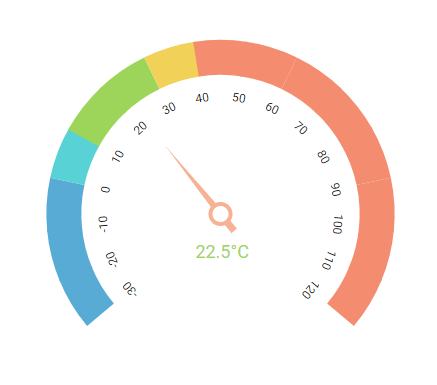
The [JavaScript Circular Gauge](https://www.syncfusion.com/javascript-ui-controls/js-circular-gauge?utm_source=npm&utm_medium=listing&utm_campaign=javascript-circulargauge-npm) control is ideal to visualize numeric values over a circular scale. All the circular gauge elements are rendered using Scalable Vector Graphics (SVG).
Getting started .
Online demos .
Learn more
Trusted by the world's leading companies

> **Using this package with an AI coding agent**
>
> Before generating Syncfusion code, ask your AI coding agent to run the Syncfusion setup using the following prompt:
>
> ```text
> Set up this project for Syncfusion before generating code. Fetch
> and follow the official instructions at https://ai.syncfusion.com,
> then report the detected platform, installed skill pack, MCP
> status, and any required licensing action.
> ```
> The setup detects your project’s platform and loads the appropriate Syncfusion skill pack. No Syncfusion account or MCP key is required to install or read Syncfusion agent skills.
>
> **Platform reference:** [https://ai.syncfusion.com/javascript/llms.txt](https://ai.syncfusion.com/javascript/llms.txt)
## Setup
To install the Circular Gauge and its dependent packages, use the following command.
```sh
npm install @syncfusion/ej2-circulargauge
```
## Supported frameworks
Circular Gauge control is also offered in the following list of frameworks.
| [ ](https://www.syncfusion.com/angular-ui-components?utm_medium=listing&utm_source=github)
[Angular](https://www.syncfusion.com/angular-ui-components?utm_medium=listing&utm_source=github) | [ ](https://www.syncfusion.com/react-ui-components?utm_medium=listing&utm_source=github)
[React](https://www.syncfusion.com/react-ui-components?utm_medium=listing&utm_source=github) | [ ](https://www.syncfusion.com/vue-ui-components?utm_medium=listing&utm_source=github)
[Vue](https://www.syncfusion.com/vue-ui-components?utm_medium=listing&utm_source=github) | [ ](https://www.syncfusion.com/aspnet-core-ui-controls?utm_medium=listing&utm_source=github)
[ASP.NET Core](https://www.syncfusion.com/aspnet-core-ui-controls?utm_medium=listing&utm_source=github) | [ ](https://www.syncfusion.com/aspnet-mvc-ui-controls?utm_medium=listing&utm_source=github)
[ASP.NET MVC](https://www.syncfusion.com/aspnet-mvc-ui-controls?utm_medium=listing&utm_source=github) |
| :-----: | :-----: | :-----: | :-----: | :-----: |
## Showcase samples
* Live update - [Live Demo](https://ej2.syncfusion.com/demos/?utm_source=npm&utm_campaign=circulargauge#/fluent2/circular-gauge/data-sample.html)
* Direction compass - [Live Demo](https://ej2.syncfusion.com/demos/?utm_source=npm&utm_campaign=circulargauge#/fluent2/circular-gauge/direction-compass.html)
## Key features
* [Arc Gauge/Radial Gauge](https://ej2.syncfusion.com/documentation/circular-gauge/gauge-axes/?utm_source=npm&utm_medium=listing&utm_campaign=javascript-circulargauge-npm#angles-and-direction): The arc gauge or radial gauge helps in the visualization of numerical values of scales in a semi-circular or quarter-circular manner. It is possible to achieve this by changing the start and end angle values.
* [Axes](https://ej2.syncfusion.com/documentation/circular-gauge/gauge-axes/?utm_source=npm&utm_medium=listing&utm_campaign=javascript-circulargauge-npm): Axes is a collection of circular axis that can be used to indicate numeric values.
* [Ranges](https://ej2.syncfusion.com/documentation/circular-gauge/gauge-ranges/?utm_source=npm&utm_medium=listing&utm_campaign=javascript-circulargauge-npm): Supports ranges to categorize the axis values. Any number of ranges can be added to the circular gauge.
* [Ticks and labels](https://ej2.syncfusion.com/demos/?utm_source=npm&utm_medium=listing&utm_campaign=javascript-circulargauge-npm#/fluent2/circular-gauge/ticks-and-labels.html): Provides options to customize the ticks and labels of the gauges.
* [Pointers](https://ej2.syncfusion.com/documentation/circular-gauge/gauge-pointers/?utm_source=npm&utm_medium=listing&utm_campaign=javascript-circulargauge-npm): Indicates the values on axis. Circular gauge supports three types of pointers: needle, range bar, and marker.
* [Annotation](https://ej2.syncfusion.com/documentation/circular-gauge/gauge-annotations/?utm_source=npm&utm_medium=listing&utm_campaign=javascript-circulargauge-npm): Uses any custom HTML element as annotation and place it anywhere on the gauge.
* [Legend](https://ej2.syncfusion.com/documentation/circular-gauge/gauge-legend/?utm_source=npm&utm_medium=listing&utm_campaign=javascript-circulargauge-npm): Summarizes the information from the ranges.
* [Tooltip](https://ej2.syncfusion.com/documentation/circular-gauge/gauge-user-interaction/?utm_source=npm&utm_medium=listing&utm_campaign=javascript-circulargauge-npm#tooltip-for-pointers): Provides information about the pointer and range values on hover.
* [Pointer drag](https://ej2.syncfusion.com/documentation/circular-gauge/gauge-user-interaction/?utm_source=npm&utm_medium=listing&utm_campaign=javascript-circulargauge-npm#pointer-drag): Provides support to place a pointer at the desired values by dragging it.
* [Range drag](https://ej2.syncfusion.com/demos/?utm_source=npm&utm_medium=listing&utm_campaign=javascript-circulargauge-npm#/fluent2/circular-gauge/pointer-ranges-drag.html): Provides support to extend the start or end of the range at the desired values by dragging it.
* [Print and Export](https://ej2.syncfusion.com/documentation/circular-gauge/gauge-print-and-export/?utm_source=npm&utm_medium=listing&utm_campaign=javascript-circulargauge-npm): Prints or exports the rendered circular gauge to a desired format. Exporting supports four formats: PDF, PNG, JPEG and SVG.
* [Templates](https://ej2.syncfusion.com/demos/?utm_source=npm&utm_medium=listing&utm_campaign=javascript-circulargauge-npm#/fluent2/circular-gauge/tooltip.html): Templates can be used to create custom user experience in the tooltip of the circular gauge.
* [Globalization](https://ej2.syncfusion.com/documentation/circular-gauge/internationalization/?utm_source=npm&utm_medium=listing&utm_campaign=javascript-circulargauge-npm): Personalize the circular gauge control with different languages, as well as culture-specific number, date and time formatting.
* [Accessibility](https://ej2.syncfusion.com/documentation/circular-gauge/accessibility/?utm_source=npm&utm_medium=listing&utm_campaign=javascript-circulargauge-npm): Provides with built-in accessibility support which helps to access all the circular gauge control features through the keyboard, screen readers, or other assistive technology devices.
## Resources
* [Documentation](https://ej2.syncfusion.com/documentation/introduction)
* [Theme Studio](https://ej2.syncfusion.com/themestudio/)
* [Custom Resource Generator](https://crg.syncfusion.com/)
* [What's New](https://www.syncfusion.com/products/whatsnew/essential-js2?utm_medium=listing&utm_source=github)
* [Road Map](https://www.syncfusion.com/products/roadmap/essential-js2?utm_medium=listing&utm_source=github)
* [E-Books](https://www.syncfusion.com/ebooks?tag=javascript&utm_medium=listing&utm_source=github)
## Support
Product support is available through the following mediums.
* [Support ticket](https://support.syncfusion.com/support/tickets/create) - Guaranteed Response in 24 hours | Unlimited tickets | Holiday support
* [Community forum](https://www.syncfusion.com/forums/essential-js2?utm_source=npm&utm_medium=listing&utm_campaign=javascript-circulargauge-npm)
* [GitHub issues](https://github.com/syncfusion/ej2-javascript-ui-controls/issues/new)
* [Request feature or report bug](https://www.syncfusion.com/feedback/javascript?utm_source=npm&utm_medium=listing&utm_campaign=javascript-circulargauge-npm)
* Live chat
## Changelog
Check the changelog [here](https://github.com/syncfusion/ej2-javascript-ui-controls/blob/master/controls/circulargauge/CHANGELOG.md?utm_source=npm&utm_campaign=javascript-circulargauge-npm). Get minor improvements and bug fixes every week to stay up to date with frequent updates.
## License and copyright
> This is a commercial product and requires a paid license for possession or use. Syncfusion’s licensed software, including this control, is subject to the terms and conditions of Syncfusion's [EULA](https://www.syncfusion.com/eula/es/). To acquire a license for 140+ [JavaScript UI controls](https://www.syncfusion.com/javascript-ui-controls), you can [purchase](https://www.syncfusion.com/sales/products) or [start a free 30-day trial](https://www.syncfusion.com/account/manage-trials/start-trials).
> A [free community license](https://www.syncfusion.com/products/communitylicense) is also available for companies and individuals whose organizations have less than $1 million USD in annual gross revenue and five or fewer developers.
Check the license detail [here](https://github.com/syncfusion/ej2-javascript-ui-controls/blob/master/controls/circulargauge/license?utm_source=npm&utm_campaign=javascript-circulargauge-npm).
© Copyright 2026 Syncfusion® Inc. All Rights Reserved. The Syncfusion® Essential Studio® license and copyright applies to this distribution.
---
_Source: https://npm.io/package/@syncfusion/ej2-circulargauge · Machine-readable twin of the npm.io package page. Health data is recomputed on every publish._