# @syncfusion/ej2-diagrams
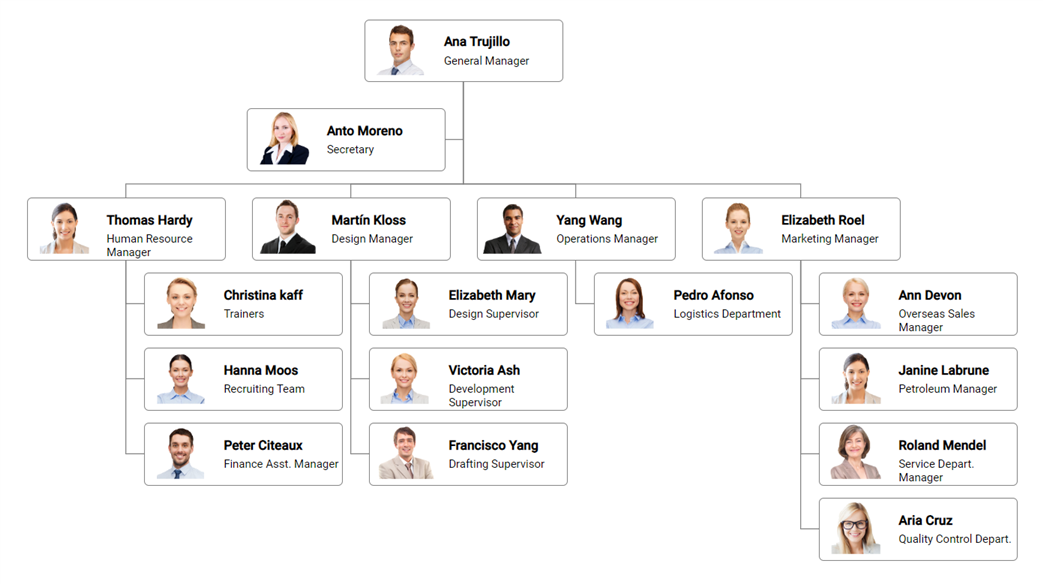
> Feature-rich diagram control to create diagrams like flow charts, organizational charts, mind maps, and BPMN diagrams. Its rich feature set includes built-in shapes, editing, serializing, exporting, printing, overview, data binding, and automatic layouts.
Latest version **34.2.7** (published 2026-09-08) · SEE LICENSE IN license license · 35.0K weekly downloads
## Install
```sh
npm install @syncfusion/ej2-diagrams
pnpm add @syncfusion/ej2-diagrams
yarn add @syncfusion/ej2-diagrams
bun add @syncfusion/ej2-diagrams
```
## Health
**Score 75/100 (B)** — status: active.
Positive: has types; esm support; no vulnerabilities; recently updated; high maintenance score.
Warnings: large bundle.
## Facts
| | |
|---|---|
| Version | 34.2.7 |
| Published | 2026-09-08 |
| First published | 2018-06-25 |
| Weekly downloads | 35.0K |
| License | SEE LICENSE IN license |
| TypeScript types | bundled |
| Module format | ESM + CommonJS |
| Dependencies | 7 |
| Unpacked size | 62.9 MB |
| Known vulnerabilities | 0 |
| Install scripts | no |
| GitHub stars | 449 |
| Author | Syncfusion Inc. |
| Maintainers | syncfusionorg, essentialjs2, syncfusion-javascript |
| Keywords | ej2, ej2-diagram, syncfusion, web-components, diagram, mindmap, mindmap diagram, org chart, organization diagram, organization chart, flow diagram, bpmn diagram, uml diagram, flowchart |
## Links
- npm: https://www.npmjs.com/package/@syncfusion/ej2-diagrams
- Repository: https://github.com/syncfusion/ej2-javascript-ui-controls
- Homepage: https://www.syncfusion.com/javascript-ui-controls
- Issues: https://github.com/syncfusion/ej2-javascript-ui-controls/issues
- npm.io page: https://npm.io/package/@syncfusion/ej2-diagrams
## Dependencies (7)
- [@syncfusion/ej2-base](https://npm.io/package/@syncfusion/ej2-base.md) ~34.2.6
- [@syncfusion/ej2-data](https://npm.io/package/@syncfusion/ej2-data.md) ~34.2.6
- [@syncfusion/ej2-lists](https://npm.io/package/@syncfusion/ej2-lists.md) ~34.2.6
- [@syncfusion/ej2-inputs](https://npm.io/package/@syncfusion/ej2-inputs.md) ~34.2.7
- [@syncfusion/ej2-popups](https://npm.io/package/@syncfusion/ej2-popups.md) ~34.2.6
- [@syncfusion/ej2-buttons](https://npm.io/package/@syncfusion/ej2-buttons.md) ~34.2.6
- [@syncfusion/ej2-navigations](https://npm.io/package/@syncfusion/ej2-navigations.md) ~34.2.7
## Alternatives
- [d3-force-3d](https://npm.io/package/d3-force-3d.md) — 1.0M weekly downloads
- [ng2-charts](https://npm.io/package/ng2-charts.md) — 486.8K weekly downloads
- [@arcgis/core](https://npm.io/package/@arcgis/core.md) — 257.8K weekly downloads
- [react-sparklines](https://npm.io/package/react-sparklines.md) — 249.3K weekly downloads
- [react-native-gifted-charts](https://npm.io/package/react-native-gifted-charts.md) — 182.3K weekly downloads
## Recent versions
- 34.2.7 (latest) — 2026-09-08
- 21.1.42 (beta) — 2023-06-28
- 34.2.6 — 2026-09-01
- 34.2.4 — 2026-08-18
- 34.2.2 — 2026-08-05
- 34.1.31 — 2026-07-14
- 34.1.30 — 2026-07-09
- 34.1.29 — 2026-07-06
- 33.2.15 — 2026-06-23
- 33.2.13 — 2026-06-16
- 33.2.12 — 2026-06-09
- 33.2.10 — 2026-06-02
- 33.2.8 — 2026-05-26
- 33.2.7 — 2026-05-19
- 33.2.6 — 2026-05-12
- … 327 more at https://npm.io/package/@syncfusion/ej2-diagrams/versions
## README
# JavaScript Diagram Control
> **Using this package with an AI coding agent**
>
> Before generating Syncfusion® code, ask your AI coding agent to run the Syncfusion® setup using the following prompt:
>
> ```text
> Set up this project for Syncfusion® before generating code. Fetch
> and follow the official instructions at https://ai.syncfusion.com/,
> then report the detected platform, installed skill pack, MCP
> status, and any required licensing action.
> ```
> The setup detects your project’s platform and loads the appropriate Syncfusion® skill pack. No Syncfusion® account or MCP key is required to install or read Syncfusion® agent skills.
>
> **Platform reference:** [https://ai.syncfusion.com/javascript/llms.txt](https://ai.syncfusion.com/javascript/llms.txt)
The [JavaScript Diagram](https://www.syncfusion.com/javascript-ui-controls/js-diagram?utm_source=npm&utm_medium=listing&utm_campaign=javascript-diagram-npm) control is used for visualizing, creating, and editing interactive diagrams. It supports creating flowcharts, organizational charts, mind maps, floor plans, UML diagrams, and BPMN charts either through code or a visual interface.
Getting started .
Online demos .
Learn more
Trusted by the world's leading companies

## Setup
To install Diagram and its dependent packages, use the following command.
```sh
npm install @syncfusion/ej2-diagrams
```
## Supported frameworks
Diagram control is also offered in the following list of frameworks.
| [ ](https://www.syncfusion.com/angular-ui-components?utm_medium=listing&utm_source=github)
[Angular](https://www.syncfusion.com/angular-ui-components?utm_medium=listing&utm_source=github) | [ ](https://www.syncfusion.com/react-ui-components?utm_medium=listing&utm_source=github)
[React](https://www.syncfusion.com/react-ui-components?utm_medium=listing&utm_source=github) | [ ](https://www.syncfusion.com/vue-ui-components?utm_medium=listing&utm_source=github)
[Vue](https://www.syncfusion.com/vue-ui-components?utm_medium=listing&utm_source=github) | [ ](https://www.syncfusion.com/aspnet-core-ui-controls?utm_medium=listing&utm_source=github)
[ASP.NET Core](https://www.syncfusion.com/aspnet-core-ui-controls?utm_medium=listing&utm_source=github) | [ ](https://www.syncfusion.com/aspnet-mvc-ui-controls?utm_medium=listing&utm_source=github)
[ASP.NET MVC](https://www.syncfusion.com/aspnet-mvc-ui-controls?utm_medium=listing&utm_source=github) |
| :-----: | :-----: | :-----: | :-----: | :-----: |
## Use case demos
* [Javascript Diagram Builder demo](https://ej2.syncfusion.com/showcase/javascript/diagrambuilder/#/home)
* [JavaScript Organizational Chart demo](https://ej2.syncfusion.com/demos/#/bootstrap5/diagram/organization-model.html)
* [JavaScript Mind Map demo](https://ej2.syncfusion.com/demos/#/bootstrap5/diagram/mind-map.html)
* [JavaScript BPMN Editor demo](https://ej2.syncfusion.com/demos/#/bootstrap5/diagram/bpmn-editor.html)
* [JavaScript Logic Circuit Diagram demo](https://ej2.syncfusion.com/demos/#/bootstrap5/diagram/logic-circuit.html)
* [JavaScript UML Activity Diagram demo](https://ej2.syncfusion.com/demos/#/bootstrap5/diagram/uml-activity.html)
* [JavaScript Network Diagram demo](https://ej2.syncfusion.com/demos/#/bootstrap5/diagram/network-diagram.html)
* [JavaScript UML Class Diagram demo](https://ej2.syncfusion.com/demos/#/bootstrap5/diagram/uml-class-diagram.html)
* [Javascript Venn Diagram demo](https://ej2.syncfusion.com/demos/#/bootstrap5/diagram/venn-diagram.html)
* [Javascript Fishbone Diagram demo](https://ej2.syncfusion.com/demos/#/bootstrap5/diagram/fishbone-diagram.html)
## Key features
* [Nodes](https://ej2.syncfusion.com/demos/#/material/diagram/getting-started-node.html) - Nodes are used to host graphical objects (path or controls) that can be arranged and manipulated on a diagram page. Many predefined standard shapes are included. Custom shapes can also be created and added easily.
* [Connectors](https://ej2.syncfusion.com/demos/#/material/diagram/connector.html) - The relationship between two nodes is represented using a connector.
* [Labels](https://ej2.syncfusion.com/demos/#/material/diagram/getting-started-annotation.html)- Labels are used to annotate nodes and connectors.
* [Ports](https://ej2.syncfusion.com/demos/#/material/diagram/port.html) - Ports act as the connection points of the node and allows to create connections with only those specific points.
* [Interactive features](https://ej2.syncfusion.com/demos/#/material/diagram/drawing-tool.html) - Interactive features are used to improve the run time editing experience of a diagram.
* [Data binding](https://ej2.syncfusion.com/demos/#/material/diagram/local-data.html) - Generates diagram with nodes and connectors based on the information provided from an external data source.
* [Commands](https://ej2.syncfusion.com/demos/#/material/diagram/key-board-functions.html) - Supports a set of predefined commands that helps edit the diagram using keyboard. It is also possible to configure new commands and key combinations.
* [Automatic Layout](https://ej2.syncfusion.com/demos/#/material/diagram/hierarchical-model.html) - Automatic layouts are used to arrange nodes automatically based on a predefined layout logic. There is built-in support for the organizational chart layout, hierarchical tree layout, symmetric layout, radial tree layout, and mind map layout.
* [Overview panel](https://ej2.syncfusion.com/demos/#/material/diagram/overview.html) - The overview panel is used to improve navigation experience when exploring large diagrams.
* [SymbolPalettes](https://ej2.syncfusion.com/demos/#/material/diagram/symbol-palette.html) - The symbol palette is a gallery of reusable symbols and nodes that can be dragged and dropped on the surface of a diagram.
* [Rulers](https://ej2.syncfusion.com/demos/#/material/diagram/drawing-tool.html) - The ruler provides horizontal and vertical guides for measuring diagram objects in diagram control.
* [Serialization](https://ej2.syncfusion.com/demos/#/material/diagram/serialization.html) - When saved in JSON format a diagram’s state persists, and then it can be loaded back using serialization.
* [Exporting and Printing](https://ej2.syncfusion.com/demos/#/material/diagram/print-export.html) - Diagrams can be exported as .png, .jpeg, .bmp, and .svg image files, and can also be printed as documents.
* [Gridlines](https://ej2.syncfusion.com/demos/#/material/diagram/default-functionalities.html) - Gridlines are the pattern of lines drawn behind diagram elements. It provides a visual guidance while dragging or arranging the objects on a diagram surface.
* [Page Layout](https://ej2.syncfusion.com/demos/#/material/diagram/print-export.html)- The drawing surface can be configured to page-like appearance using page size, orientation, and margins.
* [Context Menu](https://ej2.syncfusion.com/demos/#/material/diagram/key-board-functions.html) - Frequently used commands can easily be mapped to the context menu.
## Support
Product support is available through the following mediums.
* [Support ticket](https://support.syncfusion.com/support/tickets/create) - Guaranteed Response in 24 hours | Unlimited tickets | Holiday support
* [Community forum](https://www.syncfusion.com/forums/essential-js2?utm_source=npm&utm_medium=listing&utm_campaign=javascript-diagram-npm)
* [GitHub issues](https://github.com/syncfusion/ej2-javascript-ui-controls/issues/new)
* [Request feature or report bug](https://www.syncfusion.com/feedback/javascript?utm_source=npm&utm_medium=listing&utm_campaign=javascript-diagram-npm)
* Live chat
## Changelog
Check the changelog [here](https://ej2.syncfusion.com/javascript/documentation/release-notes/index). Get minor improvements and bug fixes every week to stay up to date with frequent updates.
## License and copyright
> This is a commercial product and requires a paid license for possession or use. Syncfusion’s licensed software, including this component, is subject to the terms and conditions of Syncfusion's [EULA](https://www.syncfusion.com/eula/es/). To acquire a license for 80+ [JavaScript UI controls](https://www.syncfusion.com/javascript-ui-controls), you can [purchase](https://www.syncfusion.com/sales/products) or [start a free 30-day trial](https://www.syncfusion.com/account/manage-trials/start-trials).
> A [free community license](https://www.syncfusion.com/products/communitylicense) is also available for companies and individuals whose organizations have less than $1 million USD in annual gross revenue and five or fewer developers.
See [LICENSE FILE](https://github.com/syncfusion/ej2/blob/master/license?utm_source=npm&utm_campaign=diagram) for more info.
© Copyright 2026 Syncfusion® Inc. All Rights Reserved. The Syncfusion® Essential Studio® license and copyright applies to this distribution.
---
_Source: https://npm.io/package/@syncfusion/ej2-diagrams · Machine-readable twin of the npm.io package page. Health data is recomputed on every publish._