# @syncfusion/ej2-image-editor
> Essential JS 2 ImageEditor
Latest version **35.1.37** (published 2026-09-29) · SEE LICENSE IN license license · 0 weekly downloads
## Install
```sh
npm install @syncfusion/ej2-image-editor
pnpm add @syncfusion/ej2-image-editor
yarn add @syncfusion/ej2-image-editor
bun add @syncfusion/ej2-image-editor
```
## Health
**Score 65/100 (B)** — status: active.
Positive: has types; esm support; no vulnerabilities; recently updated; high maintenance score.
Warnings: low downloads; large bundle.
## Facts
| | |
|---|---|
| Version | 35.1.37 |
| Published | 2026-09-29 |
| First published | 2022-09-29 |
| Weekly downloads | 0 |
| License | SEE LICENSE IN license |
| TypeScript types | bundled |
| Module format | ESM + CommonJS |
| Dependencies | 7 |
| Unpacked size | 22 MB |
| Known vulnerabilities | 0 |
| Install scripts | no |
| GitHub stars | 448 |
| Author | Syncfusion Inc. |
| Maintainers | syncfusionorg, essentialjs2, syncfusion-javascript |
| Keywords | ej2, syncfusion, image editor, photo editor, photo viewer, javascript image editor, typescript image editor, syncfusion image editor, imageeditor, image manipulation tool, canvas image editor, web image editor, image editing software |
## Links
- npm: https://www.npmjs.com/package/@syncfusion/ej2-image-editor
- Repository: https://github.com/syncfusion/ej2-javascript-ui-controls.git#master
- Homepage: https://www.syncfusion.com/javascript-ui-controls
- Issues: https://github.com/syncfusion/ej2-javascript-ui-controls/issues
- npm.io page: https://npm.io/package/@syncfusion/ej2-image-editor
## Dependencies (7)
- [@syncfusion/ej2-base](https://npm.io/package/@syncfusion/ej2-base.md) ~35.1.37
- [@syncfusion/ej2-inputs](https://npm.io/package/@syncfusion/ej2-inputs.md) ~35.1.37
- [@syncfusion/ej2-popups](https://npm.io/package/@syncfusion/ej2-popups.md) ~35.1.37
- [@syncfusion/ej2-buttons](https://npm.io/package/@syncfusion/ej2-buttons.md) ~35.1.37
- [@syncfusion/ej2-dropdowns](https://npm.io/package/@syncfusion/ej2-dropdowns.md) ~35.1.37
- [@syncfusion/ej2-navigations](https://npm.io/package/@syncfusion/ej2-navigations.md) ~35.1.37
- [@syncfusion/ej2-splitbuttons](https://npm.io/package/@syncfusion/ej2-splitbuttons.md) ~35.1.37
## Alternatives
- [exif-parser](https://npm.io/package/exif-parser.md) — 3.8M weekly downloads
- [vite-plugin-compression](https://npm.io/package/vite-plugin-compression.md) — 569.5K weekly downloads
- [pica](https://npm.io/package/pica.md) — 442.4K weekly downloads
- [@reportportal/client-javascript](https://npm.io/package/@reportportal/client-javascript.md) — 408.8K weekly downloads
- [@tldraw/state](https://npm.io/package/@tldraw/state.md) — 316.0K weekly downloads
## Recent versions
- 35.1.37 (latest) — 2026-09-29
- 21.1.42 (beta) — 2023-06-28
- 34.2.8 — 2026-09-15
- 34.2.6 — 2026-09-01
- 34.2.5 — 2026-08-25
- 34.2.2 — 2026-08-05
- 34.1.29 — 2026-07-06
- 33.2.7 — 2026-05-19
- 33.2.3 — 2026-04-21
- 33.1.44 — 2026-03-16
- 32.2.3 — 2026-02-05
- 32.1.24 — 2026-01-20
- 32.1.19 — 2025-12-16
- 31.2.16 — 2025-12-02
- 31.2.12 — 2025-11-18
- … 95 more at https://npm.io/package/@syncfusion/ej2-image-editor/versions
## README
# JavaScript Image Editor Control (JavaScript Photo Editor Control)
> **Using this package with an AI coding agent**
>
> Before generating Syncfusion® code, ask your AI coding agent to run the Syncfusion® setup using the following prompt:
>
> ```text
> Set up this project for Syncfusion® before generating code. Fetch and follow the official instructions at https://ai.syncfusion.com/agent-setup/prompt.md, then report the detected platform, installed skill pack, MCP status, and any required licensing action.
> ```
> The setup detects your project’s platform and loads the appropriate Syncfusion® skill pack. No Syncfusion® account or MCP key is required to install or read Syncfusion® agent skills.
>
> **Platform reference:** [https://ai.syncfusion.com/javascript/llms.txt](https://ai.syncfusion.com/javascript/llms.txt)
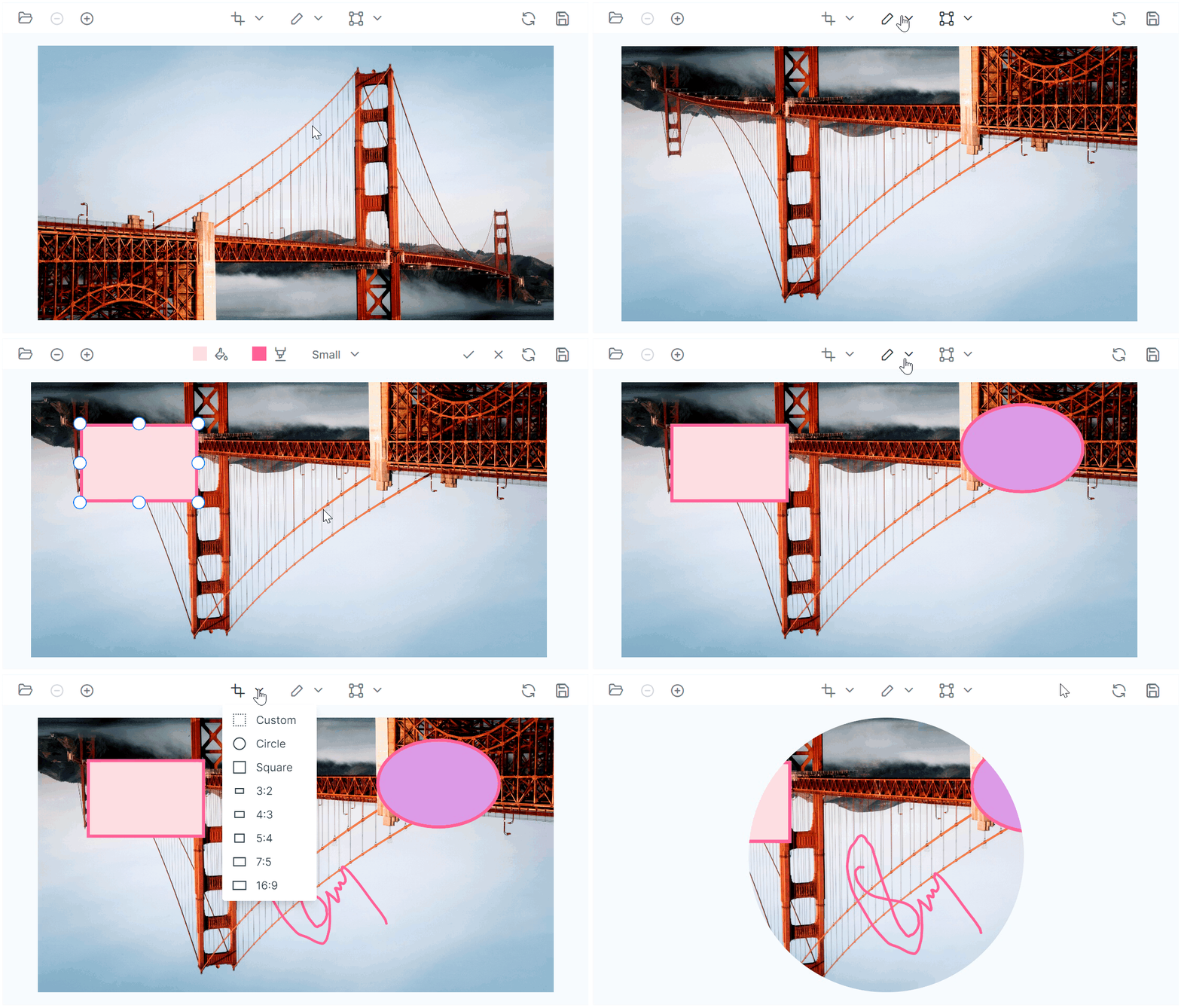
The [JavaScript Image Editor](https://www.syncfusion.com/javascript-ui-controls/js-image-editor?utm_source=npm&utm_medium=listing&utm_campaign=javascript-image-editor-npm) control is a graphical user interface used for editing images. It provides built-in support for rotate, flip, zoom, and crop the images based on the selection. It also has support for inserting an annotations including rectangle, ellipse, line, text, and freehand drawings.
Getting Started .
Online demos .
Learn more
Trusted by the world's leading companies

## Setup
To install Image Editor and its dependent packages, use the following command.
```sh
npm install @syncfusion/ej2-image-editor
```
## Supported frameworks
Image Editor control is also offered in the following list of frameworks.
| [ ](https://www.syncfusion.com/angular-ui-components?utm_medium=listing&utm_source=github)
[Angular](https://www.syncfusion.com/angular-ui-components?utm_medium=listing&utm_source=github) | [ ](https://www.syncfusion.com/react-ui-components?utm_medium=listing&utm_source=github)
[React](https://www.syncfusion.com/react-ui-components?utm_medium=listing&utm_source=github) | [ ](https://www.syncfusion.com/vue-ui-components?utm_medium=listing&utm_source=github)
[Vue](https://www.syncfusion.com/vue-ui-components?utm_medium=listing&utm_source=github) | [ ](https://www.syncfusion.com/aspnet-core-ui-controls?utm_medium=listing&utm_source=github)
[ASP.NET Core](https://www.syncfusion.com/aspnet-core-ui-controls?utm_medium=listing&utm_source=github) | [ ](https://www.syncfusion.com/aspnet-mvc-ui-controls?utm_medium=listing&utm_source=github)
[ASP.NET MVC](https://www.syncfusion.com/aspnet-mvc-ui-controls?utm_medium=listing&utm_source=github) |
| :-----: | :-----: | :-----: | :-----: | :-----: |
## Key features
* [Load and save images in various formats](https://ej2.syncfusion.com/documentation/image-editor/open-save): The Image Editor control allows users to load and edit existing images, as well as export the edited version in PNG, SVG, and JPG formats.
* [Selection and cropping](https://ej2.syncfusion.com/documentation/image-editor/selection-cropping): The control provides selection and cropping functionality, allowing users to crop images based on a customizable selection region with various aspect ratios and the ability to reposition the selection by dragging and resizing.
* [Image transformations](https://ej2.syncfusion.com/documentation/image-editor/transform): The control offers basic image editing features such as rotate, flip, zoom, and crop to adjust the appearance and composition of images.
* [Image annotation](https://ej2.syncfusion.com/documentation/image-editor/annotation): Users can insert annotations including text, rectangle, ellipse, freehand draw, and lines to mark up and annotate their images.
* Image Finetunes: Includes support to adjust the brightness, contrast, saturation, hue, exposure, opacity, and blur of their images to achieve the desired look and feel.
* Image Filters: Includes support for image filtering by applying various pre-set filters such as Default, Chrome, Warm, Cold, GrayScale, Sepia, Invert to alter their appearance.
* [Customizable toolbar](https://ej2.syncfusion.com/documentation/image-editor/toolbar/#custom-toolbar-items): The control includes a customizable toolbar to simplify user interaction and make it easy to access various image editing operations.
* RTL and localization support: The control supports RTL (right-to-left) mode and provides inherent support for localization, allowing users to easily translate the user interface into different languages.
* Various theme support: The component supports a range of themes, including fluent, tailwind css, bootstrap 5, material, and high contrast, giving users the ability to customize the look and feel of the image editor to match their preferences or brand guidelines.
## Support
Product support is available through the following mediums,
* [Support ticket](https://support.syncfusion.com/support/tickets/create) - Guaranteed Response in 24 hours | Unlimited tickets | Holiday support
* [Community forum](https://www.syncfusion.com/forums/essential-js2?utm_source=npm&utm_medium=listing&utm_campaign=javascript-image-editor-npm)
* [GitHub issues](https://github.com/syncfusion/ej2-javascript-ui-controls/issues/new)
* [Request feature or report bug](https://www.syncfusion.com/feedback/javascript?utm_source=npm&utm_medium=listing&utm_campaign=javascript-image-editor-npm)
* Live chat
## Changelog
Check the changelog [here](https://github.com/syncfusion/ej2-javascript-ui-controls/blob/master/controls/imageeditor/CHANGELOG.md?utm_source=npm&utm_medium=listing&utm_campaign=javascript-image-editor-npm). Get minor improvements and bug fixes every week to stay up to date with frequent updates.
## License and copyright
> This is a commercial product and requires a paid license for possession or use. Syncfusion® licensed software, including this component, is subject to the terms and conditions of Syncfusion® [EULA](https://www.syncfusion.com/eula/es/). To acquire a license for 80+ [JavaScript UI controls](https://www.syncfusion.com/javascript-ui-controls), you can [purchase](https://www.syncfusion.com/sales/products) or [start a free 30-day trial](https://www.syncfusion.com/account/manage-trials/start-trials).
> A [free community license](https://www.syncfusion.com/products/communitylicense) is also available for companies and individuals whose organizations have less than $1 million USD in annual gross revenue and five or fewer developers.
See [LICENSE FILE](https://github.com/syncfusion/ej2-javascript-ui-controls/blob/master/license?utm_source=npm&utm_medium=listing&utm_campaign=javascript-image-editor-npm) for more info.
© Copyright 2026 Syncfusion® Inc. All Rights Reserved. The Syncfusion® Essential Studio® license and copyright applies to this distribution.
---
_Source: https://npm.io/package/@syncfusion/ej2-image-editor · Machine-readable twin of the npm.io package page. Health data is recomputed on every publish._