# @syncfusion/ej2-ribbon
> Essential JS 2 Component
Latest version **35.1.37** (published 2026-09-29) · SEE LICENSE IN license license · 0 weekly downloads
## Install
```sh
npm install @syncfusion/ej2-ribbon
pnpm add @syncfusion/ej2-ribbon
yarn add @syncfusion/ej2-ribbon
bun add @syncfusion/ej2-ribbon
```
## Health
**Score 65/100 (B)** — status: active.
Positive: has types; esm support; no vulnerabilities; recently updated; high maintenance score.
Warnings: low downloads.
## Facts
| | |
|---|---|
| Version | 35.1.37 |
| Published | 2026-09-29 |
| First published | 2023-03-23 |
| Weekly downloads | 0 |
| License | SEE LICENSE IN license |
| TypeScript types | bundled |
| Module format | ESM + CommonJS |
| Dependencies | 7 |
| Unpacked size | 5.9 MB |
| Known vulnerabilities | 0 |
| Install scripts | no |
| Author | Syncfusion Inc. |
| Maintainers | syncfusionorg, essentialjs2, syncfusion-javascript |
| Keywords | ej2, syncfusion, ej2-ribbon |
## Links
- npm: https://www.npmjs.com/package/@syncfusion/ej2-ribbon
- Repository: https://github.com/syncfusion/ej2-ribbon-component
- Homepage: https://www.syncfusion.com/javascript-ui-controls
- Issues: https://github.com/syncfusion/ej2-ribbon-component/issues
- npm.io page: https://npm.io/package/@syncfusion/ej2-ribbon
## Dependencies (7)
- [@syncfusion/ej2-base](https://npm.io/package/@syncfusion/ej2-base.md) ~35.1.37
- [@syncfusion/ej2-lists](https://npm.io/package/@syncfusion/ej2-lists.md) ~35.1.37
- [@syncfusion/ej2-popups](https://npm.io/package/@syncfusion/ej2-popups.md) ~35.1.37
- [@syncfusion/ej2-buttons](https://npm.io/package/@syncfusion/ej2-buttons.md) ~35.1.37
- [@syncfusion/ej2-dropdowns](https://npm.io/package/@syncfusion/ej2-dropdowns.md) ~35.1.37
- [@syncfusion/ej2-navigations](https://npm.io/package/@syncfusion/ej2-navigations.md) ~35.1.37
- [@syncfusion/ej2-splitbuttons](https://npm.io/package/@syncfusion/ej2-splitbuttons.md) ~35.1.37
## Recent versions
- 35.1.37 (latest) — 2026-09-29
- 34.2.8 — 2026-09-15
- 34.2.6 — 2026-09-01
- 34.2.2 — 2026-08-05
- 34.1.31 — 2026-07-14
- 34.1.30 — 2026-07-09
- 34.1.29 — 2026-07-06
- 33.2.10 — 2026-06-02
- 33.2.5 — 2026-05-05
- 33.2.4 — 2026-04-28
- 33.2.3 — 2026-04-21
- 33.1.49 — 2026-04-14
- 33.1.44 — 2026-03-16
- 32.2.3 — 2026-02-05
- 32.1.24 — 2026-01-20
- … 54 more at https://npm.io/package/@syncfusion/ej2-ribbon/versions
## README
# Javascript Ribbon Control
> **Using this package with an AI coding agent**
>
> Before generating Syncfusion code, ask your AI coding agent to run the Syncfusion setup using the following prompt:
>
> ```text
> Set up this project for Syncfusion before generating code. Fetch
> and follow the official instructions at https://ai.syncfusion.com,
> then report the detected platform, installed skill pack, MCP
> status, and any required licensing action.
> ```
> The setup detects your project’s platform and loads the appropriate Syncfusion skill pack. No Syncfusion account or MCP key is required to install or read Syncfusion agent skills.
>
> **Platform reference:** [https://ai.syncfusion.com/javascript/llms.txt](https://ai.syncfusion.com/javascript/llms.txt)
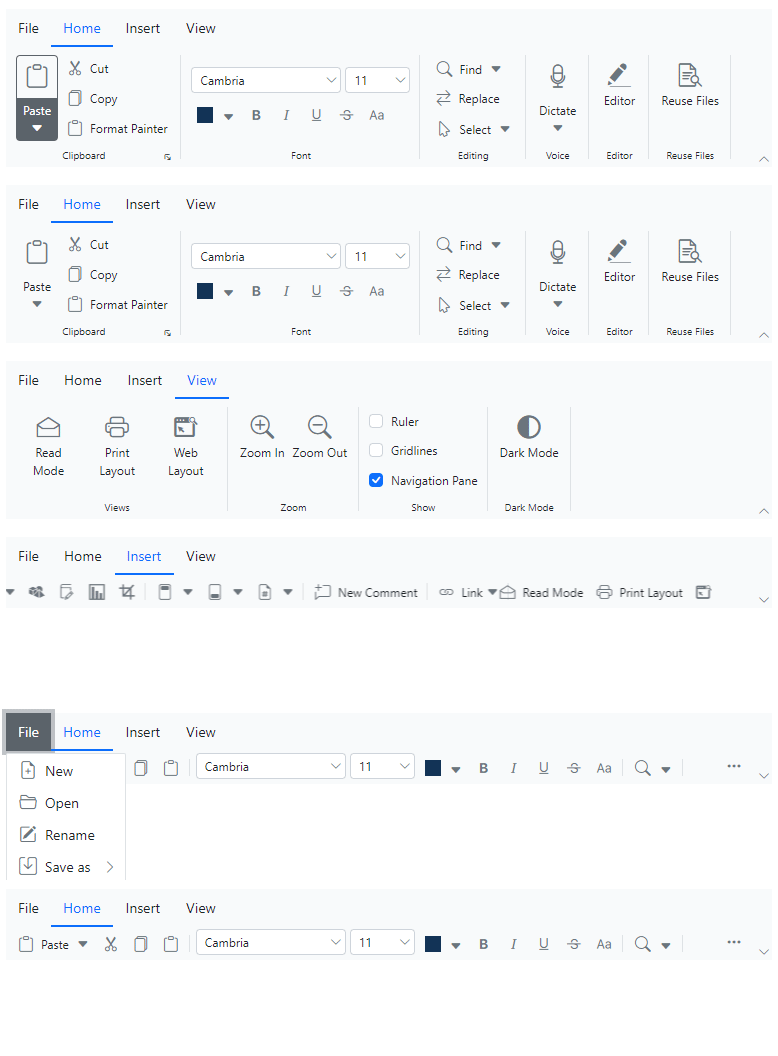
The [JavaScript Ribbon](https://www.syncfusion.com/javascript-ui-controls/js-ribbon?utm_source=npm&utm_medium=listing&utm_campaign=javascript-ribbon-npm) control provides a structured and easy-to-use user interface for users to access different features and functions through series of tabs, improving the overall user experience and making your application more efficient.
Getting Started |
Online demos |
Learn more
Trusted by the world's leading companies

## Setup
To install the Ribbon and its dependent packages, use the following command.
```sh
npm install @syncfusion/ej2-ribbon
```
## Supported frameworks
Ribbon control is also offered in the following list of frameworks.
| [ ](https://www.syncfusion.com/angular-ui-components?utm_medium=listing&utm_source=github)
[Angular](https://www.syncfusion.com/angular-ui-components?utm_medium=listing&utm_source=github) | [ ](https://www.syncfusion.com/react-ui-components?utm_medium=listing&utm_source=github)
[React](https://www.syncfusion.com/react-ui-components?utm_medium=listing&utm_source=github) | [ ](https://www.syncfusion.com/vue-ui-components?utm_medium=listing&utm_source=github)
[Vue](https://www.syncfusion.com/vue-ui-components?utm_medium=listing&utm_source=github) | [ ](https://www.syncfusion.com/aspnet-core-ui-controls?utm_medium=listing&utm_source=github)
[ASP.NET Core](https://www.syncfusion.com/aspnet-core-ui-controls?utm_medium=listing&utm_source=github) | [ ](https://www.syncfusion.com/aspnet-mvc-ui-controls?utm_medium=listing&utm_source=github)
[ASP.NET MVC](https://www.syncfusion.com/aspnet-mvc-ui-controls?utm_medium=listing&utm_source=github) |
| :-----: | :-----: | :-----: | :-----: | :-----: |
## Key features
* [Built-in items](https://ej2.syncfusion.com/documentation/ribbon/items): Several built-in support items, such as buttons, checkboxes, dropdown buttons, split buttons, combo boxes, group button, and color pickers that can be customized and used to execute specific actions.
* [Modes](https://ej2.syncfusion.com/documentation/ribbon/layouts): Offers the `classic mode` that organizes items and groups in a traditional form, and `simplified mode` that organizes items and groups into a single row for improved usability and reduced clutter.
* [Tooltip](https://ej2.syncfusion.com/documentation/ribbon/tooltip): Provide additional information when a user hovers over a ribbon item, improving user experience and increasing the usability of the application.
* [File menu](https://ej2.syncfusion.com/documentation/ribbon/file-menu): A built-in menu that to add file related actions easily.
* [Backstage](https://ej2.syncfusion.com/documentation/ribbon/backstage): It is an extension of traditional file menu for displaying information, based on the user interactions with backstage options.
* [Gallery](https://ej2.syncfusion.com/documentation/ribbon/gallery-items): In addition to the existing items, a new item gallery has been added to the Ribbon control which allows users to perform specific actions by displaying a collection of related items including icons, content, or images.
* [Contextual Tabs](https://ej2.syncfusion.com/documentation/ribbon/contextual-tabs): It allows users to show ribbon tabs on demand when needed, by adding built-in and custom items to perform specific actions just like regular ribbon tabs.
* [KeyTips](https://ej2.syncfusion.com/documentation/ribbon/keytip): It enables users to quickly access the tabs or ribbon items by using unique key tips (up to 3 characters), activated with `Alt + Windows/Command keys` and closed or navigated back with the `Esc` key.
* [Templates](https://ej2.syncfusion.com/documentation/ribbon/help-pane-template): Customize ribbon items and the help pane content using templates.
## Resources
* [Ribbon Documentation](https://ej2.syncfusion.com/documentation/ribbon/getting-started)
* [Theme Studio](https://ej2.syncfusion.com/themestudio/)
* [Custom Resource Generator](https://crg.syncfusion.com/)
* [What's New](https://www.syncfusion.com/products/whatsnew/essential-js2?utm_medium=listing&utm_source=github)
* [Road Map](https://www.syncfusion.com/products/roadmap/essential-js2?utm_medium=listing&utm_source=github)
* [E-Books](https://www.syncfusion.com/ebooks?tag=javascript&utm_medium=listing&utm_source=github)
## Support
Product support is available through the following mediums.
* [Support ticket](https://support.syncfusion.com/support/tickets/create) - Guaranteed Response in 24 hours | Unlimited tickets | Holiday support
* [Community forum](https://www.syncfusion.com/forums/essential-js2?utm_source=npm&utm_medium=listing&utm_campaign=javascript-ribbon-npm)
* [GitHub issues](https://github.com/syncfusion/ej2-javascript-ui-controls/issues/new)
* [Request feature or report bug](https://www.syncfusion.com/feedback/javascript?utm_source=npm&utm_medium=listing&utm_campaign=javascript-ribbon-npm)
* Live chat
## License and copyright
> This is a commercial product and requires a paid license for possession or use. Syncfusion® licensed software, including this control, is subject to the terms and conditions of Syncfusion® [EULA](https://www.syncfusion.com/eula/es/). To acquire a license for 140+ [JavaScript UI controls](https://www.syncfusion.com/javascript-ui-controls), you can [purchase](https://www.syncfusion.com/sales/products) or [start a free 30-day trial](https://www.syncfusion.com/account/manage-trials/start-trials).
> A [free community license](https://www.syncfusion.com/products/communitylicense) is also available for companies and individuals whose organizations have less than $1 million USD in annual gross revenue and five or fewer developers.
See [LICENSE FILE](https://github.com/syncfusion/ej2-javascript-ui-controls/blob/master/license?utm_source=npm&utm_medium=listing&utm_campaign=javascript-ribbon-npm) for more info.
© Copyright 2026 Syncfusion® Inc. All Rights Reserved. The Syncfusion® Essential Studio® license and copyright applies to this distribution.
---
_Source: https://npm.io/package/@syncfusion/ej2-ribbon · Machine-readable twin of the npm.io package page. Health data is recomputed on every publish._