# @tasiodev/react-places-autocomplete
> Component used as a field in a form to autocomplete a place, using the Google Maps API.
Latest version **2.0.0** (published 2026-05-13) · 0 weekly downloads
## Install
```sh
npm install @tasiodev/react-places-autocomplete
pnpm add @tasiodev/react-places-autocomplete
yarn add @tasiodev/react-places-autocomplete
bun add @tasiodev/react-places-autocomplete
```
## Health
**Score 50/100 (C)** — status: active.
Positive: has types; no vulnerabilities.
Warnings: low downloads; no esm support.
## Facts
| | |
|---|---|
| Version | 2.0.0 |
| Published | 2026-05-13 |
| First published | 2023-06-20 |
| Weekly downloads | 0 |
| TypeScript types | bundled |
| Module format | CommonJS |
| Dependencies | 3 |
| Unpacked size | 40.7 KB |
| Known vulnerabilities | 0 |
| Install scripts | no |
| Author | tasiodev |
| Maintainers | tasiodev |
| Keywords | google maps, places, autocomplete, picker, dropdown |
## Links
- npm: https://www.npmjs.com/package/@tasiodev/react-places-autocomplete
- Repository: https://github.com/tasiodev/react-places-autocomplete
- Homepage: https://github.com/tasiodev/react-places-autocomplete#readme
- Issues: https://github.com/tasiodev/react-places-autocomplete/issues
- npm.io page: https://npm.io/package/@tasiodev/react-places-autocomplete
## Dependencies (3)
- [core-js](https://npm.io/package/core-js.md) ^3.37.0
- [@babel/runtime](https://npm.io/package/@babel/runtime.md) ^7.20.1
- [@googlemaps/js-api-loader](https://npm.io/package/@googlemaps/js-api-loader.md) 1.16.2
## Recent versions
- 2.0.0 (latest) — 2026-05-13
- 1.1.0 — 2025-05-31
- 1.0.4 — 2023-06-27
- 1.0.3 — 2023-06-27
- 1.0.2 — 2023-06-27
- 1.0.1 — 2023-06-27
- 1.0.0 — 2023-06-21
- 0.1.9 — 2023-06-21
- 0.1.8 — 2023-06-20
- 0.1.7 — 2023-06-20
- 0.1.6 — 2023-06-20
- 0.1.5 — 2023-06-20
- 0.1.4 — 2023-06-20
- 0.1.3 — 2023-06-20
- 0.1.2 — 2023-06-20
- … 2 more at https://npm.io/package/@tasiodev/react-places-autocomplete/versions
## README
# React Places Autocomplete
Component used as a field in a form to autocomplete a place, using the Google Maps API.
The place can be a city, a country, a street, or even an establishment.
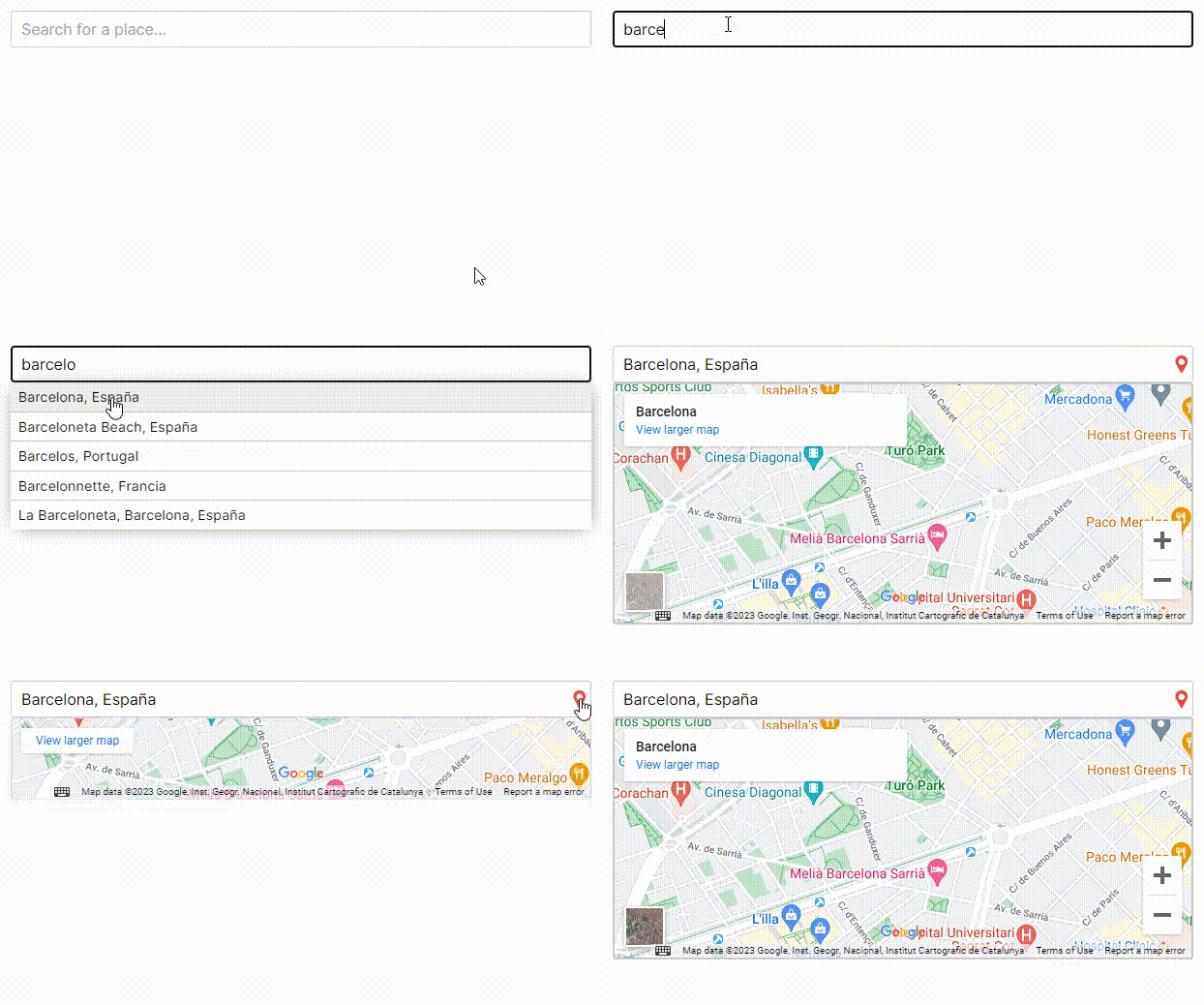
## Demo
https://react-places-autocomplete-demo.up.railway.app
## Features
- Map with the selected place
- Limit the type of places you want to retrieve
- Fully customizable
## Migrating from v1 to v2
Version 2.0.0 migrates from the deprecated `google.maps.places.AutocompleteService` to the new `google.maps.places.AutocompleteSuggestion` API.
**Required change in Google Cloud Console:** you must enable the **Places API (New)** in addition to (or instead of) the legacy Places API. Without this, autocomplete suggestions will not work after upgrading.
See the official migration guide: https://developers.google.com/maps/documentation/javascript/places-migration-overview
## Requisites
To use this component, you will need a Google API key. Here is more information on how to obtain it: https://developers.google.com/maps/documentation/javascript/get-api-key
You will also need to enable these APIs in Google Cloud Console:
- **Places API (New)** ← required from v2.0.0
- Maps JavaScript API
Exposing your API key in the front-end code of your application can pose significant security risks. Unauthorized access to your API key may lead to unauthorized usage.
Is highly recommended to store it in a separate configuration file, such as the .env file.
Additionally, we strongly recommend that you restrict the usage of your API key using the available configuration options. https://developers.google.com/maps/api-security-best-practices#restrict_apikey
## Installation and Basic Example
```bash
npm install @tasiodev/react-places-autocomplete
```
```javascript
import { useState } from 'react'
import PlacesPicker from '@tasiodev/react-places-autocomplete'
function App() {
const [value, setValue] = useState(null)
return
}
```
## Props Reference
####
| Parameter | Type | Description |
| :-------- | :------- | :------------------------- |
| `gMapsKey` | `string` | **Required**. Your API key |
| `placeId` | `string` | Id used to load an initial or stored place |
| `onChange` | `func` | Event triggered when user select a place or when user starts typing to search a place |
| `onSelectPlace` | `func` | Event triggered when user select a place |
| `placeholder` | `string` | Placeholder for input |
| `searchTypes` | `array[string]` | Limit the place types return in a search. See: https://developers.google.com/maps/documentation/places/web-service/supported_types |
| `language` | `string` | ISO code for map and results language. Default: "en" |
| `disableMap` | `bool` | Boolean to disable place Map. Default: false |
| `mapExpanded` | `bool` | If true, the map is always visible. Default: false |
| `disabled` | `bool` | Boolean to disable input |
| `customStyles` | `object` | Object to override styles of each element. See definitions |
#### customStyles example
```javascript
{
container: { backgroundColor: 'black' },
fieldInput: { color: 'red' },
searchResultsContainer: { marginTop: 12 },
searchResult: { padding: 6 },
gmapContainer: { padding: 8, height: 400 },
}
```
---
_Source: https://npm.io/package/@tasiodev/react-places-autocomplete · Machine-readable twin of the npm.io package page. Health data is recomputed on every publish._