# @transifex/vue2

> Vue i18n framework using Transifex Native

Latest version **8.0.3** (published 2026-09-01) · Apache-2.0 license · 0 weekly downloads

## Install

```sh
npm install @transifex/vue2
pnpm add @transifex/vue2
yarn add @transifex/vue2
bun add @transifex/vue2
```

## Health

**Score 55/100 (C)** — status: active.

Positive: no vulnerabilities; recently updated; high maintenance score.

Warnings: low downloads; no types; no esm support.

## Facts

| | |
|---|---|
| Version | 8.0.3 |
| Published | 2026-09-01 |
| First published | 2022-01-12 |
| Weekly downloads | 0 |
| License | Apache-2.0 |
| TypeScript types | none |
| Module format | CommonJS |
| Node | >=16.0.0 |
| Dependencies | 0 |
| Unpacked size | 9.7 KB |
| Known vulnerabilities | 0 |
| Install scripts | no |
| GitHub stars | 51 |
| Author | Transifex |
| Maintainers | transifex |
| Keywords | transifex, i18n, l10n, localization, internationalization, globalization, translation, vue, vue.js |

## Links

- npm: https://www.npmjs.com/package/@transifex/vue2
- Repository: https://github.com/transifex/transifex-javascript
- Homepage: https://github.com/transifex/transifex-javascript/tree/master/packages/vue2
- Issues: https://github.com/transifex/transifex-javascript/issues
- npm.io page: https://npm.io/package/@transifex/vue2

## Alternatives

- [messageformat](https://npm.io/package/messageformat.md) — 329.7K weekly downloads
- [@mintlify/scraping](https://npm.io/package/@mintlify/scraping.md) — 294.8K weekly downloads
- [@mintlify/previewing](https://npm.io/package/@mintlify/previewing.md) — 209.5K weekly downloads
- [@mintlify/prebuild](https://npm.io/package/@mintlify/prebuild.md) — 209.5K weekly downloads
- [@mintlify/link-rot](https://npm.io/package/@mintlify/link-rot.md) — 206.3K weekly downloads

## Recent versions

- 8.0.3 (latest) — 2026-09-01
- 8.0.2 — 2026-07-09
- 8.0.1 — 2026-06-22
- 8.0.0 — 2026-06-19
- 7.1.6 — 2026-04-17
- 7.1.5 — 2025-11-14
- 7.1.4 — 2025-05-23
- 7.1.3 — 2024-08-29
- 7.1.2 — 2024-07-03
- 7.1.1 — 2024-06-07
- 7.1.0 — 2024-02-07
- 7.0.1 — 2024-01-26
- 7.0.0 — 2024-01-26
- 6.0.2 — 2023-12-11
- 6.0.1 — 2023-10-02
- … 36 more at https://npm.io/package/@transifex/vue2/versions

## README

<p align="center">
  <a href="https://www.transifex.com">
    <img src="https://raw.githubusercontent.com/transifex/transifex-javascript/master/media/transifex.png" height="60">
  </a>
</p>
<p align="center">
  <i>Transifex Native is a full end-to-end, cloud-based localization stack for moderns apps.</i>
</p>
<p align="center">
  <img src="https://github.com/transifex/transifex-javascript/actions/workflows/npm-publish.yml/badge.svg">
  <a href="https://www.npmjs.com/package/@transifex/vue2">
    <img src="https://img.shields.io/npm/v/@transifex/vue2.svg">
  </a>
  <a href="https://developers.transifex.com/docs/native">
    <img src="https://img.shields.io/badge/docs-transifex.com-blue">
  </a>
</p>

# Transifex Native SDK: Vue i18n

Vue2 component for localizing Vue application using
[Transifex Native](https://www.transifex.com/native/).

Related packages:
- [@transifex/native](https://www.npmjs.com/package/@transifex/native)
- [@transifex/cli](https://www.npmjs.com/package/@transifex/cli)

Learn more about Transifex Native in the [Transifex Developer Hub](https://developers.transifex.com/docs/native).

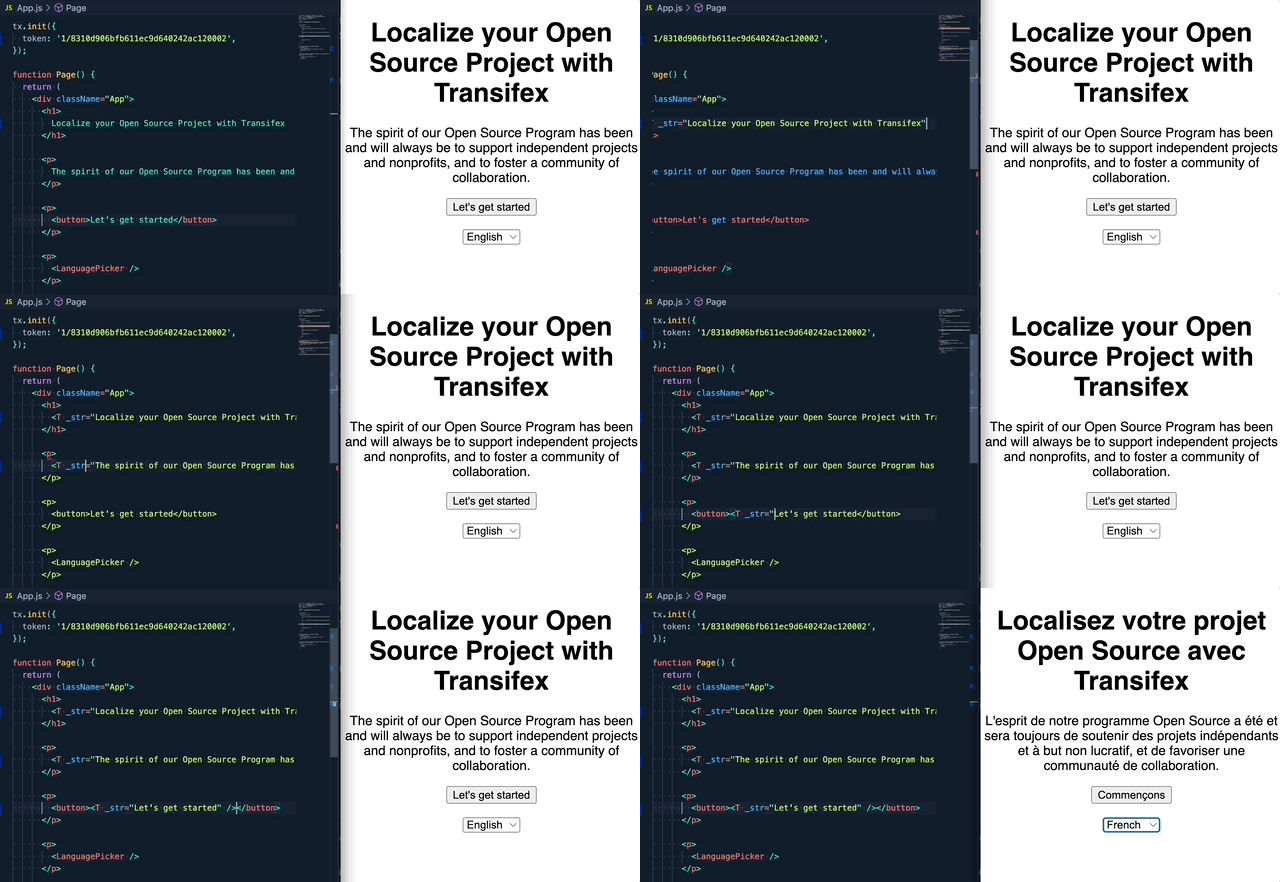
# How it works

**Step1**: Create a Transifex Native project in [Transifex](https://www.transifex.com).

**Step2**: Grab credentials.

**Step3**: Internationalize the code using the SDK.

**Step4**: Push source phrases using the `@transifex/cli` tool.

**Step5**: Translate the app using over-the-air updates.

No translation files required.
![native](https://raw.githubusercontent.com/transifex/transifex-javascript/master/media/native.gif)

# Upgrade to v2

If you are upgrading from the `1.x.x` version, please read this [migration guide](https://github.com/transifex/transifex-javascript/blob/HEAD/UPGRADE_TO_V2.md), as there are breaking changes in place.


# Install

Install the library and its dependencies using:

```sh
npm install @transifex/native @transifex/vue2 --save
```

# Usage

## Initiate the plugin in a Vue App

```javascript
import Vue from 'vue';
import App from './App.vue';
import { tx } from '@transifex/native';
import { TransifexVue } from '@transifex/vue2';

tx.init({
  token: '<token>',
});

Vue.use(TransifexVue);

new Vue({
  render: (h) => h(App),
}).$mount('#app');
```


## `T` Component

```javascript
<template>
  <div>
    <T _str="Hello world" />
    <T _str="Hello {username}" :username="user" />
  </div>
</template>

<script>
  export default {
    name: 'App',
    data() {
      return {
        user: 'John'
      };
    },
  }
</script>
```

Available optional props:

| Prop       | Type   | Description                                 |
|------------|--------|---------------------------------------------|
| _context   | String | String context, affects key generation      |
| _key       | String | Custom string key                           |
| _comment   | String | Developer comment                           |
| _charlimit | Number | Character limit instruction for translators |
| _tags      | String | Comma separated list of tags                |


## `UT` Component

```javascript
<template>
  <div>
      <UT _str="Hello <b>{username}</b>" :username="user" />
      <p>
        <UT _str="Hello <b>{username}</b>" :username="user" _inline="true" />
      </p>
  </div>
</template>

<script>
  export default {
    name: 'App',
    data() {
      return {
        user: 'John'
      };
    },
  }
</script>
```

`UT` has the same behaviour as `T`, but renders source string as HTML inside a
`div` tag.

Available optional props: All the options of `T` plus:

| Prop    | Type    | Description                                     |
|---------|---------|-------------------------------------------------|
| _inline | Boolean | Wrap translation in `span` |

## `$t` template function or `this.t` alias for scripts

Makes the current component re-render when a language change is detected and
returns a t-function you can use to translate strings programmatically.

You will most likely prefer to use the `T` or `UT` components over this, unless
for some reason you want to have the translation output in a variable for
manipulation.

```javascript

<template>
  <div>
    {{$t('Hello world').toLowerCase()}}
    {{hellofromscript}}
  </div>
</template>

<script>
  export default {
    name: 'App',
    computed: {
      hellofromscript: function() { return this.t('Hello world').toLowerCase() },
    },
  }
</script>

```

## `LanguagePicker` component

Renders a `<select>` tag that displays supported languages and switches the
application's selected language on change.

```javascript
<template>
  <div>
    <T _str="This is a translatable message" />
    <LanguagePicker />
  </div>
</template>

<script>
import { LanguagePicker } from '@transifex/vue2';
  export default {
    name: 'App',
    components: {
      LanguagePicker,
    }
  }
</script>
```

Accepts properties:

- `className`: The CSS class that will be applied to the `<select>` tag.

# License

Licensed under Apache License 2.0, see [LICENSE](https://github.com/transifex/transifex-javascript/blob/HEAD/LICENSE) file.

---
_Source: https://npm.io/package/@transifex/vue2 · Machine-readable twin of the npm.io package page. Health data is recomputed on every publish._

