# @vaadin/grid
> A free, flexible and high-quality Web Component for showing large amounts of tabular data
Latest version **24.10.8** (published 2026-10-02) · Apache-2.0 license · 0 weekly downloads
## Install
```sh
npm install @vaadin/grid
pnpm add @vaadin/grid
yarn add @vaadin/grid
bun add @vaadin/grid
```
## Health
**Score 55/100 (C)** — status: active.
Positive: no vulnerabilities; recently updated; high maintenance score.
Warnings: low downloads; no types; no esm support.
## Facts
| | |
|---|---|
| Version | 24.10.8 |
| Published | 2026-10-02 |
| First published | 2021-10-08 |
| Weekly downloads | 0 |
| License | Apache-2.0 |
| TypeScript types | none |
| Module format | CommonJS |
| Dependencies | 0 |
| Known vulnerabilities | 0 |
| Install scripts | no |
| GitHub stars | 582 |
| Author | Vaadin Ltd |
| Maintainers | web-padawan, diegocardoso, alvarezguille, platosha, jouni, manolo, yuriyyev, vaadin-owner, tomivirkki, artur-, sunzhewyq, sissbruecker |
| Keywords | vaadin, elements, components, webcomponents, web-components, grid, datagrid, datatable, data-grid, data-table |
## Links
- npm: https://www.npmjs.com/package/@vaadin/grid
- Repository: https://github.com/vaadin/web-components
- Homepage: https://vaadin.com/components
- Issues: https://github.com/vaadin/web-components/issues
- npm.io page: https://npm.io/package/@vaadin/grid
## Alternatives
- [@lexical/table](https://npm.io/package/@lexical/table.md) — 3.0M weekly downloads
- [mantine-datatable](https://npm.io/package/mantine-datatable.md) — 98.2K weekly downloads
- [react-native-collapsible-tab-view](https://npm.io/package/react-native-collapsible-tab-view.md) — 70.6K weekly downloads
- [@handsontable/vue3](https://npm.io/package/@handsontable/vue3.md) — 16.1K weekly downloads
- [vuewordcloud](https://npm.io/package/vuewordcloud.md) — 7.2K weekly downloads
## Recent versions
- 24.10.8 (latest) — 2026-10-02
- 25.4.0-dev.c9532cd333 (dev-table-theme) — 2026-09-30
- 25.4.0-alpha1 (next) — 2026-09-23
- 25.3.0-dev.1fa5a51482 (dev-disable-dates) — 2026-07-25
- 24.4.0-dev.4b20a0c55.3 (canary) — 2024-03-22
- 24.9.20 — 2026-10-02
- 25.3.2 — 2026-10-02
- 24.4.19 — 2026-10-01
- 24.7.13 — 2026-09-30
- 25.3.1 — 2026-09-30
- 25.2.14 — 2026-09-30
- 24.10.7 — 2026-09-30
- 24.9.19 — 2026-09-30
- 23.6.7 — 2026-09-30
- 25.4.0-dev.55bb86e155 — 2026-09-26
- … 650 more at https://npm.io/package/@vaadin/grid/versions
## README
# @vaadin/grid
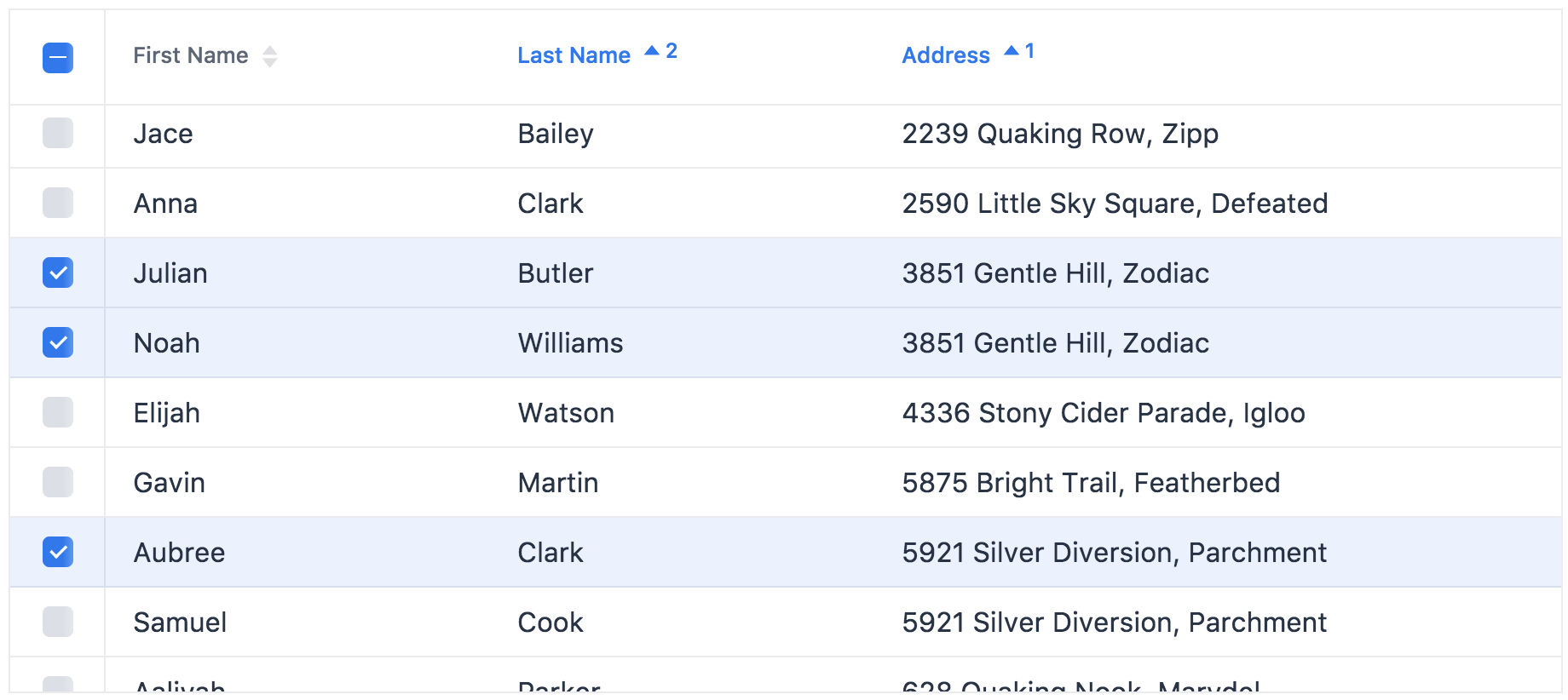
A web component for showing tabular data.
[Documentation + Live Demo ↗](https://vaadin.com/docs/latest/components/grid)
[](https://www.npmjs.com/package/@vaadin/grid)
```html
```
[ ](https://vaadin.com/docs/latest/components/grid)
## Installation
Install the component:
```sh
npm i @vaadin/grid
```
Once installed, import the components in your application:
```js
import '@vaadin/grid';
import '@vaadin/grid/vaadin-grid-column-group.js';
import '@vaadin/grid/vaadin-grid-filter-column.js';
import '@vaadin/grid/vaadin-grid-selection-column.js';
import '@vaadin/grid/vaadin-grid-sort-column.js';
import '@vaadin/grid/vaadin-grid-tree-column.js';
```
## Themes
Vaadin components come with two built-in [themes](https://vaadin.com/docs/latest/styling), Lumo and Material.
The [main entrypoint](https://github.com/vaadin/web-components/blob/main/packages/grid/vaadin-grid.js) of the package uses the Lumo theme.
To use the Material theme, import the components from the `theme/material` folder:
```js
import '@vaadin/grid/theme/material/vaadin-grid.js';
import '@vaadin/grid/theme/material/vaadin-grid-filter-column.js';
import '@vaadin/grid/theme/material/vaadin-grid-selection-column.js';
import '@vaadin/grid/theme/material/vaadin-grid-sort-column.js';
import '@vaadin/grid/theme/material/vaadin-grid-tree-column.js';
```
You can also import the Lumo version of the components explicitly:
```js
import '@vaadin/grid/theme/lumo/vaadin-grid.js';
import '@vaadin/grid/theme/lumo/vaadin-grid-filter-column.js';
import '@vaadin/grid/theme/lumo/vaadin-grid-selection-column.js';
import '@vaadin/grid/theme/lumo/vaadin-grid-sort-column.js';
import '@vaadin/grid/theme/lumo/vaadin-grid-tree-column.js';
```
Finally, you can import the un-themed components from the `src` folder to get a minimal starting point:
```js
import '@vaadin/grid/src/vaadin-grid.js';
import '@vaadin/grid/src/vaadin-grid-column-group.js';
import '@vaadin/grid/src/vaadin-grid-filter-column.js';
import '@vaadin/grid/src/vaadin-grid-selection-column.js';
import '@vaadin/grid/src/vaadin-grid-sort-column.js';
import '@vaadin/grid/src/vaadin-grid-tree-column.js';
```
## Contributing
Read the [contributing guide](https://vaadin.com/docs/latest/contributing) to learn about our development process, how to propose bugfixes and improvements, and how to test your changes to Vaadin components.
## License
Apache License 2.0
Vaadin collects usage statistics at development time to improve this product.
For details and to opt-out, see https://github.com/vaadin/vaadin-usage-statistics.
---
_Source: https://npm.io/package/@vaadin/grid · Machine-readable twin of the npm.io package page. Health data is recomputed on every publish._
](https://vaadin.com/docs/latest/components/grid)
## Installation
Install the component:
```sh
npm i @vaadin/grid
```
Once installed, import the components in your application:
```js
import '@vaadin/grid';
import '@vaadin/grid/vaadin-grid-column-group.js';
import '@vaadin/grid/vaadin-grid-filter-column.js';
import '@vaadin/grid/vaadin-grid-selection-column.js';
import '@vaadin/grid/vaadin-grid-sort-column.js';
import '@vaadin/grid/vaadin-grid-tree-column.js';
```
## Themes
Vaadin components come with two built-in [themes](https://vaadin.com/docs/latest/styling), Lumo and Material.
The [main entrypoint](https://github.com/vaadin/web-components/blob/main/packages/grid/vaadin-grid.js) of the package uses the Lumo theme.
To use the Material theme, import the components from the `theme/material` folder:
```js
import '@vaadin/grid/theme/material/vaadin-grid.js';
import '@vaadin/grid/theme/material/vaadin-grid-filter-column.js';
import '@vaadin/grid/theme/material/vaadin-grid-selection-column.js';
import '@vaadin/grid/theme/material/vaadin-grid-sort-column.js';
import '@vaadin/grid/theme/material/vaadin-grid-tree-column.js';
```
You can also import the Lumo version of the components explicitly:
```js
import '@vaadin/grid/theme/lumo/vaadin-grid.js';
import '@vaadin/grid/theme/lumo/vaadin-grid-filter-column.js';
import '@vaadin/grid/theme/lumo/vaadin-grid-selection-column.js';
import '@vaadin/grid/theme/lumo/vaadin-grid-sort-column.js';
import '@vaadin/grid/theme/lumo/vaadin-grid-tree-column.js';
```
Finally, you can import the un-themed components from the `src` folder to get a minimal starting point:
```js
import '@vaadin/grid/src/vaadin-grid.js';
import '@vaadin/grid/src/vaadin-grid-column-group.js';
import '@vaadin/grid/src/vaadin-grid-filter-column.js';
import '@vaadin/grid/src/vaadin-grid-selection-column.js';
import '@vaadin/grid/src/vaadin-grid-sort-column.js';
import '@vaadin/grid/src/vaadin-grid-tree-column.js';
```
## Contributing
Read the [contributing guide](https://vaadin.com/docs/latest/contributing) to learn about our development process, how to propose bugfixes and improvements, and how to test your changes to Vaadin components.
## License
Apache License 2.0
Vaadin collects usage statistics at development time to improve this product.
For details and to opt-out, see https://github.com/vaadin/vaadin-usage-statistics.
---
_Source: https://npm.io/package/@vaadin/grid · Machine-readable twin of the npm.io package page. Health data is recomputed on every publish._