# @wdio/junit-reporter
> A WebdriverIO reporter that creates Jenkins compatible XML based JUnit reports
Latest version **9.32.0** (published 2026-09-20) · MIT license · 0 weekly downloads
## Install
```sh
npm install @wdio/junit-reporter
pnpm add @wdio/junit-reporter
yarn add @wdio/junit-reporter
bun add @wdio/junit-reporter
```
## Health
**Score 70/100 (B)** — status: active.
Positive: has types; esm support; no vulnerabilities; has provenance; recently updated; high maintenance score.
Warnings: low downloads.
## Facts
| | |
|---|---|
| Version | 9.32.0 |
| Published | 2026-09-20 |
| First published | 2018-11-06 |
| Weekly downloads | 0 |
| License | MIT |
| TypeScript types | bundled |
| Module format | ESM |
| Node | >=18.20.0 |
| Dependencies | 4 |
| Unpacked size | 43.6 KB |
| Known vulnerabilities | 0 |
| Install scripts | no |
| Provenance | attested (GitHub Actions) |
| Author | Christian Bromann |
| Maintainers | christian-bromann, wdio-user, wswebcreation-nl |
| Keywords | webdriver, wdio, wdio-reporter, junit, reporter |
## Links
- npm: https://www.npmjs.com/package/@wdio/junit-reporter
- Repository: https://github.com/webdriverio/webdriverio
- Homepage: https://github.com/webdriverio/webdriverio/tree/main/packages/wdio-junit-reporter
- Issues: https://github.com/webdriverio/webdriverio/issues
- npm.io page: https://npm.io/package/@wdio/junit-reporter
## Dependencies (4)
- [@wdio/types](https://npm.io/package/@wdio/types.md) 9.32.0
- [@wdio/reporter](https://npm.io/package/@wdio/reporter.md) 9.32.0
- [json-stringify-safe](https://npm.io/package/json-stringify-safe.md) ^5.0.1
- [junit-report-builder](https://npm.io/package/junit-report-builder.md) ^5.1.1
## Recent versions
- 9.32.0 (latest) — 2026-09-20
- 9.32.0-alpha.14 (next) — 2026-09-13
- 8.43.0 (v8) — 2025-03-05
- 7.40.0 (v7) — 2024-12-18
- 9.0.0-alpha.0 (v9) — 2024-03-12
- 7.0.0-beta.4 (beta) — 2021-02-09
- 9.32.0-alpha.13 — 2026-09-13
- 9.32.0-alpha.6 — 2026-09-13
- 9.32.0-alpha.0 — 2026-09-13
- 9.32.0-alpha.3 — 2026-09-13
- 9.31.2 — 2026-08-21
- 9.31.1 — 2026-08-18
- 9.30.1 — 2026-08-03
- 9.29.1 — 2026-06-26
- 9.29.0 — 2026-06-18
- … 329 more at https://npm.io/package/@wdio/junit-reporter/versions
## README
WebdriverIO JUnit Reporter
========================
> A WebdriverIO reporter that creates [Jenkins](http://jenkins-ci.org/) compatible XML based JUnit reports
## Installation
The easiest way is to keep `@wdio/junit-reporter` as a devDependency in your `package.json`, via:
```sh
npm install @wdio/junit-reporter --save-dev
```
Instructions on how to install `WebdriverIO` can be found [here](https://webdriver.io/docs/gettingstarted).
## Output
This reporter will output a report for each runner, so in turn you will receive an XML report for each spec file. Below
are examples of XML output given different scenarios in the spec file.
### Single describe block
```javascript
describe('a test suite', () => {
it('a test case', function () {
// do something
// assert something
});
});
```
becomes
```xml
```
### Nested describe block
```javascript
describe('a test suite', () => {
describe('a nested test suite', function() {
it('a test case', function () {
// do something
// assert something
});
});
});
```
becomes
```xml
```
### Multiple describe block
```javascript
describe('a test suite', () => {
it('a test case', function () {
// do something
// assert something
});
});
describe('a second test suite', () => {
it('a second test case', function () {
// do something
// assert something
});
});
```
becomes
```xml
```
### Failures and Errors
All test case failures are mapped as JUnit test case errors. A failed test case due to assertion failure or error will look like:
```xml
(C:\repo\webdriver-example\test\specs/a_test_suite.spec.js:22:17)
]]>
```
## Configuration
The following example shows a basic configuration for this reporter:
```js
// wdio.conf.js
export const config = {
// ...
reporters: [['junit', {
outputDir: './',
outputFileFormat: () => `test-results.xml`;
}]],
// ...
};
```
The following options are supported:
### outputDir
Define a directory where your XML files should get stored. Ignored if either `logFile` or `setLogFile` are defined.
Type: `String`
### outputFileFormat
Function for defining the filename format for the reporter log files. Ignored if either `logFile` or `setLogFile`
are defined.
The function accepts an object input parameter with the `cid` and `capabilities` keys.
Type: `Object`
Default: ``(opts) => `wdio-${opts.cid}-junit-reporter.log` ``
Example:
```js
// wdio.conf.js
export const config = {
// ...
reporters: [['junit', {
outputDir: './',
outputFileFormat: (opts) => `results-${opts.cid}-${opts.capabilities.browserName}.xml`,
}]],
// ...
};
```
### logFile
Path to the reporter log file relative to the current directory. Overrides `outputDir` and `outputFileFormat`.
Ignored if `setLogFile` is defined.
Type: `String`
Example:
```js
// wdio.conf.js
export const config = {
// ...
reporters: [['junit', {
logFile: './reports/junit-report.xml',
}]],
// ...
};
```
### setLogFile
Function for defining the path for the reporter log files. Overrides `outputDir`, `outputFileFormat`, and `logFile`.
The function accepts two input parameters: `cid` and `name` (the reporter name, set to `junit`).
Type: `Object`
Example:
```js
// wdio.conf.js
export const config = {
// ...
reporters: [['junit', {
setLogFile: (cid, name) => `./reports/results-${cid}-${name}.xml`,
}]],
// ...
};
```
### stdout
Output the generated XML to the console instead of creating a log file.
Type: `boolean`
Default: `false`
### writeStream
Set a stream to which the generated XML should be output, instead of creating a log file.
Note: `logFile` must not be set, unless `stdout` is set to `true`.
Type: `WriteStream`
### suiteNameFormat
Format the generated name of a test suite, using custom regex or a function.
The function accepts an object input parameter with the `name` and `suite` keys.
Type: `Regex | Object`,
Default: `/[^a-zA-Z0-9@]+/`
Example with Regex:
```js
// wdio.conf.js
export const config = {
// ...
reporters: [['junit', {
outputDir: './',
suiteNameFormat: /[^a-zA-Z0-9@]+/
}]],
// ...
};
```
Example with function:
```js
// wdio.conf.js
export const config = {
// ...
reporters: [['junit', {
outputDir: './',
suiteNameFormat: ({name, suite}) => `suite-${name}-${suite.title}`,
}]],
// ...
};
```
### classNameFormat
Format the generated classname of a test case.
The function accepts an object input parameter with the [`packageName`](#packagename), `activeFeatureName`
(Cucumber only), and `suite` (non-Cucumber only) keys.
Type: `Object`
Default (Cucumber): ``(opts) => `${opts.packageName}${opts.activeFeatureName}` ``
Default (others): ``(opts) => `${opts.packageName}.${(opts.suite.fullTitle || opts.suite.title).replace(/\s/g, '_')}` ``
Example (Cucumber):
```js
// wdio.conf.js
export const config = {
// ...
reporters: [['junit', {
outputDir: './',
classNameFormat: ({packageName, activeFeatureName}) => `class-${packageName}-${activeFeatureName}`,
}]],
// ...
};
```
Example (others):
```js
// wdio.conf.js
export const config = {
// ...
reporters: [['junit', {
outputDir: './',
classNameFormat: ({packageName, suite}) => `class-${packageName}-${suite.title}`,
}]],
// ...
};
```
### addFileAttribute
Adds a `file` attribute to each testcase. The value of this attribute matches the filepath property of the parent test
suite. This config is primarily for CircleCI, but may break on other CI platforms.
Type: `Boolean`
Default: `false`
Example simplified XML:
```xml
```
### packageName
You can break out packages by an additional level by setting `'packageName'`. For example, if you wanted to iterate over a test suite with a different environment variable set:
Type: `String`
Default (Cucumber): `CucumberJUnitReport-${sanitizedCapabilities}`
Default (others): `${sanitizedCapabilities}`
Example:
```js
// wdio.conf.js
export const config = {
// ...
reporters: [['junit', {
outputDir: './',
packageName: process.env.USER_ROLE // chrome.41 - administrator
}]],
// ...
};
```
### errorOptions
Allows to set various combinations of error notifications inside xml.
Given a Jasmine test like `expect(true).toBe(false, 'my custom message')` you will get this test error:
```
{
matcherName: 'toBe',
message: 'Expected true to be false, \'my custom message\'.',
stack: 'Error: Expected true to be false, \'my custom message\'.\n at UserContext.it (/home/mcelotti/Workspace/WebstormProjects/forcebeatwio/test/marco/prova1.spec.js:3:22)',
passed: false,
expected: [ false, 'my custom message' ],
actual: true
}
```
Therefore you can choose *which* key will be used *where*, see the example below.
Type: `Object`,
Default: `errorOptions: { error: "message" }`
Example:
```js
// wdio.conf.js
export const config = {
// ...
reporters: [['junit', {
outputDir: './',
errorOptions: {
error: 'message',
failure: 'message',
stacktrace: 'stack'
}
}]],
// ...
};
```
### addWorkerLogs
Attach console logs from the test in the reporter.
Type: `Boolean`
Default: `false`
Example:
```js
// wdio.conf.js
export const config = {
// ...
reporters: [['junit', {
outputDir: './',
addWorkerLogs: true
}]],
// ...
};
```
## API
### addProperty
Add a JUnit testcase property to the currently running test step. The typical usecase for this is adding a link to
an issue or a testcase.
Simplified example (Mocha):
```js
import { addProperty } from '@wdio/junit-reporter'
describe('Suite', () => {
it('Case', () => {
addProperty('test_case', 'TC-1234')
})
})
```
```xml
```
## Jenkins Setup
Last but not least you need to tell your CI job (e.g. Jenkins) where it can find the XML file. To do that, add a post-build action to your job that gets executed after the test has run and point Jenkins (or your desired CI system) to your XML test results:
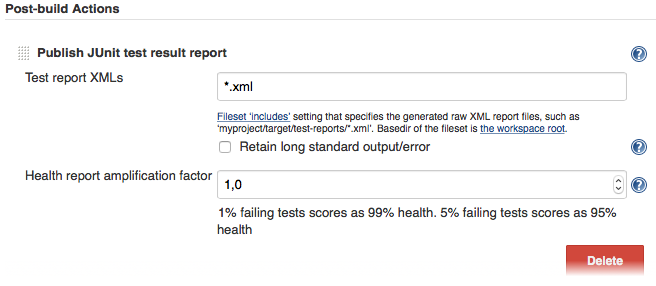
If there is no such post-build step in your CI system, there is probably a plugin for that somewhere on the internet.
----
For more information on WebdriverIO see the [homepage](https://webdriver.io).
---
_Source: https://npm.io/package/@wdio/junit-reporter · Machine-readable twin of the npm.io package page. Health data is recomputed on every publish._