# @xpressai/docusaurus-vecto-search
> Docusaurus search theme with BM25, Vecto.ai vector search, and hybrid (RRF) modes
Latest version **0.1.3** (published 2026-04-16) · MIT license · 0 weekly downloads
## Install
```sh
npm install @xpressai/docusaurus-vecto-search
pnpm add @xpressai/docusaurus-vecto-search
yarn add @xpressai/docusaurus-vecto-search
bun add @xpressai/docusaurus-vecto-search
```
Provides the command `vector-search-index`.
## Health
**Score 55/100 (C)** — status: active.
Positive: has types; no vulnerabilities; has provenance.
Warnings: low downloads; no esm support; pre 1.0.
## Facts
| | |
|---|---|
| Version | 0.1.3 |
| Published | 2026-04-16 |
| First published | 2023-10-24 |
| Weekly downloads | 0 |
| License | MIT |
| TypeScript types | bundled |
| Module format | CommonJS |
| Node | >=20.0 |
| Dependencies | 2 |
| Unpacked size | 213.4 KB |
| Known vulnerabilities | 0 |
| Install scripts | no |
| Provenance | attested (GitHub Actions) |
| GitHub stars | 0 |
| Maintainers | wmeddie, dot_treo, mfa-x-ai |
## Links
- npm: https://www.npmjs.com/package/@xpressai/docusaurus-vecto-search
- Repository: https://github.com/XpressAI/docusaurus-vecto-search
- Issues: https://github.com/XpressAI/docusaurus-vecto-search/issues
- npm.io page: https://npm.io/package/@xpressai/docusaurus-vecto-search
## Dependencies (2)
- [tslib](https://npm.io/package/tslib.md) ^2.4.0
- [@xpressai/vecto-client](https://npm.io/package/@xpressai/vecto-client.md) ^0.0.10
## Recent versions
- 0.1.3 (latest) — 2026-04-16
- 0.1.2 — 2026-04-15
- 0.1.1 — 2026-04-14
- 0.1.0 — 2026-04-14
- 0.0.5 — 2023-10-25
- 0.0.4 — 2023-10-25
- 0.0.3 — 2023-10-25
- 0.0.2 — 2023-10-25
- 0.0.1 — 2023-10-24
## README

Docs •
Blog •
Discord •
Tutorials
# Docusaurus Vecto Search
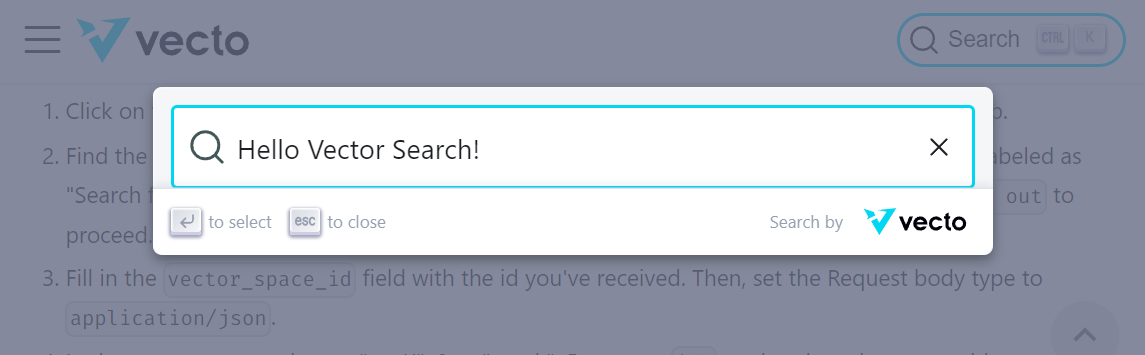
Welcome to the Docusaurus Vecto Search repository! This plugin provides Vecto-powered search for your Docusaurus website, with support for **BM25** keyword search, **Vecto.ai** vector search, and **hybrid** mode that combines both using Reciprocal Rank Fusion.
## Setup
Ensure that you have a Docusaurus v3 project ready. You may also generate a fresh one by:
```bash
yarn create docusaurus my-website classic
```
Also ensure that you have a Vecto token ready. You may request one [here](https://www.vecto.ai/contactus).
#### 1) Install Docusaurus Vecto Search Plugin
Navigate to the root of your Docusaurus project, then install via
```bash
yarn add @xpressai/docusaurus-vecto-search
```
#### 2) Update Docusaurus Configuration
In your `docusaurus.config.js` file, add the plugin to `themes` and configure it via `themeConfig`:
```javascript
// docusaurus.config.js
module.exports = {
themes: ['@xpressai/docusaurus-vecto-search'],
themeConfig: {
vectorSearch: {
mode: 'hybrid', // "bm25" | "vector" | "hybrid"
vecto: {
publicToken: process.env.VECTO_PUBLIC_TOKEN ?? '',
vectorSpaceId: Number(process.env.VECTO_SPACE_ID ?? '0'),
},
},
},
};
```
For BM25-only mode (no Vecto account needed), simply use:
```javascript
themeConfig: {
vectorSearch: {
mode: 'bm25',
},
},
```
For the full list of configs, refer to the [configuration](#configuration-options) section.
#### 3) Add Vecto User Token To Environment Variables
You'll need to set the `VECTO_USER_TOKEN` environment variable for the plugin to ingest content into Vecto during builds. This token is private and is not exposed in the client bundle.
##### a. For CI/CD (e.g., GitHub Actions)
If you are deploying your Docusaurus site using a CI/CD service like GitHub Actions, set `VECTO_USER_TOKEN` as an environment variable in your workflow configuration. You can use repository secrets to securely store the token.
```yaml
- name: Build
env:
VECTO_USER_TOKEN: ${{ secrets.VECTO_USER_TOKEN }}
run: yarn build
```
##### b. For Local Development
For local development, you can export the `VECTO_USER_TOKEN` from your terminal:
```bash
export VECTO_USER_TOKEN=your_token_value_here
```
Alternatively, you can create a `.env` file in the root of your Docusaurus project and add the token there:
```
VECTO_USER_TOKEN=your_token_value_here
```
Using a .env file ensures that the token remains set between terminal sessions.
#### 4) Build!
Finally, build your Docusaurus website with the new search configuration:
```bash
yarn build
```
That's it! Your Docusaurus website should now be set up with the `docusaurus-vecto-search` functionality.
If you'd like to give it a try, we have implemented the search in the [Vecto Docs](https://docs.vecto.ai/) and at [Xircuits.io](https://xircuits.io/)!
### Configuration Options
All configuration lives in `themeConfig.vectorSearch`. Every option has sensible defaults — you only need to set what you want to change.
| Option | Type | Default | Description |
|---|---|---|---|
| `mode` | `"bm25"` \| `"vector"` \| `"hybrid"` | `"hybrid"` | Search mode |
| `vecto.publicToken` | string | `""` | The public token for Vecto search (read-only, safe to expose) |
| `vecto.vectorSpaceId` | number | `null` | The ID of the vector space |
| `vecto.clearOnBuild` | boolean | `true` | Clear the vector space before re-indexing |
| `vecto.batchSize` | number | `10` | Documents per ingest batch |
| `maxResults` | number | `10` | Max results returned per search |
| `bm25.k1` | number | `1.5` | BM25 term frequency saturation |
| `bm25.b` | number | `0.75` | BM25 document length normalization |
| `rrf.k` | number | `60` | RRF fusion constant |
| `hotkey` | string | `"mod+k"` | Keyboard shortcut to focus search |
| `placeholder` | string | `"Search docs..."` | Input placeholder text |
| `content.chunkSize` | number | `500` | Max words per chunk before the word-window splitter kicks in |
| `content.chunkOverlap` | number | `50` | Words shared between consecutive word-window slices |
| `content.splitOnHeadings` | `[number, number]` | `[2, 4]` | Inclusive range of heading levels that start a new chunk (see below) |
#### Content chunking
Each source markdown page is turned into one or more **chunks** before being fed to BM25 and Vecto. A chunk's `text` field starts with a **breadcrumb** — the chain of ancestor headings from the page title down to the chunk's own heading, rendered as markdown — followed by the section body with its markdown structure (headings, emphasis, lists, blockquotes, code blocks) preserved. MDX-only noise — `import`/`export` lines, JSX/HTML tags, JSX expression braces — is stripped. The splitter runs in two passes:
1. **Heading split** — the page is broken at every heading whose level falls inside `content.splitOnHeadings`. The range `[min, max]` is inclusive on both ends, where `1` is `#` (H1), `2` is `##` (H2), and so on up to `6`. The default `[2, 4]` splits on `##`, `###`, and `####`. Headings outside the range are *not* boundaries — their full heading line and body flow into the enclosing chunk.
2. **Word-window split** — any section longer than `content.chunkSize` words is sliced into overlapping windows of `chunkSize` words with `chunkOverlap` words of overlap between adjacent slices. Sections shorter than `chunkSize` become a single chunk.
**Examples for `splitOnHeadings`:**
| Value | Behavior |
|---|---|
| `[2, 4]` *(default)* | Split on `##`, `###`, `####`. Good balance of chunk specificity and size for typical docs. |
| `[2, 2]` | Split only on `##`. Keeps all subsections of a section glued together — useful when H3/H4 are used for short sub-points you want retrieved alongside their parent. |
| `[2, 6]` | Split on every heading from `##` down. Finest-grained chunks; may produce very short chunks on heavily-subdivided pages. |
| `[1, 6]` | Treat `#` as a boundary too. Rarely useful in Docusaurus because the page title comes from frontmatter, not an inline `#`. |
| `[3, 4]` | Ignore `##`. An H2 section's intro and its nested H3/H4 subsections become separate chunks, but the H2 heading itself is not used as chunk metadata. |
**Picking a range:**
- Wider range → finer chunks, more specific `heading` metadata per chunk, better pinpointing — but some chunks may be tiny and lose context.
- Narrower range → coarser chunks that keep related subsections together. Better for "what does this whole feature do" queries, worse for locating a specific subsection.
- Regardless of the range, `chunkSize`/`chunkOverlap` will further slice any chunk that exceeds the word limit, so very long sections never become unboundedly large.
```javascript
vectorSearch: {
content: {
chunkSize: 500,
chunkOverlap: 50,
splitOnHeadings: [2, 3], // split on ## and ###, ignore #### and deeper
},
}
```
#### Weighted Score Fusion (alternative to RRF)
You can use weighted score normalization instead of the default Reciprocal Rank Fusion:
```javascript
vectorSearch: {
mode: 'hybrid',
weights: { vector: 0.7, bm25: 0.3 },
}
```
### Local Plugin Development
If you would like to modify the current Vecto Search plugin, here are the steps:
1. Clone and install the repository:
```bash
git clone https://github.com/XpressAI/docusaurus-vecto-search
cd docusaurus-vecto-search
yarn install
```
2. Build the plugin:
```bash
yarn build
```
3. Create a symbolic link for the project:
```bash
yarn link
```
4. In a different directory, create a new Docusaurus website or use an existing one:
```bash
yarn create docusaurus my-website
```
5. Move into the Docusaurus project directory and link the plugin:
```bash
cd my-website
yarn install
yarn link @xpressai/docusaurus-vecto-search
```
6. Build the Docusaurus project:
```bash
yarn build
```
## License
MIT
---
_Source: https://npm.io/package/@xpressai/docusaurus-vecto-search · Machine-readable twin of the npm.io package page. Health data is recomputed on every publish._