# @zhigang1992/react-native-draggable-grid
> A draggable grid for react native
Latest version **1.0.13** (published 2019-04-23) · ISC license · 0 weekly downloads
## Install
```sh
npm install @zhigang1992/react-native-draggable-grid
pnpm add @zhigang1992/react-native-draggable-grid
yarn add @zhigang1992/react-native-draggable-grid
bun add @zhigang1992/react-native-draggable-grid
```
## Health
**Score 20/100 (F)** — status: abandoned.
Positive: has types; no vulnerabilities.
Warnings: low downloads; no esm support.
Negative: abandoned; low maintenance score.
## Facts
| | |
|---|---|
| Version | 1.0.13 |
| Published | 2019-04-23 |
| First published | 2019-04-23 |
| Weekly downloads | 0 |
| License | ISC |
| TypeScript types | bundled |
| Module format | CommonJS |
| Dependencies | 0 |
| Unpacked size | 55.1 KB |
| Known vulnerabilities | 0 |
| Install scripts | no |
| GitHub stars | 360 |
| Author | shisme |
| Maintainers | zhigang1992 |
| Keywords | drag, sortable, grid |
## Links
- npm: https://www.npmjs.com/package/@zhigang1992/react-native-draggable-grid
- Repository: https://github.com/SHISME/react-native-draggable-grid
- npm.io page: https://npm.io/package/@zhigang1992/react-native-draggable-grid
## Alternatives
- [@lexical/table](https://npm.io/package/@lexical/table.md) — 3.0M weekly downloads
- [mantine-datatable](https://npm.io/package/mantine-datatable.md) — 98.2K weekly downloads
- [react-native-collapsible-tab-view](https://npm.io/package/react-native-collapsible-tab-view.md) — 70.6K weekly downloads
- [@handsontable/vue3](https://npm.io/package/@handsontable/vue3.md) — 16.1K weekly downloads
- [vuewordcloud](https://npm.io/package/vuewordcloud.md) — 7.2K weekly downloads
## Recent versions
- 1.0.13 (latest) — 2019-04-23
- 1.0.12 — 2019-04-23
- 1.0.11 — 2019-04-23
- 1.0.10 — 2019-04-23
- 1.0.9 — 2019-04-23
- 1.0.8 — 2019-04-23
## README
# react-native-draggable-grid
[](https://996.icu) [-blue.svg)](https://github.com/996icu/996.ICU/blob/master/LICENSE)
[中文文档](./README_CN.md)
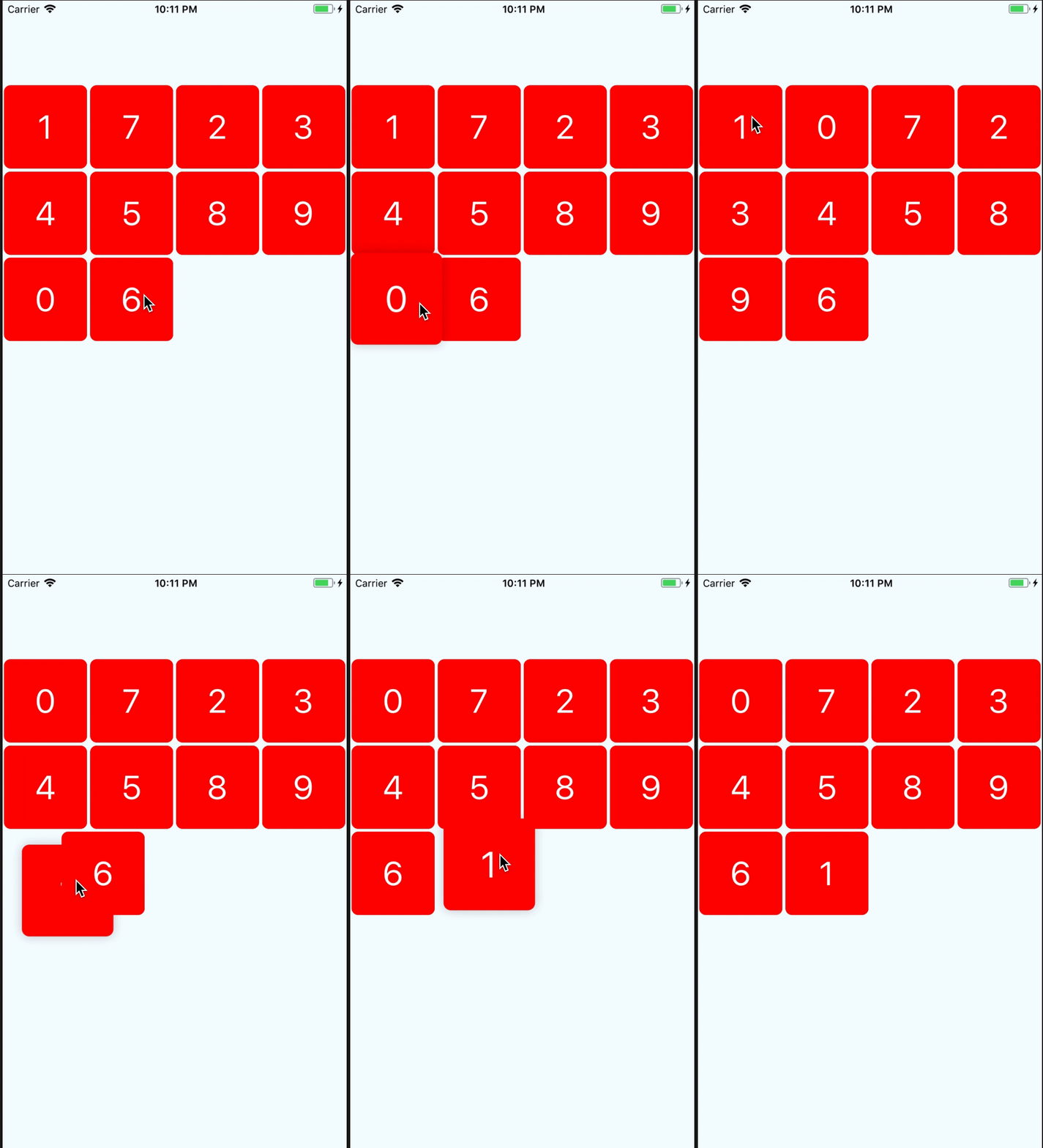
## Demo
## Getting Started
## Installation
```bash
npm install react-native-draggable-grid --save
```
## Usage
```javascript
import React from 'react';
import {
View,
StyleSheet,
Text,
} from 'react-native';
import { DraggableGrid } from 'react-native-draggable-grid';
interface MyTestProps {
}
interface MyTestState {
data:{key:string, name:string}[];
}
export class MyTest extends React.Component{
constructor(props:MyTestProps) {
super(props);
this.state = {
data:[
{name:'1',key:'one'},
{name:'2',key:'two'},
{name:'3',key:'three'},
{name:'4',key:'four'},
{name:'5',key:'five'},
{name:'6',key:'six'},
{name:'7',key:'seven'},
{name:'8',key:'eight'},
{name:'9',key:'night'},
{name:'0',key:'zero'},
],
};
}
public render_item(item:{name:string, key:string}) {
return (
{item.name}
);
}
render() {
return (
);
}
}
const styles = StyleSheet.create({
button:{
width:150,
height:100,
backgroundColor:'blue',
},
wrapper:{
paddingTop:100,
width:'100%',
height:'100%',
justifyContent:'center',
},
item:{
width:100,
height:100,
borderRadius:8,
backgroundColor:'red',
justifyContent:'center',
alignItems:'center',
},
item_text:{
fontSize:40,
color:'#FFFFFF',
},
});
```
## Props
| parameter | type | required | description |
| :-------- | :---- | :------- | :---------- |
| numColumns | number | yes | how many items should be render on one row|
| data | array | yes | data's item must have unique key,item's render will depend on the key|
| renderItem |(item, order:number) => ReactElement| yes | Takes an item from data and renders it into the list |
| itemHeight | number | no | if not set this, it will the same as itemWidth |
| dragStartAnimation | object | no | custom drag start animation |
| style | object | no | grid styles |
## Event Props
| parameter | type | required | description |
| :-------- | :---- | :------- | :---------- |
| onItemPress | (item) => void | no | Function will execute when item on press |
| onDragStart | (startDragItem) => void | no | Function will execute when item start drag |
| onDragRelease | (data) => void | no | Function will execute when item release, and will return the new ordered data |
## Custom Drag Start Animation
If you want to use your custom animation, you can do like this
```javascript
render() {
return (
);
}
private onDragStart = () => {
this.state.animatedValue.setValue(1);
Animated.timing(this.state.animatedValue, {
toValue:3,
duration:400,
}).start();
}
```
## Resort item
if you want resort item yourself,you only need change the data's sort, and the draggable-grid will auto resort by your data.
> the data's key must unique
---
_Source: https://npm.io/package/@zhigang1992/react-native-draggable-grid · Machine-readable twin of the npm.io package page. Health data is recomputed on every publish._