# abyssal
> A discord.js framework, serving the purpose of, making your discord bot modular in nature.
Latest version **0.1.1** (published 2020-04-04) · MIT license · 0 weekly downloads
## Install
```sh
npm install abyssal
pnpm add abyssal
yarn add abyssal
bun add abyssal
```
## Health
**Score 20/100 (F)** — status: abandoned.
Positive: has types; no vulnerabilities.
Warnings: low downloads; no esm support; pre 1.0.
Negative: abandoned; low maintenance score.
## Facts
| | |
|---|---|
| Version | 0.1.1 |
| Published | 2020-04-04 |
| First published | 2020-03-13 |
| Weekly downloads | 0 |
| License | MIT |
| TypeScript types | bundled |
| Module format | CommonJS |
| Dependencies | 2 |
| Unpacked size | 46.2 KB |
| Known vulnerabilities | 0 |
| Install scripts | no |
| GitHub stars | 0 |
| Author | VimHax |
| Maintainers | vimhax |
## Links
- npm: https://www.npmjs.com/package/abyssal
- Repository: https://github.com/VimHax/Abyssal
- Homepage: https://github.com/VimHax/Abyssal#readme
- Issues: https://github.com/VimHax/Abyssal/issues
- npm.io page: https://npm.io/package/abyssal
## Dependencies (2)
- [debug](https://npm.io/package/debug.md) ^4.1.1
- [uniqid](https://npm.io/package/uniqid.md) ^5.2.0
## Recent versions
- 0.1.1 (latest) — 2020-04-04
- 0.1.0 — 2020-04-01
- 0.0.6 — 2020-03-30
- 0.0.5 — 2020-03-24
- 0.0.4 — 2020-03-14
- 0.0.3 — 2020-03-14
- 0.0.2 — 2020-03-14
- 0.0.1 — 2020-03-13
## README
Abyssal is a tiny [Discord.js](https://discord.js.org/) framework, whose goal is to make your bot modular & elegant in nature. Abyssal divides a typical bot's functionality into simple flexible classes, which can be extended to add or change existing functionality. These classes come together to create a working Discord bot.
The main feature Abyssal provides is the ability for it to resume the execution of a command, in case of an interruption (restart). Abyssal will continue the execution of the command, after the restart, from where it left off.
# Table of Contents
- [Installation](#installation)
- [Example Usage](#example-usage)
- [Documentation](#documentation)
- [Database](#database---new-database)
- [Data](#data)
- [Queries](#queries)
- [Interface](#interface)
- [Functionality](#functionality)
- [Trigger](#trigger---new-triggerid-triggerid)
- [Interface](#interface-1)
- [Functionality](#functionality-1)
- [Example Usage](#example-usage-1)
- [Example 1 - Ping](#example-1---ping)
- [Example 2 - Join & Leave Messages](#example-2---join--leave-messages)
- [Example 3 - Add](#example-3---add)
- [Util](#util---new-utilconfig-utilconfig)
- [Session](#session)
- [State](#state)
- [Listeners & Handlers](#listeners--handlers)
- [Interface](#interface-2)
- [Functionality](#functionality-2)
- [Example Usage](#example-usage-2)
- [Example 1 - Generate Number](#example-1---generate-number)
- [Example 2 - React Message](#example-2---react-message)
- [Example 3 - Calculate](#example-3---calculate)
- [Client](#client---new-clientdatabase-database-clientoptions-clientoptions)
- [Interface](#interface-3)
- [Functionality](#functionality-3)
- [Example Usage](#example-usage-3)
- [Debug Logs](#debug-logs)
# Installation
**[Node.js](https://nodejs.org/) 12.0.0 or newer is required, for [Discord.js](https://discord.js.org/) to run properly.**
Simply run the following command to install Abyssal - `npm install discord.js abyssal`
> `Discord.js` is a peer dependency, of Abyssal, which is required for Abyssal to run, so it is also installed in the above command.
# Example Usage
```typescript
import * as Abyssal from 'abyssal';
const Ping = new Abyssal.Trigger('ping');
const client = new Abyssal.Client(new Abyssal.Database());
Ping.condition(async util => {
if (util.event !== 'message') return false;
const { args: [message] } = util;
return !message.author.bot && message.content === 'ping';
});
Ping.action(async util => {
const { args: [message] } = util;
message.channel.send('Pong!');
});
client.addTrigger(Ping);
client.login('secret token');
```
# Documentation
## Database - `new Database()`
This class abstracts the interaction between the bot & the database down to 6 simple methods. By default, the class stores data in memory, however this can be changed by extending the class.
### Data
The database, in the abstraction, comprises of `Data` objects. The `Data` object is defined by the following interface.
```typescript
interface Data {
[key: string]: any;
}
```
### Queries
Queries return one or more `Data` objects which match the `Query` object provided. The `Query` object is defined by the following interface.
```typescript
interface Query {
[key: string]: any;
}
```
A `Data` object matches a `Query` object if all the values of all the properties in the `Query` object match the values of the corresponding properties in the `Data` object. The following function implements this condition.
```typescript
function matchQuery(query: Query, document: Document): boolean {
const keys = Object.keys(query);
for (const key of keys) if (document[key] !== query[key]) return false;
return true;
}
```
### Interface
```typescript
interface Database {
initialize: () => Promise;
find: (query: Query) => Promise;
findOne: (query: Query) => Promise;
upsert: (query: Query, document: Document) => Promise;
insert: (document: Document) => Promise;
delete: (query: Query) => Promise;
}
```
### Functionality
| Property | Function |
| :----------: | :----------------------------------------------------------- |
| `initialize` | Runs any code which is required to make the methods functional. This method is always called before the `Client` logs in. |
| `find` | Returns an array of `Data` objects which match the provided `Query` object, from the database. |
| `findOne` | Returns one `Data` object which matches the provided `Query` object, from the database. |
| `upsert` | Replaces all the `Data` objects, in the database, which match the provided `Query` object with the `Data` object provided. If there were no replacements, the provided `Data` object is inserted into the database. |
| `insert` | Inserts the provided `Data` object into the database. |
| `delete` | Deletes all the `Data` objects, in the database, which match the provided `Query` object. |
## Trigger - `new Trigger(id: TriggerID)`
`Trigger`s execute code whenever some event is emitted in the `Client` if a condition is met.
### Interface
```typescript
type TriggerID = string;
type HandlerID = string;
type Event = string | symbol;
type HandlerEvents = Event[];
type Action = (util: Util) => Promise;
type Condition = (util: Util) => Promise;
type HandlerMethod = (util: Util) => Promise;
interface Handler {
id: HandlerID;
events: HandlerEvents;
method: HandlerMethod;
}
interface Trigger extends EventEmitter {
id: TriggerID;
execute: Action;
handlers: Handler[];
validate: Condition;
action: (method: Action) => void;
condition: (method: Condition) => void;
execHandler: (id: HandlerID, util: Util) => Promise;
handler: (id: HandlerID, events: HandlerEvents, method: HandlerMethod) => void;
}
```
### Functionality
| Property | Function |
| :-----------: | :----------------------------------------------------------- |
| `id` | A `string` which uniquely identifies each `Trigger`. |
| `handlers` | All the handlers of the `Trigger`. |
| `execute` | Calls the action of the `Trigger`. Called if `Trigger#validate` returns `true` when an event is emitted. |
| `validate` | Calls the condition of the `Trigger`. Decides whether or not to execute the action of the `Trigger` when an event is emitted. Called when any event is emitted. |
| `action` | Sets the action of the `Trigger`. (`async () => undefined` by default) |
| `condition` | Sets the condition of the `Trigger`. (`async () => true` by default) |
| `handler` | Adds a handler to the `Trigger`. (It is not active by default) |
| `execHandler` | Finds a listener with the provided `id` & calls it with the `util` instance provided. Throws an error is a listener with the provided `id` is not found. |
### Example Usage
#### Example 1 - Ping
A `Trigger` which responds to `"ping"` with `"Pong!"`.
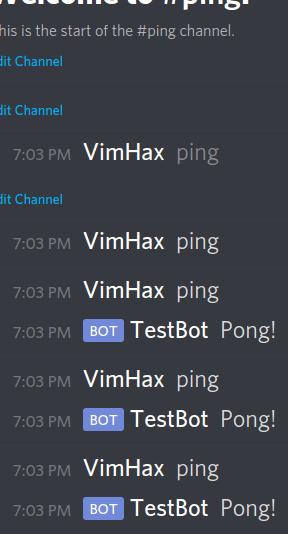
```typescript
import * as Abyssal from 'abyssal';
// Create a new trigger, whose id is 'ping'
const Ping = new Abyssal.Trigger('ping');
/* Set the trigger's condition */
Ping.condition(async util => {
// If the event is not a message event, return false
if (util.event !== 'message') return false;
const { args: [message] } = util;
// Return whether or not the author is a bot & the
// content is equal to 'ping'
return !message.author.bot && message.content === 'ping';
});
/* Set the trigger's action */
// If the action is executed, that means the condition
// returned true, meaning the event emitted must be 'message'
// and the author is not a bot & the content is 'ping'
// because those conditions have to be met, by the
// event emitted, for the trigger's condition to return
// true
Ping.action(async util => {
const { args: [message] } = util;
message.channel.send('Pong!'); // Send response
});
export default Ping;
```
#### Example 2 - Join & Leave Messages
A `Trigger` which sends join & leave messages to a channel.
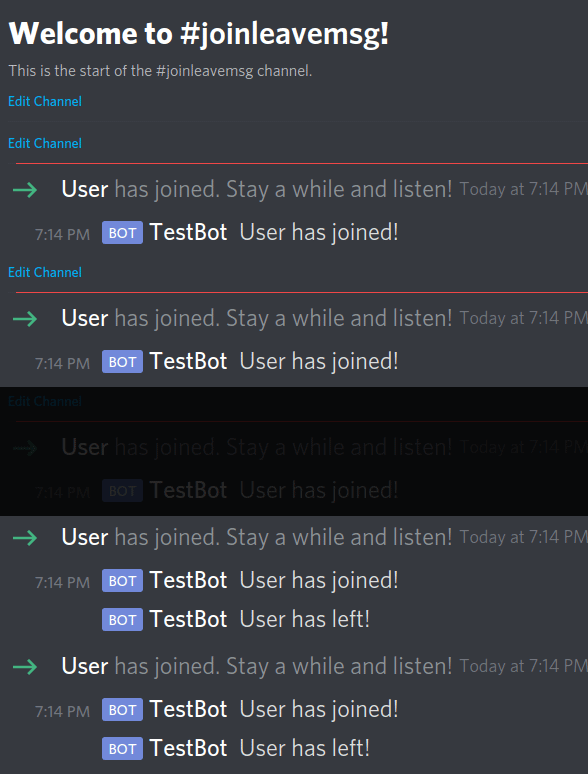
```typescript
import * as Abyssal from 'abyssal';
import DiscordJS from 'discord.js';
const JoinLeaveMsg = new Abyssal.Trigger('joinleavemsg');
/* The trigger's condition isn't set */
// Meaning the trigger's action will be executed on all event emissions
// because the default condition always returns true
/* Set the trigger's action */
JoinLeaveMsg.action(async util => {
const { args: [member] } = util;
// If the event emitted is 'guildMemberAdd'
if (util.event === 'guildMemberAdd') {
// Get the channel
const channel = util.client.channels.cache.get(CHANNEL_ID);
if (channel) { // If the channel exists
// Send message
(channel as DiscordJS.TextChannel).send(`${member.displayName} has joined!`);
}
// If the event emitted is 'guildMemberRemove'
} else if (util.event === 'guildMemberRemove') {
// Get the channel
const channel = util.client.channels.cache.get(CHANNEL_ID);
if (channel) { // If the channel exists
// Send message
(channel as DiscordJS.TextChannel).send(`${member.displayName} has left!`);
}
}
});
export default JoinLeaveMsg;
```
#### Example 3 - Add
A `Trigger` which adds 2 given numbers.

```typescript
import * as Abyssal from 'abyssal';
const Add = new Abyssal.Trigger('add');
/* Set the trigger's condition */
Add.condition(async util => {
// If the event is not a message event, return false
if (util.event !== 'message') return false;
const { args: [message] } = util;
// Return whether or not the author is a bot & the
// content starts with 'add'
return !message.author.bot && message.content.startsWith('add');
});
/* Set the trigger's action */
Add.action(async util => {
const { args: [message] } = util;
// Split the content by ' '
const args: string[] = message.content.slice(3).split(' ');
// Remove the first element of the array (which will always be 'add')
args.shift();
// If the array is empty
if (args.length === 0) {
// Send message
return message.channel.send('Please provide 2 numbers to add.');
// If all the elements, in the array, aren't numbers
} else if (args.find(arg => isNaN(parseInt(arg, 10)))) {
// Send message
return message.channel.send('Invalid number provided.');
// If the array doesn't have 2 elements
} else if (args.length !== 2) {
// Send message
return message.channel.send('Please provide the 2nd number to add.');
}
// Map all strings to numbers
const numbers = args.map(arg => parseInt(arg, 10));
// Total the elements
const answer = numbers.reduce((acc, curr) => acc + curr);
// Send message
message.channel.send(`${answer} is the answer. (${numbers[0]} + ${numbers[1]})`);
});
export default Add;
```
## Util - `new Util(config: UtilConfig)`
`Util` instances mainly expose methods, to the `Trigger`, which manipulate it's `State` & `Listener`s.
### Session
`Session`s, which are in the format of `${TriggerID}-someuniquestring`, generated using [Uniqid](https://www.npmjs.com/package/uniqid), uniquely identify every instance of a `Trigger` executed or executing. One is created for each `Trigger` on every event emission.
### State
`State` is a `Data` object, binded to each instance, stored in the database which you can store data to, which you may want to access later in the same instance. The `Data` object, storing the `State`, is defined by the following interface.
```typescript
interface State {
type: 'state';
session: string;
[key: string]: any;
}
```
`Util` instances keep a, possibly outdated, copy of the actual `State` locally, under `Util#state`. Thus, editing the local `State` doesn't affect the actual `State` & vice versa. The actual `State` isn't copied to `Util#state` by default.
### Listeners & Handlers
`Listener`s are `Data` objects, stored in the database, which contain information about the `Session` & the ID of the `Handler` they are attached to. They make it so the `Handler`, which the stored `HandlerID` belongs to, executes every time any event, in the `Handler`'s `HandlerEvents`, emits. The `Data` object, storing a `Listener`, is defined by the following interface.
```typescript
interface Listener {
type: 'listener';
session: string;
handler: string;
}
```
`Util` instances also keep a local copy of all the listeners, attached to the current instance, under `Util#listeners`.
### Interface
```typescript
type Args = any[];
type Event = string | symbol;
interface Util {
args: Args;
event: Event;
state: State;
client: Client;
session: string;
database: Database;
listeners: Listener[];
loadState: () => Promise;
saveState: () => Promise;
deleteState: () => Promise;
loadListeners: () => Promise;
removeAllListeners: () => Promise;
getStateProperty: (property: string) => void;
deleteStateProperty: (property: string) => void;
addListener: (handlerID: string) => Promise;
removeListener: (handlerID: string) => Promise;
setStateProperty: (property: string, value: any) => void;
}
interface UtilConfig {
args: Args;
event: Event;
client: Client;
session: string;
trigger: Trigger;
database: Database;
}
```
### Functionality
| Property | Function |
| :-------------------: | ------------------------------------------------------------ |
| `args` | Arguments provided by the event emitted. |
| `event` | Name of the event emitted. |
| `session` | Session of the current instance. |
| `state` | Local copy of the actual `State` of the current instance. |
| `listeners` | Local copy of all the `Listener`s attached to the current instance. |
| `client` | `Client` instance that the event was emitted on. |
| `database` | `Database` instance used to store data to. |
| `getStateProperty` | Returns the value of the provided property, in `Util#state`. |
| `setStateProperty` | Sets the provided property, of `Util#state`, to the provided value. |
| `deleteStateProperty` | Deletes the provided property, off of `Util#state`. |
| `loadState` | Updates `Util#state` to the actual `State`. |
| `saveState` | Updates the actual `State` to `Util#state`. |
| `deleteState` | Delete the actual `State` off of the database. |
| `loadListeners` | Updates `Util#listeners` with the actual `Listener`s attached to the current instance. |
| `addListener` | Adds a new `Listener` to the database & `Util#listeners`. |
| `removeListener` | Removes a `Listener` attached to the provided `HandlerID`, from the database & `Util#listeners`. |
| `removeAllListeners` | Removes all `Listener`s attached to the current instance, from the database & ``Util#listeners`. |
### Example Usage
#### Example 1 - Generate Number
A `Trigger` which generates a random number, between 0 & 100.
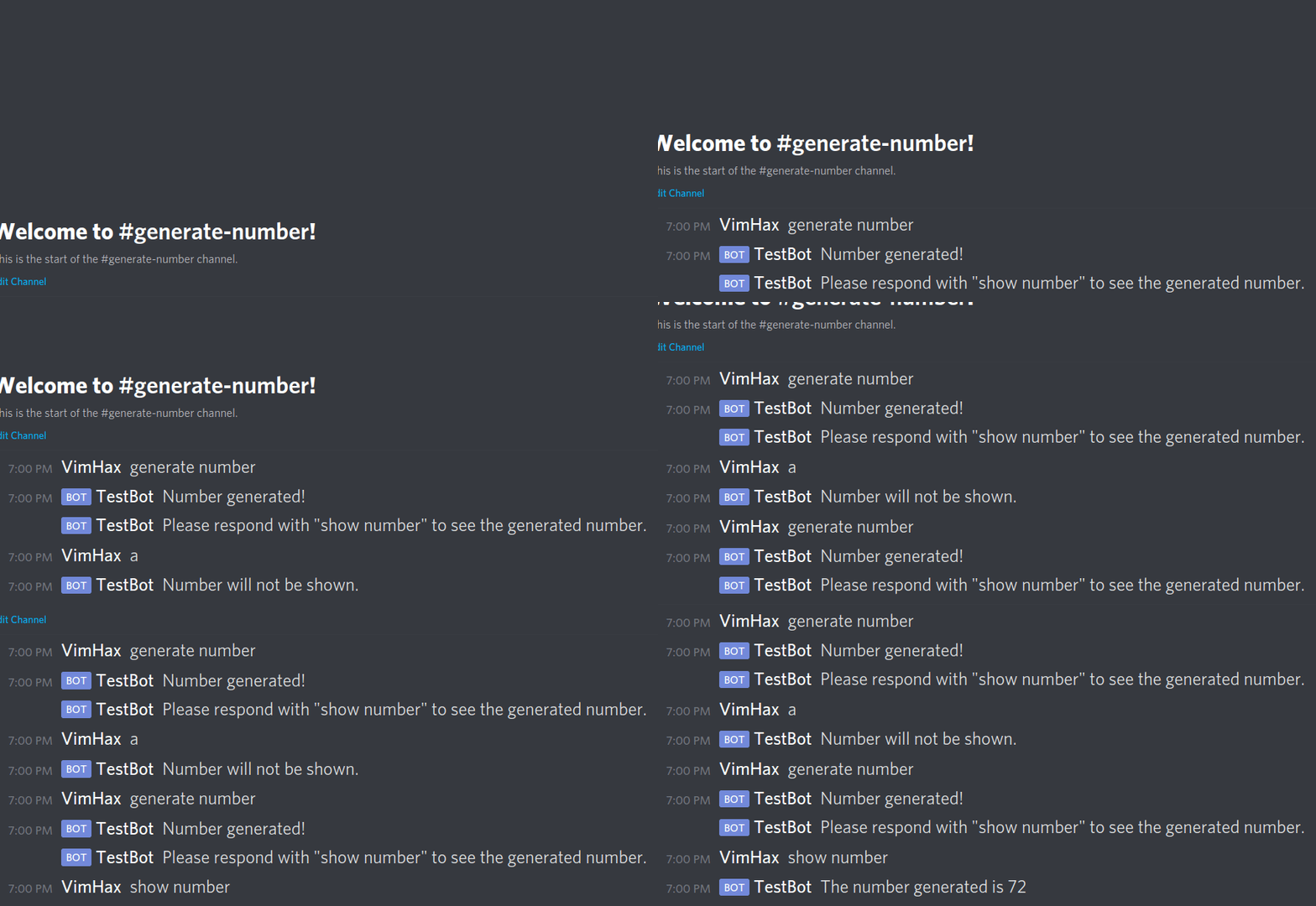
```typescript
import * as Abyssal from 'abyssal';
const GenNumber = new Abyssal.Trigger('gennumber');
/* Set the trigger's condition */
GenNumber.condition(async util => {
if (util.event !== 'message') return false;
const { args: [message] } = util;
return !message.author.bot && message.content === 'generate number';
});
/* Set the trigger's action */
GenNumber.action(async util => {
const { args: [message] } = util;
const number = Math.round(Math.random() * 100); // Generate number
util.setStateProperty('number', number); // Save the number generated
util.setStateProperty('user', message.author.id); // Save the user id
util.setStateProperty('channel', message.channel.id); // Save the channel id
await util.saveState(); // Update the actual state
await util.addListener('showNumber'); // Add a listener to the 'showNumber' handler
await message.channel.send('Number generated!'); // Send message
const content = 'Please respond with "show number" to see the generated number.';
message.channel.send(content); // Send message
});
/* Set the trigger's 'showNumber' handler */
// Called every time a 'message' event is emitted
// (because ['message'] is passed into the events parameter)
// assuming that a listener is attached to this handler
GenNumber.handler('showNumber', ['message'], async util => {
const { args: [message] } = util;
if (message.author.bot) return; // If the user is a bot, return
if (message.content !== 'show number') { // If the content isn't 'show number'
message.channel.send('Number will not be shown.'); // Send message
await util.deleteState(); // Delete the actual state
// Remove all listeners attached to the current instance
// (which currently only includes the listener attached to this handler)
await util.removeAllListeners();
return;
}
// Update the local state with the actual state,
// this has to be done since the actual state
// isn't copied to the local state by default,
// thus, values stored, previously, cannot be retrieved
await util.loadState();
// If the channel id differs, return
if (message.channel.id !== util.getStateProperty('channel')) return;
// If the author id differs, return
if (message.author.id !== util.getStateProperty('user')) return;
const number = util.getStateProperty('number');
message.channel.send(`The number generated is ${number}`); // Send message
// Delete the actual state & remove all the listeners
await util.deleteState();
await util.removeAllListeners();
});
export default GenNumber;
```
#### Example 2 - React Message
A `Trigger` which sends a message, whose description is the current reactions.
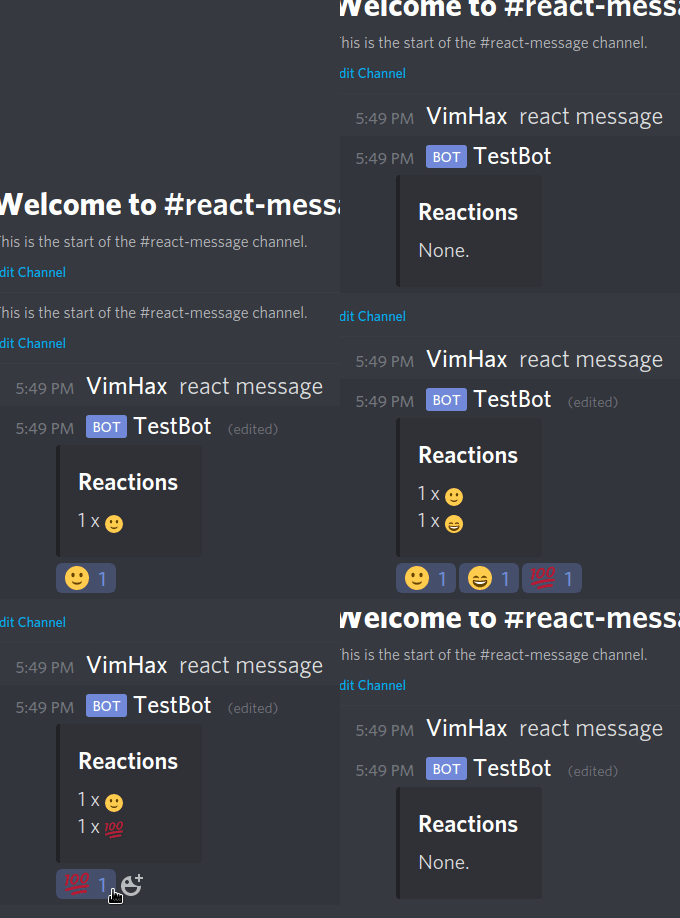
```typescript
import * as Abyssal from 'abyssal';
import DiscordJS from 'discord.js';
const ReactMsg = new Abyssal.Trigger('reactmsg');
/* Set the trigger's condition */
ReactMsg.condition(async util => {
if (util.event !== 'message') return false;
const { args: [message] } = util;
return !message.author.bot && message.content === 'react message';
});
/* Set the trigger's action */
ReactMsg.action(async util => {
const { args: [message] } = util;
const embed = new DiscordJS.MessageEmbed(); // Create embed
embed.setTitle('Reactions').setDescription('None.'); // Set properties
const msg = await message.channel.send(embed); // Send message
util.setStateProperty('message', msg.id); // Store the message id
await util.saveState(); // Update the actual state
// Add a listener attached to the 'updateMessage' handler
await util.addListener('updateMessage');
});
/* Set the trigger's 'updateMessage' handler */
// Executed everytime a 'messageReactionAdd' or 'messageReactionRemove'
// event is emitted, given that a listener is currently attached to the handler
ReactMsg.handler('updateMessage', ['messageReactionAdd', 'messageReactionRemove'], async util => {
const { args: [{ message }] } = util;
await util.loadState(); // Update the local state
// If the message id differs, return
if (message.id !== util.getStateProperty('message')) return;
type Reactions = DiscordJS.Collection;
const reactions: Reactions = message.reactions.cache; // Get all the reactions
let desc = 'None.'; // The default message
if (reactions.size > 0) { // If there is atleast one reaction
const mapper = (reaction: DiscordJS.MessageReaction) => {
const expression = `${reaction.count} x ${reaction.emoji}`;
return expression;
};
// Map the reactions to strings & join them together
desc = reactions.map(mapper).join('\n');
}
const embed = new DiscordJS.MessageEmbed(); // Create embed
embed.setTitle('Reactions').setDescription(desc); // Set properties
message.edit(embed); // Edit the message
});
export default ReactMsg;
```
#### Example 3 - Calculate
A `Trigger` which can add, subtract, multiply or divide two numbers.
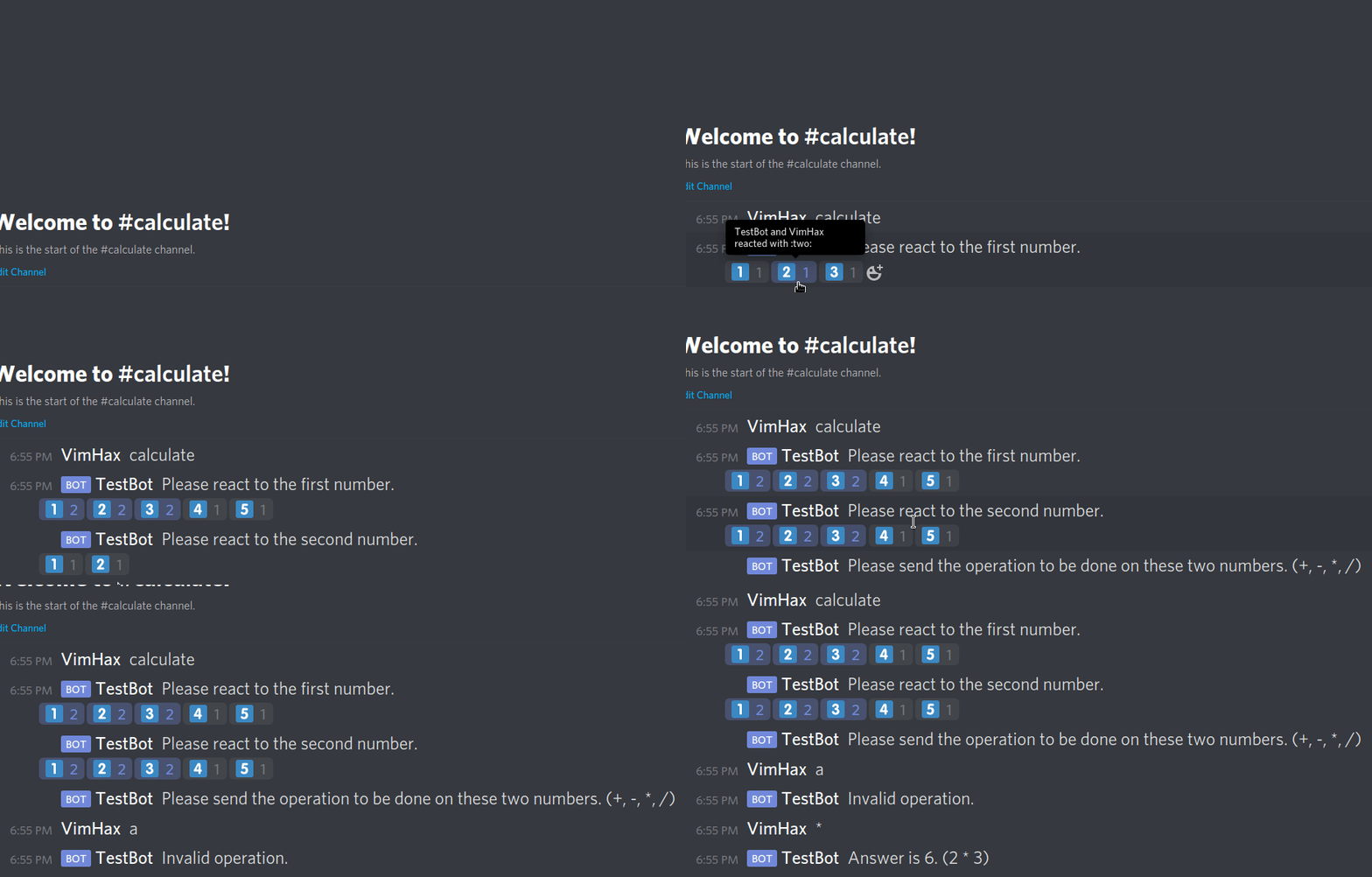
```typescript
import * as Abyssal from 'abyssal';
const emojis = ['1️⃣', '2️⃣', '3️⃣', '4️⃣', '5️⃣']; // The number emojis
const operations = ['+', '-', '*', '/']; // The operations
const Calculate = new Abyssal.Trigger('calculate');
/* Set the trigger's condition */
Calculate.condition(async util => {
if (util.event !== 'message') return false;
const { args: [message] } = util;
return !message.author.bot && message.content === 'calculate';
});
/* Set the trigger's action */
Calculate.action(async util => {
const { args: [message] } = util;
// Send message
const msg = await message.channel.send('Please react to the first number.');
util.setStateProperty('user', message.author.id); // Store the user id
util.setStateProperty('message', msg.id); // Store the message id
await util.saveState(); // Update the actual state
// Add a listener attached to the 'numbers' handler to the database
await util.addListener('numbers');
for (const emoji of emojis) await msg.react(emoji); // React all the emojis
});
/* Set the trigger's 'numbers' handler */
// Called whenever a 'messageReactionAdd' event is emitted
// given that a listener is currently attached to the handler
Calculate.handler('numbers', ['messageReactionAdd'], async util => {
const { args: [reaction, user] } = util;
const message = reaction.message;
if (user.bot) return; // If the user is a bot, return
await util.loadState(); // Update local state
// If the user id differs, return
if (user.id !== util.getStateProperty('user')) return;
// If the message id differs, return
if (message.id !== util.getStateProperty('message')) return;
// Find the index of the reacted emoji in the emoji array
const idx = emojis.findIndex(emoji => emoji === reaction.emoji.toString());
if (idx === -1) return; // if the index is -1, return
const secondInput = util.getStateProperty('secondInput'); // get the flag
if (secondInput) { // If the flag is true
const content = 'Please send the operation to be done on these two numbers. (+, -, *, /)';
message.channel.send(content); // Send message
util.deleteStateProperty('message'); // Delete the message property
util.deleteStateProperty('secondInput'); // Delete the flag
util.setStateProperty('inputTwo', idx + 1); // Store the second input
util.setStateProperty('channel', message.channel.id); // Store the channel id
await util.saveState(); // Update the actual state
// Remove the listener attached to this handler from the database
await util.removeListener('numbers');
// Add a listener attached to the 'operation' handler to the database
await util.addListener('operation');
} else {
// Send message
const msg = await message.channel.send('Please react to the second number.');
util.setStateProperty('message', msg.id); // Update the message id
util.setStateProperty('inputOne', idx + 1); // Store the first input
util.setStateProperty('secondInput', true); // Set the flag to true
await util.saveState(); // Update the actual state
for (const emoji of emojis) await msg.react(emoji); // React all the emojis
}
});
/* Set the trigger's 'operation' handler */
Calculate.handler('operation', ['message'], async util => {
const { args: [message] } = util;
if (message.author.bot) return; // If the author is a bot, return
await util.loadState(); // Update the local state
// If the channel id differs, return
if (message.channel.id !== util.getStateProperty('channel')) return;
// If the author id differs, return
if (message.author.id !== util.getStateProperty('user')) return;
// Find the index of the operator in the operator array
const idx = operations.findIndex(operation => operation === message.content);
// If the index is -1, send message
if (idx === -1) return message.channel.send('Invalid operation.');
const input1 = util.getStateProperty('inputOne'); // Get the first input
const input2 = util.getStateProperty('inputTwo'); // Get the second input
let answer = input1;
// Perform the operation
switch (idx) {
case 0: answer += input2; break;
case 1: answer -= input2; break;
case 2: answer *= input2; break;
case 3: answer /= input2; break;
}
await util.deleteState(); // Delete actual state
// Remove the listener attached to this event from the database
await util.removeListener('operation');
const expression = `${input1} ${operations[idx]} ${input2}`;
message.channel.send(`Answer is ${answer}. (${expression})`); // Send message
});
export default Calculate;
```
## Client - `new Client(database: Database, clientOptions?: ClientOptions)`
This class is a extension of the [`DiscordJS.Client`](https://discord.js.org/#/docs/main/stable/class/Client) & it manages how the `Trigger`s are executed.
### Interface
```typescript
interface Client extends DiscordJS.Client {
addTrigger: (trigger: Trigger) => void;
removeTrigger: (id: TriggerID) => void;
}
```
### Functionality
| Property | Function |
| :-------------: | ------------------------------------------------------------ |
| `addTrigger` | Activates the provided `Trigger`. |
| `removeTrigger` | Deactivates the `Trigger` with the provided `id`. Does not throw an error if a `Trigger` with the provided ID is not found. |
### Example Usage
Assuming all the above `Trigger` examples are in the directory `./Examples/`, the code below would import all of them, initialize the `Client` & add all the `Trigger`s to it.
```typescript
import * as Abyssal from 'abyssal';
// Import all the triggers
import Ping from './Examples/Ping';
import JoinLeaveMsg from './Examples/JoinLeaveMsg';
import GenNumber from './Examples/GenNumber';
import ReactMsg from './Examples/ReactMsg';
import Calculate from './Examples/Calculate';
import Add from './Examples/Add';
const client = new Abyssal.Client(new Abyssal.Database()); // Initialize client
// Add all the triggers
client.addTrigger(Ping);
client.addTrigger(JoinLeaveMsg);
client.addTrigger(GenNumber);
client.addTrigger(ReactMsg);
client.addTrigger(Add);
client.addTrigger(Calculate);
client.login('secret token'); // Login
```
# Debug Logs
Abyssal's default classes provide debug logs, they use the [debug](https://www.npmjs.com/package/debug) npm package for logging. All the logs are under their respective names below.
```
abyssal, abyssal:client, abyssal:util, abyssal:trigger, abyssal:database
```
---
_Source: https://npm.io/package/abyssal · Machine-readable twin of the npm.io package page. Health data is recomputed on every publish._