# adaptivecards-uhub
> Custom adaptive cards renderer for uhub based on the original adaptive cards module from microsoft
Latest version **1.0.2** (published 2018-08-01) · MIT license · 0 weekly downloads
## Install
```sh
npm install adaptivecards-uhub
pnpm add adaptivecards-uhub
yarn add adaptivecards-uhub
bun add adaptivecards-uhub
```
## Health
**Score 40/100 (D)** — status: abandoned.
Positive: has types; no vulnerabilities; high maintenance score; high quality score.
Warnings: low downloads; no esm support.
Negative: abandoned.
## Facts
| | |
|---|---|
| Version | 1.0.2 |
| Published | 2018-08-01 |
| First published | 2018-04-05 |
| Weekly downloads | 0 |
| License | MIT |
| TypeScript types | bundled |
| Module format | CommonJS |
| Dependencies | 0 |
| Unpacked size | 1.4 MB |
| Known vulnerabilities | 0 |
| Install scripts | no |
| GitHub stars | 1964 |
| Author | AdaptiveCards |
| Maintainers | hernancote7 |
| Keywords | adaptivecards, adaptive, cards, microsoft, bot |
## Links
- npm: https://www.npmjs.com/package/adaptivecards-uhub
- Repository: https://git@github.com/microsoft/AdaptiveCards
- Homepage: http://adaptivecards.io
- Issues: https://github.com/microsoft/AdaptiveCards/issues
- npm.io page: https://npm.io/package/adaptivecards-uhub
## Recent versions
- 1.0.2 (latest) — 2018-08-01
- 1.0.1 — 2018-04-05
## README
# Adaptive Cards
Adaptive Cards are a new way for developers to exchange card content in a common and consistent way.
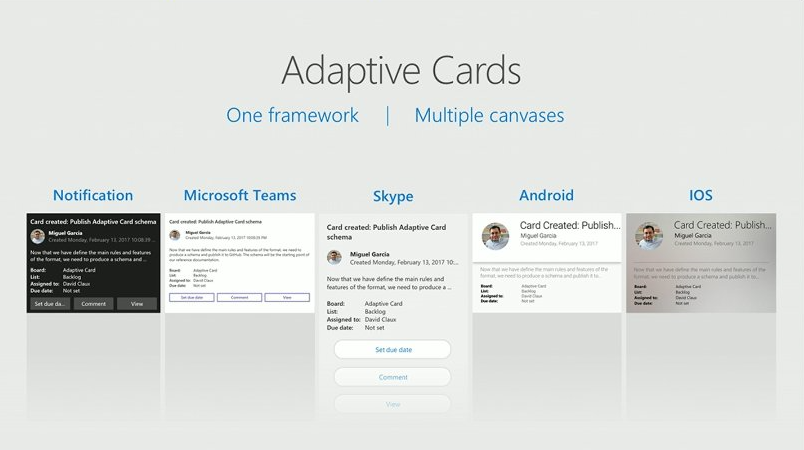
## Expressive cards, open framework, multiple platforms
Break outside the box of templated cards. Adaptive Cards let you describe your content as you see fit and deliver it beautifully wherever your customers are.
The simple open card format enables an ecosystem of shared tooling, seamless integration between producers and consumers, and native cross-platform performance on any device.
## Get Started
### Check out the [full documentation](https://docs.microsoft.com/en-us/adaptive-cards/display/libraries/htmlclient) for more
## Install
### Node
```console
npm install adaptivecards --save
```
### CDN
```html
```
## Usage
> **NOTE: BREAKING CHANGE**
>
> The standalone `renderCard()` helper function was removed as it was redundant with the class methods. Please use `adaptiveCard.render()` as described below.
### Import the module
```js
// Import the module:
import * as AdaptiveCards from "adaptivecards";
// Or require it:
var AdaptiveCards = require("adaptivecards");
// If you referenced the library from CDN, the global AdaptiveCards variable is already
// defined and can be used directly:
var adaptiveCard = new AdaptiveCards.AdaptiveCard();
```
### Render a card
```js
// Author a card
// In practice you'll probably get this from a service
// see http://adaptivecards.io/samples/ for inspiration
var card = {
"type": "AdaptiveCard",
"version": "1.0",
"body": [
{
"type": "Image",
"url": "http://adaptivecards.io/content/adaptive-card-50.png"
},
{
"type": "TextBlock",
"text": "Hello **Adaptive Cards!**"
}
],
"actions": [
{
"type": "Action.OpenUrl",
"title": "Learn more",
"url": "http://adaptivecards.io"
},
{
"type": "Action.OpenUrl",
"title": "GitHub",
"url": "http://github.com/Microsoft/AdaptiveCards"
}
]
};
// Create an AdaptiveCard instance
var adaptiveCard = new AdaptiveCards.AdaptiveCard();
// Set its hostConfig property unless you want to use the default Host Config
// Host Config defines the style and behavior of a card
adaptiveCard.hostConfig = new AdaptiveCards.HostConfig({
fontFamily: "Segoe UI, Helvetica Neue, sans-serif"
// More host config options
});
// Set the adaptive card's event handlers. onExecuteAction is invoked
// whenever an action is clicked in the card
adaptiveCard.onExecuteAction = function(action) { alert("Ow!"); }
// For markdown support you need a third-party library
// E.g., to use markdown-it, include in your HTML page:
//
// And add this code to replace the default markdown handler:
// AdaptiveCards.processMarkdown = function(text) { return markdownit().render(text); }
// Parse the card payload
adaptiveCard.parse(card);
// Render the card to an HTML element:
var renderedCard = adaptiveCard.render();
// And finally insert it somewhere in your page:
document.body.appendChild(renderedCard);
```
## Webpack
If you don't want adaptivecards in your bundle, make sure the script is loaded and add the following the your `webpack.config.json`
```js
module.exports = {
...
externals: [
{ adaptivecards: { var: "AdaptiveCards" } }
]
};
```
## Learn more at http://adaptivecards.io
* [Documentation](http://adaptivecards.io/documentation/)
* [Schema Explorer](http://adaptivecards.io/explorer/)
* [Sample Cards](http://adaptivecards.io/samples/)
* [Interactive visualizer](http://adaptivecards.io/visualizer/)
---
_Source: https://npm.io/package/adaptivecards-uhub · Machine-readable twin of the npm.io package page. Health data is recomputed on every publish._