# aframe-border-component
> A component for creating borders in VR
Latest version **0.1.6** (published 2017-05-22) · MIT license · 0 weekly downloads
## Install
```sh
npm install aframe-border-component
pnpm add aframe-border-component
yarn add aframe-border-component
bun add aframe-border-component
```
## Health
**Score 15/100 (F)** — status: abandoned.
Positive: no vulnerabilities.
Warnings: low downloads; no types; no esm support; pre 1.0.
Negative: abandoned; low maintenance score.
## Facts
| | |
|---|---|
| Version | 0.1.6 |
| Published | 2017-05-22 |
| First published | 2017-01-12 |
| Weekly downloads | 0 |
| License | MIT |
| TypeScript types | none |
| Module format | CommonJS |
| Dependencies | 0 |
| Known vulnerabilities | 0 |
| Install scripts | no |
| GitHub stars | 10 |
| Author | Mitch Allen |
| Maintainers | mitchallen |
## Links
- npm: https://www.npmjs.com/package/aframe-border-component
- Repository: https://github.com/mitchallen/aframe-border-component
- Homepage: https://github.com/mitchallen/aframe-border-component#readme
- Issues: https://github.com/mitchallen/aframe-border-component/issues
- npm.io page: https://npm.io/package/aframe-border-component
## Recent versions
- 0.1.6 (latest) — 2017-05-22
- 0.1.5 — 2017-01-23
- 0.1.4 — 2017-01-20
- 0.1.3 — 2017-01-13
- 0.1.2 — 2017-01-12
- 0.1.1 — 2017-01-12
- 0.1.0 — 2017-01-12
## README
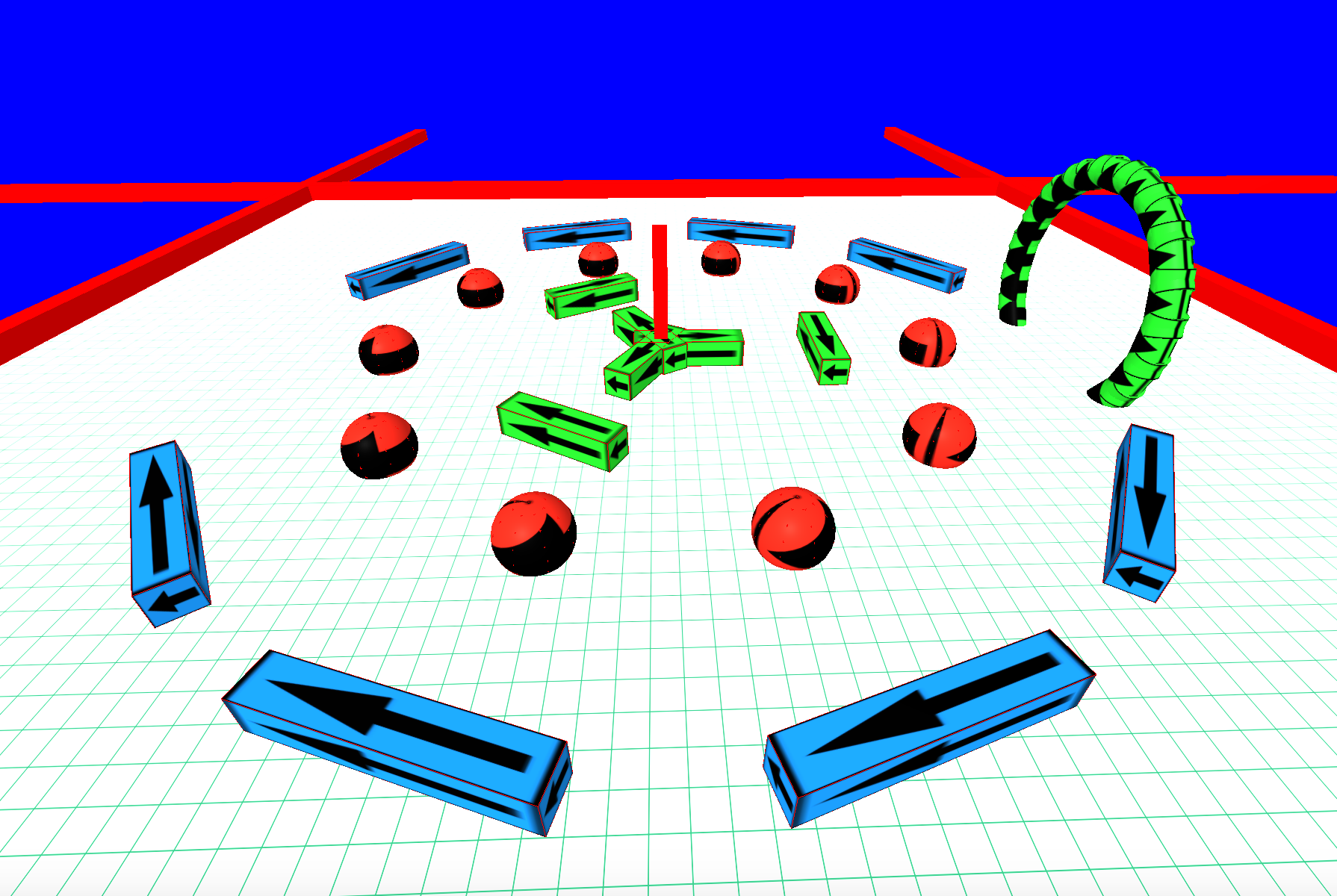
aframe-border-component
==
A component for creating borders in VR
--





## Browser Usage
### Live Example
Here are some live examples of the component. The simpler demo is ideal for mobile.
* https://mitchallen.bitbucket.io/border/index.html - best viewed in Chrome
* https://mitchallen.bitbucket.io/border/simple.html - simpler demo for mobile
Demo notes:
* Works fine in Chrome on a Mac
* Having issues with player falling through floor on iOS for complex demos (keep it simple on mobile)
* On Windows 10 machine (Lenovo Yoga 710 laptop) can't seem to walk and turn at the same time
* * *
### HTML Example
Run this example in a browser (you'll need to add your own image files or get them from my repo). Step off the birds-eye view platform and wander around.
simple aframe-border-component example


 ### Include Script
Include the latest script. Update the @version in the URL as needed:
### Define Assets
Create an __a-assets__ section and add the following:
* an __img__ to act as a material for the border
* an entity, like __a-box__, __a-cylinder__ or __a-sphere__, to act as a border
Be sure to give each entity unique __id__ attributes. They will be needed to define the border.
The example below uses the __static-body__ component from __[aframe-extras](https://github.com/donmccurdy/aframe-extras)__ so the player can not go through the borders.
You can also set the __rotation__ for an asset. It will rotate relative to it's position and rotation along the border.
### Create an Entity with a Border Component
A __border__ component can consist of the following:
* __sides__ - the number of sides to create for the border (__sides: 6;__)
* __radius__ - the distance from the parent entity to create each border wall (__radius: 10;__)
* __wall__ - the __id__ of the entity asset that will be used to create walls of the border (__wall: #wall-one;__)
* __open__ - a zero-based list of border walls that can be opened (not drawn) to allow entering and exiting (__open: 0 2;__)
Example border with no open walls:
A border with open walls:
### Adding / Removing Through JavaScript
An example of how to remove and add border attributes though JavaScript. The target element should be an __a-entity__.
* * *
## NPM Installation
$ npm init
$ npm install aframe-border-component --save
### Browserify Example
Below is an example of requiring the module within a file to be passed to browserify.
The modules named export, __Component__, should be passed to __AFRAME.aframeCore.registerComponent__:
// Browser distribution of the A-Frame component.
(function () {
if (typeof AFRAME === 'undefined') {
console.error('Component attempted to register before AFRAME was available.');
return;
}
var border = require('aframe-border-component');
// Register all components here.
var components = {
"border": border.Component
};
var primitives = {
};
Object.keys(components).forEach(function (name) {
if (AFRAME.aframeCore) {
AFRAME.aframeCore.registerComponent(name, components[name]);
} else {
AFRAME.registerComponent(name, components[name]);
}
});
Object.keys(primitives).forEach(function (name) {
if (AFRAME.aframeCore) {
AFRAME.aframeCore.registerPrimitive(name, primitives[name]);
} else {
AFRAME.registerPrimitive(name, primitives[name]);
}
});
})();
### Build with grunt
Use a [grunt](http://gruntjs.com/) task to build the distribution file:
browserify: {
dist: {
options: {
browserifyOptions: {
// ...
},
transform: [['babelify', {presets: ['es2015']}]],
plugin: [[ "browserify-derequire" ]]
},
files: {
// substitute your component name for the distribution file
"./dist/YOUR-COMPONENT.js": ["./browser.js"]
}
}
},
For more information, review the __Gruntfile.js__ and __package.json__ files in the root of this projects source code.
* * *
## Testing
To test, go to the root folder and type (sans __$__):
$ npm test
* * *
## Repo(s)
* [bitbucket.org/mitchallen/aframe-border-component.git](https://bitbucket.org/mitchallen/aframe-border-component.git)
* [github.com/mitchallen/aframe-border-component.git](https://github.com/mitchallen/aframe-border-component.git)
* * *
## Contributing
In lieu of a formal style guide, take care to maintain the existing coding style.
Add unit tests for any new or changed functionality. Lint and test your code.
* * *
## Version History
#### Version 0.1.6
* updated doc to point to demos in their new location on bitbucket
#### Version 0.1.5
* brought code coverage up to 100%
#### Version 0.1.4
* added logging of name and version to console
* integrated travis-ci and codecov
#### Version 0.1.3
* code cleanup
* added MIT license
* updated examples to latest CDN
#### Version 0.1.2
* fixed / updated documentation
#### Version 0.1.1
* added cdn example
#### Version 0.1.0
* initial release
* * *
---
_Source: https://npm.io/package/aframe-border-component · Machine-readable twin of the npm.io package page. Health data is recomputed on every publish._
### Include Script
Include the latest script. Update the @version in the URL as needed:
### Define Assets
Create an __a-assets__ section and add the following:
* an __img__ to act as a material for the border
* an entity, like __a-box__, __a-cylinder__ or __a-sphere__, to act as a border
Be sure to give each entity unique __id__ attributes. They will be needed to define the border.
The example below uses the __static-body__ component from __[aframe-extras](https://github.com/donmccurdy/aframe-extras)__ so the player can not go through the borders.
You can also set the __rotation__ for an asset. It will rotate relative to it's position and rotation along the border.
### Create an Entity with a Border Component
A __border__ component can consist of the following:
* __sides__ - the number of sides to create for the border (__sides: 6;__)
* __radius__ - the distance from the parent entity to create each border wall (__radius: 10;__)
* __wall__ - the __id__ of the entity asset that will be used to create walls of the border (__wall: #wall-one;__)
* __open__ - a zero-based list of border walls that can be opened (not drawn) to allow entering and exiting (__open: 0 2;__)
Example border with no open walls:
A border with open walls:
### Adding / Removing Through JavaScript
An example of how to remove and add border attributes though JavaScript. The target element should be an __a-entity__.
* * *
## NPM Installation
$ npm init
$ npm install aframe-border-component --save
### Browserify Example
Below is an example of requiring the module within a file to be passed to browserify.
The modules named export, __Component__, should be passed to __AFRAME.aframeCore.registerComponent__:
// Browser distribution of the A-Frame component.
(function () {
if (typeof AFRAME === 'undefined') {
console.error('Component attempted to register before AFRAME was available.');
return;
}
var border = require('aframe-border-component');
// Register all components here.
var components = {
"border": border.Component
};
var primitives = {
};
Object.keys(components).forEach(function (name) {
if (AFRAME.aframeCore) {
AFRAME.aframeCore.registerComponent(name, components[name]);
} else {
AFRAME.registerComponent(name, components[name]);
}
});
Object.keys(primitives).forEach(function (name) {
if (AFRAME.aframeCore) {
AFRAME.aframeCore.registerPrimitive(name, primitives[name]);
} else {
AFRAME.registerPrimitive(name, primitives[name]);
}
});
})();
### Build with grunt
Use a [grunt](http://gruntjs.com/) task to build the distribution file:
browserify: {
dist: {
options: {
browserifyOptions: {
// ...
},
transform: [['babelify', {presets: ['es2015']}]],
plugin: [[ "browserify-derequire" ]]
},
files: {
// substitute your component name for the distribution file
"./dist/YOUR-COMPONENT.js": ["./browser.js"]
}
}
},
For more information, review the __Gruntfile.js__ and __package.json__ files in the root of this projects source code.
* * *
## Testing
To test, go to the root folder and type (sans __$__):
$ npm test
* * *
## Repo(s)
* [bitbucket.org/mitchallen/aframe-border-component.git](https://bitbucket.org/mitchallen/aframe-border-component.git)
* [github.com/mitchallen/aframe-border-component.git](https://github.com/mitchallen/aframe-border-component.git)
* * *
## Contributing
In lieu of a formal style guide, take care to maintain the existing coding style.
Add unit tests for any new or changed functionality. Lint and test your code.
* * *
## Version History
#### Version 0.1.6
* updated doc to point to demos in their new location on bitbucket
#### Version 0.1.5
* brought code coverage up to 100%
#### Version 0.1.4
* added logging of name and version to console
* integrated travis-ci and codecov
#### Version 0.1.3
* code cleanup
* added MIT license
* updated examples to latest CDN
#### Version 0.1.2
* fixed / updated documentation
#### Version 0.1.1
* added cdn example
#### Version 0.1.0
* initial release
* * *
---
_Source: https://npm.io/package/aframe-border-component · Machine-readable twin of the npm.io package page. Health data is recomputed on every publish._