# akido-electron-tooltip
> Free your tooltips from their window bounds - Update version
Latest version **1.2.6** (published 2019-12-12) · ISC license · 0 weekly downloads
## Install
```sh
npm install akido-electron-tooltip
pnpm add akido-electron-tooltip
yarn add akido-electron-tooltip
bun add akido-electron-tooltip
```
## Health
**Score 15/100 (F)** — status: abandoned.
Positive: no vulnerabilities.
Warnings: low downloads; no types; no esm support.
Negative: abandoned; low maintenance score.
## Facts
| | |
|---|---|
| Version | 1.2.6 |
| Published | 2019-12-12 |
| First published | 2019-12-03 |
| Weekly downloads | 0 |
| License | ISC |
| TypeScript types | none |
| Module format | CommonJS |
| Dependencies | 0 |
| Unpacked size | 434.7 KB |
| Known vulnerabilities | 0 |
| Install scripts | no |
| GitHub stars | 0 |
| Author | Maarten Dings |
| Maintainers | akidodevelopers |
## Links
- npm: https://www.npmjs.com/package/akido-electron-tooltip
- Repository: https://github.com/oltreseba/akido-electron-tooltip
- Issues: https://github.com/oltreseba/akido-electron-tooltip/issues
- npm.io page: https://npm.io/package/akido-electron-tooltip
## Recent versions
- 1.2.6 (latest) — 2019-12-12
- 1.2.5 — 2019-12-11
- 1.2.4 — 2019-12-06
- 1.2.3 — 2019-12-06
- 1.2.2 — 2019-12-05
- 1.2.1 — 2019-12-03
- 1.2.0 — 2019-12-03
## README
# Akido Electron tooltip
## Introduction
This module is a fork of [Electron tooltip](https://www.npmjs.com/package/electron-tooltip), with improved support for the lastest version of electron (>5).
The documentation is the same. The name has changed.
## Description
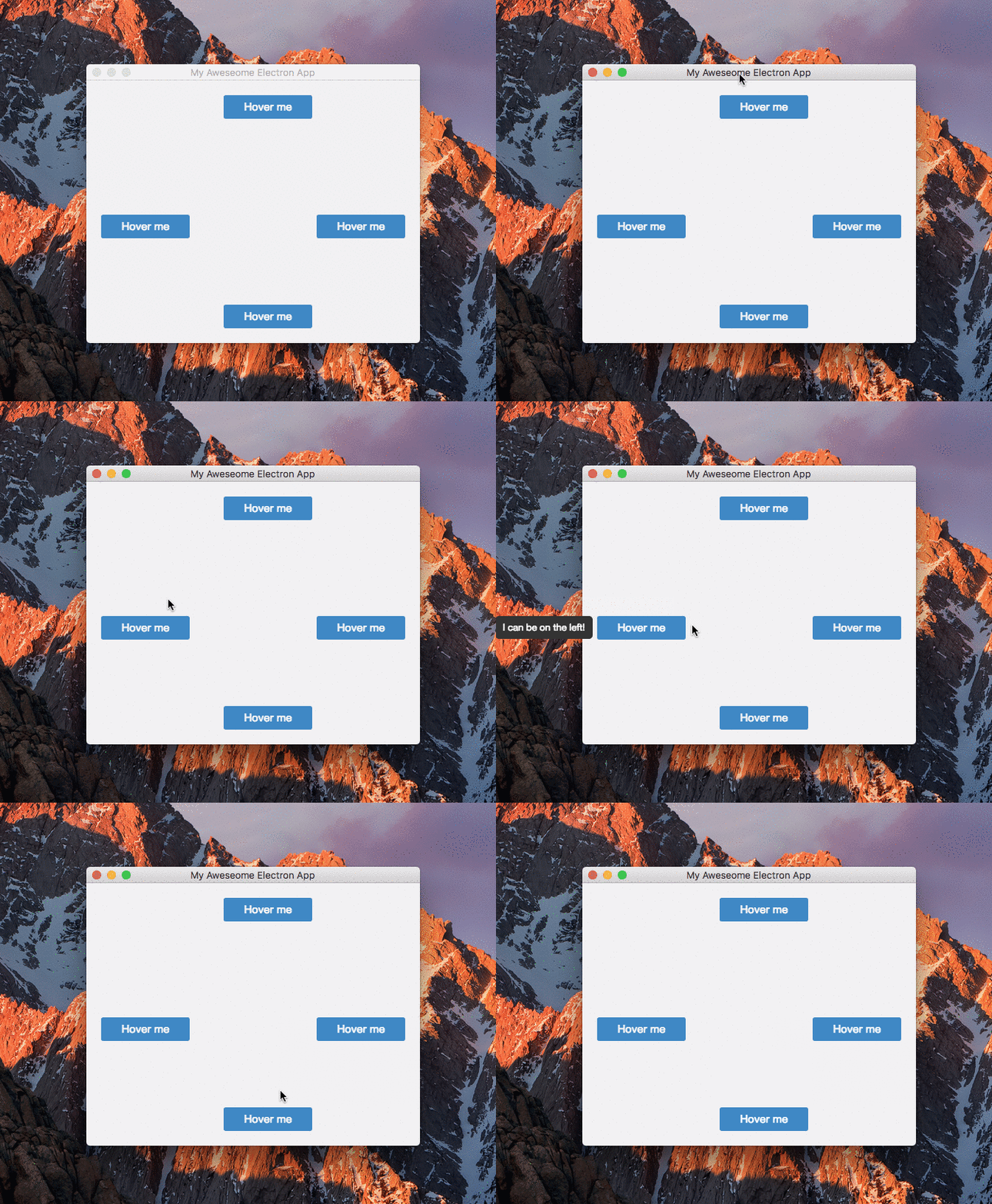
This module is intended to be used in [Electron applications](https://electron.atom.io/). It allows for tooltips to flow outside the window bounds they're called from.
 ## Installation
```javascript
npm i akido-electron-tooltip
```
## Usage
After importing the module, it will search for elements that have the data-tooltip attribute attached. A configuration object can be passed in when calling the tooltip function.
```javascript
// in the render process..
const tt = require('akido-electron-tooltip')
tt({
// config properties
})
```
Position, width and offset options can be overriden on a per element basis by using the data-tooltip-{option} attribute.
```html
```
### Configuration options
|option|description|default|values|
|---|---|---|---|
|position|Tooltip direction|top|left, top, right, bottom|
|width|Width of the tooltip. If width is set to auto, the tooltip will not wrap content|auto|> 0|
|offset|Offset from the element to the tooltip|0|> 0|
|style|Object for overwriting default styles|{}||
|customContent|Function that will be called each time the tooltip is shown. Takes two arguments: the element on which it was called, and the current value of `data-tooltip`. It should return a string which will be used instead of the `data-tooltip` value|undefined||
|level|It's possible to specify the level of the tooltip (check: https://electronjs.org/docs/api/browser-window#winsetalwaysontopflag-level-relativelevel)|'floating'| 'normal' \| 'floating' \| 'torn-off-menu' \| 'modal-panel' \| 'main-menu' \| 'status' \| 'pop-up-menu' \| 'screen-saver'||
|relativeLevel|It's possible to specify the relative level of the tooltip (check: https://electronjs.org/docs/api/browser-window#winsetalwaysontopflag-level-relativelevel)|0|integer|
```javascript
// example
// in the render process..
const tt = require('akido-electron-tooltip')
tt({
position: 'bottom',
width: 200,
style: {
backgroundColor: '#f2f3f4',
borderRadius: '4px'
},
level: 'pop-up-menu',
relativeLevel: 2
})
---
_Source: https://npm.io/package/akido-electron-tooltip · Machine-readable twin of the npm.io package page. Health data is recomputed on every publish._
## Installation
```javascript
npm i akido-electron-tooltip
```
## Usage
After importing the module, it will search for elements that have the data-tooltip attribute attached. A configuration object can be passed in when calling the tooltip function.
```javascript
// in the render process..
const tt = require('akido-electron-tooltip')
tt({
// config properties
})
```
Position, width and offset options can be overriden on a per element basis by using the data-tooltip-{option} attribute.
```html
```
### Configuration options
|option|description|default|values|
|---|---|---|---|
|position|Tooltip direction|top|left, top, right, bottom|
|width|Width of the tooltip. If width is set to auto, the tooltip will not wrap content|auto|> 0|
|offset|Offset from the element to the tooltip|0|> 0|
|style|Object for overwriting default styles|{}||
|customContent|Function that will be called each time the tooltip is shown. Takes two arguments: the element on which it was called, and the current value of `data-tooltip`. It should return a string which will be used instead of the `data-tooltip` value|undefined||
|level|It's possible to specify the level of the tooltip (check: https://electronjs.org/docs/api/browser-window#winsetalwaysontopflag-level-relativelevel)|'floating'| 'normal' \| 'floating' \| 'torn-off-menu' \| 'modal-panel' \| 'main-menu' \| 'status' \| 'pop-up-menu' \| 'screen-saver'||
|relativeLevel|It's possible to specify the relative level of the tooltip (check: https://electronjs.org/docs/api/browser-window#winsetalwaysontopflag-level-relativelevel)|0|integer|
```javascript
// example
// in the render process..
const tt = require('akido-electron-tooltip')
tt({
position: 'bottom',
width: 200,
style: {
backgroundColor: '#f2f3f4',
borderRadius: '4px'
},
level: 'pop-up-menu',
relativeLevel: 2
})
---
_Source: https://npm.io/package/akido-electron-tooltip · Machine-readable twin of the npm.io package page. Health data is recomputed on every publish._