# an-components-boxs
> vue常用组件的封装
Latest version **0.0.9** (published 2023-05-18) · AX license · 0 weekly downloads
## Install
```sh
npm install an-components-boxs
pnpm add an-components-boxs
yarn add an-components-boxs
bun add an-components-boxs
```
## Health
**Score 15/100 (F)** — status: abandoned.
Positive: no vulnerabilities.
Warnings: low downloads; no types; no esm support; pre 1.0.
Negative: abandoned; low maintenance score.
## Facts
| | |
|---|---|
| Version | 0.0.9 |
| Published | 2023-05-18 |
| First published | 2023-05-18 |
| Weekly downloads | 0 |
| License | AX |
| TypeScript types | none |
| Module format | CommonJS |
| Dependencies | 6 |
| Unpacked size | 585.7 KB |
| Known vulnerabilities | 0 (+1 in 1 direct dependencies) |
| Install scripts | no |
| Author | s1172814223@163.com |
| Maintainers | caisse |
| Keywords | dateTime, 数字滚动累加, 日期select选择器, 系统尺寸缩放, 系统水印, 数字格式化, tab页切换、滚动, 列表滚动, 鼠标拖拽 |
## Links
- npm: https://www.npmjs.com/package/an-components-boxs
- npm.io page: https://npm.io/package/an-components-boxs
## Dependencies (6)
- [vue](https://npm.io/package/vue.md) ^2.6.11
- [vuex](https://npm.io/package/vuex.md) ^3.4.0
- [core-js](https://npm.io/package/core-js.md) ^3.6.5
- [@ektx/cmap](https://npm.io/package/@ektx/cmap.md) ^2.4.2
- [vue-router](https://npm.io/package/vue-router.md) ^3.2.0
- [vue-count-to](https://npm.io/package/vue-count-to.md) ^1.0.13
## Alternatives
- [@js-joda/timezone](https://npm.io/package/@js-joda/timezone.md) — 383.4K weekly downloads
- [chartjs-adapter-moment](https://npm.io/package/chartjs-adapter-moment.md) — 210.8K weekly downloads
- [strftime](https://npm.io/package/strftime.md) — 171.2K weekly downloads
- [vue-flatpickr-component](https://npm.io/package/vue-flatpickr-component.md) — 115.8K weekly downloads
- [timepicker](https://npm.io/package/timepicker.md) — 51.0K weekly downloads
## Recent versions
- 0.0.9 (latest) — 2023-05-18
## README
用法:
```javascript
npm i llgtfoo-components-boxs --save
```
在main.js中引入
```javascript
import llgtfooComponentsBoxs from 'llgtfoo-components-boxs'
import 'llgtfoo-components-boxs/dist/llgtfoo-components-boxs.css'
Vue.use(llgtfooComponentsBoxs)
注:全局使用,组件可以单独引用
```
| 组件: | |
| :---------------- | ------------------------ |
| \ | 时间显示 |
| \ | 时间选中框 |
| \ | 数字滚动 |
| \ | tab页切换、滚动(单个和一页滚动) |
| \ | 列表无缝滚动或者逐条滚动(支持事件暂停) |
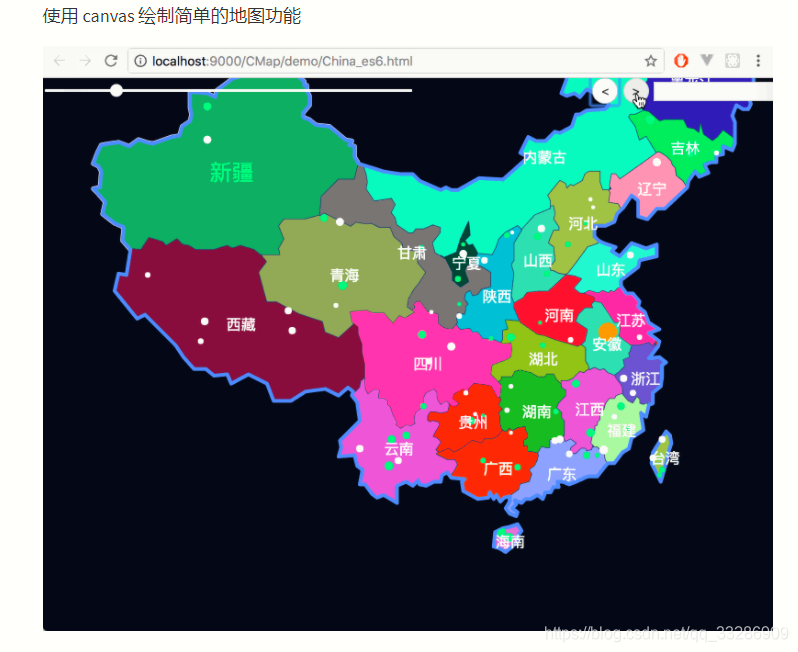
| new this.$CMap() | 集成cmap |
| **指令:** | |
| v-auto-scale | 大屏尺寸缩放 |
| v-water-marker | 系统水印 |
| v-drag | 鼠标自由拖拽 |
| **过滤器:** | |
| \|numberFormat | 格式化数字,如33,333 |
- 组件
组件-1:
```
{{time.data.year}}-{{time.data.time}}
```
利用作用域插槽返回时间对象,自定义时间格式以及样式
```javascript
data:{
year, //年
month,//月
day,//日
week,//星期几
time//时间
}
```

注:组件可以用容器包裹,来显示在不同的位置。
组件-2:
```javascript
initYear是初始年份,年下拉框显示当前年到初始年的所有年份
styleObj1:{
bg:'rgba(11, 41, 82, 0.5)',//选中框背景
dropBg:'rgba(11, 41, 82, 0.8)',//下拉框背景
hoverBg:'cyan',//下拉框选择鼠标滑过背景
scale:0.5,//大小
fontColor:'red'//字体颜色
}
```
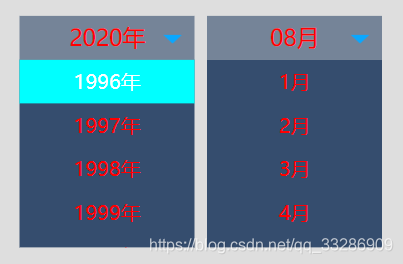
注:可选填其中几种;组件可以用容器包裹,来显示在不同的位置。
组件-3:
```javascript
maxValue:20000,//滚动数字的最大值,默认最大值2020
duration:1000,//耗时,单位ms
separator:',',//三位间隔符,默认没有字符
toFixed:1 ,//保留小数,默认不保留
prefix:'¥',//前缀,默认没有字符
suffix:'单位'//后缀,默认没有字符
注:可选填
```
注:数字样式自定义,例如类型llo

组件-4:
```javascript
dataLists:为数据
ul为slot元素
option1:{
number:5,//默认显示五个
single:true,//默认值false是一次性走动一页,true是一次性走动一个
autoScroll:true,//自动滚动,默认false不滚动
autoScrollTime:2000,//自动滚动时间间隔,默认3s,
button:true,//左右两侧按钮显示
(autoScroll为false,button必为true)
},
注:
1.li如果有间隔,请向右间隔,即margin-right
2.option1参数选填,可全不填
3.移到元素上停止滚动效果,离开继续
```

组件-5:
```javascript
//列表顶部标题
//列表滚动内容
参数:
slot="header"为标题内容
slot="main"为滚动内容
dataScrollList为滚动数据,数据不为空的时候加载组件,计算组件高度
------------------------------------------------------------------------------
scrollOption:{
number:6,//默认显示几个
seamless:true,//无缝滚动,默认true
duration:2000//滚动时间间隔,无缝滚动时间间隔为此时间除以10
},
存在鼠标滚动
-------------------------------------------------------------------------------
或者
scrollOption:{
number:6,//默认显示几个
seamless:false,//单个过渡滚动,默认true
duration:2000//滚动时间间隔,无缝滚动时间间隔为此时间除以10
},
鼠标操作无效,可以事件触发
方法:
可以利用ref调取函数
sKeep()//继续滚动
sStop()//停止滚动
-------------------------------------------------------------------------------------
注:选填几种,或者不填
```

组件-6:
CMap地图:
```
集成cmap地图,只需new this.$CMap(options)即可使用
用法: https://www.npmjs.com/package/@ektx/cmap
```
- 指令:
指令-1:
```javascript
v-auto-scale='{width: 1920, height: 1080}'
```
v-auto-scale用于根据自定义的尺寸缩放屏幕,一般用于大屏自适应
指令-2:
```javascript
v-water-marker='{
width = '200px', //宽度
height = '200px', //高度
textAlign = 'center', //规定高度和宽度剧中
textBaseline = 'middle', //垂直剧中
font = '16px microsoft yahei', //字体
fillStyle = 'rgba(184, 184, 184, 0.4)', //颜色
content = 'llgtfoo@163.com', //水印内容
rotate = '-30', //水印水平倾斜角度
zIndex = 1, //水平层级,一般要低于页面的层级
visible = true,//水印是否显示
}'
```
v-water-marker用于生成系统水印

指令3:
```javascript
v-drag="#top" 用于自由拖拽
#top是按指定区域可以拖拽,
没值按整个区域都可以拖拽
```
- 过滤器
过滤器-1:
```javascript
numberFormat 用于几位格式化数字
numberFormat(
{
separator:'*',//符号
step:4 //几位出现符号
}
)
```

---
_Source: https://npm.io/package/an-components-boxs · Machine-readable twin of the npm.io package page. Health data is recomputed on every publish._