# angular-notification-alert

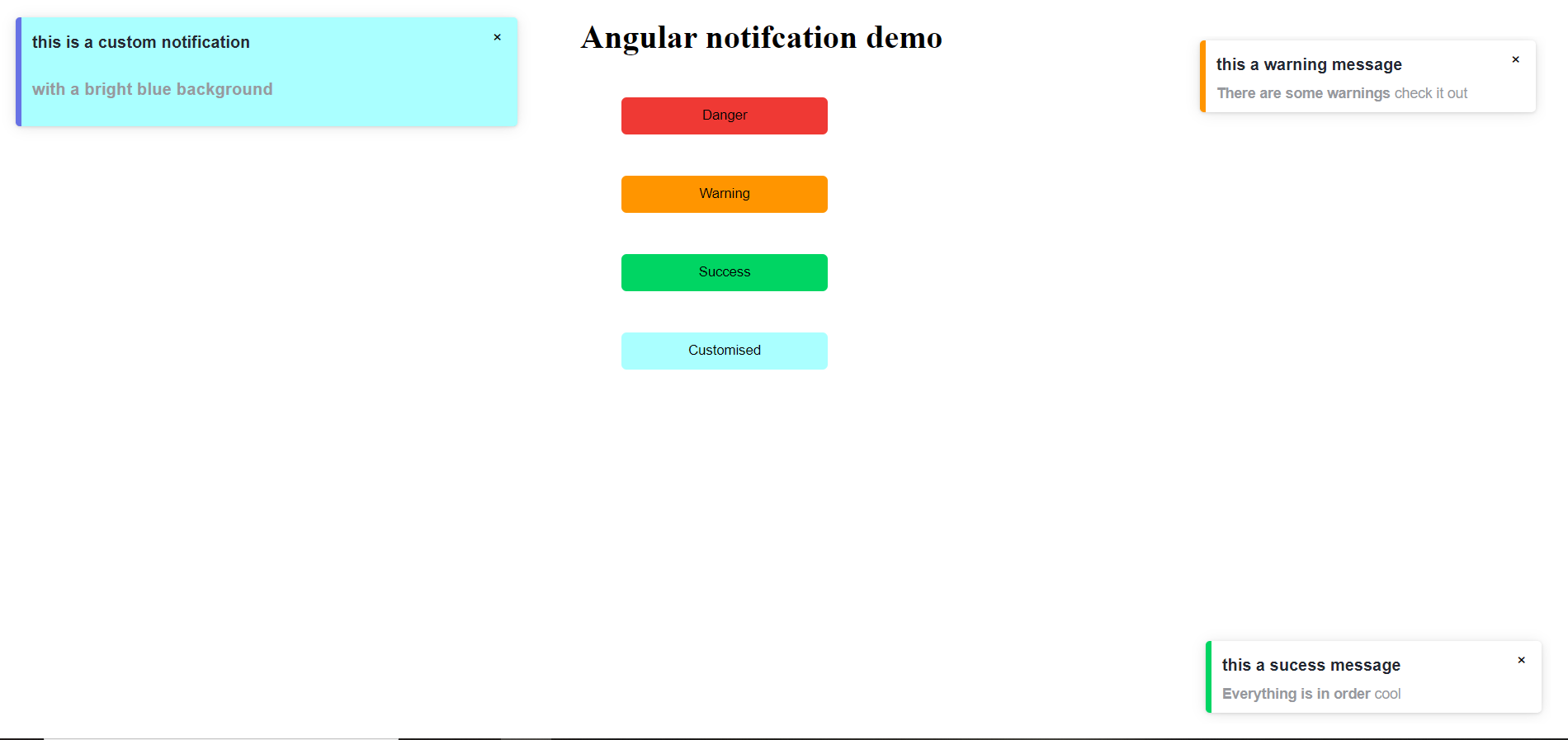
> Easy to use, highly customizable Angular notification- alert component.

Latest version **1.0.3** (published 2021-03-14) · MIT license · 0 weekly downloads

## Install

```sh
npm install angular-notification-alert
pnpm add angular-notification-alert
yarn add angular-notification-alert
bun add angular-notification-alert
```

## Health

**Score 25/100 (F)** — status: abandoned.

Positive: has types; esm support; no vulnerabilities.

Warnings: low downloads.

Negative: abandoned; low maintenance score.

## Facts

| | |
|---|---|
| Version | 1.0.3 |
| Published | 2021-03-14 |
| First published | 2021-02-26 |
| Weekly downloads | 0 |
| License | MIT |
| TypeScript types | bundled |
| Module format | ESM + CommonJS |
| Dependencies | 1 |
| Unpacked size | 125.3 KB |
| Known vulnerabilities | 0 |
| Install scripts | no |
| Author | Juda Buchahda |
| Maintainers | miminerd |
| Keywords | angular, front-end, notification, alert, component, standalone, web, customizable, inject it everywhere |

## Links

- npm: https://www.npmjs.com/package/angular-notification-alert
- Homepage: https://github.com/miminerd/angular-notification
- npm.io page: https://npm.io/package/angular-notification-alert

## Dependencies (1)

- [tslib](https://npm.io/package/tslib.md) ^2.0.0

## Alternatives

- [update-check](https://npm.io/package/update-check.md) — 4.0M weekly downloads
- [react-native-onesignal](https://npm.io/package/react-native-onesignal.md) — 134.5K weekly downloads
- [react-redux-toastr](https://npm.io/package/react-redux-toastr.md) — 33.7K weekly downloads
- [@nocobase/plugin-notification-manager](https://npm.io/package/@nocobase/plugin-notification-manager.md) — 2.0K weekly downloads
- [react-simple-toasts](https://npm.io/package/react-simple-toasts.md) — 1.9K weekly downloads

## Recent versions

- 1.0.3 (latest) — 2021-03-14
- 1.0.2 — 2021-03-01
- 1.0.1 — 2021-02-28
- 1.0.0 — 2021-02-28
- 0.0.3 — 2021-02-26
- 0.0.2 — 2021-02-26
- 0.0.1 — 2021-02-26

## README

# Angular  notifications

Easy to use, highly customizable Angular notification- alert  component.


<a href="https://www.buymeacoffee.com/judaBuchahda" target="_blank"><img align="right" width="200px"  src="https://cdn.buymeacoffee.com/buttons/v2/default-yellow.png" alt="Buy Me A Coffee"></a>


<a href="https://badge.fury.io/js/angular-notification-alert"><img src="https://badge.fury.io/js/angular-notification-alert.svg" alt="npm version" height="18"></a>

## Demo

- 👉 [demo](https://angular-notification.herokuapp.com/)
![Alt text](https://raw.githubusercontent.com/miminerd/angular-notification/main/src/assets/not.PNG?token=AOPKXTF7ACRMV4QN2VAHAADAHQB2C)


## Setup

`npm i --save angular-notification-alert`

Add dependencies to your `app.module.ts`:

 ```js
import { AngularNotificationModule} from 'angular-notification-alert';
         ...

@NgModule({
  declarations: [
    ...
  ],
  imports: [
    ...
    AngularNotificationModule
  ],
  providers: [],
  bootstrap: [...]
})

```

There are 2 ways to use the notification element; \
inject it directly in your view and customize the element configuration in NgOnInit() for example\
`<lib-notif></lib-notif>`


```js
  // then set up the configuration of the notification component 
  // ngOnInit(); if you want the notification element to show up directly in your view

  ngOnInit(): void {
    // setting object to set up the configuration
    const setting = {
      width: '450px',
      type: 'green',
      title: 'Notication title',
      body: 'The notification will viewable directly in your component',
      position: 'bottom right
    };

    // pass the setting to the service so it can be applied in the notification component. 
    this.Service.setProperties(setting);
  }

 ```

<strong>Or </strong> 
<br>
show the notification element on an event-trigger like addNotifElement() for example \
explained below

In your view.html
 ```html
 <div #parent> </div> 
 ```

In your component.ts:

 ```js
  // import the notification service from the angular-notification module
  import { AngularNotificationService, NotifComponent  } from 'angular-notification-alert';
  import { Component, OnInit, ViewChild, ViewContainerRef, ComponentFactoryResolver, ComponentRef } from '@angular/core';


  @ViewChild('parent', {read: ViewContainerRef}) target: ViewContainerRef;
  private componentRef: ComponentRef<any>;
  // inject the service in your constructor class
  constructor(private Service: AngularNotificationService,
              private componentFactoryResolver: ComponentFactoryResolver) { }


  // or show the notif element when an event fires 
  addNotifElement() {
    let setting = {
      width: '300px',
      type: 'danger',
      title: 'this an error message',
      body: '<b>Something went wrong </b> check it out',
      position: 'center',
      duration: 4000,
      background: '#fff'
    };
    this.Service.setProperties(setting);
    const childComponent = this.componentFactoryResolver.resolveComponentFactory( NotifComponent );
    this.componentRef = this.target.createComponent(childComponent);
  }
  ```


## Usage

Here is the list of the configurations you can pass to the notification component\
in the setting object


<table>
  <tr>
    <th>Name</th>
    <th>Type</th>
    <th>Default</th>
     <th>Description</th>
  </tr>
  <tr>
    <td>type</td>
    <td>'warn',  'danger',  'success',  'default'</td>
    <td>'default'</td>
    <td>type of the notification: warn, danger, ...</td>
  </tr>
  <tr>
    <td>position</td>
    <td>'bottom right', 'bottom left', 'top right', 'top left',  'center' </td>
    <td>'top left'</td>
    <td>Part of the screen where notifications will pop out</td>
  </tr>
  <tr>
    <td>opacity</td>
    <td>number </td>
    <td>1</td>
    <td>Opacity of the notification element</td>
  </tr>
  <tr>
    <td>Background</td>
    <td>string</td>
    <td>'#fff'</td>
    <td> color background of the notification element</td>
  </tr>
  <tr>
    <td>title</td>
    <td>string</td>
    <td></td>
    <td>the notification title</td>
  </tr>
  <tr>
    <td>body</td>
    <td>html</td>
    <td></td>
    <td>the notification content you can warp html tag in it</td>
  </tr>
  <tr>
    <td>duration</td>
    <td>number</td>
    <td>4000</td>
    <td> Time (in ms) to keep the notification on screen</td>
  </tr>
  <tr>
    <td>width</td>
    <td>string</td>
    <td>30%</td>
    <td> width of the notif element in px or %</td>
  </tr>
</table>

## Developement
To run a local demo from the repo please do
```js

npm install 
ng serve

```
app being served at: http://localhost:4200

## Want to help? and give me support 

<img align="right" width="100px"  src="https://camo.githubusercontent.com/f5054ffcd4245c10d3ec85ef059e07aacf787b560f83ad4aec2236364437d097/68747470733a2f2f696d672e736869656c64732e696f2f62616467652f636f6e747269627574696f6e732d77656c636f6d652d627269676874677265656e2e7376673f7374796c653d666c6174">
I welcome issues and pull requests on [pr](https://github.com/miminerd/angular-notification/pulls)
If you need something improved, added, or fixed, please contribute and create a pull request.
thank you and cheers 🍕 🍕

 ## Author👩🏻‍💻
[Juda Buchahda](https://juda-landing-cv.herokuapp.com)

---
_Source: https://npm.io/package/angular-notification-alert · Machine-readable twin of the npm.io package page. Health data is recomputed on every publish._