# ansi-to-svg

> 😹 convert ANSI Escaped CLI strings to SVGs

Latest version **1.4.4** (published 2026-09-07) · MIT license · 0 weekly downloads

## Install

```sh
npm install ansi-to-svg
pnpm add ansi-to-svg
yarn add ansi-to-svg
bun add ansi-to-svg
```

## Health

**Score 55/100 (C)** — status: active.

Positive: no vulnerabilities; recently updated; high maintenance score.

Warnings: low downloads; no types; no esm support.

## Facts

| | |
|---|---|
| Version | 1.4.4 |
| Published | 2026-09-07 |
| First published | 2018-04-07 |
| Weekly downloads | 0 |
| License | MIT |
| TypeScript types | none |
| Module format | CommonJS |
| Dependencies | 2 |
| Unpacked size | 16.7 KB |
| Known vulnerabilities | 0 |
| Install scripts | no |
| GitHub stars | 23 |
| Author | F1LT3R |
| Maintainers | f1lt3r |
| Keywords | ansi-to-html, ansi-to-image, ansi-to-svg, ansi-to-dataurl, ansi, escape, convert, console, color, chalk, terminal, html, image, jpg, png, svg, data url, log |

## Links

- npm: https://www.npmjs.com/package/ansi-to-svg
- Repository: https://github.com/F1LT3R/ansi-to-svg
- Homepage: https://github.com/F1LT3R/ansi-to-svg#readme
- Issues: https://github.com/F1LT3R/ansi-to-svg/issues
- npm.io page: https://npm.io/package/ansi-to-svg

## Dependencies (2)

- [he](https://npm.io/package/he.md) ^1.1.1
- [ansi-to](https://npm.io/package/ansi-to.md) ^1.3.0

## Alternatives

- [cli-color](https://npm.io/package/cli-color.md) — 3.4M weekly downloads
- [log](https://npm.io/package/log.md) — 1.3M weekly downloads
- [logstash-client](https://npm.io/package/logstash-client.md) — 4.5K weekly downloads
- [@nocobase/plugin-logger](https://npm.io/package/@nocobase/plugin-logger.md) — 2.0K weekly downloads
- [child-process-debug](https://npm.io/package/child-process-debug.md) — 695 weekly downloads

## Recent versions

- 1.4.4 (latest) — 2026-09-07
- 1.4.3 — 2019-05-03
- 1.4.2 — 2018-05-13
- 1.4.1 — 2018-04-17
- 1.3.0 — 2018-04-11
- 1.2.0 — 2018-04-11
- 1.1.10 — 2018-04-10
- 1.1.9 — 2018-04-10
- 1.1.8 — 2018-04-10
- 1.1.7 — 2018-04-08
- 1.1.6 — 2018-04-07
- 1.1.5 — 2018-04-07
- 1.1.4 — 2018-04-07
- 1.1.3 — 2018-04-07
- 1.1.2 — 2018-04-07
- … 2 more at https://npm.io/package/ansi-to-svg/versions

## README

# ANSI-to-SVG

> 😹  convert ANSI Escaped CLI strings to SVGs

[![Build Status](https://travis-ci.org/F1LT3R/ansi-to-svg.svg?branch=master)](https://travis-ci.org/F1LT3R/ansi-to-svg)
[![Coverage Status](https://coveralls.io/repos/github/F1LT3R/ansi-to-svg/badge.svg?branch=master)](https://coveralls.io/github/F1LT3R/ansi-to-svg?branch=master)
[![NPM Version](https://img.shields.io/npm/v/ansi-to-svg.svg)](https://www.npmjs.com/package/ansi-to-svg)
[![XO code style](https://img.shields.io/badge/code_style-XO-5ed9c7.svg)](https://github.com/sindresorhus/xo)

[Changelog](Changelog.md)

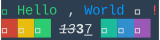
ANSI-to-SVG provides a Markdown friendly way to include Node.js CLI output in your software documentation; like this SVG here:

[![hello-world.svg](https://f1lt3r.github.io/ansi-to-svg/examples/hello-world.svg)](examples/hello-world.svg)
## Support

Support the development of ANSI-to-SVG by [becoming a patreon](https://patreon.com/bePatron?u=9720216).

<a href="https://patreon.com/bePatron?u=9720216"><img width="120" src="https://f1lt3r.io/content/images/2018/04/become_a_patron_button@2x.png"></a>

## Features

ANSI-to-SVG sits on top of tha base-package [ANSI-to](https://github.com/F1LT3R/ansi-to) and is part of a collection of tools used for ZDD development.

ANSI-to has the following plugins available:

- [SVG](https://github.com/F1LT3R/ansi-to-svg.git) - Export ANSI to Scalable Vector Graphics
- [PNG, JPG](https://github.com/F1LT3R/ansi-to-image) - Export ANSI to raster image (JPG, PNG)
- [<strike>HTML</strike>](https://github.com/F1LT3R/ansi-to-html) (coming soon)

The SVGs output have been tested with Chrome, Firefox and Sketch.

## Install

```
$ yarn add ansi-to-svg
```

## Usage

```js
const ansiToSVG = require('ansi-to-svg')

// Returns an SVG string
ansiToSVG(ansiText, {
	// Defaults to  2x for Retina compatibility
	scale: 2,

	// Font settings
	fontFace: 'Courier',
	fontSize: 14,
	lineHeight: 18,

	// Padding
	paddingTop: 0,
	paddingLeft: 0,
	paddingBottom: 0,
	paddingRight: 0,

	// Supply an iTerm2 Color file
	colors: './base16-flat-dark-f1lt3r-256.itermcolors',

	// Or override the default colors
	// (all defaults shown here)
	colors: {
		black: '#000000',
		red: '#B22222',
		green: '#32CD32',
		yellow: '#DAA520',
		blue: '#4169E1',
		magenta: '#9932CC',
		cyan: '#008B8B',
		white: '#D3D3D3',
		gray: '#A9A9A9',
		redBright: '#FF4500',
		greenBright: '#ADFF2F',
		yellowBright: '#FFFF00',
		blueBright: '#87CEEB',
		magentaBright: '#FF00FF',
		cyanBright: '#00FFFF',
		whiteBright: '#FFFFFF',
		bgBlack: '#000000',
		bgRed: '#B22222',
		bgGreen: '#32CD32',
		bgYellow: '#DAA520',
		bgBlue: '#4169E1',
		bgMagenta: '#9932CC',
		bgCyan: '#008B8B',
		bgWhite: '#D3D3D3',
		bgGray: '#A9A9A9',
		bgRedBright: '#FF0000',
		bgGreenBright: '#ADFF2F',
		bgYellowBright: '#FFFF00',
		bgBlueBright: '#87CEEB',
		bgMagentaBright: '#FF00FF',
		bgCyanBright: '#00FFFF',
		bgWhiteBright: '#FFFFFF',
		backgroundColor: '#000000',
		foregroundColor: '#D3D3D3'
	}
})
```

## Basic Text

```js
const antoToSVG = require('ansi-to-svg')
const chalk = require('chalk')
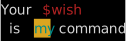
const ansiText = chalk`Your {red $wish}\n is {bgYellow.cyan my} command.`

const result = ansiToSVG(ansiText)
```

Saving this result to an `.SVG` file and opening it in your browser would reveal:

[![basic-example.svg](https://f1lt3r.github.io/ansi-to-svg/examples/basic-example.svg)](examples/basic-example.svg)
Logging the result to console would show:

```xml
<svg xmlns="http://www.w3.org/2000/svg" viewBox="0, 0, 126.02, 40.45" font-family="SauceCodePro Nerd Font, Source Code Pro, Courier" font-size="14"><g fill="#D3D3D3"><rect x="0" y="0" width="126.02" height="40"><svg xmlns="http://www.w3.org/2000/svg" viewBox="0, 0, 126.02, 40.45" font-family="SauceCodePro Nerd Font, Source Code Pro, Courier" font-size="14">
	<g fill="#D3D3D3">
		<rect x="0" y="0" width="126.02" height="40.45" fill="#000000" />
		<text x="0" y="14.55">Your </text>
		<text x="42.01" y="14.55" fill="#B22222">$wish</text>
		<text x="8.4" y="33.55"> is </text>
		<rect x="33.61" y="19" width="16.8" height="19" fill="#DAA520" opacity="1" />
		<text x="33.61" y="33.55" fill="#008B8B">my</text>
		<text x="58.81" y="33.55"> command.</text>
	</g>
</svg>
```

## iTerm2 Color Support

Using: [./fixtures/base16-flat-dark-f1lt3r-256.itermcolors](./fxitures/base16-flat-dark-f1lt3r-256.itermcolors)

```js
const ansiText = chalk`Your {red $wish}\n is {bgYellow.cyan my} command.`
const colorFile = 'base16-flat-dark-f1lt3r-256.itermcolors'

ansiToSVG(ansiText, {color: colorFile})
```

[![iterm2colors-file.svg](https://f1lt3r.github.io/ansi-to-svg/examples/iterm2colors-file.svg)](examples/iterm2colors-file.svg)

## Emoji Support

```js
const ansiText = chalk.bgRed('🌈') +
	chalk.bgYellow('🦄') +
	chalk.bgGreen('🐘') +
	chalk.bgCyan('🍄') +
	chalk.bgBlue('🎃') +
	chalk.bgMagenta('🐦') +
	chalk.bgRed('🖤') +
	chalk.bgYellow('😳') +
	chalk.bgGreen('😒') +
	chalk.bgCyan('😮') +
	chalk.bgBlue('😐') +
	chalk.bgMagenta('😱') +
	chalk.bgRed('😕') +
	chalk.bgYellow('😕') +
	chalk.bgGreen('😑') +
	chalk.bgCyan('😘')

ansiToSVG(ansiText, {
	colors: 'base16-flat-dark-f1lt3r-256.itermcolors'
})
```

[![emojis.svg](https://f1lt3r.github.io/ansi-to-svg/examples/emojis.svg)](examples/emojis.svg)

## Powerline Font Compatability

```js
const ansiText = chalk` {bgGreen.white Testing background colors } butting adjacent lines. \n` +
	chalk` {red ✘ }{bgBlue.black  ~/repos/minkjs/ansi-to }{bgYellow.blue  }{bgYellow.black  svg-image-plugins ● }{yellow } ava powerline-fonts.test.js \n` +
	chalk`  {green 1 passed}`

ansiToSVG(ansiText, {
	colors: 'base16-flat-dark-f1lt3r-256.itermcolors',
	fontFamily: 'SauceCodePro Nerd Font'
})
```

Note: you will need `SauceCodePro Nerd font` for the following example to render correctly. You can find Nerd Fonts here: [https://nerdfonts.com/](https://nerdfonts.com/)

[![powerline-font.svg](https://f1lt3r.github.io/ansi-to-svg/examples/powerline-font.svg)](examples/powerline-font.svg)

## All Styles

If we dump some ANSI to a file: [fixture.chalk-styles.ansi](fixtures/fixture.chalk-styles.ansi)

```plaintext
[1mbold            [22m [2mdim             [22m [3mitalic          [23m [4munderline       [24m [7minverse         [27m [9mstrikethrough   [29m 
[1m[30mblack           [39m[22m [1m[31mred             [39m[22m [1m[32mgreen           [39m[22m [1m[33myellow          [39m[22m [1m[34mblue            [39m[22m [1m[35mmagenta         [39m[22m [1m[36mcyan            [39m[22m [1m[37mwhite           [39m[22m 
[1m[90mgray            [39m[22m [30m[91mredBright       [30m[39m [30m[92mgreenBright     [30m[39m [30m[93myellowBright    [30m[39m [30m[94mblueBright      [30m[39m [30m[95mmagentaBright   [30m[39m [30m[96mcyanBright      [30m[39m [30m[97mwhiteBright     [30m[39m 
[37m[1m[40mbgBlack         [49m[22m[39m [30m[1m[41mbgRed           [49m[22m[39m [30m[1m[42mbgGreen         [49m[22m[39m [30m[1m[43mbgYellow        [49m[22m[39m [30m[1m[44mbgBlue          [49m[22m[39m [30m[1m[45mbgMagenta       [49m[22m[39m [30m[1m[46mbgCyan          [49m[22m[39m [30m[1m[47mbgWhite         [49m[22m[39m 
[37m[3m[100mbgBlackBright   [49m[23m[39m [30m[3m[101mbgRedBright     [49m[23m[39m [30m[3m[102mbgGreenBright   [49m[23m[39m [30m[3m[103mbgYellowBright  [49m[23m[39m [30m[3m[104mbgBlueBright    [49m[23m[39m [30m[3m[105mbgMagentaBright [49m[23m[39m [30m[3m[106mbgCyanBright    [49m[23m[39m [30m[3m[107mbgWhiteBright   [49m[23m[39m 
```

We can render it with `ansiToSVG`:

```js
const ansiText = fs.readFileSync('all-supported-styles.ansi')
ansiToSVG(String(ansiText), {colors: 'base16-flat-dark-f1lt3r-256.itermcolors'})
```

Resulting in the following output:

[![chalk-base-styles.svg](https://f1lt3r.github.io/ansi-to-svg/examples/chalk-base-styles.svg)](examples/chalk-base-styles.svg)

Note: this example uses [Chalk](https://github.com/chalk/chalk) as a base to write the ANSI Escape sequences.

## Light Color Scheme

```js
const result = ansiToSVG(String(ansiText), {colors: 'base16-tomorrow-256.itermcolors'})
```

[![light-iterm2-color-scheme.svg](https://f1lt3r.github.io/ansi-to-svg/examples/light-iterm2-color-scheme.svg)](examples/light-iterm2-color-scheme.svg)


## Padding

```js
const ansiText = chalk`{red.bold padding} {green.italic woo!}`
const colorFile = './fixtures/base16-flat-dark-f1lt3r-256.itermcolors'

const result = ansiToSVG(String(ansiText), {
	colors: colorFile,
	paddingTop: 14,
	paddingLeft: 14,
	paddingRight: 14,
	paddingBottom: 14
})
```

[![padding.svg](https://f1lt3r.github.io/ansi-to-svg/examples/padding.svg)](examples/padding.svg)


## Combined Strikethrough and Underline

```js
const ansiText = chalk`{bgCyan.yellow.strikethrough.underline woo!}`
const colorFile = './fixtures/base16-flat-dark-f1lt3r-256.itermcolors'

const result = ansiToSVG(String(ansiText), {
	colors: colorFile,
	paddingTop: 1,
	paddingLeft: 1,
	paddingBottom: -2.5,
	paddingRight: 1
})
```

[![colored-strikethrough-underline](https://f1lt3r.github.io/ansi-to-svg/examples/colored-strikethrough-underline.svg)](examples/colored-strikethrough-underline.svg)

---
_Source: https://npm.io/package/ansi-to-svg · Machine-readable twin of the npm.io package page. Health data is recomputed on every publish._
