# ant-rare-words-utils
> [](https://www.npmjs.org/package/ant-rare-words-utils) 
Latest version **0.0.10** (published 2023-11-02) · MIT license · 0 weekly downloads
## Install
```sh
npm install ant-rare-words-utils
pnpm add ant-rare-words-utils
yarn add ant-rare-words-utils
bun add ant-rare-words-utils
```
## Health
**Score 25/100 (F)** — status: abandoned.
Positive: has types; no vulnerabilities; high quality score.
Warnings: low downloads; no esm support; pre 1.0.
Negative: abandoned; low maintenance score.
## Facts
| | |
|---|---|
| Version | 0.0.10 |
| Published | 2023-11-02 |
| First published | 2023-02-20 |
| Weekly downloads | 0 |
| License | MIT |
| TypeScript types | bundled |
| Module format | CommonJS |
| Node | >=14.0.0 |
| Dependencies | 0 |
| Unpacked size | 2.5 MB |
| Known vulnerabilities | 0 |
| Install scripts | no |
| Maintainers | andyliwr |
## Links
- npm: https://www.npmjs.com/package/ant-rare-words-utils
- Repository: git@code.alipay.com:rare-words/open-rare-words-utils
- npm.io page: https://npm.io/package/ant-rare-words-utils
## Recent versions
- 0.0.10 (latest) — 2023-11-02
- 0.0.9 — 2023-10-26
- 0.0.8 — 2023-09-13
- 0.0.6-beta1 — 2023-09-05
- 0.0.7 — 2023-08-25
- 0.0.6 — 2023-06-20
- 0.0.5 — 2023-06-20
- 0.0.4 — 2023-06-01
- 0.0.3 — 2023-05-31
- 0.0.2-beta.3 — 2023-03-27
- 0.0.2-beta.2 — 2023-03-27
- 0.0.2 — 2023-03-16
- 0.0.1-beta.5 — 2023-02-24
- 0.0.1 — 2023-02-23
- 0.0.1-beta.4 — 2023-02-20
- … 3 more at https://npm.io/package/ant-rare-words-utils/versions
## README
# ant-rare-words-utils
[](https://www.npmjs.org/package/ant-rare-words-utils)

## 字体加载
生僻字普遍存在无法显示的问题,这是由于缺乏能够显示当前生僻字字符的字体导致的,如果在显示字符的过程中在字体文件中找不到字符的字形数据,字符就会被显示成 �▤□ 这类字符。
我们提供了一个加载生僻字字体的方法,在需要展示生僻字的页面调用我们的方法,就可以解决生僻字显示问题了。
### 参数
| 参数 | 类型 | 说明 |
| ----------- | ------------------------ | --------------------------------------------------- |
| fontName | string | 自定义字体名称,默认是 rare-words-font |
| fontSrc | string | 生僻字字体远程下载地址,可以不传,系统有默认配置 |
| autoSetFont | boolean | 下载字体之后是否自动设置字体到 body 上,默认为 true |
| onSuccess | (font: FontFace) => void | 字体下载成功的回调 |
| onError | (err: Error) => void | 字体下载失败的回调 |
### 返回值
| 参数 | 类型 | 说明 |
| -------- | -------- | -------- |
| fontFace | FontFace | 字体对象 |
### 用法
#### npm 包方式引用
1. 安装工具包
```bash
npm install ant-rare-words-utils --save
```
2. 在页面初始化的逻辑里执行字体加载逻辑
```js
import { FontLoader } from 'ant-rare-words-utils';
new FontLoader({
fontName: 'rare-words-font',
onSuccess: () => {
console.log('字体加载成功', fontFace);
},
onError: err => {
console.log('字体加载失败', err);
}
});
```
加载成功以后会自动在 body 上设置上 font-family: 'rare-words-font'的样式属性,字体继承 body 元素的其他元素正常就可以支持展示生僻字了。
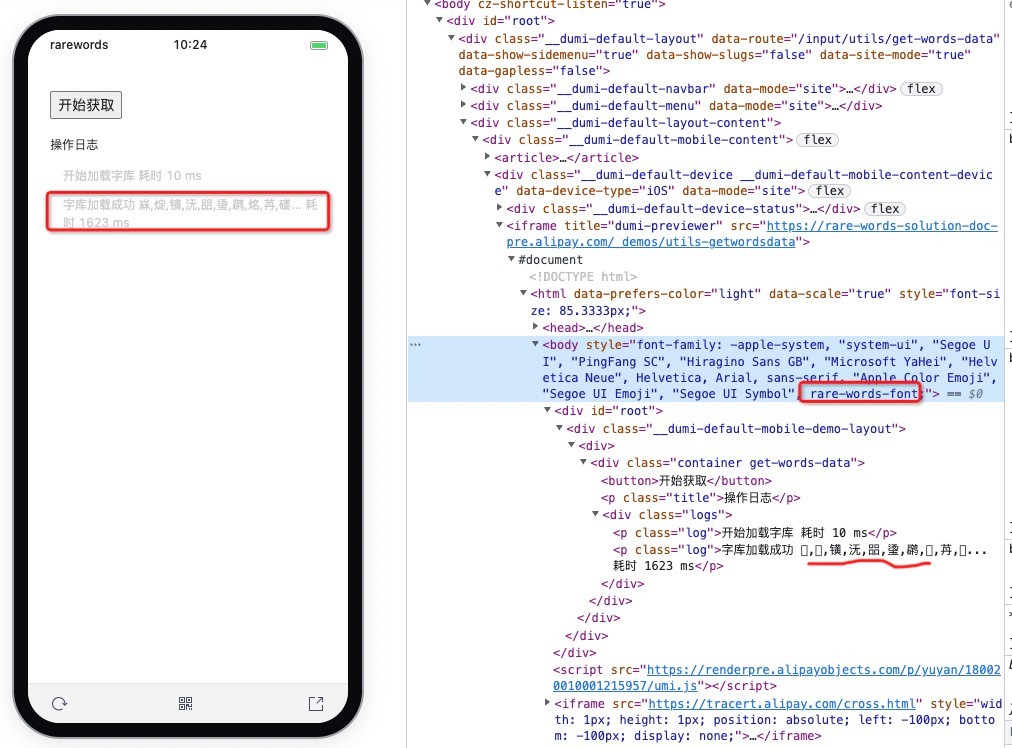
如果存在需要展示生僻字的元素,自定义了 css font-family 属性,则需要覆写 css font-family 属性,可以通过在样式文件里直接指定字体属性,也可以通过执行 js 的方式来附加字体到原有 font-family 属性上。
css 直接覆写
```css
.xxx {
font-familay: 原有字体, 'rare-words-font';
}
```
js 覆写
```javascript
const element = document.querySelector('.xxx');
const curBodyFontAttr = getComputedStyle(element).fontFamily;
const newBodyFontAttr = `${curBodyFontAttr}, '${fontFace.family}'`;
element.style.fontFamily = newBodyFontAttr;
```
#### cdn 方式引用
在一些没有使用 webpack 此类打包工具的业务中,无法做到使用 npm 包,可以在 html 内通过引入 cdn script 链接的方式加载生僻字工具库。
```html
```
> 如果 unpkg.com 被墙了,可以替换成 npm.elemecdn.com 的国内镜像,使用地址 https://npm.elemecdn.com/ant-rare-words-utils/dist/index.web.js
>
> 如果不希望跟随版本更新,可以限制引入 cdn 时的版本,使用地址 https://npm.elemecdn.com/ant-rare-words-utils@0.0.1/dist/index.web.js
## 判断是否为生僻字
有时候我们需要判断一串字符中是否包含生僻字,以决定是否需要为其加载生僻字字体,我们也提供了生僻字判断的一些函数。
- isContainRareWords 检查给定的字符串是否是包含生僻字的字符串
- isChineseNameValid 常规的中文校验规则[\u4e00-\u9fa5]是不完全的,使用此方法用于校验中文姓名是否符合规范,包含 GB18030-2022 全部汉字、少数民族 ·、以及 PUA 码段 E000-F8FF。
```js
import { isContainRareWords, isChineseNameValid } from 'ant-rare-words-utils';
isChineseNameValid('刘𪚔'); // return true
isContainRareWords('刘𪚔'); // return true
```
## 检索候选字
获取到字库数据以后,根据用户输入的拼音或者拆字信息,检索字库得到匹配的候选字列表
### 参数
| 参数 | 类型 | 说明 |
| ---------- | ---------- | ----------------------------------------- |
| wordsData | IWordsData | 字库数据 |
| inputValue | string | 当前输入的值 |
| filterKey | string | 过滤依据的 key 值,'pinyin','split','all' |
### 返回值
| 参数 | 类型 | 说明 |
| ---- | ---------- | ------------------------------ |
| list | IWordsData | 符合要求并且排序好的候选项列表 |
### 用法
```js
import { matchWordsRecommend } from 'ant-rare-words-utils';
matchWordsRecommend(wordsData, 'YAN', 'all');
```
## 获取字库数据
返回 demo 字库数据,数据格式如下:
```typescript
interface IWordsItem {
charId?: string; // 生僻字唯一ID
unicodeChar: string; // unicode 字符
unicodeCodePoint: string; // unicode 码点
unicodeFont: string | null; // 单个字字体文件地址
pinYinChars: string[]; // 拼音
splitChars: string[]; // 拆字
weight?: number | null; // 权重
type?: string; // 类型
extInfo?: string | null; // 其他信息
sort?: number; // 排序得分
}
type IWordsData = IWordsItem[];
export interface IZDatas {
version: string; // 字库版本
fontUrl: string; // 字体文件地址
data: IWordsData; // 字库数据
}
```
> !!! 一般情况下不需要调用此方法,除非想要自己实现输入键盘的情况下,或者研究 Z 字库数据结构。
### 参数
| 参数 | 类型 | 说明 |
| ----------- | ------- | ------------ |
| forceUpdate | boolean | 是否强制更新 |
### 返回值
| 参数 | 类型 | 说明 |
| -------- | -------- | -------- |
| fontFace | FontFace | 字体对象 |
| data | Object | 字库数据 |
### 用法
```js
import { getWordsData } from 'ant-rare-words-utils';
getWordsData({ forceUpdate: false })
.then(res => {
console.log(res);
})
.catch(err => {
console.log(err);
});
```
---
_Source: https://npm.io/package/ant-rare-words-utils · Machine-readable twin of the npm.io package page. Health data is recomputed on every publish._