# anteros-easy-email
Latest version **1.0.0** (published 2022-03-23) · MIT license · 0 weekly downloads
## Install
```sh
npm install anteros-easy-email
pnpm add anteros-easy-email
yarn add anteros-easy-email
bun add anteros-easy-email
```
## Health
**Score 15/100 (F)** — status: abandoned.
Positive: no vulnerabilities.
Warnings: low downloads; no types; no esm support; large bundle.
Negative: abandoned; low maintenance score.
## Facts
| | |
|---|---|
| Version | 1.0.0 |
| Published | 2022-03-23 |
| First published | 2022-03-23 |
| Weekly downloads | 0 |
| License | MIT |
| TypeScript types | none |
| Module format | CommonJS |
| Dependencies | 2 |
| Unpacked size | 9.7 MB |
| Known vulnerabilities | 0 (+18 in 1 direct dependencies) |
| Install scripts | no |
| Maintainers | edsonmartins |
## Links
- npm: https://www.npmjs.com/package/anteros-easy-email
- npm.io page: https://npm.io/package/anteros-easy-email
## Dependencies (2)
- [lerna](https://npm.io/package/lerna.md) ^4.0.0
- [liquidjs](https://npm.io/package/liquidjs.md) ^9.34.1
## Recent versions
- 1.0.0 (latest) — 2022-03-23
## README
# Easy email


.svg)


## Introduction
Easy email is developed based on the [MJML](https://mjml.io/) and has very good compatibility. At the same time, it can generate code through drag-and-drop editing.
## Features:
- Drag and drop editor
- Can be converted into `MJML`, or generated through `MJML`
- Defined custom block
- Dynamic rendering
- Easily customize UI when you need
- Theme configuration
| Video Overview |
| :-----------------------------------------------------------------------------------------------------------------: |
|  |
| Watch video overview:https://www.bilibili.com/video/BV1YQ4y167bb |
## Live Demo
Check out the live demo here: http://easy-email-m-ryan.vercel.app
## Getting started
```sh
$ npm install --save easy-email-core easy-email-editor easy-email-extensions react-final-form
```
or
```sh
$ yarn add easy-email-core easy-email-editor easy-email-extensions react-final-form
```
```js
import React from 'react';
import { BlockManager, BasicType } from 'easy-email-core';
import { EmailEditor, EmailEditorProvider } from 'easy-email-editor';
import { SimpleLayout } from 'easy-email-extensions';
import 'easy-email-editor/lib/style.css';
import 'easy-email-extensions/lib/style.css';
import '@arco-themes/react-easy-email-theme/css/arco.css'; // theme, If you need to change the theme, you can make a duplicate in https://arco.design/themes/design/1799/setting/base/Color
const initialValues = {
subject: 'Welcome to Easy-email',
subTitle: 'Nice to meet you!',
content: BlockManager.getBlockByType(BasicType.PAGE)!.create({}),
};
function App() {
return (
{({ values }) => {
return (
);
}}
);
}
export default App;
```
## Examples
> Please see https://github.com/m-Ryan/easy-email-demo
## Configuration
| property | Type | Description |
| ------------------ | -------------------------------------------------------------------------------------------------- | ------------------------------------------------------------------------------------------------------------------------------------ |
| height | string / number | Set the height of the container |
| data | interface IEmailTemplate { content: IPage; subject: string; subTitle: string; } | Source data |
| children | ( props: FormState,helper: FormApi>) => React.ReactNode | ReactNode |
| onSubmit | Config>['onSubmit']; | Called when the commit is triggered manually |
| fontList | { value: string; label: string; }[]; | Default font list. |
| interactiveStyle | { hoverColor?: string; selectedColor?: string;} | Interactive prompt color |
| onUploadImage | (data: Blob) => Promise; | Triggered when an image is pasted or uploaded |
| onAddCollection | (payload: CollectedBlock) => void; | Add to collection list |
| onRemoveCollection | (payload: { id: string; }) => void; | Remove from collection list |
| dashed | boolean | Show dashed |
| autoComplete | boolean | Automatically complete missing blocks. For example, Text => Section, will generate Text=>Column=>Section |
| mergeTags | Object | A merge tag is a bit of specific code that allows you to insert dynamic data into emails. Like `{{user.name}}`, and used for preview |
| previewInjectData | Object | Dynamic data for preview, it will overwrite mergeTags. |
| onBeforePreview | (html: string, mergeTags: PropsProviderProps['mergeTags']) => string | Promise You can replace mergeTags when previewing. |
## Hotkeys
| hotkey | Description |
| ----------------- | ------------------------------------------------------------------------------------------------- |
| mod+z | undo |
| mod+y | redo |
| delete/backspace | delete block |
| tab / shift + tab | fast select block, if block is focusing,`tab` select next block & `shift + tab` select prev block |
## Packages
- [easy-email-core](./packages/easy-email-core/readme.md)
- [easy-email-editor](./packages/easy-email-editor/readme.md)
- [easy-email-extensions](./packages/easy-email-extensions/readme.md)
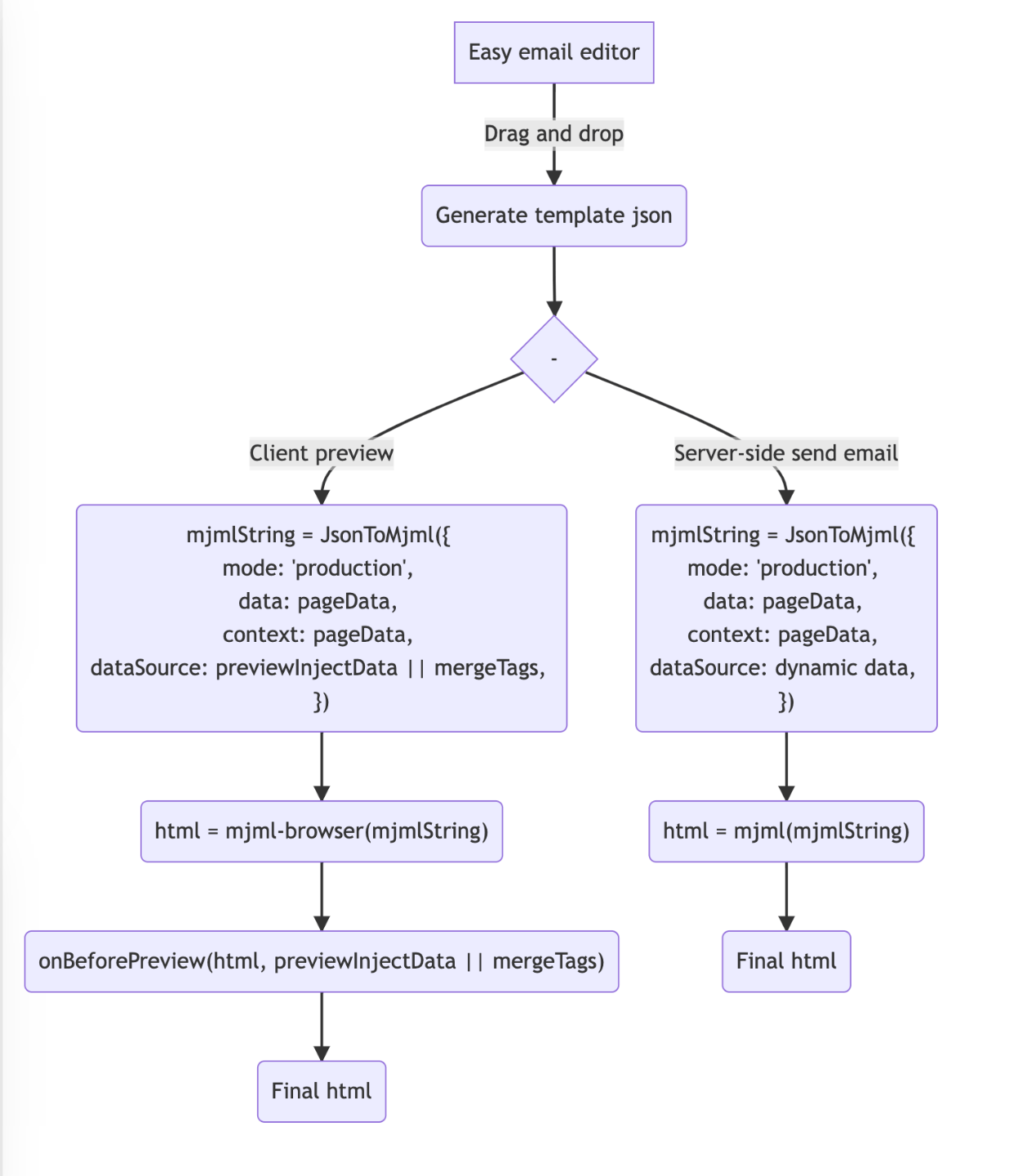
 ## How does it work?
 ## Development
```sh
$ git clone git@github.com:arco-design/easy-email.git
$ cd easy-email
$ yarn install-all
$ yarn dev
```
## License
The MIT License
---
_Source: https://npm.io/package/anteros-easy-email · Machine-readable twin of the npm.io package page. Health data is recomputed on every publish._