# antv-orgtree

> 基于antV封装tree

Latest version **2.0.1** (published 2021-07-22) · ISC license · 0 weekly downloads

## Install

```sh
npm install antv-orgtree
pnpm add antv-orgtree
yarn add antv-orgtree
bun add antv-orgtree
```

## Health

**Score 15/100 (F)** — status: abandoned.

Positive: no vulnerabilities.

Warnings: low downloads; no types; no esm support.

Negative: abandoned; low maintenance score.

## Facts

| | |
|---|---|
| Version | 2.0.1 |
| Published | 2021-07-22 |
| First published | 2021-05-26 |
| Weekly downloads | 0 |
| License | ISC |
| TypeScript types | none |
| Module format | CommonJS |
| Dependencies | 1 |
| Unpacked size | 42.1 KB |
| Known vulnerabilities | 0 |
| Install scripts | no |
| Maintainers | yefl007 |

## Links

- npm: https://www.npmjs.com/package/antv-orgtree
- npm.io page: https://npm.io/package/antv-orgtree

## Dependencies (1)

- [@antv/g6](https://npm.io/package/@antv/g6.md) ^4.2.5

## Recent versions

- 2.0.1 (latest) — 2021-07-22
- 2.0.0 — 2021-07-19
- 1.0.5 — 2021-05-31
- 1.0.4 — 2021-05-27
- 1.0.3 — 2021-05-27
- 1.0.2 — 2021-05-27
- 1.0.1 — 2021-05-27
- 1.0.0 — 2021-05-26

## README

#  antv-orgtree


## 安装
 **`$ npm i antv-orgtree`**

## 引用
######  说明，以vue项目为主


    import orgTree from 'antv-orgtree'
    export default {
      data () {
        return {
          treeData: {
            id: 'root',
            label: 'root',
            labelDes: '说明：根节点,最顶层元素, 最高级',
            value: '1576211',
            color: 'red',
            children: [
              {
                id: 'c1',
                label: 'c1',
                color: 'yellow',
                children: [
                  {
                    id: 'c1-1',
                    label: 'c1-1'
                  },
                  {
                    id: 'c1-2',
                    label: 'c1-2',
                    children: [
                      {
                        id: 'c1-2-1',
                        label: 'c1-2-1'
                      },
                      {
                        id: 'c1-2-2',
                        label: 'c1-2-2'
                      }
                    ]
                  }
                ]
              },
              {
                id: 'c2',
                label: 'c2'
              }
            ]
          }
        }
      },
      mounted () {
        let T = new orgTree({
          id: 'tree',
          data: this.treeData
        })
        T.initTree()
      }


###### 效果
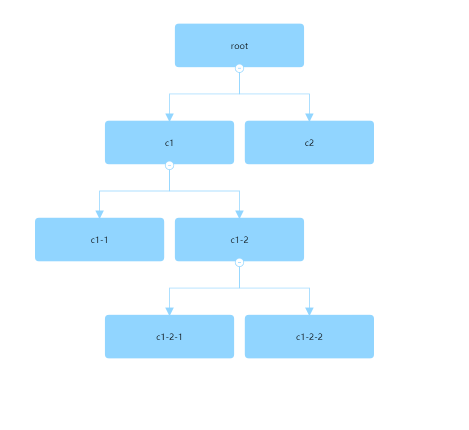
![Image text](https://raw.githubusercontent.com/yflabc/tree-imgs/main/imgs/initTree20210527104846.png)

----

# 配置项

### 参数属性


| 属性           | 类型          | 默认值    | 是否必填 | 描述                                                                                                                    |
| -------------- | ------------- | --------- | -------- | ----------------------------------------------------------------------------------------------------------------------- |
| id             | string        | ''        | 是       | 容器 id，要定义容器的高宽                                                                                               |
| data           | object        | {}        | 是       | 数据，属性结构的数据结构（参考 G6）                                                                       |
| direction      | string        | 'TB'      | 否       | 'TB、LR、RL'树的方向，TB 指上到下，LR 从左到右，RL 从右到左                                                             |
| level          | number string | ''        | 否       | 设置展开的层级，从 1 开始，默认展开所有                                                                                 |
| nodeStyle      | object        | {}        | 否       | 节点样式配置，具体查看下面nodeStyle属性                                                           |
| lineStyle      | object        | {}        | 否       | 边样式配置，具体查看下面lineStyle属性                                                                                  |
| textStyle      | object        | {}        | 否       | 文本样式配置，具体查看下面textStyle属性                                                                           |
| eventType      | string        | 'click'   | 否       | 事件的类型，还可以设置为 mouseEnter，针对树节点的展开搜索事件                                                           |
| treeType       | string number | 1         | 否       | 具体有 1,2,3 可选分别对应不同节点数据配置。当类型为 2 时，配置 data 属性 labelDes；当类型为 3 时 data 属性配置 value 值 |
| rootTreeType   | string number | 1         | 否       | 设置根节点的 treeType ，只作用于根节点，未定义时默认是 treeType                                                         |
| quotaName      | string        | ''        | 否       | 指标名称，treeType=3 有效                                                                                               |
| quotaUnit      | string        | ''        | 否       | 指标单位，treeType=3 有效                                                                                               |
| minimap        | boolean       | false     | 否       | 配置 minimap 插件                                                                                                       |
| minimapId      | string        | ''        | 否       | minimap 插件的对应容器，minimap：true 时有效                                                                           |
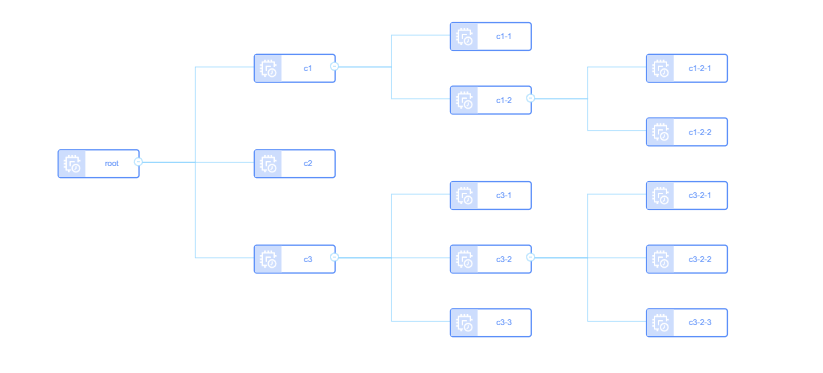
| defindNode     | boolean       | false     | 否       | 开启自定义节点功能，渲染机制将会设置为 svg，上面所有节点 fill 等样式属性配置失效,且不支持箭头                                        |
| nodeHtml       | string        | ''        | 否       | defindNode 为 true 有效， 自定义节点 html，要求必须只包含一个根节点，数据参数配置格式规定为 %{data数据属性字段}% ，data属性字段不限制      |
| isDragCanvas | boolean         | true        | 否       | 是否可拖拽画布                                                                        |
| isZoomCanvas | boolean         | true        | 否       | 是否可缩放画布                                                                        |
| subMultiple | number         | 1        | 否       | 副节点的宽是主节点的倍数， treeType是2或者3有效                                                                        |

### nodeStyle属性

| 属性           | 类型          | 默认值    | 是否必填 | 描述                                                                                                                    |
| -------------- | ------------- | --------- | -------- | ----------------------------------------------------------------------------------------------------------------------- |
| size           | array         | [180, 60] | 否       | 节点的大小，配置高和宽                                                                                                  |
| fill           | string        | '#91d5ff' | 否       | 节点的颜色。如果只配置 fill,节点边框、market、线以及箭头都会继承 fill 颜色                                              |
| subFill        | string        | '#fff' | 否          | 副节点的颜色。treeType是2或者3有效                                            |
| stroke         | string        | '#91d5ff' | 否       | 节点边框颜色。如果设置了 stroke，没有设置 edgeColor，那么线以及箭头会继承 stroke 颜色，不管 fill 是否配置了             |
| radius         | string        | 5         | 否       | 节点的半径                                                                                                              |
| lineWidth      | string        | 1         | 否       | 节点边框大小                                                                                                            |
| levelColorList | Array         | []        | 否       | 层级颜色自定义，将会作用于节点、边、combo、箭头。不会作用域treeType是2或者3时的副节点                                           |
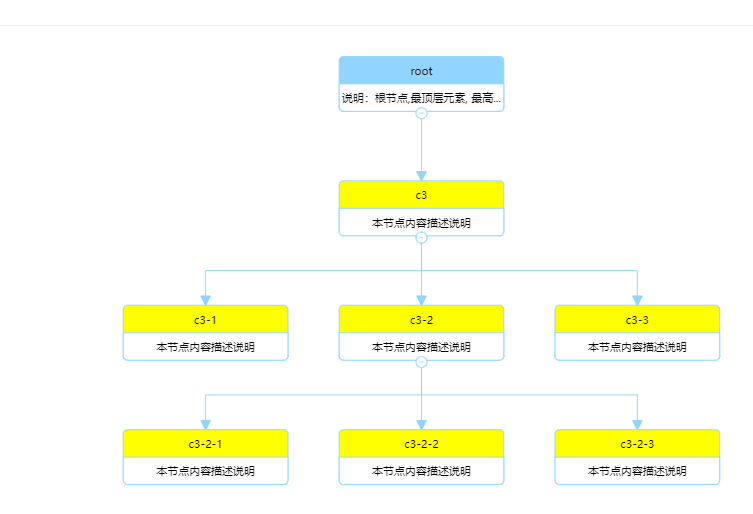
| highLightColor      | string        | '#91d5ff' | 否       | 高亮颜色，针对搜索功能（事件）开启有效                                                                                  |

### lineStyle属性

| 属性           | 类型          | 默认值    | 是否必填 | 描述                                                                                                                    |
| -------------- | ------------- | --------- | -------- | ----------------------------------------------------------------------------------------------------------------------- |
| lineWidth  | string number | 1         | 否       | 边的宽度                                                                                                                |
| stroke      | string        | '#91d5ff' | 否       | 边的颜色                                                                                                                |

### textStyle属性

| 属性           | 类型          | 默认值    | 是否必填 | 描述                                                                                                                    |
| -------------- | ------------- | --------- | -------- | ----------------------------------------------------------------------------------------------------------------------- |
| textColor      | string        | '#000'    | 否       | label 属性对应的文本颜色                                                                                                |
| fontSize       | number        | 12        | 否       | 字体大小                                                                                                                |
| subTextColor   | string        | '#000'    | 否       | 副节点label属性对应的文本颜色，treeType是2或者3有效                                                                                                |
| subFontSize    | number        | 12        | 否       | 副节点字体大小，treeType是2或者3有效                                                                                                                 |
| labelName    | string        | label        | 否     | 文本字段属性，跟data对应绑定，渲染到主节点                         |
| labelDesName    | string    | labelDes    | 否       | 文本字段属性，跟data对应绑定，渲染到副节点，treeType是2有效                       |

### 事件方法

| 方法名    | 说明    | 参数           |
| --------- | ------ | -------------------- |
| initTree    | 初始化树实例      | 无参数  |
| getNodeName | 节点被点击时的回调  | Function(data) 参数data返回节点的名称  |
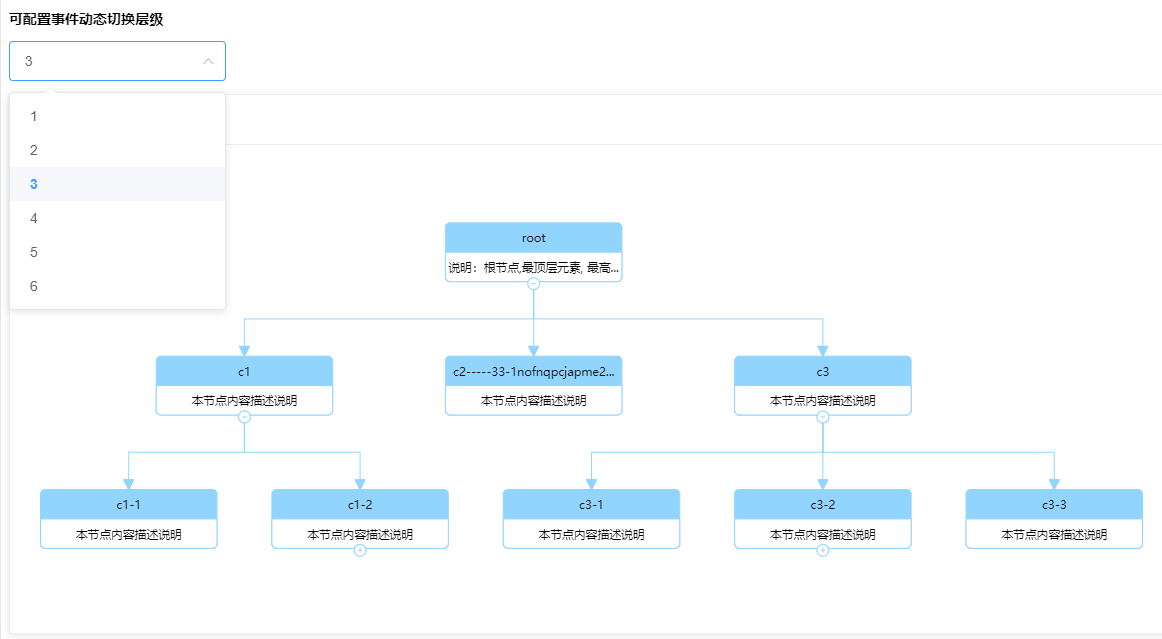
| EventSetLevel | 设置树的层级 | 参数level，表示展开的层级，从1开始算起   |
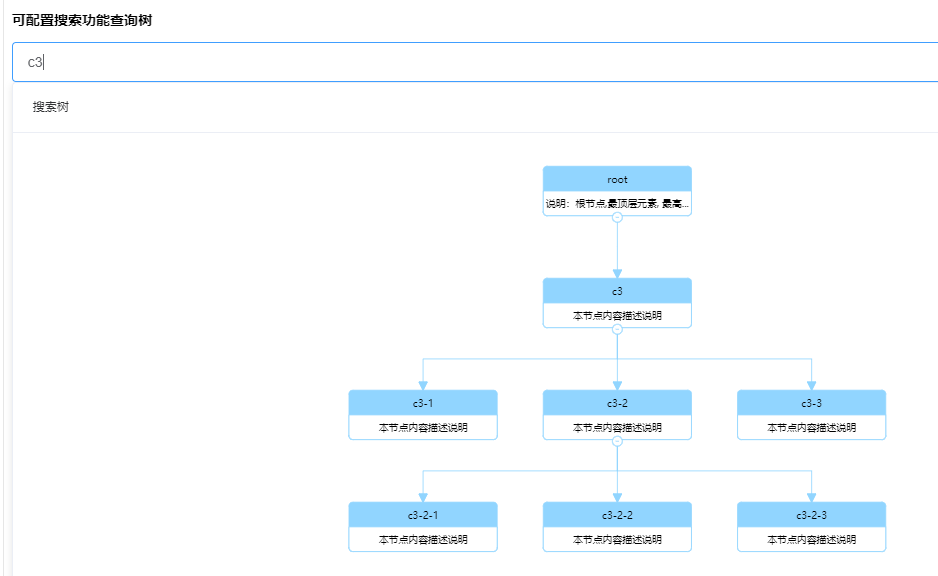
| EventSearchTree | 搜索树    | 参数key，设置关键字，为模糊查询   |
| setDirection  | 方向树切换    | 参数data ，只能为TB，RL，LR  |


-----

# 实例

### 创建
   ```
  新建对象let T = new orgTree(config)，T就是树的实例
  初始化 T.initTree()
  config是配置实例的属性
  ```
### 参数属性配置
    new orgTree({
      id: 'treeID',
      data: treeData,
      direction: 'RL',
      treeType: 3,
      quotaName: '总资产',
      quotaUnit: '万元'
    })


### 事件绑定

获取点击节点事件返回内容
  T.getNodeName(callBaclk(data))

动态设置层级 
  T.EventSetLevel(level)

搜索树
  T.EventSearchTree(key)

方向树
  T.setDirection(data)

### data的数据格式

默认类型

    treeData: {
      id: 'root',
      label: 'root',
      children: [{
        id: 'c1',
        label: 'c1'
      }]
    }
treeType =2 类型

    treeData: {
      id: 'root',
      label: 'root',
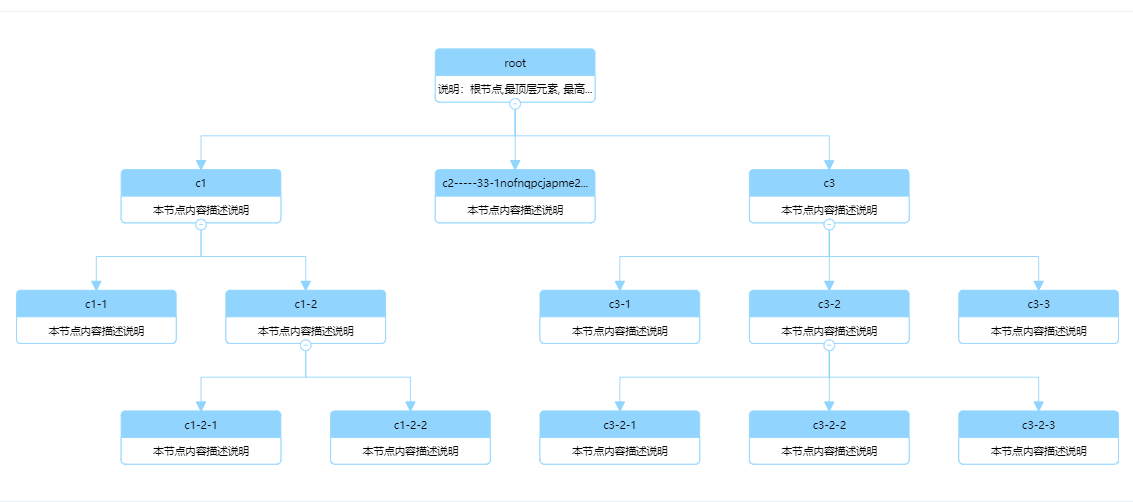
      labelDes: '这是根节点', // 描述文字
      children: [{
        id: 'c1',
        label: 'c1',
        labelDes: '这是节点C1',
      }]
    }

treeType =3 类型

    treeData: {
      id: 'root',
      label: 'root',
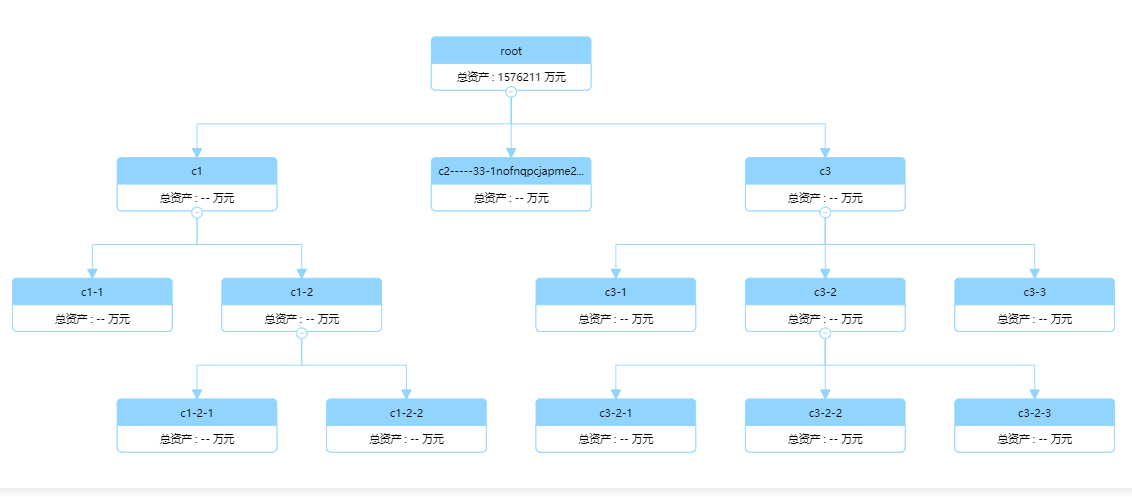
      value: '1576211',, // 指标值
      children: [{
        id: 'c1',
        label: 'c1',
        value: '618391',
      }]
    }


### 具体案例
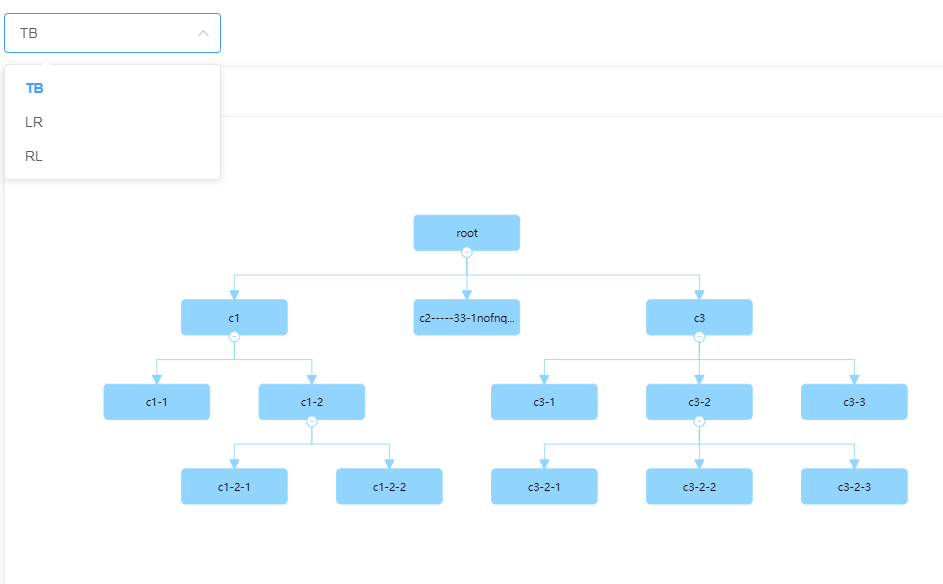
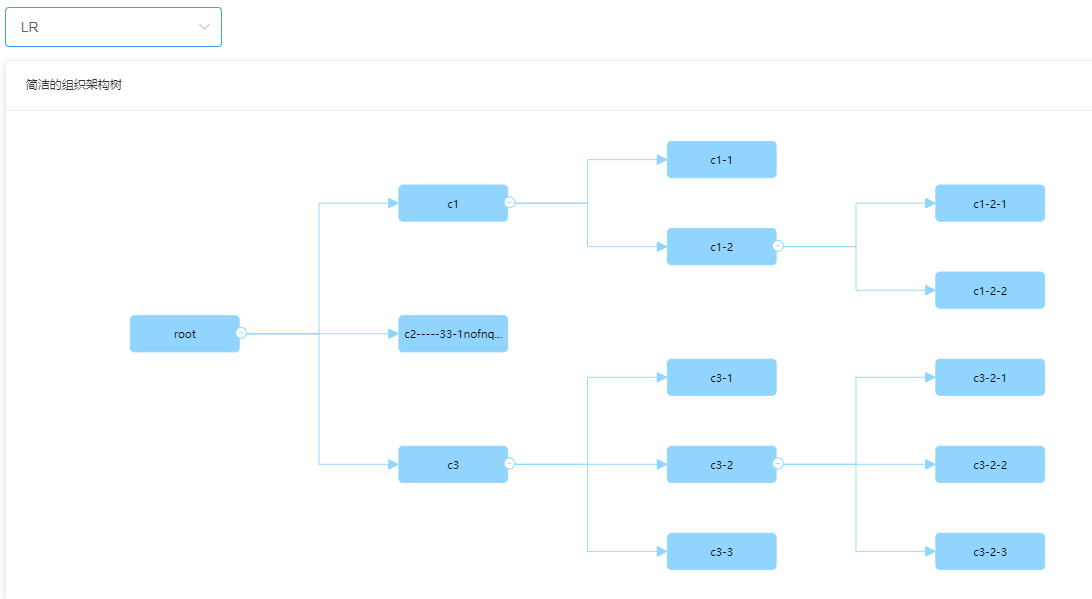
*  （1） typeTree =1  方向树，默认TB，可以自己动态配置，调用  T.setDirection(data)
![Image text](https://raw.githubusercontent.com/yflabc/tree-imgs/main/imgs/dirTree.png)
![Image text](https://raw.githubusercontent.com/yflabc/tree-imgs/main/imgs/dirTree-LR.png)

* （2）typeTree =2
![Image text](https://raw.githubusercontent.com/yflabc/tree-imgs/main/imgs/typeTree2.png)

  typeTree =3
![Image text](https://raw.githubusercontent.com/yflabc/tree-imgs/main/imgs/typeTree3.png)


* （3）树展开的层级设置，可以设置默认或者调用方法动态设置
![Image text](https://raw.githubusercontent.com/yflabc/tree-imgs/main/imgs/setLevel.png)

* （4）搜索树,设置T.EventSearchTree(key)
![Image text](https://raw.githubusercontent.com/yflabc/tree-imgs/main/imgs/searchTree.png)

设置highLightColor属性，配置高亮的颜色
![Image text](https://raw.githubusercontent.com/yflabc/tree-imgs/main/imgs/searchTree%E9%AB%98%E4%BA%AE.png)

* （5）插件minimap: true, minimapId: 'miniMapDomId'
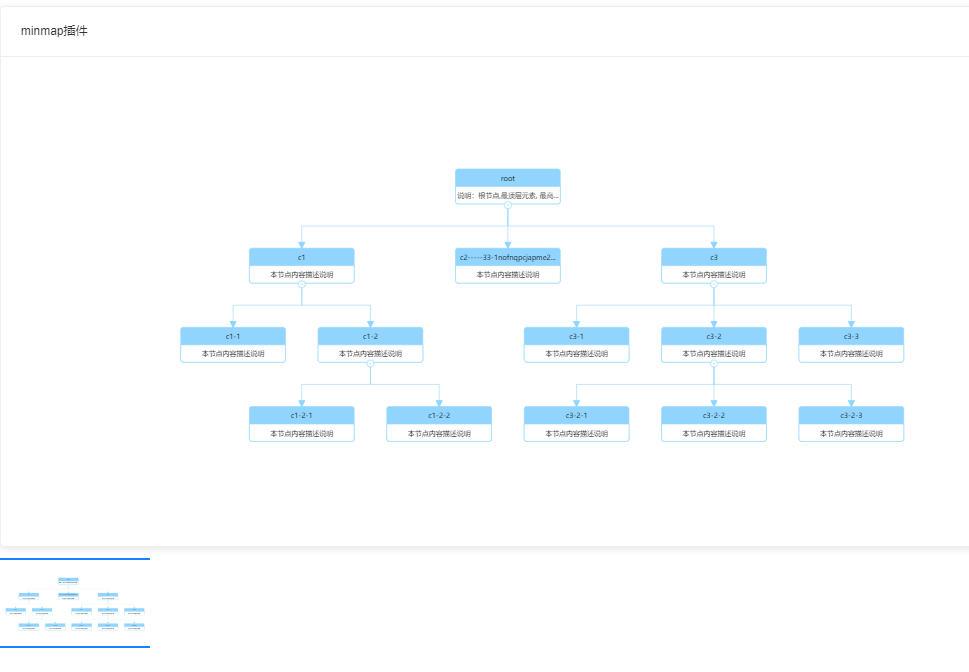
![Image text](https://raw.githubusercontent.com/yflabc/tree-imgs/main/imgs/minmap.png)

* （6）属性
```
	levelColorList: ['#91d5ff', '#99CCCC', '#FFCCCC', '#0099CC', '#99CC66'],
     edgeColor: '#ccc'
```
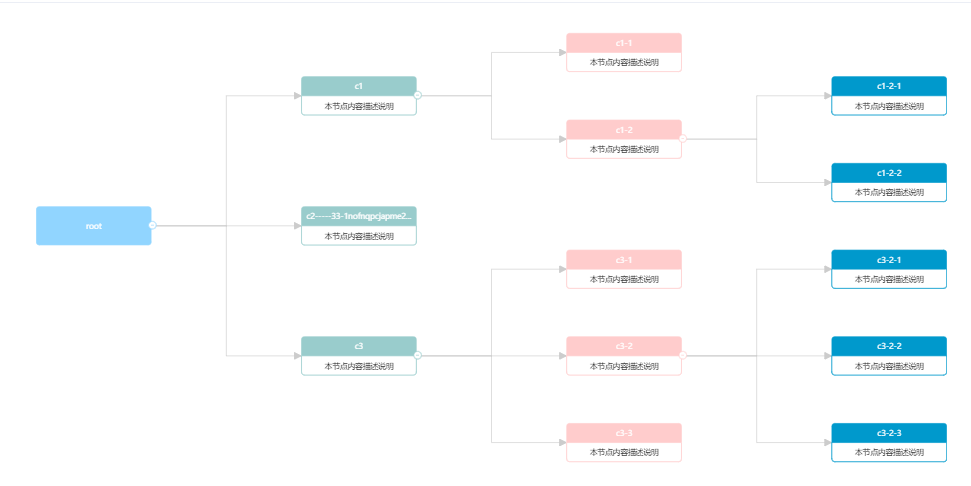
 ![Image text](https://raw.githubusercontent.com/yflabc/tree-imgs/main/imgs/levelcolor.png)

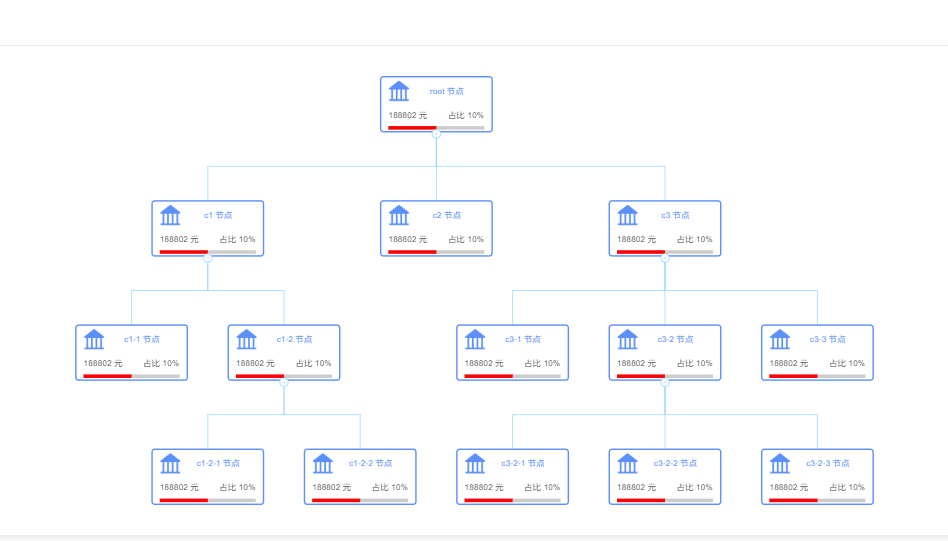
 *  （7）自定义dom
 案例1

     defindNode: true,
            nodeHtml: ` 
            <div class="aaa" style="background-color: #fff; border: 2px solid #5B8FF9; border-radius: 5px; width: 120px; height: 40px; display: flex;">
              <div style="height: 100%; width: 33%; background-color: #CDDDFD;display: flex;
                align-items: center;justify-content: center;">
                <img alt="img" src="https://gw.alipayobjects.com/mdn/rms_8fd2eb/afts/img/A*sxK0RJ1UhNkAAAAAAAAAAABkARQnAQ" />
              </div>
              <span style="margin: auto; color: #5B8FF9"> %{id}%  </span>
            </div>
            `
 ![Image text](https://raw.githubusercontent.com/yflabc/tree-imgs/main/imgs/dom1.png)

案例2


    defindNode: true,
          nodeHtml: `
          <div class="aaa" style="padding: 0 10px; box-sizing:border-box;background-color: #fff; border: 2px solid #5B8FF9; border-radius: 5px; width: 160px; height: 80px; display: flex;flex-direction: column;">
            <div style="height: 50%; display: flex;align-items: center;">
              <img alt="img" src="https://gw.alipayobjects.com/mdn/rms_f8c6a0/afts/img/A*Q_FQT6nwEC8AAAAAAAAAAABkARQnAQ" style="width: 30px;height: 30px;" />
              <span style="margin: auto; color: #5B8FF9"> %{id}% 节点 </span>
            </div>
            <div style="flex: 1;display: flex;align-items: center;justify-content: space-between; ">
              <span> 188802 元</span>
              <span>占比 10%</span>
            </div>
            <div style="background-color: #ccc; width: 100%; height: 5px;margin-bottom: 2px">
              <div style="background-color: red; width: 50%; height: 5px;"></div>
            </div>
          </div>`
 ![Image text](https://raw.githubusercontent.com/yflabc/tree-imgs/main/imgs/dom2.png)

---
_Source: https://npm.io/package/antv-orgtree · Machine-readable twin of the npm.io package page. Health data is recomputed on every publish._